Running live sound for a five-piece band, tracking vocals in a home studio, or producing a multi-camera stream from a small desk all share one stubborn problem: you need your own mix, not whatever the front-of-house engineer hands you. That’s exactly where a personal monitor mixer earns its keep, putting level, pan, and overall tone control into the hands of the person wearing the headphones. I spend a lot of time on stages and in creator setups, so I know the difference between gear that simply gets louder and gear that actually solves the feedback loop, click-track bleed, and “I can’t hear myself” frustrations that derail a performance.
The category splits into two camps. Hardwired personal monitor amplifiers are the right tool for stationary players who want a simple belt-pack solution with no digital setup. Digital personal mixers, like the Behringer Powerplay line, route 16 channels of audio over a single Cat5 cable and let each musician sculpt their own wedge replacement. The picks below cover both sides, plus a few video-mixing options for streamers who live in the AV lane.
A Fast Comparison Of The Options

Behringer Powerplay P16-HQ Personal Monitor Mixer

Behringer POWERPLAY P1 In-Ear Monitor Amplifier

Osee GoStream Deck HDMI Pro Live Streaming Switcher

Osee GoStream Duet SDI and HDMI Stream Switcher

Behringer POWERPLAY P16-M 16-Channel Digital Personal Mixer

Behringer P16-HQ POWERPLAY Bundle With Mounting Bracket
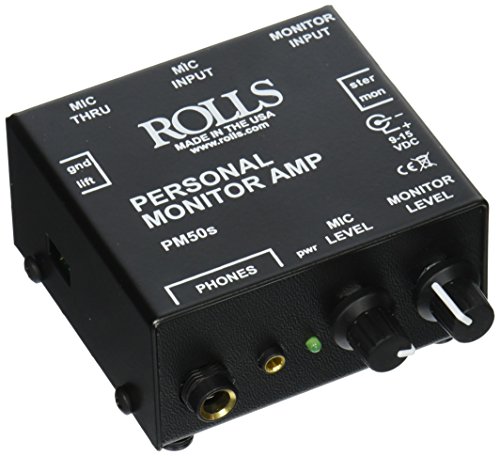
Rolls PM50s Personal Monitor Amplifier (Black)

Behringer P2 Ultra-Compact In-Ear Monitor Amplifier

Rolls PM351 Personal Monitor Station

Osee GoStream Duet Kit Pro Live Streaming Switcher With Monitor
The Details Behind The Selections
The Behringer Powerplay P16-HQ sits at the top of the digital personal monitor pile for good reason. It carries 16 channels over a single Cat5 cable from a connected hub, which means a drummer behind a riser no longer has to chase down six separate XLR runs just to hear a click and a stereo pair of vocals.
The big story is the upgraded digital-to-analog converter (DAC, the chip that turns digital audio into the analog signal your ears actually hear) paired with a freshly tuned headphone amp. In plain terms, that combo gives the P16-HQ noticeably cleaner low-volume detail than the older P16-M, so quiet passages don’t disappear into hiss. For bands running 8 to 16 input channels on stage, that’s the difference between useful monitor mixing and constant fidgeting with trim pots.
Notable Upsides
- New high-quality DAC delivers cleaner audio at low volumes
- Improved amplifier drives low-impedance (high-resistance) in-ears with more headroom
- 16 channels cover a full band mix without expansion
- Single-cable Cat5 distribution reduces stage clutter significantly
- Each musician controls their own mix independently from the front-of-house console
Things To Consider
- Requires a Behringer Powerplay distribution hub to function
- Learning curve on the menu navigation takes a few rehearsals
- Owners commonly report needing updated firmware for stable operation
Quick Facts
Made For
Larger bands, houses of worship, and stage crews who need each musician dialing a custom mix from a central hub.
Look Elsewhere When
A single stationary keyboardist or vocalist might find the Behringer POWERPLAY P1 belt-pack easier to live with than a full 16-channel system.
The Behringer POWERPLAY P1 is the no-nonsense belt-pack I hand to drummers and keyboardists who need a personal mix without dragging a full digital system into the gig. Two XLR inputs feed a hardwired headphone amp that clips onto a belt or strap, giving the player direct control over volume and balance.
The headline feature is the “drummer proof” headphone output, which simply means the amp section has enough current reserve to push high-impedance (low-efficiency) stage headphones without clipping when the kit hits hard. Stereo or mono operation is switchable on the body, so the same unit works with a stereo mix from a mixer aux send or a single mono click-track feed.
Strong Points
- High-output amp drives demanding studio and stage headphones
- Dual XLR inputs allow 2-channel mono or stereo operation
- Switchable stereo or mono with mix function on board
- Belt-pack form factor stays out of the way during seated or stationary performance
Worth Noting
- No digital channel mixing, just two physical inputs
- Hardwired only, not wireless-friendly out of the box
- Plastic chassis can pick up scuffs on heavy tour cycles
Who It Suits Best
Drummers, keyboardists, and stationary stage players who want a straightforward wired personal monitor amp at a sensible entry price.
Consider Something Else When
Multi-piece bands needing each member to sculpt a 16-channel mix should step up to the Behringer Powerplay P16-HQ instead.
The Osee GoStream Deck steps away from stage audio and into the streaming booth, but it earns a spot here because content creators treat it as a personal mixer for cameras, graphics, and audio sources. Four HDMI inputs and two HDMI outputs handle a multicam podcast or worship stream without needing a computer in the loop.
Two USB-C ports expand the deck with webcam pass-through, SSD recording, and PC tethering, while the Ethernet jack handles live streaming plus NDI HX input. NDI HX (Network Device Interface) is a protocol that shuttles video and audio over a standard network, so a second computer or PTZ camera can join the mix without a dedicated capture card. For solo creators, that removes a real chunk of friction.
Benefits That Matter
- Four HDMI inputs cover a full multicam creator setup
- Two HDMI outputs support both program and multiview monitoring
- USB-C ports allow webcam, SSD, and PC connectivity
- Ethernet handles live streaming and NDI HX over a single cable
- Headphone monitoring built in for confidence checks
Trade Offs
- No SDI inputs for professional broadcast cameras
- Interface learning curve can feel busy for first-time streamers
Feature Snapshot
Right Fit For
Solo streamers, podcasters, and worship production teams who want HDMI-based switching without a dedicated PC.
Reach For A Different Pick When
Anyone running SDI broadcast cameras should look at the Osee GoStream Duet for the extra input flexibility.
The Osee GoStream Duet expands on the Deck’s HDMI-first approach by mixing SDI, HDMI, USB-C, and NDI HX sources into one switcher. For crews that own a mix of consumer cameras and broadcast gear, this flexibility avoids the adapter pile that usually clutters a hybrid AV rack.
Control options are equally broad. The built-in GUI handles quick adjustments, the GoStream desktop software covers deeper setup on Mac or Windows, and Bitfocus Companion integration lets a stream deck or custom controller trigger cuts and overlays. That third path is the one streamers care about when they’re running a four-person show from a single lap station.
Useful Touches
- Mixes SDI, HDMI, USB-C, and NDI HX sources in one box
- Supports landscape and portrait output orientations for social streams
- Multiple control paths including GUI, desktop software, and Bitfocus Companion
- Luma key, chroma key, and layered transitions built in
Room For Improvement
- Higher complexity than the HDMI-only Deck for solo creators
- Documentation for advanced keying workflows can feel thin
Best Suited To
Hybrid broadcast and AV crews that need SDI alongside HDMI without buying two separate switchers.
Swap It Out When
All-HDMI creator setups that don’t need SDI may prefer the simpler Osee GoStream Deck HDMI Pro.
The Behringer POWERPLAY P16-M is the long-running workhorse that put digital personal monitor mixing within reach of mid-budget churches and clubs. Sixteen stereo channels of mix control over a single shielded Cat5 cable, fed from the P16-D distribution hub, made it the standard for years before the P16-HQ arrived.
Used copies and new old stock still show up regularly, and they remain a sensible choice when the front-of-house rig is already a Behringer ecosystem. The unit ships at roughly 3.4 pounds in a half-rack chassis, which makes it portable enough for fly-date tours and permanent installs alike.
The Helpful Details
- 16-channel digital stereo personal mix control
- Drops into existing Behringer Powerplay distribution systems
- Single Cat5 run reduces cable clutter on stage
- Compact half-rack chassis fits most monitor rigs
Softer Spots
- DAC and amplifier stage are older than the P16-HQ
- Menu workflow takes patience for first-time users
Who Should Grab It
Established venues and bands already running a Behringer Powerplay distribution system who need spare or replacement mix stations.
Skip It When
New installs should default to the Behringer Powerplay P16-HQ for the cleaner converter and amp stage.
The Behringer P16-HQ POWERPLAY bundle packages the digital personal mixer with a mounting bracket and an XLR cable, which trims the shopping list for installers. Touring engineers and venue techs tend to appreciate that kind of bundling, since it removes a separate order for the rack ear and a balanced run to the distribution hub.
Inside the chassis is the same upgraded DAC and amplifier stage that makes the standalone P16-HQ appealing. The mounting hardware is sturdy enough for a road case shelf or under-counter install, depending on how the venue runs cabling.
Features That Help
- Mounting bracket included for rack or under-counter installs
- Bundled XLR cable removes a separate accessory purchase
- Upgraded 114 dB DAC for cleaner monitor audio
- Improved amplifier drives low-impedance in-ears
Points To Note
- Distribution hub still required to feed the unit
- Bracket hardware is functional rather than decorative
Feature Rundown
Whose Shelf It Belongs On
Touring engineers and venue install crews who want the P16-HQ hardware plus its core mounting accessories in a single order.
A Better Fit Elsewhere
Shoppers who already own rack hardware and cabling save money by buying the standalone Behringer Powerplay P16-HQ instead.
The Rolls PM50s is a small, no-frills personal monitor amp that punches well above its size class. It blends a stereo or mono line-level feed with a microphone-level XLR input, then sends the combined signal to headphones or in-ears, which is the exact recipe drummers and choir singers ask for.
Mic pass-through XLR jacks let the PM50s share a vocal mic with the front-of-house mix without splitting the signal at the snake, and the stereo TRS 1/4-inch monitor input handles a click track, a metronome, or a backing track from any standard mixer aux. Two headphone outputs on the front mean a singer and a coach can monitor from the same box.
A Favorable Mix
- Combines a mic signal with a stereo or mono line feed
- Two front-panel headphone jacks support duet monitoring
- Mic pass-through XLR keeps the front-of-house signal intact
- TRS 1/4-inch stereo input accepts a click or backing track
Minor Gripes
- Compact case has limited front-panel labeling in low light
Perfect Match For
Drummers tracking a click, choir singers who need their voice plus a reference track, and worship teams mixing a mic and a feed from a single small unit.
Not Your Match When
Bands needing multi-channel personal mixing should look at the Behringer Powerplay P16-HQ system instead.
The Behringer P2 is a pocketable belt-pack for performers who stay planted behind a single spot on stage. A keyboard rig, a drum kit, or a stationary vocal position all benefit from a hardwired personal monitor that doesn’t ask the player to manage a full digital rig.
The unit pairs with any headphone, earbud, or custom-molded IEM (in-ear monitor) through a standard top-mounted 3.5 mm jack, and a Mono or Stereo switch on the body lets the same pack work with a single aux send or a stereo mixer feed. Compared with the larger P1, the P2 trims size at the cost of fewer XLR inputs on board.
Advantages To Know
- Lightweight belt-pack form factor stays out of the way
- Standard 3.5 mm output works with any IEM or earbud
- Mono or Stereo switch adapts to any mixer feed
- Simple control layout reduces setup time on small gigs
Points To Keep In Mind
- Single input limits the pack to one feed at a time
Built With In Mind
Stationary stage performers who need a lightweight, hardwired in-ear amp they can clip on and forget.
Where Another Pick Suits Better
Players wanting dual XLR inputs and more output drive should consider the Behringer POWERPLAY P1 instead.
The Rolls PM351 has been a familiar sight in rehearsal rooms and small venues for years, doing the one job a personal monitor station needs to do: blend a microphone and a program feed into a single headphone mix. It’s an old-school tool that earns its longevity by staying simple.
For singers, presenters, and acoustic players who want a single volume knob and a single balance control, that simplicity is the point. There’s no firmware to update, no app to pair, and no distribution hub to rack up. Plug a mic XLR in one side, a stereo feed in the other, and the unit runs.
Positive Points
- Single-function design avoids unnecessary menu diving
- Combines a mic and a program feed into one headphone mix
- Familiar form factor for musicians who have used similar units for years
- Suited to small stages and rehearsal spaces with simple monitor needs
Honest Caveats
- Lacks the multi-channel flexibility of a digital personal mixer
- Limited modern feature updates compared with newer competitors
The Right Fit
Singers, presenters, and small-stage performers who want a proven, no-frills personal monitor station that just works.
Another Choice May Suit
Bigger bands needing multi-channel digital mixing should step up to the Behringer Powerplay P16-HQ system.
The Osee GoStream Duet Kit packages the Duet switcher with a 14-inch 1080 by 1920 monitor, a silent fan, and cheese plates with standard thread mounts, which is a ready-to-roll streaming workstation in a single Pelican-style case. Mobile streamers and event crews find that integration useful because the monitor pulls double duty as confidence display and rig handle.
The switcher section keeps the same mixed SDI plus HDMI input count as the standalone Duet, plus USB-C I/O and an activated NDI license. The whole rig lands around 5 kilograms, which matters for one-person crews running between venues.
The Good Stuff
- 14-inch built-in monitor removes the need for a separate confidence display
- Cheese plates with quarter-inch and 3/8-inch threads mount to standard rigging hardware
- Silent fan keeps the switcher cool under long stream runs
- 5-kilogram total weight suits one-person mobile crews
- NDI license activated out of the box
Some Limits To Know
- 14-inch monitor is fixed, no tilt adjustment built in
- Higher total cost than the switcher alone
Spec Overview
Who Will Love This
Mobile streamers and event crews who want a single integrated rig that travels without needing a separate confidence monitor.
Where A Sibling Pick Shines
Fixed studio streamers may prefer the Osee GoStream Deck HDMI Pro and a separate full-size production monitor.
Factors To Weigh When Choosing Personal Monitor Mixers
The first fork in the road is hardwired versus digital. Hardwired personal monitor amps like the Behringer P1, P2, Rolls PM50s, and Rolls PM351 are inexpensive, fast to set up, and well-suited to stationary players who only need one or two feeds. Digital systems like the Behringer P16-HQ and P16-M route 16 channels over Cat5 and let every band member craft a custom mix, but they require a distribution hub and a small learning curve.
For creators, the term “personal monitor mixer” extends into video switchers like the Osee GoStream Deck and Duet. The decision there is mostly about input mix: HDMI-only creators will be happy with the Deck, while crews running broadcast SDI cameras need the Duet’s flexible input matrix.
Headphone drive matters more than most shoppers expect. Low-impedance in-ears (high-end custom IEMs, for instance) need a clean amplifier with current headroom, which is exactly the upgrade the P16-HQ delivers over the older P16-M. For hardwired amps, headphone output power affects whether stage headphones can keep up with a loud drummer or a brass section.
Finally, count the cables. A digital P16 rig replaces a thick analog snake with a single Cat5 per player, which is the difference between a 20-minute setup and a 90-minute one. For touring bands, that math alone justifies the higher upfront cost.
Smart Considerations For This Category
Where Shoppers Go Wrong
The most common mistake is buying a digital personal monitor mixer without accounting for the distribution hub it requires. The P16-HQ and P16-M look like standalone units, but neither sends audio over Cat5 by itself. Shoppers also underestimate how much low-volume detail gets lost with a noisy DAC, which is why the P16-HQ’s upgraded converter is worth the premium for quiet passages in jazz, acoustic, and worship settings.
Where The Extra Money Goes
Spending up on the P16-HQ over the P16-M buys a cleaner DAC, a stronger amplifier stage, and a refreshed chassis. For bands that already run at full volume, those upgrades matter at low mix levels where monitor detail usually falls apart. For streamers, the kit version of the Osee GoStream Duet costs more because the 14-inch monitor, silent fan, and cheese plates turn a switcher into a ready-to-travel rig.
Frequently Asked Questions
What Is A Personal Monitor Mixer?
A personal monitor mixer is a unit that lets a performer shape their own headphone or in-ear mix on stage or in the studio, rather than relying on a wedge or a single monitor send from the front-of-house engineer.
How Is A Digital Personal Mixer Different From A Belt-Pack Amp?
A digital personal mixer like the Behringer P16-HQ routes many channels over a single Cat5 cable and lets the player dial level, pan, and EQ per channel. A belt-pack amp like the Behringer P1 or P2 handles just one or two inputs with simple level and balance controls.
Do I Need A Distribution Hub For The Behringer P16 Series?
Yes, both the P16-HQ and the P16-M need a Behringer Powerplay distribution hub to receive the 16-channel digital feed. The mixer alone cannot generate audio.
Are These Units Useful For Live Streaming Or Just Audio?
The Osee GoStream Deck, Duet, and Duet Kit are video switchers designed for streaming rather than stage audio, but they earn a spot in this roundup because they perform the same “personal control over my mix” role for creators managing multiple cameras and audio sources.
How Many Headphones Can Plug Into Each Unit?
The belt-pack amps typically have one 3.5 mm jack, while the Rolls PM50s adds a second front-panel headphone output for duet monitoring. The Behringer P16-HQ and P16-M each have a single front-panel headphone jack, since each player uses their own unit.
Wrap Up
The right pick comes down to role and rig size. Stationary players who want a fast, hardwired solution will be happy with the Behringer POWERPLAY P1, the Behringer P2, or the Rolls PM50s, while bands running a full monitor setup should invest in the Behringer Powerplay P16-HQ system. Creators who live in the video lane will find the Osee GoStream Deck and Duet earn their place at a small streaming desk or a multicam live event. Pick the unit that matches the gig, and the rest of the night tends to take care of itself.