Personal computers have quietly shrunk into a category of their own. Mini PCs now handle real workloads: office multitasking, home servers, media centers, even on-device AI workflows that used to demand a full tower. I pulled together ten personal PCs that span barebones kits, everyday office machines, fanless industrial builds, and high-spec workstations, so you can match the hardware to how you actually compute.
A Side-By-Side Look
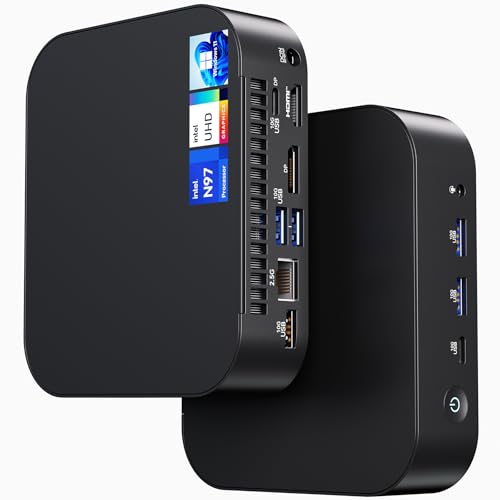
Intel NUC 14 NUC14MNK Essential Mini PC (N97, 8GB/256GB)

Intel NUC 13 Pro NUC13ANHi5 Barebone Kit (Core i5-1340P)

GMKtec G5S Mini PC (Intel N5095, 8GB/128GB)

BOSGAME E2 Plus Mini PC (Ryzen 5 3501U, 8GB/256GB)
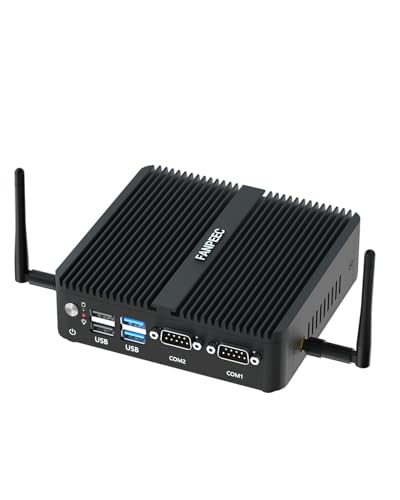
FANPEEC Industrial Fanless Mini PC (J5005, 8GB/256GB)
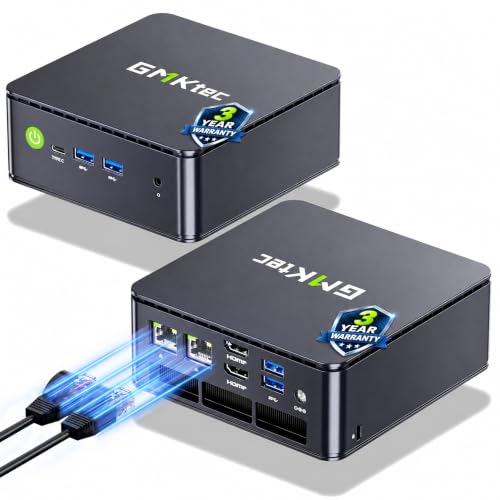
GMKtec G11 Mini PC (Ryzen R2514, 16GB/512GB)

BOSGAME M5 AI PC MAX+ 395 (128GB LPDDR5x)

BOSGAME P3 Lite Mini PC (Ryzen 7 6800H, 32GB/1TB)

BOSGAME P3 Plus Mini PC (Ryzen 7 7840HS, 16GB/1TB)

Intel NUC 13 Pro NUC13ANHi5 (i5-1340P, 16GB/512GB)
Taking A Closer Look At The Options
The NUC 14 Essential arrives ready to work: Windows 11 Pro is preinstalled, the Intel N97 chip keeps everyday tabs snappy, and the 8GB/256GB config covers spreadsheets, browser stacks, and POS-style workloads without drama. Versus the GMKtec G5S that appears later in this list, this one trades pocket-size charm for a sturdier office-class foundation and stronger Wi-Fi 6E radios.
For a small business that wants to drop a box behind a monitor and forget about it, the NUC14MNK feels like an easy answer. The Bluetooth 5.3 connection also helps when pairing modern wireless peripherals.
What Stands Out
- Intel N97 chip is the lowest-fuss option for office multitasking and digital signage loops.
- Windows 11 Pro preinstalled means no setup weekend, just plug in and sign in.
- Wi-Fi 6E and Bluetooth 5.3 keep wireless throughput current for newer mesh networks.
- Compact NUC form factor fits VESA mounts behind monitors, saving visible desk space.
Things To Consider
- The 256GB SSD fills up quickly once local file storage starts piling up.
- 8GB of RAM is the floor for modern multitasking, not the ceiling.
- Fan-cooled chassis produces a low hum under sustained load.
Feature Snapshot
Who It Suits Best
An office manager rolling out a fleet of compact workstations for staff who mostly live in browser tabs, Office documents, and POS software.
Where Another Pick Suits Better
Power users juggling large spreadsheets or virtual machines should reach for the BOSGAME P3 Lite Mini PC, which ships with 32GB of DDR5.
Here is the Arena Canyon NUC as a kit: the Core i5-1340P silicon is soldered in, but RAM, storage, and the operating system are yours to source. That trade-off matters if you want a future-proof personal PC built around exact specs, and it bothers anyone who would rather not crack open a chassis on day one.
The 1340P brings 12 cores and a turbo up to 4.6GHz, which keeps heavy browser work and even light content creation moving. Compared with the fanless FANPEEC J5005 further down, this NUC has active cooling that lets the CPU stretch its legs.
Where It Delivers
- 13th Gen i5-1340P with 12 cores handles multitasking and light creative work with headroom.
- Barebones format lets builders choose exact RAM capacity and SSD speed.
- Gigabit Ethernet plus Wi-Fi 6 covers wired stability and wireless convenience.
- 8K-capable output makes it friendly for high-resolution monitor setups.
Worth Noting
- No RAM, storage, or OS included means extra purchases before first boot.
- Requires comfort with assembly and Windows or Linux installation.
- Cost adds up quickly once quality SODIMM memory and NVMe drives are factored in.
Made For
Tinkerers and IT pros who treat a PC like a project and want to choose their own RAM and SSD brands.
Skip It When
Non-technical shoppers should pivot to the Intel NUC 13 Pro configured variant later in this list, which ships ready to run.
The G5S is a palm-sized 2.8-inch cube weighing roughly seven ounces, built for tight shelves, kitchen counters, and rear-of-monitor VESA mounts. The Intel N5095 is a budget Jasper Lake chip, so this is a personal PC aimed at streaming, browsing, and light productivity rather than heavy workloads.
Against the roomier NUC 14 Essential, the G5S sacrifices storage headroom and CPU muscle for a footprint that disappears into a drawer. 8GB of LPDDR4 RAM is soldered on, which is a real constraint for upgraders.
A Favorable Mix
- Sub-3-inch footprint fits behind monitors or inside media cabinets.
- Low weight makes wall-mount or shelf placement painless.
- Energy-efficient N5095 keeps power draw modest for always-on roles.
- A clean choice for kiosk, signage, or secondary-room setups.
Trade Offs
- 128GB SSD fills quickly and limits local media storage.
- LPDDR4 is soldered, so memory is not upgradable later.
- N5090-class performance slows down under heavy multitasking.
Key Specs
Right Fit For
Anyone furnishing a small apartment office, dorm room, or secondary workstation where desk real estate matters more than horsepower.
Look Elsewhere When
The BOSGAME E2 Plus Mini PC is a smarter call for full-time productivity, since it ships with a faster Ryzen 5 chip and a roomier 256GB drive.
The E2 Plus leans on AMD’s Ryzen 5 3501U, a 4-core, 8-thread chip that brings genuine laptop-class muscle to the mini-PC format. Combined with 8GB of DDR4 and a 256GB SSD, it handles document work, video calls, and streaming media without breaking a sweat. Memory is expandable, which softens one of the usual mini-PC compromises.
Stacked against the GMKtec G5S, the E2 Plus is a clear step up in CPU performance for similar desk space. It is also a more conservative buy than the Ryzen 7-powered BOSGAME P3 Plus that appears later.
What Pays Off
- Ryzen 5 3501U brings Zen+ multitasking headroom for daily office apps.
- 256GB SSD leaves comfortable room for documents and a media library.
- Expandable DDR4 memory means a future upgrade path.
- Compact form factor tucks behind most monitors without fuss.
Points To Keep In Mind
- Integrated graphics cap creative and gaming workloads.
- 8GB base RAM is comfortable but not generous for power users.
- Earlier-generation Ryzen chip trails newer Zen 3 and Zen 4 options.
Whose Shelf It Belongs On
Remote workers and home offices that need a balanced personal PC for everyday tasks without overspending on a workstation.
Consider Something Else When
The GMKtec G11 Mini PC is a stronger match for triple-monitor workstations, given its triple-display support and dual 2.5GbE NICs.
The FAH3 leans hard into a specific use case: silent operation. A Pentium Silver J5005 chip, 4 cores, low 10W TDP, no moving parts. That makes it a natural fit for workshops, dusty backrooms, or signage installations where fan failure is a real liability. The mSATA SSD slot keeps the storage path simple, even if it caps ceiling speeds compared to NVMe.
Versus the GMKtec G5S, this build sacrifices a slimmer chassis for fanless silence and broader OS support. It is also a quieter choice than the configured NUC 13 Pro, whose active cooler emits a faint hum under load.
The Upside
- Truly silent operation is perfect for noise-sensitive environments.
- Fanless design removes dust intake and extends component life in industrial settings.
- Supports Windows 11 Pro, Windows 10, and Linux distributions for flexibility.
- Low 10W TDP keeps power and cooling costs minimal for always-on deployments.
Room For Improvement
- J5005 chip is modest compared to modern Ryzen options in this list.
- mSATA SSD limits storage speed versus NVMe-equipped peers.
- 4K media playback is workable, but heavier creative tasks will chug.
Quick Facts
Best Suited To
Industrial control rooms, digital signage cabinets, and home theater PCs where silence and reliability outrank raw speed.
A Better Fit Elsewhere
The NUC 14 Essential is a smarter office PC, pairing an active cooler with Windows 11 Pro and snappier everyday performance.
The G11 leans on AMD’s embedded Ryzen R2514, a Zen+ chip designed for 24/7 professional workloads. It pairs that silicon with 16GB of DDR4, a 512GB PCIe M.2 SSD, dual 2.5GbE NICs, and triple-display support through USB-C and HDMI. That stack positions it as a personal PC for analysts, traders, and small-business power users.
Compared with the BOSGAME E2 Plus, the G11 doubles memory and storage while adding serious connectivity. It is a quieter workstation than the gaming-leaning BOSGAME P3 Plus and a calmer choice than the AI-tuned M5 further down.
Key Advantages
- Triple-display output via USB-C and HDMI opens genuine multi-monitor desks.
- Dual 2.5GbE NICs are useful for NAS setups, firewalls, or network segmentation.
- 512GB PCIe M.2 SSD keeps boot and project load times brisk.
- 16GB DDR4 handles multitasking without bottlenecking the Ryzen chip.
Potential Drawbacks
- Zen+ architecture is older than the Zen 4 chips found in newer BOSGAME models.
- Integrated graphics cap AAA gaming and GPU-heavy creative work.
- Higher connectivity count means a busier back panel to cable-manage.
Spec Overview
Built With In Mind
Prosumer desks and small-business operators who run multiple monitors, want fast wired networking, and value stability over flash.
Not Your Match When
Casual gamers should reach for the BOSGAME P3 Plus Mini PC instead, which pairs Ryzen 7 7840HS with Radeon 780M graphics.
The M5 is not trying to blend in. Its AMD Ryzen AI Max+ 395 chip combines 16 cores, 32 threads, and an NPU (a neural processing unit designed to accelerate AI workloads) in a single package. Pair that with 128GB of LPDDR5x memory using AMD’s Variable Graphics Memory tech, and the system can allocate up to 96GB as VRAM for local large-language-model inference.
For AI developers, video editors, and engineers running CAD or 3D rendering locally, this is the most workstation-flavored personal PC on the list. It also outclasses the BOSGAME P3 Lite in raw thread count and memory bandwidth, though at a much higher tier of capability and complexity.
Notable Upsides
- 16-core Ryzen AI Max+ 395 with NPU excels at on-device AI inference and compilation.
- 128GB LPDDR5x with up to 96GB allocable as VRAM runs massive local models.
- Quad 8K display support across HDMI 2.1, DisplayPort 1.4, and two USB4 ports.
- Radeon 8060S graphics handle CAD, AAA gaming, and 8K media editing.
Some Limits To Know
- High-spec hardware places this well above mainstream personal-PC budgets.
- Demanding workloads push the cooling system harder than quieter picks.
- Specialized AI workflows are required to take advantage of the NPU.
Perfect Match For
AI developers, technical artists, and small studios who need a workstation-class machine with serious memory and thread count.
Another Choice May Suit
Everyday users will find the BOSGAME P3 Plus Mini PC far more practical, since it covers mainstream creative work at a friendlier scale.
The P3 Lite is a generous spec sheet in a small box: Ryzen 7 6800H, 32GB of DDR5, and a 1TB NVMe SSD. That is enough memory and storage to skip upgrades for years, and the 8-core, 16-thread CPU handles spreadsheets, code compilation, video calls, and even casual gaming through Radeon 680M graphics.
It is the more spacious cousin to the BOSGAME E2 Plus and the calmer sibling of the M5 AI workstation. Most shoppers who want a personal PC that “just works” for years will land here.
Real Benefits
- 32GB DDR5 RAM smooths heavy multitasking and future-proofs the build.
- 1TB NVMe SSD swallows large project files without an external drive.
- Ryzen 7 6800H keeps productivity apps and light creative work responsive.
- Radeon 680M graphics add casual gaming and 4K media playback capability.
Honest Caveats
- Zen 3+ chip is a generation behind the Ryzen 7 7840HS in the P3 Plus.
- Not built for sustained AAA gaming at high settings.
Product Snapshot
Who Should Grab It
Power users who want a personal PC with generous memory, ample storage, and enough headroom for future software without overspending on workstation hardware.
Reach For A Different Pick When
Shoppers chasing the latest Zen 4 architecture and stronger integrated graphics should pivot to the BOSGAME P3 Plus Mini PC.
The P3 Plus is the gaming-leaning sibling in BOSGAME’s mini lineup. Ryzen 7 7840HS on Zen 4 brings 8 cores, 16 threads, and a turbo up to 5.1GHz, while Radeon 780M integrated graphics push well past what most mini PCs offer for casual 1080p gaming. The 1TB NVMe drive and DDR5 memory keep the system feeling responsive across the board.
For shoppers comparing this to the P3 Lite, the main difference is architecture: Zen 4 trades the P3 Lite’s larger 32GB RAM pool for newer graphics and a more efficient CPU. Both are excellent personal PCs depending on which trade matters more.
What Makes Sense
- Ryzen 7 7840HS with Zen 4 efficiency handles modern apps and games with ease.
- Radeon 780M graphics deliver the strongest iGPU gaming in this roundup.
- 1TB NVMe SSD keeps storage pressure low for game libraries and projects.
- Compact chassis still fits on a desk or behind a monitor.
Less-Strong Areas
- 16GB of RAM is solid but capped compared to the P3 Lite’s 32GB.
- Heavy AAA titles still demand settings compromises at 1080p.
Who Will Love This
Casual gamers, students, and creative hobbyists who want a personal PC that blends modern CPU architecture with playable integrated graphics.
Where A Sibling Pick Shines
For pure multitasking, the BOSGAME P3 Lite Mini PC brings more RAM to the table and serves as a steadier daily-driver workstation.
The configured NUC 13 Pro is the polished alternative to its barebones sibling earlier in this list. The Core i5-1340P, 16GB of RAM, 512GB SSD, and Windows 11 Pro arrive preinstalled, so the box behaves like a personal PC the moment it boots. 12 cores at up to 4.6GHz bring hybrid-workplace performance into a small chassis.
Compared with the GMKtec G11, this NUC delivers comparable memory and storage with a newer CPU architecture and Intel’s track record for office stability. It is a steadier pick than the AI-specialized M5 for everyday hybrid work.
Notable Gains
- 13th Gen i5-1340P with 12 cores is well-matched to productivity and hybrid work.
- 512GB SSD leaves room for project files and meeting apps.
- Windows 11 Pro preinstalled removes setup friction.
- Compact NUC form factor saves desk space while staying expandable.
Things To Weigh Up
- Integrated graphics cap creative and gaming workloads.
- Active cooling produces a soft hum under sustained load.
Best Suited To
Productivity-focused professionals and hybrid workers who want a personal PC that ships ready to run, with no assembly required.
A Better Fit Elsewhere
Creative hobbyists chasing better integrated graphics should consider the BOSGAME P3 Plus Mini PC, which pairs Zen 4 with Radeon 780M.
Factors To Consider When Choosing Personal Pcs
Match The Processor To Your Workload
The single biggest decision in a personal PC is the CPU. Chips like the Intel N97 and Pentium Silver J5005 are tuned for everyday browsing and signage, while Ryzen 5 and Ryzen 7 mobile parts bring laptop-class multitasking into a desktop form factor. AI-specialized chips like the Ryzen AI Max+ 395 exist for a reason: their NPUs (neural processing units) accelerate machine-learning tasks that would otherwise require a discrete GPU. Pick the chip that aligns with the heaviest task you actually run.
Memory And Storage Scale Together
RAM and SSD size determine how long a personal PC stays usable. 8GB of RAM is the floor for modern Windows; 16GB feels comfortable today, and 32GB covers years of multitasking headroom. Storage is similar: 128GB fills quickly, 256GB is the practical minimum for most shoppers, and 512GB or 1TB drives remove the need for external help on day one. Choosing a system with both at sensible levels avoids an early upgrade cycle.
Form Factor And Noise Matter In Real Spaces
A pocket-sized GMKtec G5S disappears into a shelf, while a fanless FANPEEC FAH3 runs completely silent for noise-sensitive rooms. Active-cooled NUCs and BOSGAME P3-series machines offer stronger performance but produce a low hum under load. Consider where the personal PC will live, how visible it needs to be, and whether silence outranks throughput in your environment.
Ports And Displays Shape The Setup
Triple-display support, dual 2.5GbE NICs, and USB4 connectivity change how a personal PC fits into a workstation. Analysts and traders benefit from triple monitors; NAS builders lean on dual NICs; creators and editors need fast storage and high-resolution outputs. Match the port layout to your peripherals, not the other way around.
Key Considerations Across These Picks
Common Shopping Slip Ups
Many shoppers chase the smallest chassis without checking the CPU behind it. The G5S fits in a palm, but its N5095 chip is a budget part. Others overbuy high-core CPUs like the M5 AI workstation without realizing the NPU only accelerates specific AI workloads. Confirm the chip matches the actual daily workload before falling for marketing language. Storage is another silent pitfall: 128GB drives fill quickly, and a slow mSATA interface can bottleneck even moderate use.
What The Higher Tier Buys
Stepping up from a budget personal PC to a mid-range Ryzen 7 system buys tangible benefits: more cores, faster DDR5 memory, NVMe storage, and stronger integrated graphics. The bigger jump to AI workstation hardware pays for itself only when workloads actually use the extra memory, NPU acceleration, or thread count. Spending more makes sense once the bottleneck is identified, not before.
Frequently Asked Questions
Are mini personal PCs powerful enough for everyday work?
Yes. Mini PCs with Ryzen 5 or Ryzen 7 mobile chips handle browser-heavy workloads, Office apps, video calls, and streaming with the same responsiveness as many laptops. The smaller chassis does not automatically mean weaker performance.
Can mini personal PCs handle gaming?
Some can. Systems with Radeon 780M integrated graphics, like the BOSGAME P3 Plus, manage casual 1080p gaming. Demanding AAA titles still require settings compromises or a discrete GPU, which most mini personal PCs do not include.
Do mini PCs run hot?
Heat depends on the design. Fanless industrial builds rely on passive cooling and run cooler overall but throttle under heavy loads. Active-cooled NUCs and Ryzen 7 systems run warmer under sustained work yet sustain higher performance.
What is a barebones kit?
A barebones kit ships with the processor, chassis, and motherboard installed, but leaves RAM, storage, and the operating system for the user to source. It is ideal for builders who want to choose their own parts, and less ideal for anyone who wants a turnkey personal PC.
How much storage do I really need?
Most shoppers feel comfortable with 256GB as a starting point, while 512GB and 1TB drives remove the need to manage storage aggressively. Heavy media libraries and game collections push the practical answer toward 1TB.
Bottom Line
The right personal PC depends less on a single spec and more on the workload you bring to it. Office multitaskers and signage operators will be served by the NUC 14 Essential or the FANPEEC J5005 build. Power users and creative hobbyists will get more years of use from the BOSGAME P3 series. AI developers and engineers pushing local models will find the M5 AI workstation hard to match in this format. Match the chip, memory, and form factor to your real tasks, and the rest of the choice follows naturally.