Anyone working from cafés, hotel rooms, or a home office that doubles as a kitchen table knows the hunt for the right compact input setup. A reliable portable keyboard and mouse pair keeps long spreadsheets comfortable, fits inside a backpack, and survives the daily shove into a commuter bag. I narrowed down nine solid options across full-size foldables, silent office sets, and pocket-friendly phone companions, so you can match the right travel kit to the way you actually work.
A Snapshot Of The Selections

Trueque KM71 Full Size Wireless Combo

ProtoArc XKM01 Foldable Combo Gray
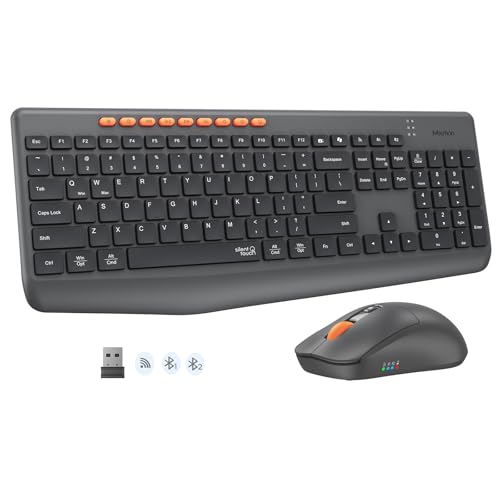
MEETION Silent Bluetooth Combo


ProtoArc XKM01 Pro Backlit Combo

ProtoArc XKM01 CaseUp Combo

seenda COE64-3 Pro Backlit Combo

ProtoArc XK01 TP Touchpad Keyboard

ProtoArc XK04 Pocket Keyboard
A Breakdown Of The Leading Choices
The Trueque KM71 leans into the full-size end of the portable keyboard category, giving up some packability for the kind of typing comfort you usually only get from a desk-bound board. The integrated palm rest sits beneath a standard QWERTY layout, so anyone moving from a workstation at home to a shared office won’t feel like their wrists suddenly lost support. Compared to the slim foldables further down this list, it trades a slimmer carry profile for a more natural typing posture.
I see this working well for hybrid office workers who split time between a fixed desk and a kitchen table, and for students who type out long essays from a dorm room chair. The included phone holder built into the chassis is a thoughtful touch for keeping a second screen in view during focused work sessions.
Useful Touches
- Integrated palm rest helps reduce wrist fatigue during multi-hour writing sessions
- Contoured mouse shape sits comfortably in either hand for daily use
- Built-in phone holder keeps a secondary device propped at a useful viewing angle
- Full-size layout means no relearning muscle memory when switching from a desktop board
- Tilt legs let you dial in a slightly angled typing position
Things To Consider
- Full-size footprint won’t disappear into a slim laptop sleeve, so plan on a dedicated pouch or backpack pocket
- Spills and crumbs can settle around the palm rest, so quick wipe-downs become part of the routine
Key Specs
Who It Suits Best
Remote workers and students who type for hours and want palm-rest comfort in a kit they can still move between rooms.
Skip It When
Frequent travelers should look at the ProtoArc XKM01 instead, since its folding design fits more easily in a carry-on.
The ProtoArc XKM01 splits the difference between laptop bag portability and full desktop typing comfort. A 105-key folding layout keeps a dedicated number pad and function row intact, while the hinged chassis folds down without locking clips for a quick grab-and-go setup. Unlike the Trueque KM71, this one sacrifices the palm rest in exchange for a slimmer travel profile.
Anyone bouncing between client sites, coworking spaces, and hotel desks will appreciate the flat typing surface, which lets the keyboard rest on a small tray table without forcing awkward wrist angles. I think of it as the right pick for road-warrior consultants and remote analysts who can’t afford to lose their number-pad muscle memory mid-trip.
Standout Benefits
- 105-key folding layout preserves dedicated number pad and function row for spreadsheet-heavy work
- Clip-free hinge design means faster deploy-and-collapse cycles at airport gates
- Ultra-slim folded profile slips into a backpack laptop pocket
- Flat typing surface works comfortably on small tray tables and tight hotel desks
Worth Noting
- The flat surface lacks tilt legs, so users used to angled typing may need a brief adjustment period
- Dust can collect along the folding seam, so a quick brush before packing keeps the hinge smooth
Made For
Business travelers and data-focused professionals who need a full number pad without hauling a desktop-sized board.
Look Elsewhere When
Late-night typists should consider the ProtoArc XKM01 Pro, which adds backlit keys for dim hotel rooms.
The MEETION combo is the set I’d hand to anyone whose partner sleeps three feet away from their desk. Silent key switches (the mechanism under each keycap that registers a keystroke) and a near-silent click mouse keep typing sessions from leaking into shared rooms. Where the Trueque KM71 focuses on ergonomic palm support, this combo focuses on staying quiet while still delivering a full-size layout.
Bluetooth and 2.4GHz wireless both come standard, and the keyboard can store up to three paired devices. That makes it a natural fit for apartment dwellers, late-night study sessions in shared dorms, and home offices that share a wall with a baby’s room.
Reasons It Performs
- Silent key switches and low-noise mouse keep shared spaces undisturbed
- Dual-mode Bluetooth and 2.4GHz wireless cover laptops, tablets, and phones
- Three-device pairing memory lets you swap screens without re-pairing each time
- Full-size layout includes a number pad for budget spreadsheets and accounting work
Trade Offs
- Silent switches can feel slightly mushy to typists who prefer the snappy feedback of mechanical boards
- Mouse batteries tend to drain faster in always-connected Bluetooth mode
Best Suited To
Anyone working in shared apartments, open offices, or late-night study environments where noise carries.
A Better Fit Elsewhere
Typists who want a more tactile key feel should look at the ProtoArc XKM01 Pro for a backlit board with clearer switch feedback.
The ProtoArc XK01 keyboard-only pick skips the bundled mouse for travelers who already own a favorite pointer. A tri-fold design with internal aluminum hinges (the metal mechanism connecting the keyboard’s folding segments) collapses to roughly the size of a paperback, while 105 full-size keys keep the desktop layout intact. Pair it with any wireless mouse in your bag and you’ve got a complete travel setup without redundancy.
I think this hits the sweet spot for hybrid office workers carrying a separate Magic Mouse, Logitech Pebble, or trackball they already trust. The 0.65-inch keycaps also feel closer to a desktop board than the flatter chiclet keys on most laptops.
What Helps Most
- Aluminum internal hinges tested past 10,000 folds for confident long-term travel use
- Full 105-key layout preserves dedicated number pad, function row, and navigation cluster
- Bluetooth 5.1 pairing supports three stored devices with one-touch switching
- No-clip fold design deploys in seconds at airport lounges or coworking benches
Points To Note
- Keyboard-only kit means you’ll supply your own mouse, which adds to the overall carry weight
- Keycaps sit slightly closer together at the fold seam, so touch typists may notice a short break-in period
Perfect Match For
Hybrid professionals who already own a mouse they love and just need a desktop-grade travel keyboard.
Consider Something Else When
Shoppers who want a bundled mouse should consider the ProtoArc XKM01, which pairs a similar foldable board with a matching travel mouse.
The XKM01 Pro adds three-level white backlighting to the original XKM01 folding combo, along with a protective hard case that keeps the chassis safe inside a stuffed carry-on. It carries forward the same 105-key folding layout, but the backlit keys make it the obvious choice for late-night flights and dimly lit hotel rooms. If you regularly wrap up reports after dinner, this is the version that won’t leave you hunting for the asterisk key.
Business travelers handling evening conference calls from hotel desks get the clearest ownership benefit: a familiar backlit typing surface plus a hard shell that survives being sandwiched between a laptop and a toiletry bag. Compared to the standard XKM01, this trades a slightly higher carry weight for visibility and durability.
Points In Its Favor
- Three-level white backlight keeps keys legible in dim rooms and overnight flights
- Protective hard case shields the folding hinge from baggage handler roughhousing
- Full 105-key layout keeps a real number pad for spreadsheets on the road
- Matching wireless mouse stays paired without re-syncing after travel storage
Minor Gripes
- Backlight usage eats battery faster, so pack a charging cable for multi-day trips
- The hard case adds bulk to an otherwise slim package
Key Specs
Who Will Love This
Late-night road warriors who wrap up work in dim hotel rooms and need keys they can actually see.
Reach For A Different Pick When
Strict daytime-only users can save carry weight with the standard ProtoArc XKM01, which skips the backlight.
The CaseUp version of the XKM01 throws in an adjustable laptop stand alongside the folding keyboard, mouse, and hard case, turning a travel kit into a complete posture-friendly workstation. The stand lifts the screen closer to eye level, which helps reduce the neck craning that comes from hunching over a laptop on a low café table. For anyone working from home with neck or shoulder complaints, that ergonomic angle is the real sell.
Unlike the backlit XKM01 Pro, this combo trades lighting for structural support. Digital nomads who camp out in vacation rentals and remote workers using a kitchen island as a desk will appreciate arriving somewhere and instantly assembling a healthier setup.
Strong Points
- Adjustable folding laptop stand raises screen height for better neck posture
- Complete kit includes keyboard, mouse, stand, and hard case in one box
- 105-key folding keyboard keeps a dedicated number pad for data work
- Hard case protects the stand and keyboard during airline travel
Honest Caveats
- Adding the stand makes the package noticeably heavier than the standard XKM01
- Stand assembly adds a small setup step at each new workspace
Built With In Mind
Remote workers and digital nomads who set up shop in unfamiliar spaces and want a healthier screen height from day one.
Swap It Out When
Travelers chasing a lighter pack should pick the original ProtoArc XKM01 and skip the bundled stand.
The seenda COE64-3 Pro leans into multi-device flexibility and customizable backlighting, with seven color options and three brightness levels for typing through changing light. A slim metal keyboard chassis and two typing angles (5.5° and 9°) keep the desk footprint minimal, while the full US QWERTY layout preserves a dedicated number pad for daily data work.
Anyone splitting work between a laptop, tablet, and phone will like the three-device pairing memory, which lets one keyboard follow you across screens without re-syncing. The slim metal build also feels sturdier than typical plastic travel boards.
The Good Stuff
- Seven backlight colors with three brightness levels adapt to different lighting conditions
- Three-device pairing memory jumps between laptop, tablet, and phone with one switch
- Slim metal chassis feels more durable than plastic travel keyboards
- Two typing angles let you adjust posture without a separate wrist rest
Practical Considerations
- Higher brightness settings noticeably shorten battery life between charges
- Color cycling through all seven options takes a few button presses to learn
Key Specs
The Right Fit
Multi-device home offices where one keyboard swaps between a work laptop, a personal tablet, and a phone during the day.
Another Choice May Suit
Strict travelers should look at the ProtoArc XKM01 Pro, which folds smaller for true carry-on portability.
The XK01 TP replaces the bundled mouse with a built-in multi-touch trackpad, folding gesture control straight into the keyboard chassis. For tablet and phone users who don’t want to carry a separate pointer, this collapses two devices into one and shaves real weight from the bag. The tri-fold design plus a PU leather carrying pouch make it feel more like a notebook than a peripheral.
I see this as the right pick for iPad-first road workers and Android tablet users who travel light. The integrated phone stand also props up a secondary screen for quick reference during writing sessions.
Useful Strengths
- Integrated multi-touch trackpad with gesture support removes the need for a separate mouse
- Tri-fold design plus PU leather pouch feels like carrying a small notebook
- Built-in phone stand props up a second device for quick reference
- 0.65-inch keycaps give a more desktop-like typing feel than flat chiclet keys
A Few Limitations
- Trackpad precision on a small surface won’t match a full desk mouse for detailed work
- PU leather pouch can show wear after a year of daily commuter bag use
Key Specs
Whose Shelf It Belongs On
Tablet-first travelers and phone-focused writers who want a single foldable device instead of a keyboard-mouse pair.
Where A Sibling Pick Shines
Users who prefer a separate mouse for design or spreadsheet work should consider the ProtoArc XK01, which focuses on keyboard-only portability.
The ProtoArc XK04 is the smallest board in this lineup, weighing around 7.8 ounces and folding down to a footprint roughly the size of a phone. The compact key layout trades a number pad for pocket portability, making it the right answer for anyone whose main screen is an iPhone or an Android tablet. The included PU leather cover doubles as a screen guard when the keyboard is folded shut.
Commuters who reply to long emails between train stops, and travelers who only need a keyboard for occasional note-taking, get the most from this size. Compared to the larger ProtoArc boards earlier in the list, it gives up desk-comfort for a board that genuinely fits in a jacket pocket.
What Pays Off
- Around 7.8 ounces makes it easy to slip into a coat pocket or small crossbody bag
- Two-fold design with PU leather cover keeps the keys protected in transit
- Optimized key layout for phones and tablets keeps typing accurate on smaller screens
- Bluetooth pairing works with iOS, Android, and tablet operating systems
Less Ideal Details
- Compact layout lacks a dedicated number pad, so heavy data entry feels cramped
- Smaller key spacing takes longer to get used to for touch typists coming from full-size boards
Who Should Grab It
Phone-first writers and casual tablet users who reply to long messages on the go and value pocket size over a full desktop layout.
Not Your Match When
Daily spreadsheet workers should reach for the Trueque KM71 or ProtoArc XKM01, which preserve a dedicated number pad.
Choosing A Travel Keyboard Combo That Actually Works
Picking a portable keyboard and mouse setup comes down to how you actually move through your week, not just the spec sheet. A consultant flying every Monday has completely different needs from a student typing in a dorm corner, and forcing a phone-sized board on either one ends in frustration. Here’s what to weigh before committing.
Layout vs. Portability
Full-size boards with number pads feel like home but demand backpack space. Folding boards keep the desktop layout but add hinge weight and a small fold-seam learning curve. Compact boards disappear into a coat pocket but cram the keys together. Match the layout to your screen: a phone can handle compact keys, while a laptop deserves at least a near-full layout to avoid finger gymnastics.
Switch Type And Noise Level
Mechanical switches give crisp feedback but click loudly, which becomes a problem in shared apartments or library study sessions. Membrane and scissor-switch boards (low-profile mechanisms that use a rubber dome or X-shaped support under each key) type more quietly and feel lighter to carry. Late-night typists and shared-room dwellers should put silent switches near the top of the list.
Wireless Standard And Pairing
Bluetooth 5.1 holds a stable connection across phones, tablets, and laptops, and three-device memory saves re-pairing every time you swap screens. The 2.4GHz wireless option (a small USB receiver that plugs into your computer) tends to feel snappier for gaming-style response, but eats a USB port. Multi-device home offices usually want both.
Build And Travel Durability
Aluminum hinge plates, hard cases, and PU leather covers all extend the life of a folding board inside a stuffed commuter bag. A board that survives a year of daily folding without wobble pays back the extra cost when a cheaper alternative cracks at the seam after six months.
Key Considerations Across These Picks
Where Shoppers Go Wrong
The most common mistake is buying a board sized for a desk and expecting it to vanish into a laptop sleeve. Measure your actual carry space first. A second pitfall is ignoring switch noise until the roommate complains. Before checking out, picture where you’ll use the board at 11 p.m. on a Tuesday. If the answer involves sleeping neighbors, lean toward a silent membrane switch from the start.
When Paying More Pays Off
The jump from a budget board to a mid-tier foldable usually buys hinge durability and backlighting, which matter most for frequent flyers. Top-tier kits like the XKM01 Pro add a hard case and better mouse pairing, which pay off if you check luggage or work in cafés daily. For occasional travel, a mid-tier board delivers most of the value without the bulk.