Pre-built computers have come a long way from the bland office towers of a decade ago. Today’s off-the-shelf systems cover everything from compact creator workstations to compact living-room media hubs, and they arrive ready to plug in, power on, and get to work.
I pulled together ten pre-built computers that cover the most common shopping missions: gaming rigs for serious frame rates, a Mac mini for the Apple faithful, and several compact mini PCs that hide behind a monitor. Each pick below gets a real rundown of what it does well, where it falls short, and who should spend the money.
The Shortlist At A Glance

STORMCRAFT Sirius AI Gaming Desktop, Intel i5 14400F, Arc B570 10GB GDDR6

CYBERPOWERPC Gamer Master Gaming PC, AMD Ryzen 5 7600, RTX 4060

Apple 2024 Mac mini Desktop Computer with M4 chip, 16GB, 256GB SSD
Apple 2024 Mac mini Desktop Computer with M4 chip, 16GB, 512GB SSD

CyberpowerPC Gamer Xtreme VR Gaming PC, i5-10400F, GTX 1660 Super
Apple 2024 Mac mini Desktop Computer with M4 Pro, 24GB, 512GB SSD

MINISFORUM AI X1 Pro-370 Mini PC, Ryzen AI 9 HX 370, 32GB, 1TB

MINISFORUM M1 Pro Mini PC, Core Ultra 5 125H, 32GB, 1TB
CyberpowerPC Gamer Xtreme VR Gaming PC, i5-9400F, GTX 1660

MINISFORUM X1-255 Mini PC, Ryzen 7 255, Barebone Desktop Computer
A Breakdown Of The Leading Choices
The STORMCRAFT Sirius AI Gaming Desktop pairs a 14th-gen Intel Core i5 14400F processor with an Intel Arc B570 graphics card carrying 10GB of GDDR6 memory, and the combination lands in an interesting middle ground. It targets 1440P gaming rather than the lower-res comfort zone most budget systems sit in, which sets it apart from the CyberpowerPC Gamer Xtreme VR models reviewed later.
For a typical desk setup with a 1440P monitor, this STORMCRAFT machine promises a noticeable step up from 1080P without demanding a flagship GPU. Owners who care about RGB accents will appreciate the 16GB of DDR4 RGB memory, and the 1TB NVMe SSD keeps load times tight for a sizable modern game library.
What Works In Its Favor
- 10-core Intel i5 14400F reaches a 4.7 GHz boost, so heavily threaded games and streaming workloads stay responsive.
- Arc B570 with 10GB GDDR6 VRAM handles 1440P textures comfortably, an uncommon amount for this tier.
- 1TB NVMe SSD gives breathing room for a 20+ game library alongside Windows and productivity apps.
- VR-ready certification extends usefulness if a headset joins the setup later.
Honest Caveats
- Arc drivers have historically lagged Nvidia on day-one game support, so patience may be needed after major launches.
- 16GB of DDR4 is plenty today but limits future headroom compared to the DDR5-equipped CYBERPOWERPC Gamer Master below.
- The mid-tower footprint needs a real desk footprint, so cramped dorm setups may feel cramped.
Feature Card
Made For
Gamers stepping up from 1080P who want modern Intel silicon without jumping to a tower twice the size.
Skip It When
Mainstream shoppers chasing top-tier ray tracing should grab the CYBERPOWERPC Gamer Master instead, since its RTX 4060 handles that workload more reliably.
The CYBERPOWERPC Gamer Master Gaming PC arrives with a Ryzen 5 7600 CPU running at 3.8GHz across 6 cores and 12 threads, paired with an RTX 4060 graphics card and 16GB of DDR5 memory. It is the most balanced mainstream gaming box on this list, and it ships with Windows 11 Home ready to go.
Compared with the STORMCRAFT above, this build leans on Nvidia’s mature driver stack and the faster throughput of DDR5. The tempered glass side panel and custom RGB lighting give it visible personality, while the included keyboard and 7-color gaming mouse get a beginner out the door on day one.
What Helps Most
- RTX 4060 brings DLSS and dependable ray tracing to mid-range budgets.
- 16GB DDR5 leaves more upgrade runway than the DDR4 STORMCRAFT rig.
- PCIe Gen4 NVMe SSD cuts cold boot and load times noticeably.
- Wi-Fi ready with 802.11AC and gigabit Ethernet covers any home network layout.
Trade-Offs To Consider
- 500GB SSD fills quickly with modern 80GB+ game installs.
- Bundled peripherals feel basic and are commonly upgraded within months.
Feature Card
Right Fit For
Mainstream gamers and first-time PC owners who want a turnkey tower with modern parts and proven Nvidia drivers.
Where Another Pick Suits Better
Shoppers chasing a smaller footprint should consider the Apple 2024 Mac mini Desktop Computer with M4 chip, 16GB, 256GB SSD instead, which disappears on a shelf but trades away discrete graphics.
The Apple 2024 Mac mini Desktop Computer with M4 chip drops a 10-core CPU and 10-core GPU into a five-inch square enclosure, which is roughly the size of a small paperback. It runs Apple Intelligence, supports native iPhone and iPad workflows, and ships with 16GB of unified memory alongside a 256GB SSD.
This entry-level M4 Mac mini sits in a different universe than the gaming towers above. For a writer’s desk, a living-room media station, or a coding workstation that mostly talks to a terminal, it covers the bases with very little noise or heat. The catch is local storage, which fills fast if you work with raw photos or 4K video.
Strong Points
- Five-by-five-inch chassis slips behind a monitor or on a bookshelf.
- Unified memory architecture keeps multitasking snappy on 16GB.
- Deep iPhone and iPad integration for anyone already inside the Apple ecosystem.
Less Ideal Details
- 256GB SSD feels tight for photo and video libraries out of the box.
- No discrete GPU means gaming leans on cloud streaming rather than native titles.
Built With In Mind
Everyday Apple users with light storage needs who want a near-silent desktop that disappears on a shelf.
Reach For A Different Pick When
Shoppers wanting twice the local storage should grab the Apple 2024 Mac mini Desktop Computer with M4 chip, 16GB, 512GB SSD, which is the same machine with room to breathe.
The Apple 2024 Mac mini Desktop Computer with M4 chip, 512GB SSD version doubles the storage of its 256GB sibling while keeping the same 10-core M4 silicon, 16GB unified memory, and tiny footprint. For anyone working with photo libraries, Logic projects, or a few large games, that extra space is the difference between daily housekeeping and just working.
It is the same five-inch chassis and Apple Intelligence experience described above, so most of the same strengths apply. I see it as the more practical pick between the two base M4 Mac minis.
The Upside
- 512GB SSD handles larger macOS installs, project folders, and media caches.
- Same M4 10-core CPU/GPU performance as the smaller sibling.
- Quiet, fan-cooled design suits bedrooms and shared spaces.
Things To Consider
- Internal storage still tops out below what tower builders expect.
- External SSDs are common companions, which adds desk clutter.
Best Suited To
Creators and remote workers who want Apple silicon in a small box with enough room for project files.
A Better Fit Elsewhere
Gamers chasing high frame rates should look at the CYBERPOWERPC Gamer Master Gaming PC above, since macOS gaming libraries remain limited.
The CyberpowerPC Gamer Xtreme VR Gaming PC (GXiVR8060A10) leans on an Intel i5-10400F at 2.9GHz, a GTX 1660 Super with 6GB of VRAM, 8GB of DDR4, and a 500GB NVMe SSD. It runs Windows 10 Home and stays Wi-Fi ready out of the box. The GTX 1660 Super is the headline part, and it still punches above its weight in esports titles.
For someone stepping into PC gaming without spending flagship money, this build handles most competitive games at 1080P with high frame rates. It is an older-generation platform, but for the price tier it lands in, owners commonly report solid day-to-day reliability.
The Value In It
- GTX 1660 Super 6GB comfortably handles esports and indie games at 1080P.
- NVMe boot drive keeps Windows and game loads snappy.
- Wi-Fi ready, so a wireless adapter is not needed.
Things To Weigh Up
- 8GB DDR4 limits multitasking and modern game performance.
- 10th-gen Intel CPU sits behind newer Ryzen and Core options in efficiency.
- No ray tracing hardware, unlike the RTX-equipped CyberpowerPC pick above.
Perfect Match For
Casual gamers focused on esports and indie titles who want a turnkey tower at a modest spend.
Swap It Out When
Buyers wanting modern DDR5 memory and ray tracing should reach for the CYBERPOWERPC Gamer Master Gaming PC reviewed earlier.
The Apple 2024 Mac mini Desktop Computer with M4 Pro chip is the most powerful pick in the Mac mini family on this list, packing a 12-core CPU and 16-core GPU alongside 24GB of unified memory and a 512GB SSD. For creative workloads like video encoding, 3D rendering, or compiling code, the extra cores translate directly into shorter job times.
It keeps the same compact five-by-five-inch footprint as the base M4 model, so it slots into the same shelf-friendly spots. The trade-off is the price tier, which places it well above the base M4 Mac mini and into professional laptop territory.
Useful Highlights
- 16-core GPU accelerates video work and on-device machine learning tasks.
- 24GB unified memory sustains large Logic sessions and Xcode builds.
- Same whisper-quiet operation as the standard Mac mini.
Worth Bearing In Mind
- Higher cost than the base M4 Mac mini for users who won’t push the GPU.
- 512GB SSD may still require external storage for serious media libraries.
Feature Card
Whose Shelf It Belongs On
Prosumers and creators who need real horsepower but prefer a tiny desktop over a tower workstation.
Consider Something Else When
Gaming-first shoppers should consider the STORMCRAFT Sirius AI Gaming Desktop instead, since macOS still trails Windows for native game support.
The MINISFORUM AI X1 Pro-370 Mini PC runs an AMD Ryzen AI 9 HX 370 with 12 cores and 24 threads, paired with 32GB of DDR5 memory, a 1TB SSD, and AMD Radeon 890M integrated graphics. The port layout is unusually dense for its size, with HDMI, DisplayPort, dual USB4 outputs, and twin RJ45 Ethernet jacks.
For a small-form-factor workstation that lives behind a monitor or under a standing desk, this MINISFORUM delivers workstation-class CPU performance in a case that takes up less space than a router. Copilot support and Wi-Fi 7 round out a forward-looking spec sheet that holds up well into 2026.
A Few Highlights
- Dual USB4 and dual Ethernet give it rare flexibility for pro setups.
- 32GB DDR5 supports heavy multitasking without breaking a sweat.
- 1TB SSD eliminates the immediate need for extra storage.
- Wi-Fi 7 future-proofs wireless networking for years to come.
Potential Compromises
- Integrated Radeon 890M graphics top out below discrete GPU territory.
- Compact chassis can run warm under sustained AI workloads.
Who Should Grab It
Tinkerers and AI-curious pros who want workstation CPU power in a near-silent mini box.
Not Your Match When
Gamers chasing high frame rates at 1440P are better served by the STORMCRAFT Sirius AI Gaming Desktop at the top of this list.
The MINISFORUM M1 Pro Mini PC pairs an Intel Core Ultra 5 125H processor (14 cores, 18 threads, up to 4.5GHz) with 32GB of DDR5 running up to 6400MHz, 1TB SSD storage, and Intel Arc integrated graphics. The standout feature is the Oculink port, which opens the door to external GPU enclosures for shoppers who want to upgrade later.
Where the MINISFORUM AI X1 Pro above leans on AMD’s AI branding, this M1 Pro stays Intel-flavored and adds that Oculink expansion slot. It is a smart middle ground for a home office PC that may grow into a quiet gaming setup later.
Everyday Wins
- Oculink port supports external GPU upgrades without cracking the case open.
- 32GB DDR5 at 5600MHz keeps headroom for many browser tabs and apps.
- Compact frame disappears under a monitor or on a shelf.
Possible Sticking Points
- Integrated graphics mean gaming requires the Oculink eGPU to be fun.
- Fan noise under heavy compile jobs is a commonly reported note from owners.
Perfect Match For
Home-office users who want a small Intel-based PC with room to grow via external graphics.
Where A Sibling Pick Shines
Shoppers wanting AI-tuned silicon should consider the MINISFORUM AI X1 Pro-370 Mini PC, which adds a beefier AMD CPU in the same compact class.
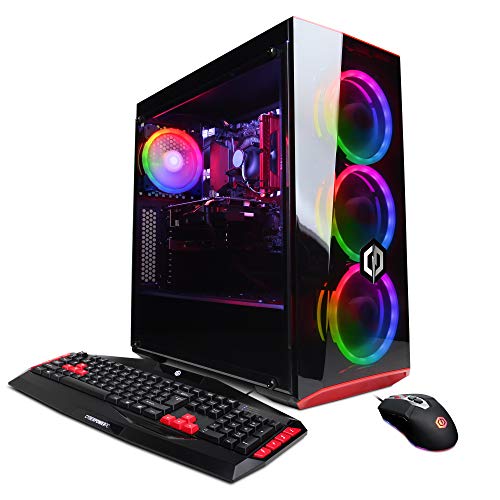
The CyberpowerPC Gamer Xtreme VR Gaming PC (GXiVR8060A7) uses an Intel Core i5-9400F at 2.9GHz, a GTX 1660 with 6GB of VRAM, 8GB of DDR4 memory, and a hybrid 120GB SSD plus 1TB HDD storage layout. It runs Windows 10 Home and stays Wi-Fi ready out of the box.
The dual-drive storage is the practical standout. The 120GB SSD handles the operating system and a few favorite games, while the 1TB HDD covers a deep library of older titles and media files. It is a workhorse layout for budget-conscious shoppers who do not want to fuss with separate drives.
Where It Helps
- Hybrid storage gives both speed and capacity without extra purchases.
- GTX 1660 6GB handles 1080P gaming in classic and indie genres.
- Wi-Fi ready cuts setup steps for first-time builders.
Points To Note
- 120GB SSD fills quickly with modern game installs.
- 9th-gen Intel CPU sits behind the 10th-gen Gamer Xtreme model reviewed earlier.
Best Suited To
Light gamers and students who want a balance of SSD speed and HDD capacity on a tight budget.
Look Elsewhere When
Shoppers needing faster load times and a more modern platform should look at the CyberpowerPC Gamer Xtreme VR Gaming PC with the i5-10400F and GTX 1660 Super.
The MINISFORUM X1-255 Mini PC arrives as a barebone system built around the AMD Ryzen 7 255 with 8 cores and 16 threads. RAM and storage are intentionally left out, so the shopper picks their own DDR5 modules and SSD or hard drive. The port layout mirrors the larger X1 Pro: HDMI 2.1, DisplayPort 2.0, dual USB4, an Oculink port, and 2.5G Ethernet.
For hobbyists who enjoy the build process without wrestling a full tower, this barebone gives a tidy project. Compared to the MINISFORUM M1 Pro above, it lands in a similar footprint but with fewer cores and a more DIY feel.
Bright Spots
- DIY RAM and storage let you pick capacity that matches your workload.
- Oculink port opens external GPU upgrades down the road.
- HDMI 2.1 and DisplayPort 2.0 support high-refresh monitors.
Worth Noting
- No RAM or storage included means additional purchases are required.
- Ryzen 7 255 trails the HX 370 in the X1 Pro for multithreaded workloads.
Who Will Love This
Dabblers and hobbyists who enjoy a small weekend build without buying a full-size case.
Consider Something Else When
Shoppers wanting a turnkey plug-and-play box should reach for the MINISFORUM M1 Pro Mini PC, which ships ready to power on.
Picking The Right Pre-Built Computer Without Regret
Buying a pre-built computer is really about matching silicon to a use case, then ignoring anything that does not earn its keep in your day. CPU cores matter most for video work, programming, and large spreadsheets. GPU horsepower matters most for modern games and 3D rendering. RAM keeps multitasking smooth, and storage size decides how many large files you can keep locally without juggling external drives.
CPU Or GPU: Which One Should Win Your Budget
For a workstation that runs browsers, Office apps, and the occasional photo edit, a modern mid-range CPU like the Apple M4 or Intel Core Ultra 5 will feel snappier than a flashy GPU ever will. For a 1440P gaming tower like the STORMCRAFT Sirius above, the GPU carries most of the load, and the CPU just needs to keep up. Spending more on whichever part your workload actually stresses is the honest play.
RAM And Storage Are Easier To Upgrade Later, Sometimes
Tower desktops usually accept extra RAM sticks and a second SSD without much fuss, so a base configuration is often fine. The Mac minis in this list cannot be upgraded after purchase, so picking the right RAM and storage up front matters more. Mini PCs from MINISFORUM sit in the middle: storage is sometimes user-accessible, while soldered RAM is permanent.
Port Layout And Wireless Standards
Count the monitors, USB devices, and Ethernet cables you actually need before clicking buy. A Mac mini hides ports front and back for convenience, while the MINISFORUM AI X1 Pro spreads HDMI, DisplayPort, and twin USB4 across the rear. For shoppers with Wi-Fi 6E or 7 routers, picking a system with matching wireless future-proofs the network.
Key Considerations Across These Picks
Common Shopping Slip Ups
Chasing the highest GPU number on the box often pushes shoppers past parts they will not use. Pairing a flagship graphics card with a slow CPU creates a bottleneck that no frame rate graph will fix. Storage is another trap: a fast 256GB SSD feels great for a week, then forces daily cleanup once a few modern games land on it.
When Paying More Pays Off
Stepping from the base Apple 2024 Mac mini to the M4 Pro version costs more up front, but the extra cores and memory pay back over years of creative work. The same logic applies to gaming towers: the jump from a GTX 1660 to an RTX 4060 brings DLSS support and ray tracing, which extends the useful lifespan of the build.
Frequently Asked Questions
How long should a pre-built computer last before it feels slow? A well-spec’d tower or Mac mini generally stays comfortable for five to seven years of mainstream use. Gaming rigs age faster because new titles push GPU requirements harder each generation.
Do pre-built computers come with everything needed to start? Most towers include a power cable, a basic keyboard and mouse, and a Windows install. Macs ship with the operating system but no peripherals, so a monitor and input devices are separate purchases.
Is upgrading RAM or storage easy on these machines? Tower desktops are usually straightforward to open and upgrade. Mac minis are sealed and not user-upgradable. Mini PCs vary: storage slots are sometimes accessible, while RAM is often soldered.
Are gaming PCs loud under load? Larger towers tend to run quieter because of bigger fans moving more air at lower RPMs. Compact mini PCs can ramp fans up under sustained loads, especially during AI or compile tasks.
Should I pick a Mac mini or a Windows gaming tower? The choice comes down to operating system preference and intended use. Mac mini suits creative work, development, and Apple ecosystem households. Windows towers suit gaming, broader software compatibility, and frequent hardware tinkering.
Closing Remarks
The honest read is that the right pre-built computer depends almost entirely on what sits across the desk from it. A writer, a competitive gamer, a video editor, and a hobbyist tinkerer all need different things, and the ten picks above are designed to map to those distinct profiles. Take a clear look at the workload, pick the part that matters most, and the rest of the build tends to fall into place on its own.