Going paperless at home used to feel like a chore, and tracking inventory for a small business often meant clipboard chaos. A modern home scanner quietly handles both jobs, turning a stack of receipts into searchable PDFs or a pallet of products into clean inventory updates. I’ve spent time looking through the current crop of options, and the picks below cover dedicated document scanners for paperwork plus rugged handheld units that pull double duty for inventory and retail.
A Fast Comparison Of The Options

Fujitsu ScanSnap iX1500 Color Duplex Document Scanner with Touch Screen (Black)
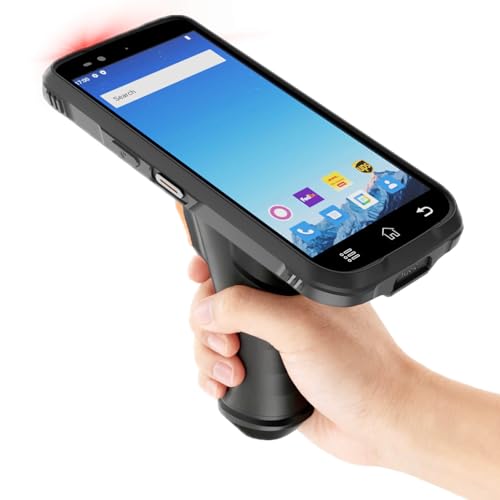
RAYOUNGTEK Rugged Android Barcode Scanner Handheld PDA with Pistol Grip
RAYOUNGTEK Android Barcode Scanner with Pistol Grip and SE4710 Engine

Rayoungtek Rugged Android Barcode Scanner with NFC and IP66 Rating

Rayoungtek Android Barcode Scanner with HW N5703 Engine (4-inch Screen)

Rayoungtek Android Barcode Scanner with HW N5703 Engine and Charge Dock
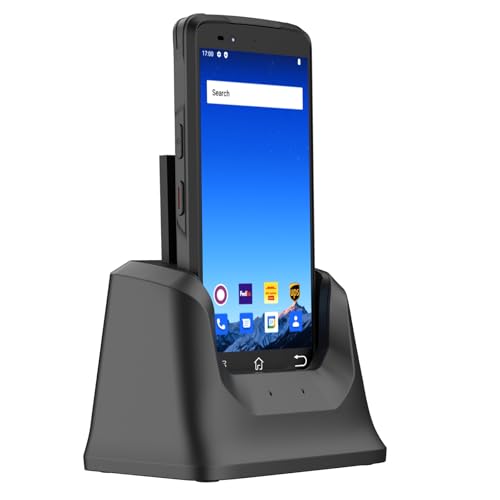
Rayoungtek Android Barcode Scanner with Zebra SE4710 Engine and Charging Dock

Fujitsu ScanSnap iX500 Deluxe Bundle Scanner for PC
The Strengths Of Each Pick
The ScanSnap iX1500 sits at the top of Fujitsu’s home-office lineup, and the touchscreen is the first thing that earns it attention. Color icons replace the old single-button workflow, so a household can build custom scan destinations and pull up a saved profile in a tap rather than digging through desktop software.
For a paper-heavy household with years of receipts, tax records, and kids’ artwork, duplex (two-sided) scanning in a single pass keeps a backlog moving. Wi-Fi support means the whole family can scan from a laptop or phone without fighting over a cable.
Reasons It Performs
- Built-in touchscreen creates scan shortcuts, so routing a document to email versus a cloud folder becomes a single tap rather than a software dive.
- Duplex color scanning chews through mixed paperwork stacks, which matters during tax season or after a medical-records handoff.
- Wireless connectivity lets multiple devices share the scanner without juggling USB cables.
- Compatible with both Mac and PC, so a mixed-vintage household doesn’t have to pick sides.
Things To Consider
- The footprint is larger than a portable sheetfed unit, so a dedicated desk nook is the realistic placement.
- Fujitsu’s companion software has a learning curve, and some routines require a desktop session rather than the mobile app.
Key Product Details
Who It Suits Best
Households with recurring paperwork piles, freelancers managing client documents, and families archiving kids’ schoolwork will get daily value from this pick.
Consider Something Else When
Shoppers who only need light scanning should look at the ScanSnap iX500 reviewed below, which covers the basics for less.
Where the ScanSnap above handles paper, this RAYOUNGTEK shifts the category entirely: a rugged pistol-grip handheld built for warehouse aisles. The Zebra SE4710 scan engine (a professional-grade sensor from a recognized barcode-imaging brand) sits inside, which gives it the credibility to read damaged 1D and 2D codes on shipping cartons.
Android 12 on an octa-core 2.0GHz chip with 4GB of RAM means the device runs full business apps like ERP (Enterprise Resource Planning) or WMS (Warehouse Management System) software without the lag a stripped-down scanner tends to show. A 6-inch screen leaves room for inventory lists while the pistol grip keeps all-day scans comfortable.
Strong Points
- Zebra SE4710 engine reads 1D barcodes (traditional linear codes) and 2D codes (QR and data-matrix style) quickly, which matters for mixed-label shipments.
- Pistol-grip design reduces hand fatigue during long shifts on a warehouse floor.
- 4G LTE alongside Wi-Fi keeps inventory data flowing even when routers are out of range.
Trade Offs
- The rugged body and pistol grip make this heavier than a slim office scanner, so it isn’t useful for casual receipt work.
- Setup leans heavily on configuring third-party inventory software, which may require IT support for a first-time small business owner.
Made For
Warehouse staff, logistics teams, and small-business owners who need an industrial-grade scanner rather than a desk accessory.
A Better Fit Elsewhere
Anyone running a simple home inventory without ERP software should look at the RAYOUNGTEK N77S covered later, which is friendlier for smaller setups.
This RAYOUNGTEK unit shares the same Zebra SE4710 sensor as the warehouse pick above but trims a few enterprise extras. The 6-inch full-screen display is tuned for outdoor readability, meaning farm-stand operators, flea-market vendors, and pop-up retail sellers can read the screen in direct sunlight without shading it with a hand.
Dual-band Wi-Fi on both 2.4GHz and 5GHz frequencies gives more flexibility in crowded venues where one band is congested. Compared with the rugged N77 series below, this model leans toward portability over dust-and-water sealing.
Real Benefits
- Sunlight-readable 6-inch display cuts down on glare problems during outdoor sales or yard events.
- Dual-band Wi-Fi plus 4G LTE keeps the connection steady in busy retail environments where networks clog easily.
- Runs Android apps like Odoo, Fishbowl, and Zoho Inventory for small-business workflows out of the box.
Honest Caveats
- Battery life drains faster with the bigger display lit at full brightness, so all-day outdoor sellers should plan a charging break.
- No dedicated charging dock ships with this configuration, so a spare cable lives on the counter.
Quick Facts
Best Suited To
Outdoor vendors, pop-up retailers, and home-based sellers who scan inventory away from a stable Wi-Fi network.
Skip It When
Shoppers needing an IP66-rated (fully dust-tight and water-jet resistant) body for messy environments should look at the rugged Rayoungtek IP66 model reviewed next.
Dust, splashes, and accidental drops are everyday risks in a garage, garden center, or light-industrial shop. The IP66-rated enclosure on this Rayoungtek handheld seals out dust and resists water jets, so a knocked-over drink or a dusty shelf is less of a disaster. An integrated NFC (Near Field Communication) reader opens up tap-to-scan workflows for product tags and anti-counterfeit labels.
The 6-inch touchscreen, octa-core chip, and 4GB-plus-64GB memory match the larger N77S design reviewed earlier, so users trade a slimmer body for a tougher shell. Android 12 keeps app compatibility identical.
Features That Help
- IP66-rated housing handles dusty workshops, damp basements, and outdoor job sites without drama.
- Built-in NFC reader supports tap-based product tracking, useful for inventory audits and authentication checks.
- 1D and 2D barcode engine reads shipping labels, QR codes, and product packaging alike.
Points To Note
- The rugged frame adds noticeable weight, so a lanyard or hip holster becomes a comfort essential during long shifts.
- Charging accessories are sold separately, so the first-time setup may require an extra cable purchase.
Feature Snapshot
Perfect Match For
Workshop owners, garage-based sellers, and anyone who scans in dusty or damp conditions where a fragile phone would be at risk.
Look Elsewhere When
Shoppers wanting a slim profile for retail counters should consider the Rayoungtek N60 with charge dock reviewed later in this list.
Step down to a 4-inch IPS touchscreen (IPS means In-Plane Switching, a panel technology that holds color and clarity at wide viewing angles) and the unit shrinks into a more pocketable form. The HW N5703 scan engine reads 1D and 2D codes, and a numeric keypad underneath the display speeds up manual SKU entry when a label is unreadable.
This is the model I’d point a small Etsy seller or thrift-store reseller toward. It’s lighter than the larger N77 units and easier to operate one-handed at a checkout counter.
Everyday Advantages
- Compact 4-inch form fits comfortably in one hand, ideal for counter-side scanning.
- Numeric keypad shortcuts manual SKU input when labels fade or fall off.
- NFC reader built in for quick tag reading on apparel or packaged goods.
Worth Noting
- The smaller display shows less information per screen, so inventory lists require more scrolling.
- No charging dock is included with this configuration.
Whose Shelf It Belongs On
Counter-based small businesses, pop-up shops, and resellers who want a phone-sized scanner without a rugged frame.
Where Another Pick Suits Better
Shoppers who need a tougher body should consider the Rayoungtek IP66 model reviewed above for job-site durability.
This N60 configuration shares the same 4-inch screen and HW N5703 engine as the previous pick, but the charge dock in the box changes the day-to-day feel. Drop the unit into the cradle between shifts and the battery stays topped up without fishing for cables.
For a fixed-counter setup where the scanner lives at one station, the dock removes a small but persistent annoyance. The trade-off is that the dock takes up a corner of the counter.
The Good Stuff
- Included charging dock makes end-of-shift power-ups effortless for fixed locations.
- Numeric keypad and NFC reader match the broader N60 family for consistent workflows.
- Android 12 keeps ERP and WMS apps running smoothly.
A Few Limitations
- The dock anchors the scanner to one spot, which isn’t ideal for roaming inventory checks.
- 4-inch display is compact for outdoor visibility.
Who Should Grab It
Counter-based retail scanners, library checkouts, and ticket booths that benefit from always-charged hardware.
Another Choice May Suit
Roaming warehouse staff should consider the Rayoungtek with Zebra SE4710 reviewed below, which pairs a 6-inch screen with a dock.
This N77 unit combines the larger 6-inch display, the Zebra SE4710 imaging engine, and a charging dock into a single package. Logistics and warehouse teams that need both screen real estate for inventory apps and a tethered charge point between truck arrivals will appreciate the bundled dock.
Compared with the rugged IP66 unit reviewed earlier, this version prioritizes a bigger working screen over environmental sealing. For climate-controlled warehouses, that’s a fair trade.
What Makes Sense
- Zebra SE4710 sensor reads damaged or low-contrast codes reliably in fast-paced shipping environments.
- Charging dock simplifies shift changes, especially in multi-user operations.
- 4GB RAM and 64GB storage handle larger product databases than entry-level scanners.
Where It May Fall Short
- Without an IP rating, this unit is best kept indoors away from heavy dust or moisture.
- Heavier than the 4-inch N60, so all-day carry requires a holster.
Feature Card
The Right Fit
Logistics teams, mid-sized warehouses, and back-office inventory hubs that want a dock-equipped unit with a professional sensor.
Swap It Out When
Outdoor crews should consider the Rayoungtek IP66 model reviewed earlier for environmental sealing.
The iX500 is the older sibling in Fujitsu’s home scanner family, and it remains a sensible pick for budget-minded households. Duplex color scanning at 25 pages per minute covers the basics without the touchscreen interface of the newer iX1500 reviewed at the top.
USB and Wi-Fi connectivity to a single computer keep the workflow simple, and the deluxe bundle typically includes extra software or accessories for organizing receipts. For anyone whose scanning needs top out at a stack of mail and tax documents each spring, the iX500 quietly gets the job done.
Bright Spots
- 25 pages-per-minute duplex speed handles a year’s worth of receipts in a weekend.
- Wi-Fi or USB connection to one computer keeps setup straightforward.
- Compatible with PC and Mac.
Soft Spots
- No touchscreen means scan profiles are managed through desktop software.
- The design is older, so replacement parts or rollers may require extra sourcing compared with the current generation.
Spec Overview
Built With In Mind
Home offices with annual paperwork cleanups, students archiving course materials, and small nonprofits tracking donation receipts.
Reach For A Different Pick When
Shoppers wanting touchscreen shortcuts and faster batch scanning should consider the ScanSnap iX1500 reviewed first.
Factors To Weigh Before Choosing Scanners For Home
Document Scanners Versus Barcode Handhelds
The first fork in the road is the type of work on the table. A home office drowning in paper needs a sheetfed document scanner like the Fujitsu iX1500 or iX500, which excels at converting stacks of mixed-size pages into searchable PDFs. A home-based business tracking inventory or processing orders benefits more from a handheld barcode scanner with a Zebra or HW scan engine, where the priority is reading labels quickly rather than archiving pages.
Connectivity And Software Compatibility
Wi-Fi, USB, and 4G LTE each fit a different scenario. A desk-bound home scanner can live happily on Wi-Fi or USB, while a roaming inventory scanner benefits from 4G LTE for places where Wi-Fi is unreliable. Equally important is software fit. Android-based scanners run mainstream apps like Odoo, Fishbowl, and Zoho Inventory, while document scanners rely on their bundled software plus cloud integrations.
Build Quality And Environment
A scanner living in a climate-controlled office can skip rugged ratings entirely. A scanner used in a garage, garden center, or warehouse should carry an IP rating (a two-digit Ingress Protection code that rates dust and water resistance), with IP65 and IP66 being common thresholds for dust-tight and water-jet-resistant builds. The trade-off is weight: rugged scanners tire out hands faster during long shifts.
Screen Size And Input Method
Touchscreen size affects daily comfort. A 6-inch screen leaves room for inventory lists and split-screen workflows, while a 4-inch screen keeps the unit pocketable but requires more scrolling. A numeric keypad underneath the screen speeds up manual SKU entry when a barcode is unreadable.
Navigating Smart Upgrades In This Category
Where Shoppers Go Wrong
A common slip is buying a document scanner when the real need is barcode capture, or vice versa. Another trap is underestimating software setup. Even the best scanner falls flat without the right desktop client or inventory app configured properly. Reading through the included software ecosystem before checkout saves hours of frustration.
What The Higher Tier Buys
Spending more typically means a faster scan engine, a larger touchscreen, and extras like a charging dock or NFC reader. The ScanSnap iX1500’s touchscreen, for example, eliminates software trips for common tasks, which adds up to real time saved across a year. For inventory scanners, the jump to a Zebra SE4710 sensor pays off in cleaner reads on damaged or low-contrast labels. The honest read is that these upgrades only matter when the workload is heavy enough to feel the difference.