A solid scientific calculator is the kind of tool students forget about until they actually need it. The right one carries a student through Algebra 1 and 2, Geometry, Trigonometry, Statistics, Biology, Chemistry, and Physics without ever feeling like the bottleneck. The wrong one makes a simple fraction conversion feel like punishment.
I put together this list for high school students (and the parents quietly footing the bill) who want a calculator that handles textbooks and standardized tests without drama. Each pick below covers a different angle, from long-lasting classroom veterans to graphing-ready workhorses and protective cases that keep gear safe between home and locker.
A Fast Comparison Of The Options

Tourmate Hard Travel Case for Graphing Calculators (Black + Gray)

Texas Instruments TI-30XS MultiView Scientific Calculator

Texas Instruments TI-36X Pro Engineering/Scientific Calculator

iPepul Scientific Calculator with Notepad, 10-Digit (Red)
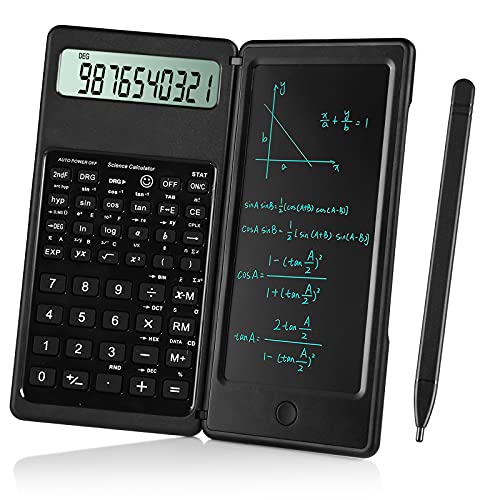
iPepul Scientific Calculator with Notepad, 10-Digit (Black)

IPEROT Pink Solar Scientific Calculator (417 Functions)

IPEROT Solar Blue Scientific Calculator (417 Functions)

IPEROT Graphing Calculator with 10 Modes

iPepul Scientific Calculator with Notepad, 10-Digit (Purple)
A Closer Look At Each Pick
Most students never think about what happens to a graphing calculator between classes. It rides in a backpack next to textbooks, water bottles, and the occasional laptop cable, which is exactly the kind of environment where screens crack and key caps pop off. The Tourmate hard case steps in before any of that happens, with a fitted EVA shell that wraps a calculator like a second skin.
Inside the shell sits a soft lining that absorbs minor drops and shrugs off dust, while the zippered closure keeps the calculator from sliding out during a commute. For students using a CASIO PRIZM FX-CG50 or FX-9750GIII, or a Texas Instruments TI-34 or BA II Plus, the case ships sized to match, so there’s no guessing about whether the device will fit.
Features That Help
- Sturdy EVA exterior resists scuffs, splashes, and the daily grind of a backpack.
- Soft inner lining cushions against drops and prevents surface scratches on the screen and key area.
- Zippered closure keeps the calculator secure during bus rides and locker swaps.
- Custom fit for popular graphing calculators, removing guesswork for shoppers.
Things To Consider
- The case only ships as the protective shell, so the calculator itself is not included.
- Owners commonly report that the interior mesh pocket is best for cords and small accessories only.
Made For
Students who already own a graphing calculator and need a reliable case for daily school commutes.
Where Another Pick Suits Better
Anyone without a calculator yet should look at the Texas Instruments TI-30XS MultiView instead, since the Tourmate case is purely protective gear.
The TI-30XS MultiView has been a steady presence in math classrooms for a reason, and it keeps earning its spot on required supply lists year after year. Unlike the Tourmate case I covered first, this one is the actual calculator, with a four-line display that lets students compare results side by side instead of scrolling back through history.
The MultiView screen renders fractions and stacked expressions the way they appear in textbooks, which removes a layer of friction when translating between paper and keypad. It’s approved for most standardized tests and stays simple enough that freshmen can pick it up without a manual, which is exactly what most households actually need.
Notable Gains
- Four-line MultiView display makes it easier to spot patterns and check prior entries.
- Textbook-style entry reduces the learning curve for students moving between printed math and the keypad.
- Approved for major standardized exams, including SAT and ACT subject areas.
- Solar-assisted power keeps batteries from dying mid-test.
Honest Caveats
- No graphing capability, so pre-calculus and calculus students may eventually outgrow it.
- The key labels can wear down over several years of heavy homework use.
Key Specs
Who Should Grab It
High school students working through Algebra, Geometry, and Statistics who want a calculator that travels and tests well.
Not Your Match When
Students heading into Pre-calculus or any course that requires graphing should consider the TI-36X Pro instead.
The TI-36X Pro sits in a useful middle ground between the TI-30XS MultiView above and a full graphing calculator. It’s the calculator a student reaches for when math classes start pushing into Pre-calculus territory and the textbook stops looking like the screen on a basic scientific model.
It uses the same textbook-style MathPrint input as the MultiView family, so transitioning up from a TI-30XS feels natural rather than like learning a new device. Conversion between fractions, decimals, and constants like Pi is handled directly on the keypad, which keeps students focused on the problem instead of the menu system.
Reasons It Performs
- MultiView display with MathPrint entry mirrors textbook layout and supports stacked fractions.
- Built-in support for fractions, decimals, and Pi conversions saves time on multi-step problems.
- Covers Algebra 1 and 2, Geometry, Trigonometry, Statistics, and Calculus in a single device.
- Designed for courses that don’t permit graphing technology, which keeps it exam-friendly.
Trade Offs
- No true graphing screen, so AP Calculus or engineering work may require a separate graphing tool.
- The button layout is denser than the TI-30XS, which can feel crowded to first-time users.
Right Fit For
High schoolers tackling advanced math who need more horsepower than a basic scientific calculator offers.
Look Elsewhere When
Students who need true graphing functions should consider the IPEROT Graphing Calculator later in this list.
The iPepul Scientific Calculator in red takes a different angle from the Texas Instruments picks above. Instead of leaning on textbook rendering, it folds a writable notepad surface right onto the calculator body, so students can scratch out intermediate steps without reaching for a separate sheet of paper.
It’s aimed at middle and early high schoolers, and the layout is intentionally simple. The 10-digit large screen keeps numbers readable, and the notepad feature doubles as a quiet study surface when the calculator is closed. Compared to the TI-30XS, this one trades advanced function depth for everyday accessibility.
Useful Touches
- Integrated notepad lets students write while calculating, which speeds up multi-step problems.
- Matte LCD screen reduces glare during long homework sessions.
- Ten-digit large display keeps long numbers and decimals easy to read.
- Simple key layout suits beginners who haven’t touched a scientific calculator before.
Points To Note
- Not built for upper-level math, so students advancing into Pre-calculus will need to upgrade.
- The notepad surface collects smudges over time and needs occasional wiping down.
Feature Snapshot
Whose Shelf It Belongs On
Middle and early high school students building confidence with their first scientific calculator.
Swap It Out When
Students moving into Algebra 2 or higher should graduate to the Texas Instruments TI-30XS MultiView.
The black version of the iPepul calculator offers the same internal layout as the red model above, just wrapped in a more neutral finish. For students who don’t want a bright calculator sitting on a serious-looking desk, the black housing reads more like a study tool and less like a toy.
It still ships with the integrated notepad, the 10-digit large screen, and the same simple button layout. The matte LCD keeps the display easy on the eyes, which matters during evening homework marathons.
Useful Highlights
- Black housing suits older students who prefer a low-key look at their desk.
- Notepad feature encourages showing work directly alongside calculations.
- Large 10-digit display keeps long numbers from getting lost on screen.
- Straightforward button arrangement lowers the barrier for first-time scientific calculator users.
Room For Improvement
- Limited function depth compared to the TI-30XS or TI-36X Pro.
- Some owners report the included stylus can wander off in a backpack pocket.
Best Suited To
Students who want the iPepul notepad design without the bright color of the red version.
Reach For A Different Pick When
Students taking on Statistics or Trigonometry should consider the IPEROT 417-function calculator for more headroom.
The IPEROT pink calculator packs 417 functions into a body aimed squarely at students juggling Statistics, Trigonometry, and Calculus basics. Compared to the iPepul models I covered earlier, it drops the integrated notepad in favor of broader math coverage and a solar cell that keeps the device powered without battery swaps.
The function list covers algebra, fractions, derivatives, integrals, statistics, complex numbers, linear regression, standard deviation, and variable solving. That’s a lot of ground, and the button layout leans on a multi-key access system, so reading the included reference card is genuinely worth a few minutes before the first big test.
Practical Advantages
- 417 built-in functions cover the core math curriculum through Statistics and Calculus basics.
- Solar power reduces dependence on backup batteries during long school days.
- Large display keeps multi-digit entries visible at a glance.
- Available in a bright pink finish for students who prefer a distinctive calculator.
Some Limits To Know
- The dense function library means students may need to study the button layout before relying on it.
- Solar power can dim under low indoor lighting, so a backup battery is worth keeping on hand.
Feature Card
Perfect Match For
Students who want function depth for Statistics and Calculus without paying for a graphing model.
A Better Fit Elsewhere
Anyone who needs graphing output should consider the IPEROT Graphing Calculator instead.
The blue variant of the IPEROT 417-function calculator shares its internals with the pink version I just covered, only dressed in a calmer colorway. For students who want the same broad math coverage without the bright pop of pink on the desk, the blue finish slides in nicely.
It still ships with the same 417 functions, the solar-powered body, and the large display that makes Statistics entries readable. The shift is purely cosmetic, which matters when a student wants a calculator that feels neutral rather than expressive.
The Value In It
- Same 417-function depth as the pink IPEROT, covering Algebra through Calculus basics.
- Solar cell keeps the device powered across back-to-back class periods.
- Blue finish offers a quieter look that fits a traditional desk setup.
- Large screen format reduces eye strain on multi-digit entries.
Things To Weigh Up
- Function depth comes with a learning curve, so casual users may not tap into the full set.
- Low-light classrooms can weaken the solar cell, so a backup battery is a smart add-on.
Built With In Mind
Students who use their calculator multiple times a day and want long battery life without buying replacements.
Skip It When
Students who need a graphing screen should jump ahead to the IPEROT Graphing Calculator.
The IPEROT Graphing Calculator is the only model on this list that delivers a true graphing screen, which is exactly what Pre-calculus and AP students start asking for by junior year. Where the 417-function calculators handle numbers and equations, this one plots them on a coordinate plane, and that visual step matters when problems stop being purely arithmetic.
The device packs 10 function modes: Calculate, Complex, Statistics, Base-N, Equation, Table, Matrix, Vector, Graphic, and G-Solve. That’s a wide spread of territory, which makes it useful for engineering students, financial analysts, or anyone who needs more than a standard scientific calculator offers.
Positive Points
- Ten function modes cover everything from basic arithmetic to Matrix and Vector math.
- Built-in graphing capability helps students visualize equations and intersections.
- G-Solve mode streamlines solving equations once they’re plotted on screen.
- Suits engineering and finance students who need advanced math beyond a typical high school curriculum.
Potential Drawbacks
- Graphing feature sets may not be approved for every standardized test, so check the school’s policy first.
- Owners commonly report the steeper learning curve compared to non-graphing scientific calculators.
Quick Technical Notes
Who Will Love This
High school and early college students who need graphing capability and broad math mode coverage.
Consider Something Else When
Students in test-restricted courses should default to the Texas Instruments TI-36X Pro for a graphing-free option.
The purple iPepul rounds out the notepad-equipped trio I covered earlier, sitting alongside the red and black versions. It keeps the same integrated writing surface, the same 10-digit screen, and the same beginner-friendly layout, just dressed in a third color option for shoppers who want a specific look.
For students who bounce between home and school with their calculator, the notepad design removes one piece of gear from the backpack. That’s a small thing until it adds up across a week of homework.
Strengths Worth Knowing
- Integrated notepad supports showing work directly on the calculator body.
- Matte LCD keeps the screen readable in bright classroom lighting.
- Large 10-digit display handles long decimal entries without strain.
- Purple finish offers a distinct look compared to the red and black versions.
A Few Limitations
- Function library is more limited than the IPEROT or Texas Instruments picks above.
- The notepad surface picks up pencil dust and benefits from regular cleaning.
The Right Fit
Students who want a beginner-friendly calculator that doubles as a writable surface for everyday math work.
Another Choice May Suit
Students who plan to take advanced math classes should look at the TI-36X Pro for a stronger function set.
Matching The Calculator To The Math Class
Picking the right scientific calculator starts with the class list, not the brand. Most high school math courses list approved calculators in the syllabus, and matching that list saves the hassle of buying twice. A student in Algebra 1 needs a different tool than one heading into AP Calculus, and the gap between those two is wider than most shoppers expect.
Start by checking whether the course or exam allows graphing calculators. Tests like the SAT and most in-class exams restrict or ban graphing models, which makes non-graphing picks like the Texas Instruments TI-30XS MultiView or TI-36X Pro safer defaults. Where graphing is allowed or required, the IPEROT Graphing Calculator earns its place by handling equations and visualization in one device.
Function depth matters next. A basic calculator handles arithmetic, fractions, and basic trig, but Statistics and Calculus ask for standard deviation, regression, and even matrix operations. The IPEROT 417-function models cover that middle ground for students who want extra capability without paying for graphing. For younger students still building confidence, the iPepul notepad models keep things simple and approachable.
Display quality is a quiet but real factor. Matte LCD screens and large 10-digit readouts reduce squinting, especially during late-night homework sessions. A four-line MultiView screen, like the one on the TI-30XS and TI-36X Pro, also lets students compare prior entries without scrolling back, which speeds up multi-step problems.
Build and portability round out the decision. Solar power keeps the device running through long school days, while a protective case like the Tourmate hard case prevents the kind of screen crack that ends a calculator’s life mid-semester. For students who already own a graphing calculator, that case is a small add-on that prevents a much larger replacement cost.
Key Considerations Across These Picks
Pitfalls Shoppers Hit
The most common mistake is buying a graphing calculator when the school’s exam policy bans them. A graphing model is a powerful learning tool, but during a restricted test it can mean a confiscated device and a hand-graded section. Always check the exam rules before committing to a graphing model.
Another frequent trap is overpaying for functions a student never uses. The IPEROT 417-function models offer depth, but a freshman in Algebra 1 will likely use a fraction of that list. Matching the function set to the current course (with a little headroom for the next year) usually beats buying for a class two years away.
What The Higher Tier Buys
Stepping up from a basic scientific calculator to a model like the TI-36X Pro buys better display rendering, stronger equation handling, and broader subject coverage. The upgrade pays off most when students hit Pre-calculus and Calculus, where stacked fractions and conversion shortcuts start saving real time.
The jump to a graphing calculator like the IPEROT 10-mode model buys visualization, which changes how students approach problems. Plotting an intersection or a curve often teaches more than solving for variables, which is why graphing models earn their higher cost in math-heavy programs.
Frequently Asked Questions
Do high school students actually need a scientific calculator?
Most high school math courses expect one, and standardized tests like the SAT accept approved scientific calculators. A four-function calculator runs out of steam once fractions and trig show up, so a scientific model is the practical minimum.
Can students use a graphing calculator on the SAT?
The SAT permits graphing calculators but restricts some features like CAS (computer algebra system) functionality. Always confirm the calculator model is on the official approved list before test day.
What is a MultiView display?
A MultiView display shows multiple lines of calculations at once, so students can compare entries and check prior work without scrolling. It speeds up multi-step problems and helps catch input mistakes.
How long do these calculators typically last?
With daily school use, a quality scientific calculator usually lasts four to six years before keys start wearing or the display fades. Storing the device in a hard case like the Tourmate extends that lifespan considerably.
Should I buy a solar-powered calculator?
Solar power keeps a calculator running through long school days and removes the cost of replacement batteries. It’s especially handy for students who forget to swap batteries, though a backup battery helps in dim classrooms.
The Takeaway
The right scientific calculator depends on the math class list, the school’s exam policy, and how much growth room the student needs over the next two to three years. The TI-30XS MultiView remains the safest default for most high schoolers, while the TI-36X Pro and IPEROT models cover students heading into tougher coursework. A protective case keeps any of them working longer, which is the easiest upgrade on this list.