Running a home lab used to mean a corner of the closet, a tangle of cables, and a system that sounded like a small jet engine. Today the category has matured into something far more approachable, with quiet mini PCs handling media libraries and full rackmount systems running virtualization clusters from a garage shelf. I put together this roundup for tinkerers, creators, and families who want a server OS for home setups that actually fits their space, budget, and tolerance for fan noise.
A Side-By-Side Look

PCSP PowerEdge R640, 2X Intel Xeon Silver 4110 2.1GHz (Renewed, 32GB DDR4)

PCSP DL380 G10 8B SFF 2U Server, 2X Xeon Gold 6148 (Renewed, 256GB DDR4)
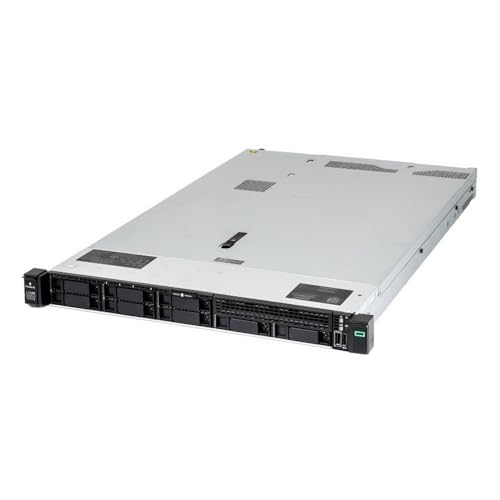
PCSP DL360 Gen10 40 Core SFF Server (512GB DDR4)
PCSP DL380 G10 8B SFF 2U Server, 2X Xeon Gold 6148 (Renewed, 768GB DDR4)

Apple 2024 Mac mini Desktop Computer with M4 Chip

Synology 5-Bay NAS DiskStation DS1019+ (Diskless)

Getorli Mini PC Ryzen 5 3501U, 16GB RAM, 512GB SSD

Dell PowerEdge R640 Server (Renewed, 256GB RAM, 7.7TB SSD)

Dell PowerEdge R640 Server, 2X Xeon Gold 6134 (Renewed)
Huidun H50 Mini PC Ryzen 3300U, 16GB DDR4, 512GB SSD
The Strengths Of Each Pick
The PowerEdge R640 sits in the most approachable corner of the rackmount world, which is exactly why I kept it in the roundup. Dual Xeon Silver 4110 chips add up to sixteen physical cores, enough headroom for a learning-grade hypervisor and a few always-on containers at the same time.
Where this unit earns its keep is the chassis layout. The 1U shell (a standardized 1.75-inch rack height) fits a shallow closet rack, the H730 RAID controller keeps storage flexible, and four 1GbE NICs (network interface cards) leave room for VLAN segmentation (separating traffic into isolated virtual networks) without buying extra gear. For someone dipping into Proxmox or TrueNAS for the first time, that combination is rare at this tier.
Practical Advantages
- Dual-socket platform gives real multitasking headroom for small VM labs.
- Four 1GbE ports support network segmentation out of the box.
- Renewed condition makes a server-grade chassis friendlier to first-time buyers.
- Compact 1U footprint suits a closet shelf or shallow rack.
Things To Consider
- Server-class fans tend to run louder than consumer desktops, so placement matters.
- 32GB of RAM fills up quickly once several VMs (virtual machines) are running concurrently.
Feature Snapshot
Right Fit For
Curious tinkerers setting up their first rack with a modest learning workload.
Where Another Pick Suits Better
Shoppers needing lots of in-memory capacity should look at the PCSP DL380 G10 with 768GB DDR4 instead.
The DL380 Gen10 doubles down on what the R640 only hints at. Dual Xeon Gold 6148 chips bring forty cores into the chassis, and the P408i-a RAID controller (a hardware card that manages drive redundancy and performance) handles mixed SATA and SAS drives without complaint. This is the configuration I would point a virtualization hobbyist toward once the home lab starts running actual services.
Networking is where this box punches above its size. Two 10Gb SFP (small form-factor pluggable) ports and four 1GbE copper ports let you split storage traffic from management without adding a PCIe card. Compare that to the R640 above, which only offers copper gigabit, and the difference shows up fast once you start pushing large backups across the network.
What Works In Its Favor
- Forty cores handle dense virtualization, media transcoding, and parallel builds.
- Dual 10Gb SFP ports future-proof a multi-gig home network.
- 2U height (3.5 inches of rack space) improves airflow and reduces thermal throttling.
- Eight 2.5-inch bays accommodate a healthy mix of SSD and spinning storage.
Points To Note
- Power draw climbs quickly under sustained load, so a managed UPS helps.
- The chassis is heavier than 1U alternatives and harder to mount on a closet shelf.
Built With In Mind
Home-lab enthusiasts running multi-node Kubernetes clusters or several always-on VMs.
Look Elsewhere When
Quiet bedrooms are non-negotiable for you, in which case the Apple Mac mini with M4 chip is the friendlier neighbor.
The DL360 Gen10 takes the same horsepower as the DL380 above and crams it into a slimmer 1U chassis. Forty cores, 512GB of DDR4, and dual 10Gb SFP ports all live behind a front bezel barely thicker than a hardcover book. For a small apartment rack, that footprint matters more than people expect.
The trade-off shows up in expansion. With only eight small-form-factor bays and constrained PCIe slots, heavy storage builds demand careful drive planning. For someone running memory-hungry databases or dozens of containers, though, this hits a sweet spot between density and quiet operation.
Positive Takeaways
- Forty Xeon Gold cores keep latency stable across many concurrent VMs.
- Dual 10Gb networking matches the larger DL380 at half the chassis depth.
- 512GB of RAM supports memory-resident caching for analytics workloads.
- 1U height saves precious rack space in closets or shared offices.
Trade Offs
- Eight SFF bays limit raw storage unless you add external enclosures.
- 1U airflow can run warmer under sustained all-core loads.
Spec Overview
Best Suited To
Lab builders with shallow racks who need genuine compute density per inch.
Consider Something Else When
Storage capacity matters more than core count, in which case the Dell PowerEdge R640 with 7.7TB SSD storage is the stronger match.
If you want the same forty-core foundation as the DL380 above but with the memory ceiling pushed near its limit, this 768GB configuration is the more ambitious choice. It targets the home operator who has moved past learning exercises and into serious data work: a self-hosted analytics stack, a Redis cache cluster, or a development environment that mirrors production.
The networking layout mirrors the other DL380, so 10Gb backbones and quad gigabit copper both come standard. Where this configuration separates itself is sustained multi-VM throughput under heavy memory pressure, which the smaller R640 in pick one would choke on quickly.
Points In Its Favor
- 768GB of DDR4 supports memory-resident data tools without swapping to disk.
- Same dual-socket compute platform as the lighter DL380, simplifying the upgrade path.
- 2U chassis leaves headroom for additional PCIe cards later.
- Renewed tier makes high-memory hardware accessible at a lower entry cost.
Softer Spots
- Power and cooling demands scale with memory population, which a closet setup may struggle with.
Perfect Match For
Engineers running memory-hungry workloads from a home office or detached lab space.
A Better Fit Elsewhere
Casual NAS users should consider the Synology DS1019+ instead, which trades raw cores for friendlier management software.
Compared to every rackmount in this roundup, the Mac mini almost disappears. It measures roughly five by five inches, runs cool enough to live behind a monitor, and stays silent even when pushing several Docker containers. The M4 chip pairs a ten-core CPU with a ten-core GPU on a unified memory architecture (a design where CPU and GPU share the same RAM pool), which makes memory access unusually fast for the class.
What surprised me is how well macOS handles lightweight server duties. Time Machine sharing, Home Assistant, Pi-hole, and Plex all install cleanly, and the front-and-back port layout is more practical than people expect. For a creative household that wants self-hosting without the rack, this is the obvious starting point.
Real-World Strengths
- Five-inch footprint tucks into a living room, studio, or shared desk.
- Unified 16GB memory accelerates mixed CPU and GPU workloads.
- Front-facing ports make plugging in temporary drives painless.
- M4 efficiency keeps power draw far below rack alternatives.
Honest Caveats
- macOS supports fewer mainstream self-hosting stacks than Linux, so power users may feel boxed in.
- 256GB of internal storage fills up quickly with media libraries.
- Gigabit wired networking lags behind the 10Gb options in the rack picks above.
Quick Facts
Who Will Love This
Creators and remote workers who want a near-silent home server sitting next to a display.
Skip It When
You plan to run more than a handful of containers simultaneously, in which case the PCSP DL360 Gen10 with forty cores makes more sense.
Synology sells the DS1019+ as a small-office device, but its real audience is the family that wants a quiet, app-driven home server. Five bays swallow a healthy mix of mirrored and parity drives, and DiskStation Manager packages everything from backups to surveillance into a single web interface. For someone who never wants to touch iSCSI (a protocol that lets the NAS appear as a local hard drive to other machines) targets, that polish matters.
Under the hood, a quad-core CPU with hardware AES-NI encryption (a processor feature that accelerates encrypted file operations without taxing the CPU) keeps file transfers quick even with encryption turned on. Owners commonly cite over 225 MB/s of sustained throughput, which is more than enough for a household of streamers and remote workers.
What Stands Out
- Five bays scale from modest backup pools to multi-terabyte media vaults.
- DSM software makes container deployment approachable for non-technical users.
- Hardware encryption keeps full-drive performance close to unencrypted speeds.
- Compact footprint fits on a bookshelf or beside a printer.
Less Ideal Details
- Diskless means buying drives separately, which adds to the total project cost.
- 8GB of DDR3L memory caps heavy virtualization ambitions.
Right Fit For
Families who want a polished backup and media server without command-line tinkering.
Consider Something Else When
You need true compute performance rather than storage, in which case the Huidun H50 Mini PC delivers more cores in a similar footprint.
The Getorli mini PC leans on AMD’s Ryzen 5 3501U, a quad-core mobile chip that sips power and runs cool enough to sit on a desk without a fan curve kicking in. Sixteen gigabytes of DDR4 and a half-terabyte NVMe (a fast solid-state drive connected over the PCIe bus) drive handle Plex, Home Assistant, and a small Docker stack without breaking a sweat.
What separates this box from the Synology above is display flexibility. Triple-display output and WiFi 6 make it a sensible choice when the same machine doubles as a workstation and a light home server. The trade-off is storage, since a single small NVMe cannot match a multi-bay NAS.
Where It Delivers
- Ryzen 5 3501U balances power efficiency with enough headroom for daily services.
- WiFi 6 simplifies placement away from the network closet.
- Triple-display support merges workstation and server duties on one device.
- 512GB NVMe boot drive keeps the operating system responsive.
Practical Considerations
- Storage is fixed internally, so large media libraries require external drives.
- Four cores feel modest compared to the rack systems earlier in this list.
Best Suited To
Users who want one machine that doubles as a desktop and a home-server host.
Another Choice May Suit
Buyers needing five-figure IOPS (input/output operations per second) for database work should reach for the PCSP DL380 G10 instead.
The Dell R640 returns in this roundup, but in a very different costume. Thirty-two cores handle virtualization comfortably, while 7.7TB of SSD storage removes the spinning-disk bottleneck that plagues the smaller R640 in pick one. For container hosts with persistent volumes, that single change rewrites the experience.
Where this server earns its keep is in low-latency workloads. Database replicas, GitLab runners, and search engines all benefit from SSDs that can absorb read storms without queueing. Compared to the DL380 in pick two, you trade bay flexibility for raw density in a 1U envelope.
A Favorable Mix
- 7.7TB of SSD capacity handles container volumes and database replicas without external shelves.
- Thirty-two cores spread across two sockets for reliable parallel throughput.
- 1U chassis preserves rack space while delivering storage-heavy compute.
- Renewed classification lowers the barrier to enterprise-grade hardware.
A Few Limitations
- SSD-only storage raises the total cost noticeably over hybrid builds.
- 1U cooling still runs warm under sustained all-core load.
Right Fit For
Home operators running production-grade databases, search indices, or container registries.
Not Your Match When
You mostly store large media archives, where the Synology DS1019+ with roomy drive bays serves you better.
The R640 with dual Xeon Gold 6134 chips targets users who care about clock speed more than core count. Sixteen cores running at 3.2GHz punch through single-threaded workloads such as home automation scripts, DNS (domain name system) services, and latency-sensitive databases. For a household chasing responsive response times, higher frequency is often more valuable than raw core density.
Eight 2.5-inch trays leave room for a balanced SSD and HDD mix, and the H730p RAID controller (an enterprise-grade card with a battery-backed write cache) protects write performance during unexpected power events. It is a more focused take than the SSD-dense R640 in pick eight, trading raw storage for snappier per-thread performance.
Well-Handled Touches
- Higher 3.2GHz clock accelerates single-threaded services like DNS and automation hubs.
- Battery-backed RAID cache protects in-flight writes during brief outages.
- Eight SFF trays support a balanced SSD and HDD layout.
- 1U form keeps the rack footprint consistent with the other Dell options.
Possible Compromises
- 32GB of RAM constrains the number of VMs you can run concurrently.
- Drives ship separately, so budgeting must include storage media.
Made For
Lab builders chasing snappy response times on latency-sensitive home services.
Reach For A Different Pick When
Heavy parallel workloads matter more than single-thread speed, in which case the DL380 G10 with forty cores earns the slot.
The Huidun H50 arrives with Windows 11 Pro pre-installed and full Linux support, which removes the awkward first-night setup for anyone new to self-hosting. The Ryzen 3300U inside is a quad-core chip that prioritizes efficiency, so the box sips power while running Plex, Home Assistant, or a small Docker swarm.
Dual-band WiFi and 4K-capable DisplayPort plus HDMI output make it easy to drop behind a TV as a media hub. Compared to the Getorli above, you trade triple-display support for a longer warranty window, which matters for households that want a low-fuss appliance.
The Helpful Details
- Pre-installed Windows 11 Pro shortens the path from box to running services.
- Dual WiFi bands keep latency reasonable when placed away from the router.
- 4K output at 60Hz supports modern TVs as primary displays.
- Compact chassis fits inside entertainment centers or under desks.
Things To Weigh Up
- Four cores feel modest once you scale past a handful of containers.
- Internal storage tops out at 512GB without room for expansion.
Best Suited To
Curious first-time server owners who want a turnkey mini PC rather than a rack build.
Swap It Out When
You anticipate expanding into heavier virtualization, where the PCSP DL360 Gen10 offers a more futureproof compute path.
What Matters When Picking A Home Server OS
Match Hardware To Workload, Not Spec Sheets
The single most useful question to ask before buying is what the machine will actually do. Plex and media streaming lean on fast single-thread performance and quick storage, which a Mac mini or a Ryzen-based mini PC handle without complaint. Virtualization labs lean on cores and ECC RAM (error-correcting memory that detects and fixes data corruption on the fly), which is where dual-socket rack systems shine. A NAS for family backups asks for drive bays and quiet fans, which makes a Synology DiskStation the calmest fit. Matching the chassis to the workload keeps both noise and power bills in check.
Think About Power, Heat, And Noise Together
A rack server that hums in a garage is one thing, but the same chassis in a bedroom closet is a different conversation. For living spaces, anything above forty watts of idle draw becomes noticeable on the electricity bill, and fans above thirty decibels are tough to sleep near. Mini PCs and Mac minis often run nearly silent and idle under ten watts, which is why they earn their place in apartments and shared offices. Larger rack systems reward a detached or sound-insulated enclosure.
Plan Storage With Growth In Mind
Storage is the attribute that grows the fastest in any home setup. Buying a chassis with only one or two drive bays feels economical until the first full backup, at which point an external enclosure or a complete rebuild becomes inevitable. Five-bay NAS units and eight-bay rack servers give room for mirrored pools plus a parity drive, which keeps data safe through drive failures. SSDs cost more per terabyte but remove spinning rust from the noise profile, which is worth weighing for media-heavy households.
Decide On A Software Path Early
Linux distributions such as Ubuntu Server, Debian, and Fedora handle nearly every workload on this list. Hypervisor platforms like Proxmox and XCP-ng wrap that foundation with web-managed virtualization, which is a major convenience for first-time users. Synology’s DSM and Windows 11 Pro both reduce the learning curve at the cost of flexibility. Choosing a software direction before buying avoids the trap of mismatched drivers, missing virtualization extensions (VT-x for Intel or AMD-V for AMD), or unsupported RAID controllers.
Key Considerations Across These Picks
Where Shoppers Go Wrong
A common mistake is buying enterprise hardware without planning for rack rails, network drops, and UPS (uninterruptible power supply) backup. The cheapest rack server can become the most expensive purchase once you add rails, a switch, and surge protection. Another misstep is underestimating memory needs, since virtual machines and containers consume RAM faster than most spreadsheets predict. Allocating capacity for growth up front keeps the system useful longer.
Why Top Tier Costs More
Higher-tier models carry a price premium because they ship with more cores, faster storage, and larger memory ceilings. The PCSP DL380 G10 with 768GB of DDR4 illustrates the pattern clearly: it uses the same chassis and CPU platform as the lighter 256GB version, yet costs more because populated memory modules are expensive. For households running memory-hungry databases or analytics tools, that premium translates directly into fewer slowdowns and longer useful life. For everyone else, a lighter configuration often delivers more value per dollar.
Frequently Asked Questions
Do I Need ECC Memory In A Home Server?
ECC memory catches single-bit errors that would otherwise slip through silently, which matters most for long-running file servers and databases. For casual media hosting or learning-grade VMs, non-ECC RAM typically performs fine and costs less.
Is A NAS The Same As A Home Server?
A NAS (network attached storage) focuses on file sharing, backups, and media streaming, while a home server runs broader workloads such as virtualization, home automation, and custom applications. Some devices, like the Synology DS1019+, blur the line by supporting container apps.
Can A Mini PC Replace A Full Rack Server?
For light virtualization, media services, and Docker containers, a modern mini PC often replaces a rack server cleanly. Heavy multi-tenant virtualization or dense database workloads still benefit from rack-class CPUs and memory headroom.
How Loud Are Renewed Rack Servers?
Most renewed rack servers run louder than consumer desktops, often in the forty to fifty decibel range under load. Sound-dampening enclosures or garage placement help, though mini PCs and Mac minis remain the quietest options in this roundup.
What Is The Easiest Operating System For Beginners?
TrueNAS Scale, Synology DSM, and Windows 11 Pro offer the most approachable interfaces for newcomers. Proxmox and Ubuntu Server reward users willing to learn a few command-line basics with far more flexibility down the road.
Closing Remarks
The right home server is the one that matches your workload, your room, and your patience for setup. Start with the use case, decide how much noise and power draw you can live with, then pick the chassis that fits both. The ten options above cover everything from silent living-room appliances to full virtualization labs, so the honest read is that any of them can serve well when matched thoughtfully.