Running a small business means your data quietly does the heavy lifting: invoices, customer records, shared files, the Wi-Fi login everyone forgets. The right server turns that mess into something predictable, and the wrong one turns a Tuesday into a weekend. I pulled together nine servers and racks that small teams actually buy: rack-ready enterprise towers, compact workstations, and the cabinets that keep them cool and tidy. Here’s where I’d start looking if my office depended on uptime.
A Closer Look At The Lineup

PCSP DL380 G10 8B SFF 2U Server 256GB DDR4 (Renewed)
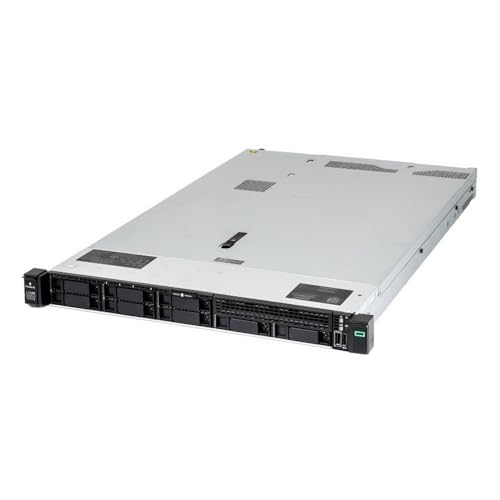
PCSP Entry-Level DL360 Gen10 40 Core SFF Server 512GB DDR4
PCSP DL380 G10 8B SFF 2U Server 768GB DDR4 (Renewed)

Dell PowerEdge R730xd 24-Bay SFF 2U Server (Renewed)

Sysracks 42U Floor-Standing Server Rack 39″ Deep

Dell PowerEdge R720 16-Core Server 192GB (Renewed)

18U Wall Mount Server Rack 24″ Deep with PDU

DELL PowerEdge R810 4-Socket 40-Core Server (Renewed)

Dell PowerEdge T40 Tower Server Xeon E-2224G
A Closer Look At Each Pick
A refurbished DL380 Gen10 is the kind of server that quietly absorbs whatever your business throws at it: a dozen virtual machines, shared storage, a few databases, all at once. Two Intel Xeon Gold 6148 chips deliver 40 cores, and the P408i-a RAID controller keeps eight 1.2TB SAS drives organized and protected. Built-in networking includes two 10Gb SFP ports for fast backbone links, plus four 1GbE ports for everyday connections.
For a small business moving off consumer-grade hardware, this is a serious step up without the brand-new sticker shock. You may find the chassis runs warm in a closet without airflow, so plan rack ventilation accordingly. Owners commonly report that the iLO management interface makes remote administration far less painful than consumer boards.
Notable Gains
- 40 physical cores handle multiple VMs and concurrent users without breaking a sweat.
- Eight included 1.2TB 10K SAS drives give roughly 9.6TB of raw spinning storage out of the box.
- Dual 10Gb SFP ports future-proof the network for faster switches and aggregated uplinks.
- Hardware RAID with battery-backed cache protects writes during power events.
- HPE iLO remote management means firmware updates and reboots happen from a laptop.
Trade Offs
- Renewed units may show minor cosmetic wear on bezels or drive caddies.
- 2U chassis and 10K SAS drives generate noticeable noise in a quiet office.
- Power draw runs higher than a small tower, so budget for circuit capacity.
Feature Snapshot
Built With In Mind
Mid-sized offices running several virtual machines, file shares, and a database under one roof.
Reach For A Different Pick When
The 18U Wall Mount Server Rack is a smarter starting point if you only need a single server in a home or studio.
The DL360 Gen10 is the smaller sibling of the DL380 above: same dual Xeon Gold 6148 silicon, same P408i-a RAID controller, but squeezed into a 1U chassis. That makes it ideal when rack space costs more than raw storage bays. With 512GB of DDR4 already installed, you can spin up memory-hungry workloads without buying DIMMs on day one.
One practical consideration: the unit ships with eight empty drive caddies, so factor in storage purchases if you have nothing on hand. The dual 10Gb SFP plus onboard quad 1GbE layout keeps networking flexible for segregated VLAN traffic. Rails are not bundled, so check your cabinet before mounting.
Noteworthy Benefits
- 1U form factor leaves room for switches, patch panels, and a UPS in the same rack.
- 512GB of pre-installed DDR4 removes the immediate need to source compatible memory.
- Dual 10Gb SFP ports mirror the DL380 for consistent network architecture across sites.
- HPE iLO remote management streamlights firmware updates and remote diagnostics.
Honest Caveats
- No drives or caddies filled from the factory, only empty trays included.
- Rail kit not included, so budget for a compatible set if your cabinet lacks them.
Key Specs
Whose Shelf It Belongs On
Small IT teams working inside cramped server rooms where every U counts.
Swap It Out When
The Dell PowerEdge T40 makes more sense for a single-desk office that simply wants a quiet tower under a table.
This is the same DL380 Gen10 chassis as pick number one, but it ships with 768GB of DDR4 instead of 256GB. For businesses running memory-resident databases, in-memory caches, or many simultaneous virtual machines, that extra RAM is the difference between smooth afternoons and constant swapping. The dual 10Gb SFP networking and eight 10K SAS drives stay the same dependable foundation.
For most small businesses, 256GB is plenty, but if your workload profile leans toward analytics or virtualization density, the upgrade pays off fast. Owners commonly note that the larger memory population draws slightly more power under load. Airflow planning matters as much here as on the lighter sibling.
What Makes Sense
- 768GB of DDR4 supports many concurrent VMs or large in-memory datasets.
- Identical storage and networking layout to the 256GB version simplifies spares.
- P408i-a RAID controller with 2GB cache accelerates writes across the eight SAS drives.
Possible Compromises
- Higher populated memory draws more power under sustained load.
- 2U form factor still needs proper rack ventilation to keep thermals in check.
At A Glance
Best Suited To
Growing teams running database servers, virtualization hosts, or analytics workloads that need generous RAM.
Look Elsewhere When
The DL360 Gen10 is a smarter pick for shallow racks where 1U matters more than dual-socket memory ceilings.
The R730xd is Dell’s answer when you need storage density more than memory ceilings: 24 small-form-factor bays in a 2U body, all backed by dual Xeon E5-2690 v4 processors and an H730P RAID controller with 2GB of cache. For small businesses drowning in file shares, scanned documents, or video archives, that 24-bay footprint is hard to beat. The included 1.2TB SAS drives give a starting platform, and you can expand with additional drives over time.
Compare that to the 8-bay DL380 above: less memory, more spindles. The honest read is that this server is built for capacity-first workloads, not VM density. Owners commonly mention that the rear 10Gb SFP+ plus 1Gb NIC layout covers most office networks without an extra card.
What Works In Its Favor
- 24 SFF bays fit dense storage pools for backups, archives, and large shared drives.
- H730P RAID controller with 2GB cache accelerates parity calculations and write performance.
- Dual 10Gb SFP+ plus 1Gb NICs offer flexible network segmentation out of the box.
- Dell iDRAC management handles remote reboots and firmware updates through any browser.
Soft Spots
- 128GB of DDR4 limits virtualization density compared to the DL380 picks.
- Pre-owned chassis may need new caddies if you expand beyond the four bundled drives.
Quick Facts
The Right Fit
File-heavy offices, backup targets, or studios with lots of media to keep online.
Not Your Match When
The Dell PowerEdge T40 suits you better if you just need one simple tower for a small team without rack hardware.
The first four picks handle the compute side. A proper rack holds everything together, and this 42U Sysracks cabinet gives small businesses real room to grow. The 39-inch depth fits full-length enterprise servers like the DL380 and R730xd, and the glass front door lets you eyeball status lights without opening it up.
Four cooling fans and a temperature control unit keep airflow steady, which matters once you load the rack with multiple servers and switches. A built-in PDU means you can plug straight in without buying a separate power strip. The honest read is that this cabinet earns its keep the moment you add a second piece of gear.
Positive Takeaways
- 42U of vertical space supports current gear plus future expansion in one frame.
- 39-inch depth swallows full-length servers without forcing you to leave off rear panels.
- Included PDU removes one more accessory purchase at setup time.
- Four fans with temperature control tame heat buildup in closed-door operation.
Things To Consider
- Empty cabinet weighs a lot to ship; plan delivery access before ordering.
- Glass door is convenient but adds a step when adjusting cabling behind the frame.
Spec Overview
Made For
Small IT rooms and growing offices that want one sturdy cabinet to anchor the whole infrastructure.
A Better Fit Elsewhere
The 18U Wall Mount Server Rack is a smarter choice for tight home offices where floor space is at a premium.
The PowerEdge R720 is an older-generation Dell that shows up in the refurbished market often, and that’s good news for budget-conscious small businesses. Dual E5-2690 chips give 16 cores, while 192GB of DDR4 RAM handles modest virtualization and file services without breaking a sweat. The H710 RAID controller keeps storage arrays protected.
For most offices running a single application server and a file share, this hits a comfortable middle ground. Owners commonly report that older R720s run reliably but do eat more power per core than newer Xeons. Plan to refresh the drives if you buy used, since prior age isn’t always clear.
Advantages To Know
- 192GB of DDR4 fits several virtual machines and a few application servers.
- Refurbished pricing makes entry into rack servers easier for tight budgets.
- Dell iDRAC management gives remote access to console and power controls.
Points To Note
- Older E5-2690 architecture draws more power per task than newer Xeons.
- Refurbished drives and caddies may need early replacement depending on prior use.
Who It Suits Best
Branch offices running light virtualization, file services, or remote-desktop workloads.
Skip It When
The Dell PowerEdge R730xd is the stronger choice if storage bays matter more than the price savings.
Not every small business needs a full 42U cabinet, and this 18U wall-mount cabinet shows why. The 24-inch depth still accepts 1U and shallow 2U servers, and the locking glass door keeps curious hands off the hardware. With two shelves, a fan, and a built-in PDU, it covers the basics for a single-server home or studio installation.
Load capacity matters here: wall-mounted units support up to 133 lbs, so factor in your server weight before drilling. The cabinet’s compact footprint turns an unused closet wall into a proper mini data room. For most home offices, that is more than enough rack to get started.
A Strong Showing
- Wall-mount form factor clears floor space in tight offices and studios.
- Locking glass door adds a layer of physical security in shared spaces.
- Built-in PDU and fan reduce accessory shopping at setup.
Minor Gripes
- 18U fills up fast if you add switches, patch panels, and UPS hardware.
- Wall mounting requires studs or solid anchors rated for the loaded weight.
Perfect Match For
Home offices, recording studios, and small shops that want one server secured on a closet wall.
Consider Something Else When
The Sysracks 42U Floor-Standing Server Rack is the right call once you plan to host more than two servers and a switch.
The PowerEdge R810 is a different beast entirely: four-socket architecture with four E7-4870 processors combining for 40 cores. That kind of compute density shows up in heavily threaded database work and complex virtualization. The H700 RAID controller manages six 600GB 10K SAS drives, and 128GB of DDR3 RAM comes installed.
The trade-off is power and heat: four sockets draw serious watts under load, so cooling and circuit planning matter. For most small businesses, this is more machine than they need, but for a regional office running SQL servers or simulation workloads, it’s a strong fit. Owners commonly mention that the R810 runs loud, so closet placement beats open desks.
Reasons It Performs
- Four sockets give 40 cores for heavily threaded applications and big VMs.
- SAS 10K drives with hardware RAID keep I/O consistent under load.
- Dell iDRAC management enables remote console access even on older hardware.
Things To Consider
- Power draw and heat output run higher than dual-socket alternatives.
- Refurbished hardware may need a thorough drive and fan check on arrival.
Who Should Grab It
Technical teams running multi-core database engines or batch processing at a regional office.
A Better Fit Elsewhere
The Dell PowerEdge R730xd is the calmer choice if storage matters more than raw core count.
The T40 is the gateway server for shops that have outgrown a desktop PC but don’t want a rack. The BTX tower form factor sits quietly under a desk, the Xeon E-2224G processor gives proper server-class reliability, and the included 1TB 7.2K SATA drive offers a starting point for file and print services. Windows Server is not bundled, so plan your licensing separately.
8GB of DDR4 is modest, but expandable: this is genuinely an entry-level machine. Owners commonly pair the T40 with a small UPS and use it as a file, print, and mail hub for ten employees or fewer. For most first-time server owners, the tower form factor removes the rack learning curve entirely.
Well-Handled Touches
- Tower form factor fits under desks without a rack or special cooling.
- Xeon E-2224G processor offers ECC memory support for data integrity.
- Simple interior makes upgrades straightforward for non-IT staff.
Some Limits To Know
- Only 8GB of RAM out of the box, so plan a memory upgrade for heavier use.
- Windows Server license is not included, adding to total setup cost.
- Single processor limits future scalability versus dual-socket picks.
Right Fit For
First-time server owners running file, print, and basic mail services for a small team.
Look Elsewhere When
The PCSP DL380 G10 256GB is the upgrade path once your team needs more cores and shared storage.
Matching Server Specs To Real Workloads
Picking a server for a small business rarely starts with “what’s the best hardware.” It starts with a workload profile: file shares, email, a database, a few virtual machines, or a mix. Once that’s clear, the rest narrows fast.
Match Compute To User Count And Apps
For a team of ten running file, print, and mail, a tower like the Dell PowerEdge T40 handles the load without rack hardware. Once you add virtual machines, dual-socket servers like the PCSP DL380 Gen10 give you core headroom without crowding a single processor. Thread-heavy databases benefit from the four-socket R810, though that comes with power and heat trade-offs.
For most growing offices, 16 to 40 cores is the comfortable zone, and matching that to your application’s thread count matters more than chasing the highest number on a spec sheet. Memory sizing follows the same logic: 8GB is enough for a small file server, 128GB or more makes sense for VM hosts.
Plan Storage Before Networking
Storage architecture is where small business servers live or die. SAS drives spin faster and last longer under 24/7 use, while SATA drives offer more capacity per dollar for archives. The R730xd’s 24-bay layout shows up well when backups and shared files are the priority, while an 8-bay DL380 keeps things tighter for VM clusters.
RAID controllers like the P408i-a and H730P protect against drive failures and accelerate writes. For most offices, RAID 6 or RAID 10 strikes the right balance between capacity and redundancy. Plan storage first, then layer networking on top.
Don’t Forget The Cabinet
Servers need a home, and an undersized cabinet creates heat and cable headaches fast. A 42U floor-standing rack like the Sysracks gives growing offices room to add switches, patch panels, and UPS hardware. Smaller setups often start with an 18U wall-mount cabinet, which keeps the footprint tight.
Cooling and PDU features matter once you stack more than one server. Built-in fans with temperature controls take a chore off your plate, and bundled PDUs remove a hidden accessory cost.
Decide Refurbished Vs New
Many servers on this list are renewed units, meaning professionally inspected and tested hardware at lower cost than new equivalents. For small businesses, that trade-off often pays off, especially for older generations like the R720. Renewed gear does warrant a closer look at drives, fans, and rails, since those wear out first.
For brand-new reliability in a tower, the Dell T40 is the fresh option in this roundup. Match the buy to your team’s tolerance for occasional component swaps, and factor in the time to refresh older gear.
Practical Pointers Before You Buy
Pitfalls Shoppers Hit
One common slip: assuming more cores always mean better performance. For single-threaded workloads, fewer faster cores outperform many slower ones. Another trap is buying RAM-heavy servers for storage-heavy jobs, which leaves capacity unused.
Skipping the cabinet purchase until later is another familiar stumble. Servers piled on shelves run hot and gather dust fast. Budget for a proper rack or wall-mount cabinet early, especially since cabling and airflow get harder to fix after the fact.
Where The Extra Money Goes
Higher-tier servers earn their cost in three places: more memory channels, faster cache on the RAID controller, and better remote management like iLO or iDRAC. For offices running virtualization or critical databases, those features prevent downtime that would cost more than the hardware premium over the life of the machine.
The honest read is that premium picks like the PCSP DL380 with 768GB of RAM pay off when workloads are memory-bound. For a simple file server, the extra spend doesn’t move the needle, so match tier to workload instead of buying the most expensive option by default.
Frequently Asked Questions
How much RAM does a small business server actually need?
For file, print, and mail on a single tower, 8GB to 16GB covers most small teams. Virtualization hosts and databases push that range to 128GB or higher, depending on how many VMs run at once.
Are refurbished enterprise servers reliable for daily business use?
Renewed units go through professional inspection and testing before resale, and many small businesses run them for years without issues. Drives and fans wear first, so plan for those replacements over time.
Do I need a rack cabinet for a single tower server?
Towers like the Dell PowerEdge T40 sit fine on a desk or shelf with basic ventilation. Cabinets matter when you add a second unit, switches, and patch panels, since heat and cable management get harder otherwise.
What’s the difference between SAS and SATA drives in servers?
SAS drives spin at 10K or 15K RPM and handle 24/7 workloads better, while SATA drives offer more capacity at lower cost for archives. For most small business file and VM servers, SAS is the more durable choice.
Do these servers come with Windows Server pre-installed?
The Dell PowerEdge T40 explicitly excludes a Windows Server license, and most refurbished units ship without an operating system. Plan to purchase a license separately or run a Linux distribution if that fits your stack.
Wrap Up
The right server for your small business depends less on chasing specs and more on matching hardware to your actual workload, team size, and room. Whether you start with a quiet tower like the Dell T40 or a rack-ready DL380 Gen10, the key is choosing gear that handles today’s jobs with room to grow into tomorrow’s. Pair it with a proper cabinet, plan storage before networking, and you’ll have a foundation that quietly does its job while you focus on the business itself.