A proper desktop used to demand a chunky tower and a dedicated corner of the desk. That’s no longer the trade-off. Modern small computers pack serious processing into cases small enough to hide behind a monitor or slip into a media cabinet, which makes them a strong fit for studios, dorms, retail counters, and anyone who simply wants a cleaner workspace without sacrificing the muscle for everyday work.
The Lineup, Simplified
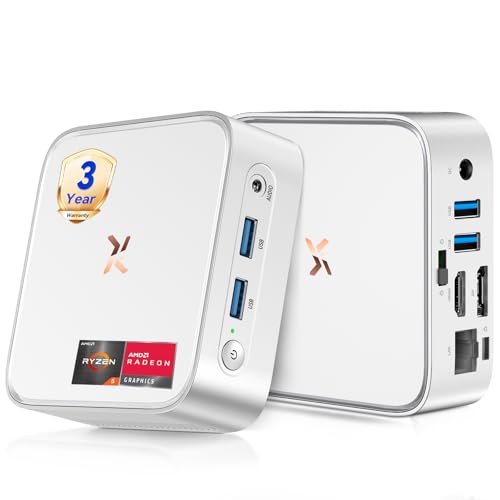
Huidun 2026 H80 Mini PC Ryzen 5 3500U 16GB 512GB

GEEKOM IT15 AI Mini PC Intel Ultra 9 285H 32GB 1TB
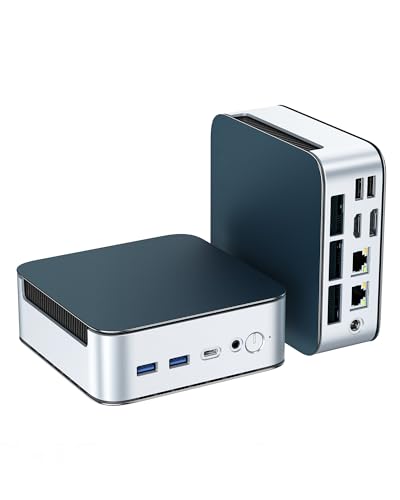
Glorlin Mini PC Ryzen 5300U 16GB 512GB Triple 4K

C4 SE Mini PC Ryzen 5 3500U 8GB 256GB

GEEKOM Air12 Mini PC Intel 7505 8GB 256GB
GEEKOM AX8 Max Silent Mini PC Ryzen 7 8745HS 16GB 1TB

GEEKOM IT13 MAX AI Mini PC Intel Ultra 9 185H 24GB 500GB
A Deeper Look At The Lineup
The Huidun H80 slots neatly into a small-office or family-room setup, especially for households that already use Windows and want a box that simply works on day one. It pairs a Ryzen 5 3500U with Radeon Vega 8 graphics, so the integrated GPU can handle 4K video playback and light photo work without leaning on a discrete card.
For most people running spreadsheets, browser tabs, and Zoom calls, this feels far faster than the typical N95 or N100 mini PCs in the same tier. Compared to the C4 SE in this lineup, it doubles memory and storage for noticeably smoother multitasking.
Features That Help
- Ryzen 5 3500U with 4 cores and 8 threads, boosting to 3.7 GHz for short bursts of heavier work
- 16GB of RAM keeps dozens of browser tabs and office apps open without choking
- 512GB SSD provides room for a full Windows install plus projects and media libraries
- HDMI plus DisplayPort outputs support dual 4K monitors at 60Hz for serious screen real estate
- WiFi and Bluetooth handle wireless peripherals, printers, and audio without dongles
Things To Consider
- The plastic shell and small footprint can run warm under sustained loads, so airflow matters in tight cabinets
- No dedicated GPU means modern 3D games and heavy 3D rendering sit well outside its comfort zone
Feature Snapshot
Made For
Remote workers and small-office households running browser-heavy productivity, video calls, and streaming on a tight budget.
Look Elsewhere When
Step up to the GEEKOM AX8 Max Silent Mini PC if you regularly edit video or run CAD and need eight high-speed cores with whisper-quiet cooling.
The IT15 is a different class of mini PC, aimed squarely at offices that need workstation-grade output in a chassis small enough to mount behind a display. With an Intel Core Ultra 9 285H and Arc 140T graphics, this thing pulls serious weight for spreadsheets, code, and rendering tasks.
It’s positioned as the top performer in this lineup, and it shows. The combination of 32GB DDR5, a 1TB SSD, and WiFi 7 makes it a future-resistant foundation for trading desks, retail signage, and medical-reception kiosks running several screens at once.
Positive Points
- 16-core processor with boost speeds up to 5.4 GHz handles massive multitasking and compute-heavy jobs
- Arc 140T integrated graphics enable quad-display setups for monitoring, signage, and control rooms
- 32GB of DDR5 memory keeps virtual machines and large datasets responsive under pressure
- 1TB SSD provides room for OS, project files, and recorded media on a single drive
- WiFi 7 support means faster wireless throughput and lower latency on modern networks
- Compact enough to VESA-mount behind a monitor, freeing the desk entirely
Worth Noting
- This tier of hardware costs more than the home-focused picks here, so it only makes sense if you genuinely use the cores
- Without a dedicated GPU, sustained 3D workloads still lean on the integrated Arc 140T, which can throttle under continuous load
- Firmware updates may take longer to roll out compared to mainstream consumer models
Best Suited To
IT departments and prosumer power users who need workstation-class muscle and quad-display support in a compact box.
Consider Something Else When
The Huidun 2026 H80 Mini PC is a smarter fit for a household that mainly needs fast web apps and the occasional 4K stream.
The Glorlin Mini PC is the kind of small form factor machine that quietly solves awkward desk setups. Three independent display outputs, dual 2.5G networking, and expansion-friendly internals make it feel more like a small server than a basic office box.
For anyone running trading screens, point-of-sale stations, or a control-room layout, the triple 4K support is the headline feature. It also has room to grow, with memory expandable to 64GB and storage topping out at 4TB.
What Makes Sense
- Triple 4K output across HDMI, DisplayPort, and USB-C drives busy multi-monitor workflows cleanly
- Dual 2.5G Ethernet ports let you segregate office and guest networks, or bond for faster throughput
- WiFi 6 plus Bluetooth 5.3 keep wireless gear responsive without laggy handoffs
- Expansion path to 64GB RAM and 4TB storage extends the useful life of the system
Honest Caveats
- The Ryzen 3 5300U is comfortable for productivity but not aimed at heavy creative work
- Achieving the full 64GB or 4TB configuration means buying and installing your own modules, which adds setup time
- The fan profile may spin up under multi-display load and sit slightly louder than the silent models
Quick Facts
Right Fit For
Small businesses and home offices that want true triple-monitor setups and strong wired networking in a compact box.
Swap It Out When
Skip to the GEEKOM IT13 MAX AI Mini PC if your workflow leans heavily into AI-assisted content tools that benefit from a newer Intel Ultra chip.
The C4 SE keeps things lean and unfussy. It uses the same Ryzen 5 3500U processor as the H80, but pares memory and storage down to entry-level figures. That makes it a tidy choice for a guest room, a kid’s homework station, or a back-office terminal.
Where the H80 aims at households doing a bit of everything, the C4 SE leans toward single-task use cases. Email, documents, and streaming are all it really wants to handle, and it does that without complaint.
Where It Helps
- Ryzen 5 3500U with Radeon Vega 8 graphics supports smooth 4K video and light multitasking
- NVMe SSD boot times feel near-instant compared to older spinning-drive systems
- Compact chassis fits on a small shelf or mounts behind a monitor with a VESA bracket
- Auto Power On, RTC Wake, and Wake-on-LAN make it friendly for remote management
Room For Improvement
- 8GB of RAM fills up fast when many browser tabs are open, so heavy multitaskers may feel constrained
- 256GB of storage is tight for video libraries or large photo collections without an external drive
- The cooling solution can get audible under sustained loads in a poorly ventilated spot
Whose Shelf It Belongs On
Light users and small-business terminals that handle documents, email, and streaming rather than heavy multitasking.
Reach For A Different Pick When
Choose the Glorlin Mini PC instead if you need triple-display support and expansion headroom for future growth.
The Air12 is GEEKOM’s take on a quiet, inexpensive box for offices that just need a dependable workstation. Powered by an Intel 7505 chip with 8GB of RAM and 256GB of SSD storage, it’s aimed squarely at fleets and shared workspaces.
It runs cool and quiet, which matters in open offices where a dozen of these might be tucked behind monitors. The footprint is small enough that it can disappear behind a display with a basic VESA mount.
A Few Strong Suits
- Intel 7505 platform delivers responsive performance for typical office apps and browser sessions
- 8GB of RAM is expandable to 64GB for shops that want to extend service life later on
- 256GB SSD gives enough room for the OS and standard productivity software
- Low fan noise keeps shared offices quiet during calls and meetings
Points To Note
- The 7505 chip is comfortable for everyday work but shows its age under heavier multitasking or large datasets
- Out-of-the-box storage fills up quickly with modern software installs, so an upgrade may be on the horizon
Feature Card
Who Should Grab It
Reception desks, classrooms, and small offices that need a quiet, easy-to-deploy box for basic productivity.
A Better Fit Elsewhere
The Huidun 2026 H80 Mini PC is a better match for remote workers who run heavier workloads and want 16GB of RAM out of the box.
The AX8 Max leans into the silent angle hard, and the rest of the spec sheet backs it up. The Ryzen 7 8745HS is an 8-core chip with boost speeds up to 4.9 GHz, paired with DDR5 memory and a 1TB SSD. It’s the kind of build that feels overbuilt for everyday web apps and yet perfectly suited to creative studios.
For trading floors and broadcast booths where fan noise is a distraction, the silent cooling is the whole point. The chip stays quick under sustained load without the usual mini-PC whir.
Everyday Perks
- Ryzen 7 8745HS with 8 cores delivers fast render times and smooth live previews
- DDR5 memory at 16GB keeps heavy projects and many apps responsive at once
- 1TB SSD provides generous space for project files and footage libraries
- Silent cooling lets the box sit next to audio gear without adding hum
- Compact chassis mounts neatly behind monitors or under desks
Points To Keep In Mind
- The premium parts put this comfortably above mid-range pricing, so it only makes sense if silence and speed both matter
- No dedicated GPU means 3D-heavy workloads still rely on integrated graphics, which can limit high-end rendering
Spec Overview
Perfect Match For
Creative studios, audio rooms, and trading floors where silence and high core counts both matter daily.
Skip It When
The GEEKOM IT15 AI Mini PC is the stronger pick for environments that lean on quad-display support and AI-driven enterprise workloads.
The IT13 MAX rounds out the lineup as the AI-focused flagship. It uses an Intel Core Ultra 9 185H, which combines CPU and neural processing on a single die, paired with 24GB of LPDDR5 and a 500GB SSD.
Where the IT15 leans into display count and networking, the IT13 MAX leans into on-device AI. For small studios running local model inference, image generation, or AI-assisted editing, the dedicated NPU offloads work from the CPU and keeps the system responsive.
Strengths Worth Knowing
- Intel Core Ultra 9 185H with 16 cores balances fast creative apps and on-device AI tasks
- 24GB LPDDR5 memory keeps large AI models and creative timelines responsive together
- 500GB SSD gives quick boot times and fast project loading
- Compact enclosure fits behind a monitor, which matters in studio environments
Trade-Offs To Consider
- LPDDR5 is soldered, so memory upgrades after purchase are not an option
- Storage tops out at 500GB, which fills quickly with raw video and AI model files
- The premium price is justified only if you actively use the AI features
Quick Technical Notes
Built With In Mind
AI-driven creators, film producers, and small studios running local model inference and content tools on a daily basis.
Where Another Pick Suits Better
The Glorlin Mini PC is a smarter choice for small businesses that want triple-display support and expandable storage without paying for AI silicon they won’t use.
What To Weigh Before Picking A Mini PC
The right small computer depends on how you actually work, not just what’s cheap. Start with the processor family, since that determines how much headroom you have as apps get heavier over time. Modern Ryzen and Core Ultra chips handle everyday productivity easily, while older or lower-tier mobile chips can feel sluggish once you open several browser tabs and a video call at once.
Memory matters more than people expect. 8GB is workable for light office use, but 16GB has become the comfortable minimum for households and remote workers who multitask heavily. Storage should be SSD-only at this point, since a spinning hard drive slows the entire system down. If you store large media libraries, look for expansion options or budget for an external drive.
Connectivity is the silent deal-breaker. Count the display outputs you actually need, and check whether the box supports the right standards, like HDMI 2.0 or DisplayPort 1.4 for 4K at 60Hz. Networking matters too: dual Ethernet ports, WiFi 6, and WiFi 7 are useful for offices that run several screens and want reliable wireless. For most home setups, WiFi 6 and a single Ethernet port cover the basics.
Key Considerations Across These Picks
Mistakes Worth Dodging
Chasing the cheapest mini PC often means settling for 4GB of RAM and slow eMMC storage, which feels fine on day one and miserable within months. Skipping the connectivity check is another common slip, since a single HDMI port may not be enough if you already use a second monitor.
Where The Extra Money Goes
Higher-tier models like the GEEKOM IT15 and IT13 MAX buy more cores, faster memory, and modern wireless standards like WiFi 7. The payoff shows up in multi-display offices, AI workloads, and any job that runs several heavy apps at once. For basic email and browser work, the entry-level picks cover everything most people need.
Frequently Asked Questions
Are mini PCs powerful enough for everyday work? For web browsing, office apps, video calls, and 4K streaming, modern mini PCs handle the workload comfortably. Heavy video editing or 3D rendering is where you start to feel the limits.
Can a mini PC replace a full desktop? Most households and office workers can switch to a mini PC without giving up meaningful performance. Power users running heavy creative tools should look at workstation-class options like the GEEKOM IT15 instead.
Do mini PCs run hot? Compact enclosures do trap heat, but most modern designs handle it well. Poor ventilation in tight cabinets can push temperatures up, so leaving a few inches of clearance around the unit helps.
How much RAM do I need? 8GB covers single-task use like email and light browsing. 16GB is the comfortable sweet spot for multitasking households and remote workers, while 32GB or more fits AI and creative workflows.
Can I upgrade a mini PC later? Some models support memory and storage upgrades, while others solder components to the board for size. Check the spec sheet before you commit if future expansion matters.
The Takeaway
Small computers now cover an impressively wide spread, from quiet reception-desk boxes to AI-ready workstations. Match the processor, memory, and connectivity to your actual workload rather than the spec sheet’s biggest number. The right pick disappears into the desk and just works, which is exactly the point.