Setting up a small business workstation shouldn’t require a closet-sized tower or a fortune in IT support. The current crop of compact desktops delivers genuine office muscle in a footprint that fits beside a coffee mug, handling spreadsheets, video calls, and back-office software without complaint. I picked these seven because they hit the balance that matters for owners running a real shop: capable processors, quiet thermals, and enough ports to plug in the gear your team already owns.
A Side-By-Side Look
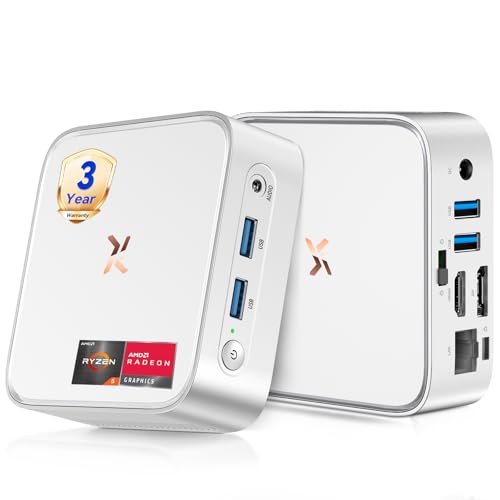
Huidun 2026 H80 Mini PC Ryzen 5 3500U 16GB 512GB

Getorli Mini PC Ryzen 5 3501U 16GB 512GB

Lenovo ThinkCentre neo 50s Gen 5 SFF
Huidun H50 Ryzen 3300U Mini PC Win 11 Pro

KAMRUI AM21 Mini PC Ryzen 7 8745HS

Beelink MINI S12 Pro Mini PC N100

C4 SE Mini PC Ryzen 5 3500U 8GB 256GB
The Details Behind The Selections
The Huidun H80 is the kind of office machine that fades into the background and just gets work done. It runs an AMD Ryzen 5 3500U, a quad-core chip that boosts to 3.7 GHz, paired with integrated Radeon Vega 8 graphics that handle dual 4K monitors without flinching. For a busy reception desk juggling browser tabs, scheduling software, and the occasional video call, that headroom matters.
It comes with 16GB of DDR4 RAM and a 512GB SSD, which keeps Windows 11 Pro snappy and leaves room for client files. HDMI plus DisplayPort outputs, USB 3.2 ports, and built-in Wi-Fi plus Bluetooth round out a connectivity package that covers most office setups. Compared with the slimmer entries on this list, the H80 offers a more capable processor at a similar footprint.
Everyday Advantages
- Quad-core Ryzen 5 with eight threads handles spreadsheets, browser stacks, and Zoom calls at once.
- Dual 4K@60Hz output through HDMI and DisplayPort makes a clean two-monitor desk easy to build.
- Pre-installed Windows 11 Pro means BitLocker and Remote Desktop work out of the box for office use.
- Compact chassis slips behind a monitor or into a cable-congested reception area.
Things To Consider
- The integrated graphics are fine for office work but not built for heavy rendering or CAD.
- Owners commonly note that fan noise rises under sustained load during long export jobs.
Best Suited To
Small business owners who need a balanced everyday workstation for invoicing, email, browsing, and video meetings without paying for unused power.
Consider Something Else When
Creators running large Photoshop files or video edits should look at the KAMRUI AM21 for its eight-core Ryzen 7 headroom.
Where the Getorli earns its keep is screen real estate. The Ryzen 5 3501U powering it is a quad-core, eight-thread chip with integrated graphics, and the chassis pushes video out to three displays at once. Bookkeepers running QuickBooks on one screen, a CRM on another, and reference docs on a third tend to appreciate that without needing to explain why.
It ships with 16GB of DDR4 RAM, a 512GB PCIe NVMe SSD, and Wi-Fi 6 for faster wireless on modern office routers. The build reads like a refined take on the Huidun H80 formula above, with display count as the headline difference. Storage expansion is available if the 512GB eventually feels tight.
What Helps Most
- Triple-display output turns one compact box into a serious back-office workstation.
- Wi-Fi 6 support keeps wireless transfers and video calls stable on newer routers.
- PCIe NVMe storage delivers fast boot and application launch times for daily workflows.
Points To Note
- The 3501U is a step behind the 3500U in single-core responsiveness, depending on your workload.
- Triple-monitor setups require cables and adapters that aren’t included in every configuration.
- Some owners report the BIOS takes a moment to learn for those new to AMD mini PCs.
Key Specs
Made For
Bookkeepers, dispatch coordinators, and small-office managers who spread their work across three monitors and value clean cable management.
Look Elsewhere When
Shops needing true tower-class expansion should consider the Lenovo ThinkCentre neo 50s Gen 5 SFF instead.
The ThinkCentre neo 50s is the most traditional desktop on this list, and that’s precisely its appeal for office managers who don’t want surprises. It uses a 14th-generation Intel Core i5-14400 with a hybrid design (six performance cores plus four efficient cores) that boosts up to 4.7 GHz under load. Running ten Chrome tabs alongside Excel and Outlook doesn’t make it blink.
Small-form-factor towers like this one are easier to service and upgrade than mini PCs. RAM slots, storage bays, and PCIe cards are reachable without specialized tools, which matters when a shop is buying several units and wants long service life. It’s the anti-gadget choice, and plenty of IT departments are grateful for that.
The Good Stuff
- Ten-core Intel i5-14400 with 16 threads tackles spreadsheets and data analysis with headroom to spare.
- Small-form-factor chassis sits upright or horizontal and stays out of the way on a credenza.
- Tool-less access simplifies RAM and storage upgrades down the road.
- Lenovo’s business-class support reputation reduces friction for multi-unit purchases.
- Quiet cooling under typical office workloads, based on the chassis design and reported behavior.
Honest Caveats
- It’s still a tower, so the footprint is larger than any mini PC on this list.
- Some configurations ship with discrete graphics omitted, so heavy GPU tasks need a separate card.
Who Should Grab It
IT coordinators outfitting a small office floor who want predictable, serviceable hardware with business-class backing.
Reach For A Different Pick When
Solo operators in studio apartments or shared desks will find the Beelink MINI S12 Pro a quieter, smaller companion.
Warranty terms rarely move the needle in a desktop roundup, but the Huidun H50’s three-year coverage makes it a different conversation. The unit runs an AMD Ryzen 3300U, a quad-core chip that handles document editing, light spreadsheets, and standard office software without complaint. For shops that treat hardware as a depreciating asset, that’s a calmer conversation to have with the accountant.
It pairs that processor with 16GB of DDR4 RAM and a 512GB SSD, plus dual-band Wi-Fi and HDMI plus DisplayPort outputs. The H50 is essentially a more conservative cousin to the H80 covered earlier, trading a bit of CPU speed for longer coverage. Linux and Ubuntu installations are also supported, which is helpful for shops running mixed stacks.
Good Reasons To Consider
- Three-year warranty covers the kinds of failures that typically hit in year two or three.
- Quad-core Ryzen 3300U handles document workflows, POS software, and remote desktop sessions cleanly.
- Linux and Ubuntu compatibility opens the door to custom business stacks beyond Windows.
Worth Noting
- Performance lands a tier below the Ryzen 5-equipped units earlier in this list, depending on workload intensity.
- The compact chassis limits internal expansion, so storage growth typically means an external drive.
Right Fit For
Risk-averse office managers outfitting reception desks or satellite branches who value long-term coverage over peak specs.
A Better Fit Elsewhere
Power users who routinely run demanding software should pick the KAMRUI AM21 with its Ryzen 7 processor instead.
Not every small business runs on email and spreadsheets. Studios, marketing agencies, and analytics-heavy teams need real CPU muscle, and the KAMRUI AM21 is the most capable machine in this roundup. Its AMD Ryzen 7 8745HS uses eight cores and sixteen threads with boost speeds up to 4.9 GHz, and the integrated Radeon 780M graphics (built on the RDNA 3 architecture) handle light editing and visualization that older mini PCs struggle with.
For most users the headroom is overkill, but the same machine that breezes through a 4K video export also handles a packed Outlook inbox without complaint. It ships with Windows 11 Pro and the chassis is still compact enough for a small desk. Think of it as future-proofing for a growing shop.
Features That Help
- Eight-core Ryzen 7 with sixteen threads crushes multitasking for content and analytics workloads.
- Radeon 780M graphics support light video editing and casual creative work without a separate GPU.
- Zen 4 architecture offers meaningful gains in power efficiency over older Ryzen chips.
- Boost speeds up to 4.9 GHz shorten compile and export times for demanding apps.
Some Limits To Know
- Higher-end performance commands a higher price than the budget-focused entries here.
- Sustained heavy loads push the cooling fan harder than lighter office use cases.
- Some specialty business apps aren’t optimized for the Zen 4 architecture yet, depending on the vendor.
Feature Snapshot
Whose Shelf It Belongs On
Creative agencies, analytics teams, and small studios that run software heavier than the typical office suite and want one compact box to handle it.
Swap It Out When
A solo home-office user with only browser-based work will overpay for the headroom and find the C4 SE a saner match.
The Beelink MINI S12 Pro is the quietest presence in this lineup, literally. Its Intel Twin Lake N100 processor is a four-core, four-thread chip designed for low power draw and silent operation, making it a natural fit for front-counter POS stations, lobby kiosks, and any workspace where fan noise would be unwelcome.
It includes 16GB of DDR4 RAM and a 500GB SSD, plus Windows 11 Home. The N100 won’t win benchmark races against the Ryzen 5 entries above, but for software that doesn’t ask much beyond displaying a checkout screen or running browser-based tools, it’s plenty. The honest read is that this is a specialist’s tool, and it knows exactly what it’s for.
Where It Excels
- Whisper-quiet operation suits reception desks, libraries, and customer-facing kiosks.
- Low power draw reduces electricity costs across many deployed units.
- Compact footprint tucks behind monitors or under counters with no clearance issues.
Factors To Consider
- The N100’s four-thread design struggles with heavy multitasking or large spreadsheets.
- Windows 11 Home lacks some business management features found in Pro editions.
Perfect Match For
Retail counters, clinic front desks, and small hospitality setups running POS or browser-based tools where silence matters.
Not Your Match When
Offices running heavy data software will find the Huidun H80 a smarter fit than the more conservative N100.
The C4 SE is the gentlest entry point in this roundup, pairing the same Ryzen 5 3500U chip found in the Huidun H80 with a more modest 8GB of RAM and a 256GB NVMe SSD. For a solo operator running a single screen with modest browser and document workflows, that combination is genuinely enough, and the price reflects that restraint.
Auto Power On, RTC Wake, and Wake-on-LAN are baked in, which is helpful for shops that want machines to boot on a schedule or wake for remote management. The Radeon Vega 8 graphics also handle 4K playback, so a lobby display or digital signage duty is in reach.
Strong Points
- Same Ryzen 5 3500U silicon as higher-priced entries means solid everyday performance.
- Wake-on-LAN and RTC Wake support simplify remote management for small IT setups.
- 4K video playback makes it a sensible pick for signage and lobby screens.
Less Ideal Details
- 8GB of RAM fills up fast once multiple browser tabs and Office apps stack up.
- 256GB of storage means leaning on cloud drives or external SSDs for larger archives.
- Some specialty business apps assume 16GB and may run tight here.
Who It Suits Best
Solo home-office operators, freelance bookkeepers, and pop-up retail setups running lighter software loads.
Skip It When
Anyone managing multiple browser-heavy workflows daily will appreciate the 16GB headroom of the Getorli Mini PC more.
What To Weigh Before Choosing Your Office Desktop
Processing Power And Real Workloads
The processor, or CPU, is the brain that runs every app on the machine. In office settings, a quad-core chip like the Ryzen 5 3500U or Intel i5-14400 handles email, browsers, spreadsheets, and video calls without complaint. Quad-core CPUs manage multiple tasks by splitting work across four independent processing units, which prevents slowdowns when several apps run together.
For solo work, a quad-core chip is plenty. Multi-user offices or anyone running heavier software should lean toward eight-core options like the Ryzen 7 8745HS. The honest read is that overspending on CPU rarely helps; matching the chip to actual workloads does.
Memory And Storage Trade-offs
RAM, or random-access memory, is the short-term workspace your computer uses to keep open apps and files ready. 16GB has become the practical baseline for modern office work, while 8GB feels tight once browser stacks grow. Storage follows a similar logic, and 512GB NVMe SSDs (solid-state drives with no moving parts) hit the sweet spot for most small businesses.
Slower spinning hard drives still exist, but NVMe drives boot Windows in seconds and stay silent under load. For most users, faster storage matters more day-to-day than raw capacity.
Form Factor And The Office Footprint
Mini PCs disappear behind monitors and under counters, which keeps customer-facing desks tidy. Small-form-factor towers like the ThinkCentre neo 50s trade compactness for easier upgrades and tool-less service. The honest choice depends on whether serviceability or minimal footprint matters more to your operation.
Key Considerations Across These Picks
Common Shopping Slip Ups
The most common mistake is buying a quad-core chip with 8GB of RAM and expecting modern browser stacks to feel quick. RAM tops out before the CPU does in most office workflows, so skimping there hurts the daily experience. Another misstep is ignoring display output, since many mini PCs cap at two screens and business users often need a third for reference work.
Where The Extra Money Goes
Higher-tier models like the KAMRUI AM21 spend the extra money on more cores, better integrated graphics, and stronger single-thread speed. For most office users, that headroom is overkill. The upgrade is worth it for shops running creative software, analytics tools, or any workflow where time saved per task multiplies across many users.
Frequently Asked Questions
How Much RAM Does A Small Business Desktop Really Need?
For most office workloads, 16GB is the practical floor, and 8GB starts to feel tight once browser tabs and Office apps stack up. Solo operators with light loads can still get by on 8GB.
Are Mini PCs Powerful Enough For Office Work?
Yes, modern mini PCs with quad-core Ryzen or Intel chips handle spreadsheets, browsers, email, and video calls without issue. Heavy creative or analytics work still benefits from eight-core options.
What Is The Advantage Of A Small-Form-Factor Tower Over A Mini PC?
Small-form-factor towers offer easier RAM and storage upgrades, more ports, and tool-less service access. The trade-off is a larger footprint on or under the desk.
Do These Desktops Come With Windows Pre-Installed?
Most units on this list ship with either Windows 11 Home or Windows 11 Pro, though the exact edition varies by listing. Pro adds BitLocker encryption and Remote Desktop, which some shops prefer.
Can These Mini PCs Drive Dual 4K Monitors?
Several entries here, including the Huidun H80 and Getorli Mini PC, support dual 4K output at 60Hz through HDMI and DisplayPort. The Getorli also extends that to three displays.
Closing Remarks
The right desktop depends less on benchmark numbers and more on the daily reality of your shop. Front desks and kiosks run fine on quiet, efficient chips like the N100. Multi-user offices benefit from the serviceability of a small-form-factor tower, and creative teams justify the spend on eight-core performance. Pick the machine that matches the workflow, not the one with the longest spec sheet.