I keep a tiny PC tucked behind my monitor, and the convenience never gets old. If you want a desktop that disappears into your setup without giving up real performance, these small desktop computers deliver the kind of muscle that used to require a full tower. I picked ten models that fit real budgets, real desks, and real workloads.
A Closer Look At The Lineup
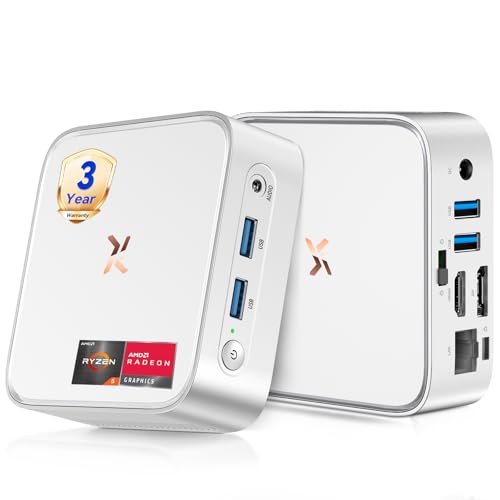
Huidun H80 Mini PC Win-11 Pro Ryzen 5 3500U 16GB 512GB

GEEKOM IT15 AI Mini PC Intel Ultra 9 285H 32GB 1TB
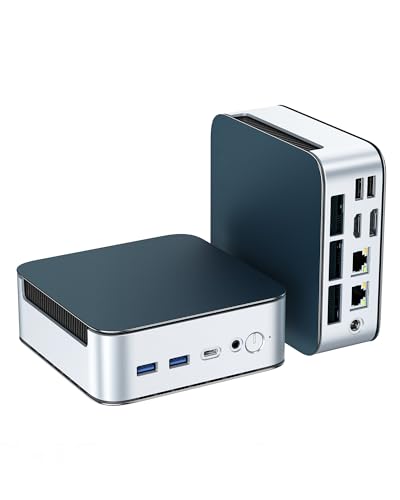
Glorlin Mini PC Ryzen 5300U 16GB 512GB Triple 4K

Beelink Mini S12 N95 Mini Computer

Beelink SER5 MAX Ryzen 7 7735U Mini PC

Beelink SER5 Ryzen 5 5500U 16GB 480GB

origimagic C4 SE Mini PC Ryzen 5 3500U 8GB 256GB

GEEKOM Air12 Mini PC Intel 7505 8GB 256GB
GEEKOM AX8 Max Silent Mini PC Ryzen 7 8745HS

GEEKOM IT13 MAX AI Mini PC Intel Ultra 9 185H
More On The Choices That Made The List
The Huidun H80 lands at the top because it threads a needle most compact PCs miss: enough Ryzen 5 horsepower for daily work without the bulk or the premium pricing. The 3500U (a mobile-class AMD chip with integrated Radeon Vega 8 graphics) handles documents, browser tabs, video calls, and light photo edits without breaking a sweat, and the silver chassis slips behind almost any monitor.
Compared to the budget Beelink Mini S12 coming later in this list, the H80 gives you real multitasking headroom. Ports matter here: HDMI, DisplayPort, and USB 3.2 cover a dual-monitor desk, while WiFi and Bluetooth keep the cable count low. For most home offices and dorm rooms, this is the small desktop computer I would buy first.
Advantages To Know
- Ryzen 5 3500U with Vega 8 graphics, capable for office apps, streaming, and light creative work
- 16GB RAM paired with a 512GB SSD keeps multitasking snappy and boot times short
- Triple video outputs (HDMI plus DisplayPort plus USB-C video) handle a productive multi-monitor setup
- 4K output at 60Hz means crisp text and clean video for a primary display
- Compact silver shell tucks behind a monitor or mounts with a VESA bracket, freeing desk space
Things To Consider
- Integrated graphics struggle with modern 3D titles or heavy GPU workloads
- The chassis vents on top, so leaving papers stacked on it can trap heat over time
Who It Suits Best
Students, remote workers, and family households that want a fast, quiet Windows machine for everyday productivity without paying for a dedicated tower.
Where Another Pick Suits Better
The GEEKOM IT15 is a better match for creative pros who need the Intel Ultra 9 CPU and 32GB DDR5 for heavier rendering tasks.
The GEEKOM IT15 is the kind of mini PC that makes tower buyers pause. Inside sits an Intel Core Ultra 9 285H with 16 cores, paired with 32GB of DDR5 RAM and a 1TB SSD. That is genuine workstation territory, and the small shell still fits behind a monitor. The integrated Arc graphics and WiFi 7 round it out for an office that wants one machine to anchor a multi-screen trading desk or a busy creative studio.
Where the Huidun H80 covers everyday basics, the IT15 leans into enterprise deployments: financial teams, retail signage, conference rooms, and reception kiosks. Quad display support means a single unit can drive four 8K-capable screens simultaneously, which is rare at this size.
Real-World Strengths
- 16-core Intel Ultra 9 with neural processing for AI-assisted workflows and faster content creation
- 32GB DDR5 and 1TB SSD handle large datasets, 4K timelines, and dozens of browser tabs without slowing
- Quad-display output drives busy trading desks or digital signage walls from a single box
- WiFi 7 future-proofs networking for years of router upgrades
Worth Noting
- The high-end CPU draws more power and runs warmer than entry-level options like the Beelink Mini S12
- Larger workload means louder fans under sustained multi-core loads
- Bulk buyers and enterprise pricing tiers vary, so procurement teams should request quotes
Made For
Engineers, content creators, and finance teams running CAD, simulations, or multi-display setups who need genuine workstation muscle in a tiny shell.
Consider Something Else When
The GEEKOM AX8 Max is the quieter pick for studios where noise matters more than peak multi-core throughput.
The Glorlin stands out for one reason: I/O. Triple 4K output over HDMI, DisplayPort, and USB-C is unusual at this price, and dual 2.5G LAN ports give network-savvy users redundancy or aggregation that even the GEEKOM IT15 cannot match. The Ryzen 3 5300U inside is a modest chip, but with 16GB of DDR4 and a 512GB NVMe SSD it handles the office workload most people actually run.
This is the small desktop computer for someone whose desk looks like a control room. The expandable RAM ceiling (up to 64GB) and storage up to 4TB make it a long-term platform rather than a disposable box.
Everyday Advantages
- Triple 4K display support turns one tiny PC into a multi-screen command center
- Dual 2.5G Ethernet ports appeal to home-lab users, streamers, and small business networks
- WiFi 6 and Bluetooth 5.3 keep wireless peripherals and networks fast and stable
- RAM and storage both expand, so the machine grows with heavier workloads
Trade Offs
- Ryzen 3 5300U trails the Ryzen 5 chips found in the Huidun H80 for sustained CPU work
- The dense port layout crowds the back panel, so labeling cables helps during setup
Right Fit For
Power users and small businesses running multi-monitor dashboards, network-attached setups, or light server tasks.
Skip It When
The origimagic C4 SE is a more compact choice for single-display desks that do not need the extra ports.
The Beelink Mini S12 is the no-frills pick for a basic Windows desktop. Its 12th-gen Intel N95 chip is a quad-core, low-power part designed for kiosks, digital signage, and light office tasks. Pair that with the included 8GB of DDR4 and a 256GB M.2 SSD, and you have a competent little box that boots fast and stays quiet.
Compared to the Huidun H80 earlier, the S12 gives up a lot of CPU headroom but costs far less. Owners commonly use it for browser-based work, point-of-sale terminals, and media streaming. The M.2 SSD is faster than older mSATA designs, so the system feels snappy even with modest specs.
Well-Handled Touches
- Quad-core N95 with 10nm efficiency keeps power draw and heat low for 24/7 use
- M.2 SSD boots Windows noticeably faster than older eMMC storage
- Compact shell fits behind monitors with included VESA hardware on many Beelink models
- Comes pre-loaded with Windows 11, so setup is plug-and-play for most users
Room For Improvement
- 8GB of RAM fills up fast with browser-heavy workloads, so heavier multitasking may require a RAM upgrade
- N95 integrated graphics limit any serious photo or video editing
Best Suited To
Front-desk kiosks, signage displays, and shoppers who want a cheap, quiet Windows box for browsing and email.
Not Your Match When
The GEEKOM Air12 is the better low-cost office choice if fleet management and bulk pricing matter.
The SER5 MAX is Beelink’s most ambitious Ryzen mini PC on this list. The Ryzen 7 7735U uses a 6nm process with 8 cores and 16 threads, hitting up to 4.75GHz when a workload demands it. That is a serious processor for a chassis this small, and the integrated Radeon graphics handle light creative work without a dedicated GPU.
Where the GEEKOM IT15 leans into enterprise, the SER5 MAX stays closer to prosumer territory. I see it as the right answer for video editors, streamers, and developers who want Ryzen 7 power without the bulk of a full tower or the cost of a workstation chip.
Useful Highlights
- Ryzen 7 7735U with 8 cores and 16 threads tackles heavy multitasking and code compilation
- 6nm efficiency keeps the system cool under sustained loads
- Compact aluminum-feel chassis looks at home next to a Mac mini on a clean desk
- Strong port selection covers dual-monitor setups and external SSDs without dongles
Honest Caveats
- Sustained all-core loads can warm the chassis, so a well-ventilated spot matters
- Costs noticeably more than the Ryzen 5 Beelink SER5 a few picks down
Perfect Match For
Power users who want near-workstation CPU performance in a living-room-friendly form factor.
Reach For A Different Pick When
The GEEKOM IT13 MAX AI Mini PC is worth the step up for shoppers who need Intel AI acceleration.
The Beelink SER5 sits in the comfortable middle of this lineup. Its Ryzen 5 5500U is a 6-core, 12-thread chip that hums through spreadsheets, browser research, video calls, and photo edits without complaint. 16GB of DDR4 and a 480GB NVMe SSD give the system enough breathing room for a household with multiple users.
It is the small desktop computer I would recommend to families upgrading from an aging laptop. It runs cool, stays quiet, and the chassis looks tidy on a kitchen counter or a kid’s homework station.
What Helps Most
- 6-core Ryzen 5 handles multitasking better than the N95-based Mini S12
- 480GB NVMe gives families space for apps, school files, and a media library
- Compact Beelink chassis is well-ventilated and widely praised by owners for quiet operation
- Modern wireless options cover standard home networks with no fuss
Points To Note
- Integrated Radeon graphics limit modern gaming, though older titles and indie games run fine
- The included 480GB fills up sooner than expected with photo and video libraries
Who Should Grab It
Families and general home users who want a single PC that handles schoolwork, streaming, and everyday office software without specialized hardware.
Look Elsewhere When
The Glorlin Mini PC is the better fit for desks running three or more monitors at once.
The origimagic C4 SE is the smallest pick that still gives you a real Ryzen 5 inside. The 3500U is the same family as the Huidun H80’s chip, with Vega 8 graphics that handle 4K video and casual gaming with ease. What you give up for the smaller footprint is RAM (8GB) and storage (256GB), so this is more of a primary-PC upgrade than a household hub.
I see it as a strong fit for dorm rooms and small desks where space matters more than expandability. Auto Power On and Wake-on-LAN features also make it useful for a small home server or media box.
Points In Its Favor
- Tiny chassis slips into tight dorm setups and minimal home offices
- Ryzen 5 3500U with Vega 8 graphics handles 4K streaming and casual gaming
- Auto Power On and Wake-on-LAN support suit remote or always-on use cases
- NVMe SSD keeps boot and app load times quick despite the smaller capacity
Softer Spots
- 8GB RAM can feel tight with browser-heavy workflows, though upgrades are typically possible
- 256GB of storage fills up fast with modern game installs or media libraries
Whose Shelf It Belongs On
Students, minimalists, and anyone furnishing a small desk who wants Ryzen 5 performance without bulk.
A Better Fit Elsewhere
The Huidun H80 is the smarter buy for shoppers who can spare a little more desk space in exchange for 16GB of RAM.
The GEEKOM Air12 is a fleet-friendly mini PC built for offices that buy in volume. The Intel 7505 chip is modest, but it is plenty for browser-based apps, email, and cloud workflows. GEEKOM pitches it for shared computing areas, retail stores, classrooms, and front-desk stations where predictable, low-cost performance matters more than speed.
Where the Beelink Mini S12 is a single-unit budget buy, the Air12 is positioned as a roll-out option with bulk quotes available. For a small business replacing aging desktops, that flexibility matters.
A Strong Showing
- Compact, standardized chassis simplifies IT deployments and imaging
- Intel 7505 is efficient enough for 24/7 shared workstations
- GEEKOM supports volume orders and tailored configurations for larger offices
- Modern connectivity covers standard office networks and peripherals
Things To Consider
- Modest CPU performance is not the right tool for creative or engineering workloads
- 8GB RAM and 256GB storage are minimums, so heavier office use may need upgrades
Right Fit For
IT managers and small business owners refreshing fleets of front-desk, classroom, or retail PCs on a single spec sheet.
Swap It Out When
The Glorlin Mini PC is the better office pick when multi-monitor support and dual LAN are required.
The GEEKOM AX8 Max is built for noise-sensitive environments. Its Ryzen 7 8745HS packs 8 cores and DDR5 memory, but the cooling design aims for whisper-quiet operation even under load. That makes it a natural fit for recording studios, broadcast suites, trading floors, and other places where fan noise translates directly into lost focus.
It also targets enterprise deployments where quiet and reliability both matter: financial trading desks, creative agencies, and CAD workspaces for automotive engineers. The 1TB SSD means less time juggling files.
Positive Points
- Ryzen 7 8745HS with 8 cores handles CPU-heavy creative and engineering tasks
- Silent cooling keeps the room quiet for recording or focused office work
- 1TB SSD gives large project files room to breathe without external storage
- DDR5 memory bandwidth helps in CAD, simulation, and timeline editing workloads
Points To Keep In Mind
- Higher component cost than the mid-range Beelink SER5
- Bulk and enterprise pricing varies, so procurement should request quotes
Built With In Mind
Audio producers, traders, and creative studios that want desktop-class Ryzen 7 power without fan noise disrupting the room.
Another Choice May Suit
The GEEKOM IT15 is the better fit when raw multi-core throughput and AI workloads outrank silent operation.
The GEEKOM IT13 MAX is the AI-tuned flagship of this roundup. The Intel Core Ultra 9 185H brings 16 cores and a built-in neural processing unit (NPU, a dedicated chip that speeds up machine-learning tasks) to a tiny enclosure, paired with 24GB of LPDDR5 memory. That is enough horsepower to run local AI models, large video edits, and engineering simulations without reaching for a tower.
It is pitched at film production, automotive R&D simulation, medical imaging workstations, and AI creative studios. Compared to the GEEKOM IT15 a few picks earlier, the IT13 MAX leans harder into AI acceleration and on-device machine learning.
What Makes Sense
- 16-core Core Ultra 9 with a dedicated NPU accelerates AI workflows locally
- 24GB LPDDR5 memory bandwidth helps with large datasets and AI inference
- Compact form factor suits medical and broadcast environments where space is at a premium
- GEEKOM supports volume orders for AI studios and enterprise rollouts
Where It May Fall Short
- Premium components push this well above the Huidun H80’s everyday pricing
- 500GB SSD fills quickly with large simulation or media files, so external storage is likely
Whose Desk It Belongs On
AI developers, medical imaging professionals, and creative studios running local machine-learning and high-compute workflows.
Where A Sibling Pick Shines
The Beelink SER5 MAX is the better balanced pick for shoppers who want strong CPU performance without the AI premium.
What To Weigh Before Picking A Mini Desktop
A few attributes separate a satisfying mini PC from a frustrating one. CPU generation and core count matter most: a Ryzen 5 or Core Ultra chip from the last few years will handle modern productivity apps for years, while an older N95 or Celeron-class part starts to feel slow once browser tabs and chat apps stack up. RAM is the next gate: 16GB has become the comfortable minimum, and 8GB only makes sense for kiosks or single-task setups.
Storage type matters more than raw capacity. NVMe SSDs (small, fast drives that plug directly into the motherboard) boot Windows in seconds and load apps quickly, while older eMMC drives feel sluggish even when capacity looks generous on paper. Look for machines that let you add or swap storage later if your needs may grow.
Ports shape how the machine lives on your desk. HDMI plus DisplayPort plus USB-C video covers most multi-monitor setups, while dual Ethernet ports (the Glorlin’s 2.5G LAN) help in small offices and home labs. Wireless standards like WiFi 6 and WiFi 7 keep transfers fast on newer routers.
Finally, match the cooling design to your room. Silent-focused builds like the GEEKOM AX8 Max make sense in recording environments, while a standard Ryzen mini PC is usually quiet enough for an open office. The compact form factor only helps if the airflow has somewhere to go, so leave a few inches of clearance behind whatever you choose.
Key Considerations Across These Picks
Wrong Turns To Avoid
Chasing the cheapest listing often ends with 4GB of RAM and 64GB of slow storage, which feels cramped within months. Another common slip is ignoring port layout. A machine with two HDMI ports and no USB-C video may not fit a multi-monitor desk without dongles, and adapters add cost and clutter.
Where The Extra Money Goes
Stepping up from a budget N95 build to a Ryzen 5 or Core Ultra machine adds faster multi-core performance, longer useful life, and quieter thermals. For most shoppers, that jump pays back in fewer slowdowns and a longer upgrade cycle. The premium tier, including the GEEKOM IT15 and IT13 MAX, adds AI acceleration and workstation memory bandwidth that only matters to specific creative and engineering workflows.
Frequently Asked Questions
Are Mini PCs Powerful Enough For Daily Work?
For office apps, browser research, video calls, and streaming, modern mini PCs with Ryzen 5 or Core Ultra chips handle daily work as well as a mid-range laptop. They fall short for high-end gaming or long GPU renders, which still need a dedicated graphics card.
Can I Upgrade RAM And Storage Later?
Many mini PCs, including the Glorlin and Huidun H80, expose SO-DIMM RAM slots and an M.2 SSD bay for easy upgrades. Some compact models use soldered LPDDR5 memory (chips permanently attached to the motherboard), so confirming upgradability before purchase matters if you want room to grow.
Do Mini PCs Run Hot?
Compact cases concentrate heat, but most Ryzen 5 and Core Ultra designs manage thermals with small internal fans. Placing the unit behind a monitor with a few inches of clearance, or mounting it with a VESA bracket, helps airflow and keeps noise low.
What Is An NPU?
An NPU is a neural processing unit, a chip dedicated to machine-learning tasks like on-device AI assistants, image upscaling, and speech recognition. It offloads work from the main CPU and is most useful for AI builders and creative tools.
Do I Need WiFi 7?
WiFi 7 is helpful if you own a newer router and move large files over a wireless network. For most home offices on WiFi 5 or WiFi 6, the practical difference is small, so paying a premium for WiFi 7 only makes sense when the rest of your network supports it.
Wrap Up
A great mini PC should fade into the desk while doing real work, and the ten small desktop computers above each nail that idea in a different way. Match the CPU, RAM, and port layout to your actual workload, leave room for storage upgrades, and you will end up with a setup that feels effortless for years to come.