Small form factor PCs have earned their place on crowded desks, living-room media cabinets, and tucked-away home offices where full towers simply won’t fit. I pulled together ten current models ranging from a five-inch-square Mac mini to feature-loaded Ryzen AI boxes, comparing CPU generation, port selection, memory ceiling, and expansion headroom. Whether you’re mounting one behind a monitor, building a quiet productivity station, or hunting for a console-sized gaming replacement, there’s a shape and price tier here worth a serious look.
A Closer Look At The Lineup

Apple Mac mini M4 Desktop Computer
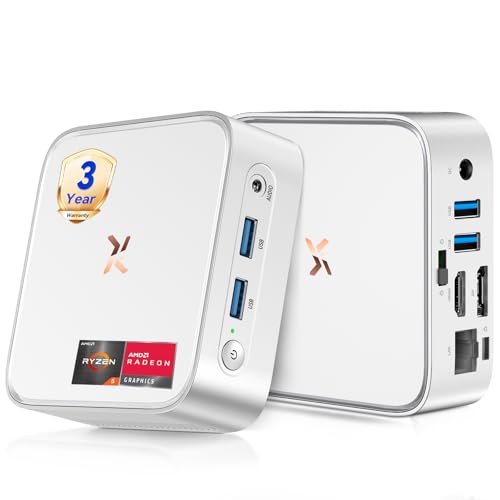
Huidun H80 Mini PC Ryzen 5 3500U

Getorli Mini PC Ryzen 5 3501U
Huidun H50 Ryzen 3300U Mini PC

Beelink Mini S12 Quad-Core N95

Beelink SER5 MAX Ryzen 7 7735U

Beelink SER5 Ryzen 5 5500U

MINISFORUM AI X1 Pro-370 Mini PC

MINISFORUM M1 Pro Core Ultra 5

MINISFORUM X1-255 Barebone Mini PC
Meet The Standout Selections
The Mac mini measures roughly five inches square and slips behind any monitor I park on my desk. The M4 chip pairs a 10-core CPU with a 10-core GPU, and Apple offers configurations from 16GB unified memory with 256GB SSD up through 24GB with 512GB storage. For an Apple household running Final Cut, Logic, or a stack of Xcode builds, that headroom matters more than the cube’s footprint.
Gigabit Ethernet sits on the rear alongside multiple Thunderbolt-style ports, while Apple puts front-facing USB-C connections within arm’s reach. Compared to the Huidun H80 below, the Mac mini trades raw multi-thread benchmarks for an OS environment that handles media pipelines and unified memory more efficiently than a typical Windows mini PC.
Strengths Worth Knowing
- Five-by-five-inch chassis fits beside displays or under a stand
- M4 silicon delivers responsive multitasking in creative apps
- Unified memory architecture keeps graphics and CPU feeds shared
- Front and rear ports reduce cable clutter behind the unit
- Apple Intelligence support for on-device AI workflows
Things To Consider
- Storage upgrades locked at purchase, no user expansion later
- Gigabit Ethernet caps wired network speeds versus 2.5Gb options elsewhere
- 16GB base memory may feel tight for heavy virtual-machine users
Made For
Creators and home-office pros already invested in the Apple ecosystem who want desktop-class speed without a tower.
Look Elsewhere When
The Beelink SER5 MAX makes more sense for Windows-first users who need higher core counts at a lower cost.
Huidun’s H80 runs an AMD Ryzen 5 3500U with four cores and eight threads, a chip that boosts to 3.7GHz for bursty workloads. Sixteen gigabytes of DDR4 RAM and a 512GB SSD cover most home-office routines, and the silver chassis stays cool enough for a tucked-away shelf. Windows 11 Pro ships pre-installed, which spares anyone setting up a fresh small business from the licensing dance.
Video output covers HDMI, DisplayPort, and USB 3.2 with 4K at 60Hz UHD support across three monitors. The integrated Radeon Vega 8 graphics handle streaming, browser tabs, and light photo editing without breaking a sweat, though gaming at high settings isn’t realistic. Stack this against the Mac mini above and you give up the unified-memory advantage, but you gain three-display flexibility and a lower entry price.
The Practical Payoff
- Ryzen 5 3500U handles spreadsheets, browser stacks, and video calls smoothly
- Three video outputs make a multi-monitor desk setup practical
- Pre-installed Windows 11 Pro saves setup time
- 4K at 60Hz output works for editing timelines and sharp text
Trade Offs
- Integrated graphics limit gaming and GPU-accelerated workloads
- Fan noise may rise during sustained multi-core loads in a warm room
Best Suited To
Home-office users and remote workers who juggle documents, browsers, and video calls across multiple screens.
Swap It Out When
The MINISFORUM M1 Pro is a better fit if you need an Oculink port for an external GPU box.
Getorli’s Ryzen 5 3501U shares DNA with the H80 above, but adds WiFi 6 and triples the display output options for trading desks or coding workstations. Sixteen gigabytes of DDR4 memory and a 512GB NVMe SSD handle typical productivity suites, while the chip’s quad-core, eight-thread layout keeps responsive performance during screen sharing and large spreadsheets.
The triple-display claim stands out in a category where dual output is the norm. Three monitors at 4K let traders watch multiple feeds and let editors park timelines beside preview windows. Compared to the Beelink Mini S12 later in this list, this Getorli is the right step up for anyone whose daily work depends on real screen real estate.
Noteworthy Benefits
- WiFi 6 support improves wireless speed on modern mesh networks
- Triple-display output handles trading, coding, and editing workflows
- NVMe SSD shortens boot and load times versus older SATA drives
Worth Noting
- Higher display count means more cables and a powered hub nearby
- Same integrated graphics ceiling as other Ryzen 3500U siblings
Perfect Match For
Multi-monitor productivity users like analysts, editors, and developers who rely on parallel screens.
Consider Something Else When
The MINISFORUM X1-255 suits builders who want to bring their own RAM and storage.
Huidun’s H50 drops to a Ryzen 3300U, a quad-core chip aimed at office productivity and home-theater-PC duties. Sixteen gigabytes of DDR4 RAM and a 512GB SSD pair with dual-band WiFi and 4K output over both DisplayPort and HDMI. The system runs Windows 11 Pro and supports Linux distributions for anyone running Ubuntu servers or lightweight distros on the side.
What separates the H50 from the H80 earlier in this list is the three-year warranty Huidun includes, a real plus for small-business owners who can’t afford downtime. The Ryzen 3300U is a step down from the 3500U, so expect slightly longer render times in heavier tasks, though for office apps and streaming it’s perfectly adequate.
A Favorable Mix
- Three-year warranty covers small-business deployments longer than typical
- Dual DisplayPort and HDMI outputs support flexible dual-screen desks
- Linux and Ubuntu compatibility beyond the pre-installed Windows 11 Pro
Honest Caveats
- Ryzen 3300U trails the 3500U in multi-thread benchmarks
- No USB4 or Thunderbolt for high-bandwidth docks
Who Will Love This
Small-business owners and IT buyers looking for an office or HTPC unit with longer factory coverage.
A Better Fit Elsewhere
The Beelink SER5 covers you if you prefer a six-core Ryzen 5 5500U over warranty length.
The Beelink Mini S12 uses Intel’s 12th-generation N95, a quad-core chip with a 10nm process that runs up to 3.4GHz on burst. Buyers pick between 8GB or 12GB of DDR4 RAM and SSD sizes ranging from 256GB to 480GB in the M.2 slot, which is a notable step up from older mSATA layouts. The compact box slips behind a TV and stays quiet enough for living-room duty.
This unit targets a different audience than the Ryzen-based picks above. Streaming, kiosk displays, digital signage, and a parent’s first home computer all fit the S12’s profile. Compared to the Huidun H50, you trade multi-thread throughput for a smaller price tag, but the S12’s lower power draw means quieter operation.
The Value In It
- Low entry price makes it accessible for first-time PC buyers
- M.2 SSD slot enables faster storage than older mini PCs
- 10nm N95 chip runs cool and quiet under typical loads
Possible Compromises
- Quad-core N95 trails Ryzen chips in multi-thread tests
- Limited headroom for heavy multitasking or gaming
Built With In Mind
First-time PC owners, parents setting up a study spot, and anyone needing a low-cost streaming box.
Skip It When
The Huidun H80 is a smarter pick if your workload pushes into heavier multitasking territory.
Beelink’s SER5 MAX packs an AMD Ryzen 7 7735U built on a 6nm process, with eight cores, sixteen threads, and a boost clock reaching 4.75GHz. That’s laptop-class silicon squeezed into a mini desktop, and the chip’s multi-thread throughput makes light work of code compilation, video encoding, and parallel browser work. The 6nm architecture keeps thermals manageable in a tight chassis.
The integrated Radeon graphics handle light gaming and GPU-accelerated apps, though dedicated gaming still demands a discrete GPU. Against the Mac mini earlier in the list, this Beelink trades Apple’s unified memory for higher core counts and standard DDR5 expandability. Power users running virtual machines or compiling on a regular basis will find the headroom worth stepping up to.
Positive Points
- Eight-core, sixteen-thread Ryzen 7 handles compile and encode tasks well
- 6nm process keeps power draw and heat lower than older Ryzen chips
- 4.75GHz boost clock shortens single-thread bottlenecks in apps
Things To Weigh
- Integrated graphics cap serious gaming without an external GPU
- Higher core counts mean the fan works harder under sustained loads
Whose Shelf It Belongs On
Power users, hobbyist developers, and content creators who want desktop-class threading in a small box.
Where Another Pick Suits Better
The MINISFORUM AI X1 Pro-370 fits better for dedicated AI workloads thanks to its higher TOPS NPU.
Beelink’s SER5 drops the core count to a Ryzen 5 5500U with six cores and twelve threads, a chip that still reaches 4.0GHz when a single core is asked to sprint. Sixteen gigabytes of DDR4 RAM and a 480GB NVMe SSD come standard, and Beelink keeps the compact footprint that makes the SER line popular for tight desks.
For everyday productivity, web development, and casual photo editing, the SER5 sits in a comfortable middle spot. The Huidun H80 above offers similar thread counts, while the SER5 MAX later in this list cranks core count higher. Pick the SER5 if you want six reliable cores without paying for the eight-core jump.
What Makes Sense
- Six-core Ryzen 5 covers office, school, and casual creative loads comfortably
- NVMe storage shortens boot times versus spinning disks
- Compact chassis fits behind most monitors with VESA mounts
Small Caveats
- Trails eight-core siblings in heavy parallel workloads
Right Fit For
Home users and students who want responsive everyday performance without paying for top-tier silicon.
Reach For A Different Pick When
The Beelink SER5 MAX is a better call for serious video encoding and code compilation.
MINISFORUM’s AI X1 Pro-370 leads this list on raw specifications. The AMD Ryzen AI 9 HX 370 uses the Zen 5 architecture, packs twelve cores and twenty-four threads, and boosts to 5.1GHz. The integrated NPU (neural processing unit) handles AI acceleration, and the chip is rated for substantial TOPS (tera operations per second) performance for on-device inference. Copilot support rounds out the AI-PC branding.
Radeon 890M graphics, 32GB of DDR5 RAM, and a 1TB SSD round out a build aimed at creators, developers, and AI tinkerers. The dual USB4 ports, dual 2.5Gb Ethernet jacks, and WiFi 7 make this a serious connectivity hub. Compared to the Mac mini at the top, the X1 Pro-370 brings more cores, more ports, and explicit AI hardware to the table.
Key Advantages
- Ryzen AI 9 HX 370 delivers twelve cores with strong single and multi-thread output
- Integrated NPU accelerates AI inference for compatible apps
- Dual USB4 plus HDMI and DisplayPort support four-display desks
- WiFi 7 and dual 2.5Gb Ethernet handle high-bandwidth networking
Points To Note
- Premium positioning places it at the top of the budget ladder
- Sustained AI workloads demand active cooling that produces some fan noise
The Right Fit
AI developers, researchers, and prosumers who want on-device inference in a desk-sized chassis.
Where A Sibling Pick Shines
The MINISFORUM M1 Pro suits Intel-architecture loyalists and Oculink-based eGPU builders.
MINISFORUM’s M1 Pro brings Intel’s Core Ultra 5 125H to the small form factor conversation, with fourteen cores, eighteen threads, and Intel Arc graphics. The Arc iGPU (integrated graphics) is a meaningful step up from older Intel UHD chips for casual gaming and GPU-accelerated creative tasks. 32GB of DDR5 at 5600MHz keeps memory bandwidth high, and the 1TB SSD means storage won’t bottleneck typical workflows.
The Oculink port is the standout feature. Oculink is a standard for connecting external PCI Express devices, allowing connection to an external GPU enclosure without the bandwidth penalty that USB4 sometimes imposes. Pair the M1 Pro with an eGPU box, and it transforms into a credible gaming or rendering rig. Against the AI X1 Pro above, this unit swaps the AMD NPU focus for Intel’s Arc graphics and Oculink expandability.
Advantages To Know
- Oculink port enables external GPU connections at full PCIe bandwidth
- Intel Arc iGPU handles light gaming and creative acceleration
- DDR5 at 5600MHz supports heavy multitasking without slowdown
Things That May Matter
- eGPU enclosure adds cost and desk footprint
- Intel’s NPU capabilities trail AMD’s Ryzen AI silicon for some workflows
Who Should Grab It
eGPU enthusiasts and creative professionals who want desktop-class expandability from a mini PC.
Not Your Match When
The MINISFORUM AI X1 Pro-370 makes more sense for buyers prioritizing raw AI throughput.
The X1-255 ships as a barebone kit, meaning the Ryzen 7 255 CPU is installed but RAM and storage are left to the builder. Eight cores and sixteen threads of Ryzen 7 silicon make this a serious foundation, and the dual USB4 ports plus HDMI 2.1 and DisplayPort 2.0 outputs give the chassis plenty of modern display bandwidth.
Oculink returns here for external PCIe expansion, paired with WiFi 7 and a 2.5Gb Ethernet port for networking. Picking this over a fully configured option makes sense for system builders who already own compatible DDR5 SODIMMs (small outline DIMM laptop-style memory modules) and an NVMe drive. Compared to the M1 Pro above, the X1-255 keeps the same expandability language but shifts to an AMD Ryzen core.
The Helpful Details
- Barebone layout lets builders reuse existing DDR5 and NVMe parts
- Ryzen 7 255 brings eight-core performance for productivity and light gaming
- Dual USB4 alongside HDMI 2.1 and DisplayPort 2.0 support modern monitors
Where It Is Less Suited
- RAM and SSD must be sourced separately, adding setup steps
- Barebone pricing can exceed prebuilt equivalents once parts are added
Built With In Mind
DIY builders and tinkerers who want a configurable AMD-based mini PC with Oculink support.
Consider Something Else When
The Beelink SER5 MAX fits better for shoppers who prefer a fully configured, ready-to-run system.
What Matters Most Before Choosing Small Form Factor Pcs
Processing Power And Architecture
The chip inside a mini PC defines what it can do. A modern eight-core Ryzen or Core Ultra chip handles multitasking, code compilation, and creative work that older quad-core N-series processors cannot. For office productivity and streaming, a Ryzen 5 or Intel N95 is plenty. For video editing, AI workloads, or running virtual machines, eight-core or twelve-core silicon is worth the step up.
Memory And Storage Configuration
16GB of RAM is the comfortable minimum for a Windows mini PC today, while 32GB suits anyone running creative apps, VMs, or heavy browser stacks. SSD storage matters more than capacity at first, since NVMe drives (Non-Volatile Memory Express SSDs that connect directly to the PCIe bus for higher throughput) boot and load much faster than older SATA disks. Look for M.2 slots if you plan to expand later, and check whether RAM is soldered or upgradeable.
Connectivity And Expansion
Port selection determines how the mini PC fits into your setup. HDMI plus DisplayPort covers dual monitors, while USB4 and Thunderbolt open docks and fast storage. WiFi 6 or WiFi 7 keeps wireless future-proof, and 2.5Gb Ethernet helps if your network runs above gigabit. Builders who want to add a discrete GPU should look for Oculink support, which gives external PCIe bandwidth without the limits of USB4.
Size, Noise, And Mounting
Mini PCs live behind monitors, inside media cabinets, and on shelf corners. A VESA mount (a standard four-hole pattern on the back of displays that lets a PC attach directly to a monitor) lets you hide the box entirely, while a quiet fan profile matters in bedrooms and living rooms. Higher core counts and dedicated GPUs produce more heat, so check the cooling design before squeezing a powerful unit into a tight space.
Key Considerations Across These Picks
Where Shoppers Go Wrong
The common slip is buying a quad-core N-series chip and expecting it to replace a desktop tower. For light browsing and streaming, that’s fine, but anyone running creative apps should target at least a six-core Ryzen 5. Another trap is overlooking RAM ceilings; some mini PCs ship with soldered memory that cannot be upgraded later. Always confirm the maximum supported RAM and whether the SO-DIMM slots (laptop-style RAM slots) are user-accessible.
When Paying More Pays Off
The price jump from a budget N95 box to a Ryzen AI 9 or Core Ultra 5 system reflects real architecture gains: more cores, NPUs, faster memory, and USB4. For office work alone, the extra money may not show up in daily use. For AI workloads, video editing, or running multiple virtual machines, the higher tier earns its place through noticeably faster rendering and smoother multitasking.