Touch screens stopped being a luxury years ago, and the range of gear now spans everything from full Windows laptops to portable travel panels and signage kiosks. I put together this list for anyone weighing a new daily driver, a second screen for the road, or a touch-capable display for a shop or classroom. Each pick below leans into a different real-world scenario, so the right match depends less on spec sheets and more on how you actually work.
A Snapshot Of The Selections

HP 17-inch Touchscreen Business Laptop – Ryzen 5 7430U (64GB | 2TB)

Dell 16 Plus Touchscreen Laptop – Core 7 150U, 16GB DDR5, 512GB SSD

cocopar Portable Touchscreen Monitor 15.6″ 1080P FHD 90% sRGB
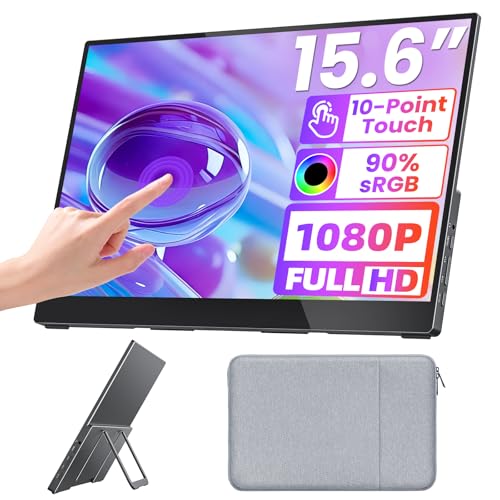
Upperizon Portable Touchscreen Monitor 15.6″ FHD 90% sRGB HDR

JASZDOT 43″ Digital Signage Touch Display Kiosk Android OS

Elo 2270L 21.5″ PCAP 10-Touch Touchscreen Monitor

TouchWo 21.5″ Android 12 Touchscreen Monitor Tablet (4GB | 64GB)

TouchWo 43″ Capacitive Multi-Touch Industrial Monitor 1080P
Meet The Standout Selections
Big laptops tend to feel like compromises, but the HP 17-inch Touchscreen Business Laptop leans into that size with a clear purpose. The 17.3-inch HD+ touch panel gives spreadsheets, side-by-side documents, and long email threads room to breathe, and the AMD Ryzen 5 7430U with Radeon Graphics keeps day-to-day work responsive without burning through battery life.
Compared with the Dell 16 Plus I cover next, this HP swings toward sheer memory and storage rather than pixel density. For someone running heavy browser tabs, virtual meetings, and a few creative apps at once, that trade-off tends to matter more than resolution. Windows 11 Pro, Wi-Fi 6, and a privacy-aware camera round out a laptop built for the desk more than the road.
Practical Pluses
- 17.3-inch HD+ touchscreen, comfortable for full-day office work and split-window multitasking.
- 64 GB of RAM and a 2 TB SSD handle large project files and dozens of open tabs without slowing down.
- AMD Ryzen 5 7430U reaches up to 4.3 GHz, which helps during compile jobs or batch photo edits.
- Wi-Fi 6 support keeps video calls stable on crowded home and office networks.
- Built-in privacy shutter on the camera, a small but meaningful detail for shared workspaces.
Things To Consider
- At 17 inches, it’s noticeably heavier than the Dell 16 Plus and not ideal for daily commuting.
- HD+ resolution on a screen this large looks softer than the Dell’s FHD+ panel for pixel-heavy creative work.
- The bundled Redragon accessories add value but may be redundant if you already own a mouse or headset.
Who It Suits Best
Office workers and students who mostly work from a fixed spot and want a roomy screen paired with generous memory and storage.
Consider Something Else When
The Dell 16 Plus Touchscreen Laptop suits shoppers who travel more often and prefer a sharper 16-inch panel over maximum RAM.
The Dell 16 Plus Touchscreen Laptop trades a little screen real estate for noticeably better image quality. The 16-inch IPS FHD+ panel delivers wider viewing angles and sharper text than the HP 17-inch option above, which matters during long writing sessions or color-sensitive design reviews. An Intel Core 7 150U paired with 16 GB of DDR5 RAM keeps the system quick across office and creative workflows.
Dell’s chassis tends to feel a touch more refined than the HP’s bulkier build, and that carries over to the typing surface and hinge. I think this is the more travel-friendly of the two traditional laptops on this list, especially for commuters who occasionally unplug. The 512 GB SSD is modest for the category, though external drives handle most overflow.
Reasons It Performs
- FHD+ resolution on a 16-inch IPS panel, sharper than the HP 17-inch’s HD+ display for design and document work.
- Intel Core 7 150U handles multitasking and light creative apps with headroom to spare.
- 16 GB of DDR5 RAM future-proofs the system for several years of software updates.
- 16-inch form factor strikes a useful balance between screen space and backpack portability.
Worth Noting
- 512 GB of storage fills up quickly on large media libraries, so external drives are likely needed over time.
- Touchscreens on productivity laptops collect fingerprints on the glossy surface, requiring regular wiping.
- Pricing for premium configurations tends to climb, especially compared to the larger HP model.
Key Specs
Right Fit For
Mobile professionals and creative freelancers who want a sharp 16-inch panel and modern Intel silicon in a portable shell.
Look Elsewhere When
The HP 17-inch Touchscreen Business Laptop is a better match for users prioritizing maximum memory and storage over pixel density.
Portable monitors used to mean a basic second screen with no touch, but the cocopar 15.6-inch panel flips that script. It supports native touch gestures on both Windows and macOS, so single-finger scrolling, pinch-to-zoom, and drag-and-drop all work the way you’d expect on a tablet. 1080P resolution at 90% sRGB color keeps documents crisp and casual photo edits honest.
Where the cocopar differs from a stationary monitor like the Elo 2270L later in this list is its travel-friendly shape. A single USB-C cable handles video, touch data, and power on supported laptops, which trims cable clutter on a hotel desk. Built-in speakers, HDMI input, and VESA mount compatibility make it useful both on the road and at a permanent workstation.
A Strong Showing
- Native multi-touch support on Windows and macOS, including gestures that other portable panels often block.
- 15.6-inch 1080P FHD panel with 90% sRGB coverage, solid for color-aware work in a travel-friendly size.
- Single-cable USB-C connection simplifies setup on supported laptops and tablets.
- VESA mountable, so it doubles as a permanent desk screen when you’re home.
Trade Offs
- Built-in speakers are fine for casual video but shallow for music or film work.
- Glossy touchscreen surface shows fingerprints and glare in bright environments.
- Requires a USB-C or HDMI source, and touch data only passes through USB-C, not HDMI alone.
Best Suited To
Remote workers and frequent travelers who want a true touch-enabled second screen for laptops, MacBooks, and tablets on the go.
Swap It Out When
The Upperizon Portable Monitor fits shoppers who prefer a kickstand design and built-in HDR mode for varied lighting.
The Upperizon 15.6-inch portable touchscreen monitor takes a slightly different approach than the cocopar option above. A glossy tempered glass surface with projected capacitive touch (a technology that senses finger contact through electrical changes in a glass layer) gives the panel a tablet-like feel, and the built-in kickstand removes the need to prop the screen against a coffee mug. HDR support at 60 Hz adds a bit more punch to streaming and games.
I think this is the friendlier of the two travel monitors for casual use, especially when you move between a hotel desk and a kitchen table. The 90% sRGB panel keeps colors consistent enough for design reviews, though it isn’t aimed at full professional grading. Speakers, HDMI, and dual USB-C ports cover most modern laptops and consoles.
Noteworthy Benefits
- Tempered glass surface with capacitive touch feels responsive and durable for daily travel.
- Built-in kickstand adjusts without needing a separate case or sleeve.
- 90% sRGB color and HDR support handle streaming, photo checks, and console gaming in one panel.
- Dual USB-C ports plus HDMI cover most laptops, phones, and game consoles.
Minor Gripes
- At 60 Hz, fast-moving games look softer than higher-refresh dedicated monitors.
- The glossy finish is reflective in sunlit rooms, so brightness often needs cranking.
- Speakers are tuned for voice, not bass-heavy media, so headphones help for entertainment.
Feature Snapshot
Whose Shelf It Belongs On
Hybrid workers and casual creatives who want a versatile travel panel that doubles as a stationary screen at home.
Reach For A Different Pick When
The cocopar Portable Monitor is the better call for shoppers who lean on macOS gestures and prefer slightly stronger color output.
Stepping away from personal computers, the JASZDOT 43-inch digital signage kiosk is built for environments where a regular monitor would feel out of place. The IPS LCD panel puts out 600 nits of brightness (a measure of how much light the screen emits, higher numbers mean better visibility in bright rooms), so menu boards, retail displays, and lobby directories stay legible under overhead lighting. A 178° viewing angle means nobody gets a washed-out image from the side.
Android OS is baked in, which makes the JASZDOT closer to a giant tablet than a typical display. USB, HDMI, and Wi-Fi let shops push scheduled ads, interactive directories, or self-service menus without needing a separate media player. It’s a meaningful upgrade from the TouchWo Android panel later in the list, mainly because the floor-standing form factor is ready for public spaces out of the box.
Useful Strengths
- 600-nit IPS panel holds up against bright retail and lobby lighting from any angle.
- Built-in Android OS removes the need for a separate media player or PC.
- Floor-standing totem design ships ready for public installation.
- USB, HDMI, and Wi-Fi cover most signage workflows and content updates.
Points To Note
- At 43 inches, the kiosk requires significant floor space and secure placement.
- Android signage apps vary in reliability, so choosing well-supported software matters.
- Cleaning the touchscreen surface regularly is part of ownership in public-facing spots.
Made For
Small business owners and venue operators who want an all-in-one signage display that handles menus, ads, and directories.
Where Another Pick Suits Better
The Elo 2270L fits shops that prefer a smaller, mountable POS panel over a large floor-standing kiosk.
Elo’s name comes up constantly in commercial touchscreens, and the 2270L 21.5-inch monitor leans into that reputation. PCAP 10-touch (projected capacitive, the same tech used in tablets and phones) tracks ten fingers at once, which matters for collaboration tools, POS stations, and interactive kiosks where several people might interact with the screen. The clear glass surface feels closer to a tablet than a typical office monitor.
The 1920×1080 resolution keeps text legible at point-of-sale distances, and the IK07 durability rating (a measure of impact resistance against accidental knocks) suggests the panel handles the bumps of a busy counter better than consumer displays. A blue-light filter and high-refresh operation help reduce eye fatigue during long shifts, and the flexible stand tilts from 20 to 70 degrees or folds away for VESA mounting.
The Helpful Details
- PCAP 10-touch tracks multiple fingers smoothly for collaborative or POS workflows.
- IK07-rated clear glass surface holds up to the daily wear of public counters.
- Low blue light output and flicker-free refresh reduce fatigue during long shifts.
- Tilting stand or VESA mount offers flexibility for counters, kiosks, and arms.
Soft Spots
- Commercial pricing tends to run higher than consumer 21.5-inch touchscreens.
- No built-in speakers, so audio requires external hardware for media or alerts.
- Glossy glass collects fingerprints in high-traffic environments and needs routine cleaning.
Quick Facts
Who Will Love This
POS stations, retail counters, and clinical or industrial kiosks that need a reliable touch panel built for daily public use.
Not Your Match When
The TouchWo 21.5-inch Android 12 Monitor is a smarter pick for classrooms and meeting rooms that need a standalone smart display.
The TouchWo 21.5-inch Android 12 Touchscreen Monitor blurs the line between display and tablet. It runs Android 12 on an RK3588 processor (a low-power ARM chip designed for media and smart-display roles) with 4 GB of RAM and 64 GB of storage, so the screen stands alone without needing a connected PC. Built-in Wi-Fi, Bluetooth, and speakers make it a drop-in smart board for classrooms and meeting rooms.
Where it differs from the Elo 2270L above is its standalone nature. There is no driver to install and no host PC to keep powered on, which simplifies classroom setups and small meeting areas. 10-point touch, glove-friendly operation, and a microSD slot for expanded storage round out a panel aimed at casual shared spaces rather than commercial POS duty.
Where It Delivers
- Standalone Android 12 system means no PC, cables, or driver installs are required.
- 10-point touch works with gloves, which helps in labs, workshops, and quick classrooms.
- Built-in Wi-Fi, Bluetooth, and speakers handle typical smart-board needs.
- MicroSD expansion supports extra apps, files, and offline content.
A Few Limitations
- 4 GB of RAM limits heavy multitasking compared to Windows-based smart boards.
- Android app compatibility varies, so specific education or business apps need checking.
- The plastic-feeling build is lighter than commercial panels, which suits mobile carts but not hard-use kiosks.
Perfect Match For
Teachers, trainers, and meeting facilitators who want a plug-and-play smart screen without managing a host PC.
Skip It When
The Elo 2270L is the smarter choice for permanent POS or commercial installations that demand rugged build quality.
The TouchWo 43-inch capacitive multi-touch industrial monitor closes out the list with a panel built for heavier-duty environments. Capacitive 10-point touch (the same finger-tracking approach used in phones and tablets) works through gloves, which matters in workshops, garages, and factory floors where operators rarely handle bare-handed input. The 1920×1080 panel keeps spreadsheets, schematics, and signage content readable from several feet away.
Connectivity is the practical highlight. USB, VGA, DP, and HDMI mean the panel pairs with older industrial PCs and modern laptops alike, which is rare for a touchscreen at this size. Built-in speakers handle basic audio cues, and the chassis leans toward fixed-mount installation rather than portable use, which sets it apart from the JASZDOT floor-standing kiosk I covered earlier.
Useful Highlights
- Capacitive 10-point touch supports glove use, ideal for industrial and workshop settings.
- Broad port selection, including USB, VGA, DP, and HDMI, fits legacy and modern host systems.
- 43-inch 1080P panel reads clearly from across a workbench or production floor.
- Built-in speakers cover alert tones and short media clips without extra hardware.
Points To Keep In Mind
- Touch input runs over USB, so the host system must support USB touch drivers for full gesture support.
- No standalone operating system, unlike the TouchWo 21.5-inch Android panel above.
- At 43 inches, the monitor needs sturdy mounting hardware for safe industrial placement.
Technical Highlights
Built With In Mind
Industrial operators, workshop managers, and signage integrators who need a large, glove-friendly touch panel with flexible host connections.
Where A Sibling Pick Shines
The JASZDOT 43″ Digital Signage Kiosk fits venues that prefer a standalone Android-based display over an industrial monitor.
What Matters Most Before Choosing Touch Screen Computers
Match The Form Factor To The Job
Laptops with touchscreens, like the HP 17-inch and Dell 16 Plus, make sense for portable productivity. Portable monitors, such as the cocopar and Upperizon panels, extend an existing setup without replacing it. Larger panels from JASZDOT and TouchWo are aimed at fixed environments like retail floors, classrooms, and workshops. Picking the right shape early prevents overspending on features you will not use.
Check The Touch Technology
Touch input comes in different forms. Projected capacitive (PCAP), used in the Elo 2270L and TouchWo panels, behaves like a tablet screen and supports multi-finger gestures. Older resistive touchscreens register single-point pressure and work with any input, including gloves. For most modern workflows, capacitive is the more natural choice, though resistive still has a place in harsh industrial settings.
Look At Brightness, Color, And Viewing Angles
Touchscreens used in bright rooms need higher brightness ratings. The JASZDOT signage kiosk offers 600 nits for sunlit lobbies, while indoor panels typically run closer to 250-350 nits. Color coverage, such as the 90% sRGB on both portable monitors, matters for design work. Wide viewing angles keep the image consistent when several people gather around the screen.
Consider Connectivity And Future Use
USB-C single-cable setups simplify portable use, while VGA and DisplayPort support keep industrial monitors compatible with older systems. Confirm the touch data path as well, since HDMI video alone does not always carry touch input back to the host. A few minutes of port planning saves the frustration of returning a panel that nearly fits the workflow.
Key Considerations Across These Picks
Common Shopping Slip Ups
The most frequent mistake is buying a touch panel based purely on screen size without checking the touch technology or supported gestures. A glossy 15.6-inch panel looks great in photos but turns into a fingerprint magnet in a bright room. Another pitfall is assuming HDMI carries touch data, when in most cases it only handles video, leaving gestures stuck until a USB cable is added.
Where The Extra Money Goes
Spending more on a touchscreen usually gets you brighter panels, tougher glass, and commercial-grade touch sensors. The Elo 2270L’s IK07 rating and PCAP 10-touch are the kind of upgrades that show up after months of daily use, not in the first hour. Higher-tier models also tend to ship with better color accuracy, which matters more for design and signage than for casual browsing.
Frequently Asked Questions
What Is The Best Screen Size For A Touch Screen Computer?
Screen size depends on where the device lives. 13 to 17 inches works well for laptops, while 15.6-inch portable monitors hit a sweet spot for travel. 21 to 43 inches suits POS stations, classrooms, and signage setups where viewers sit or stand farther away.
Do All Touch Screens Support Multi-Touch Gestures?
No. Modern capacitive panels, including the Elo 2270L and both portable monitors above, support multi-touch. Older resistive screens and some basic industrial displays track only one point at a time, so pinch-to-zoom and similar gestures will not work.
Can A Portable Touchscreen Monitor Work Without A Laptop?
Only if it has a built-in operating system, like the TouchWo Android 12 panel. Most portable monitors, including the cocopar and Upperizon, need a connected laptop, tablet, or phone to deliver both video and touch input.
Are Touchscreen Laptops Less Durable Than Regular Laptops?
Not necessarily, but the hinge and digitizer add complexity, which can affect long-term repair costs. Treat the screen like a tablet panel, keep it away from sharp objects, and avoid pressing too hard, since the touch layer sits just above the LCD.
Is A Higher Nits Rating Always Better?
Higher brightness helps in bright rooms and outdoor-facing signage, but it can wash out colors in dim offices and use more power. For indoor productivity laptops and monitors, 250 to 350 nits is plenty, while signage displays benefit from 500 nits and above.
Final Verdict
Touch screens have grown well beyond laptops, and the right pick depends entirely on the space it will live in. Travelers tend to get the most out of portable panels like the cocopar or Upperizon, while offices lean toward the Dell 16 Plus or HP 17-inch. Shops and classrooms usually do best with the JASZDOT, Elo, or TouchWo displays, which are built for shared, hands-on use. Match the form factor to the workflow, and the rest falls into place.