A tower computer anchors serious workspaces. Whether someone games at 1440p, edits video from a cluttered desk, or just wants their desktop off the carpet, the right tower makes daily computing quieter, cooler, and more reliable. I pulled together ten current options spanning budget gaming rigs, premium builds with next-gen graphics, and mobile stands that solve real cable and airflow headaches. The mix below helps shoppers match hardware muscle to their actual setup, instead of paying for components they will never push.
The Choices Worth Comparing

STORMCRAFT Sirius AI Gaming Desktop (i5 14400F, Arc B570)

Ultra 50 V3 Gaming PC (RTX 5080, Ryzen 7 9800X3D)

FANXIYQ Computer Tower Stand with Charging Station (White)

Hovadova Adjustable Computer Tower Stand (Black)

CyberpowerPC Gamer Xtreme VR Gaming PC (GXiVR8060A10)

Computer Tower Stand with Dual Cooling Fans
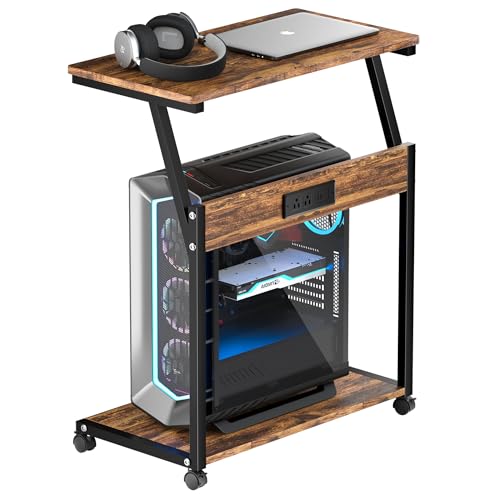
FANXIYQ Computer Tower Stand with Charging Station (Rustic Brown)

FANXIYQ Computer Tower Stand with Charging Station (Black)

Hovadova Computer Tower Stand, Adjustable Mobile CPU Stand
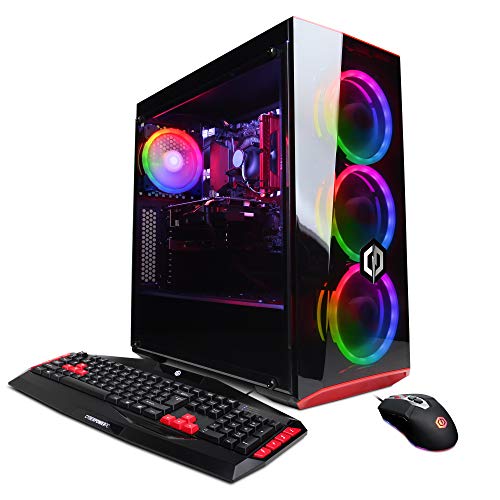
CyberpowerPC Gamer Xtreme VR Gaming PC (GXiVR8060A7)
A Breakdown Of The Leading Choices
The STORMCRAFT Sirius sits in the comfortable middle of the gaming desktop market. Its 14th-gen Intel i5 14400F (a mid-range chip with ten cores and sixteen threads, capable of boosting to 4.7 GHz under load) pairs with Intel’s Arc B570 graphics card carrying 10GB of GDDR6 VRAM. That combination handles most modern games at 1440p with reasonable settings, and 16GB of DDR4 RGB memory keeps multitasking smooth during streaming or chat-heavy sessions.
Compared to the entry-level CyberpowerPC picks later in this list, this STORMCRAFT offers a much newer CPU architecture and noticeably more graphics horsepower. For anyone upgrading from a 9th or 10th-gen system, the jump in single-thread performance feels substantial. Owners commonly report that the 1TB NVMe SSD boots Windows and loads large game libraries quickly, though long-term storage upgrades may eventually be needed for power users.
The Helpful Details
- Ten-core CPU handles modern titles and streaming simultaneously
- 10GB GDDR6 VRAM comfortably drives 1440p gaming
- RGB-equipped DDR4 memory gives a clean aesthetic upgrade path
- 1TB NVMe SSD cuts load times noticeably versus older SATA drives
- VR-ready certification for Meta Quest and similar headsets
Things To Consider
- Arc B570 is a newer GPU with driver maturity still catching up to AMD and NVIDIA alternatives
- 148W TDP means thermal management matters in tighter cases
- 16GB DDR4 is fine for now, but newer titles push that ceiling fast
Built With In Mind
Mid-range gamers who want 1440p performance without jumping into flagship pricing, especially those planning to stream or run multiple background apps.
Consider Something Else When
Hardcore enthusiasts chasing 4K ultra settings should look at the Ultra 50 V3 Gaming PC instead, which pairs an RTX 5080 with Ryzen 7 9800X3D muscle.
The Ultra 50 V3 reads like a wish-list build for serious gamers and content creators. AMD’s Ryzen 7 9800X3D brings 3D V-Cache technology, which stacks extra memory directly on the chip for dramatically faster gaming performance, and it turbos up to 5.2 GHz when thermals allow. Pair that with NVIDIA’s RTX 5080 carrying 16GB of GDDR7 (the latest, fastest graphics memory standard) and you get a system comfortable at 1440p ultra and 4K in most titles.
Where the STORMCRAFT Sirius is balanced, the Ultra 50 V3 is unapologetic. The 32GB of DDR5 at 6000MHz handles massive creative workloads, while the 2TB Gen4 NVMe SSD leaves room for game libraries and project files without external storage. ARGB fans and an 850W Gold-rated PSU round out a chassis built for sustained loads. For most living rooms, this is more than enough, but creators rendering 8K timelines will appreciate the headroom.
Where It Delivers
- 3D V-Cache CPU architecture excels in modern gaming benchmarks
- RTX 5080 with 16GB GDDR7 VRAM future-proofs for upcoming AAA releases
- 32GB DDR5 at 6000MHz handles heavy multitasking and creative apps
- 2TB Gen4 SSD removes near-term storage pressure for large game libraries
Trade Offs
- Premium component selection puts this firmly in enthusiast pricing territory
- 850W PSU leaves limited headroom for extreme overclocking
Made For
Hardcore gamers, streamers, and creative professionals who push their machines with 4K gaming or high-resolution rendering workloads.
A Better Fit Elsewhere
Casual gamers on tighter budgets should consider the CyberpowerPC Gamer Xtreme VR Gaming PC (GXiVR8060A10), which covers mainstream 1080p gaming at a fraction of the cost.
The FANXIYQ rolling cart shifts focus away from internal specs and toward how a tower actually lives on the floor. A white metal frame pairs with light wood-grain shelves, giving the unit a softer look than most PC furniture. The lower shelf holds up to 100 lbs when weight is distributed evenly, which covers nearly any mid-tower comfortably, while the top shelf doubles as a printer perch or laptop station.
Where the gaming towers above focus on silicon, this stand focuses on cable management and accessibility. A built-in charging station keeps phones and accessories powered from a single hub, cutting down on adapter clutter. For home offices where the PC sits on carpet or against a wall, raising it off the floor noticeably reduces dust intake.
Positive Points
- Two-tier design stacks tower, printer, or laptop in one footprint
- Built-in charging station reduces wall-adapter sprawl
- Rolling casters make repositioning for cleaning or rearranging simple
Minor Gripes
- Wood-grain shelves are decorative rather than ventilated, so heavy heat-generating towers may run warmer
- White finish shows dust more readily than darker alternatives
Right Fit For
Home office users with light to moderate workloads who value tidy cable management and easy mobility over aggressive cooling support.
Skip It When
High-heat gaming builds like the Ultra 50 V3 Gaming PC pair better with the Hovadova Computer Tower Stand with Dual Cooling Fans, which actively pushes air through the chassis.
The Hovadova adjustable stand keeps things minimal and functional. Its ventilated design lifts a tower off carpet or hardwood, which matters because dust and pet hair love low-clearance floor placement. Dual guardrails stop the PC from sliding off during accidental bumps, and rear access stays open for plugging in USB drives or display cables.
Unlike the FANXIYQ carts, this unit focuses purely on supporting a single tower cleanly. The mobile base makes it easy to pull the PC out for vacuuming or cable swaps. For tight bedrooms or dorm rooms where every inch counts, the compact footprint feels like the right answer.
A Few Strong Suits
- Ventilated platform reduces dust intake on carpeted floors
- Guardrails prevent sliding during desk bumps or chair collisions
- Mobile base simplifies cable management and cleaning routines
Points To Note
- No integrated charging ports, so accessories need separate power strips
- Single-shelf design offers no extra storage for printers or laptops
Best Suited To
Students, remote workers, and small-bedroom setups where floor space is at a premium and basic airflow matters more than elaborate storage.
Look Elsewhere When
Anyone needing printer storage and a charging hub on the same cart will find the FANXIYQ Computer Tower Stand (Rustic Brown) more useful for office organization.
The GXiVR8060A10 covers the entry-level gaming tier without leaving too much on the table. Its 10th-gen Intel i5-10400F runs six cores and twelve threads at 2.9 GHz base, and the GTX 1660 Super with 6GB of VRAM pushes solid 1080p performance in most modern titles. CyberpowerPC pairs that with 8GB of DDR4 RAM and a 500GB NVMe SSD, enough for an OS plus a handful of favorite games.
Where the STORMCRAFT Sirius and Ultra 50 V3 chase 1440p and 4K territory, this build focuses on accessible 1080p gaming. WiFi support comes built in, and the chassis is VR-ready for budget-friendly headset setups. Owners commonly use this rig as a starter tower that later gets a GPU or storage upgrade.
Features That Help
- GTX 1660 Super handles 1080p gaming smoothly in most current releases
- Built-in WiFi removes the need for an aftermarket adapter
- VR-ready certification supports entry-level headsets out of the box
Honest Caveats
- 10th-gen CPU lags several generations behind current mid-range silicon
- 8GB DDR4 will feel tight for heavy multitasking or streaming
Whose Shelf It Belongs On
First-time gaming PC shoppers, parents building a starter rig for teens, or anyone wanting reliable 1080p performance without premium pricing.
Reach For A Different Pick When
Power users seeking newer architecture and stronger 1440p headroom should look at the STORMCRAFT Sirius AI Gaming Desktop, which runs a 14th-gen Intel chip with double the memory.
This Hovadova stand takes cooling seriously. Two built-in fans push air through the platform, which actively vents heat away from a tower’s underside, where intake vents typically sit. The width adjusts from roughly 9 to 12.6 inches, fitting most mid-towers on the market, and four locking wheels keep the rig stable once positioned.
RGB lighting adds a subtle glow for gaming setups, and the 110 lb support rating covers even heavy dual-GPU configurations. Compared to the basic Hovadova Adjustable Stand earlier in this list, this version trades storage simplicity for active thermal management. For tower computers that run hot during long sessions, the airflow upgrade is genuinely useful.
Key Advantages
- Dual fans actively cool tower undersides during demanding loads
- Adjustable width fits a wide range of mid-tower chassis
- 110 lb capacity handles heavier enthusiast builds
- RGB accents complement gaming-room aesthetics
Softer Spots
- Active fans add a small amount of background noise to consider
- RGB adds a power cord requirement that passive stands avoid
Who Will Love This
Gamers running thermals-heavy builds like the Ultra 50 V3 Gaming PC, or anyone whose tower currently runs hot on carpet or enclosed shelving.
Swap It Out When
Office towers with low TDP processors do not need active cooling, so the Hovadova Adjustable Computer Tower Stand covers that case without extra fans or noise.
The Rustic Brown version of the FANXIYQ stand leans into warmer aesthetics. A black metal frame anchors wood-grain shelves in a darker stain, which fits farmhouse offices, mid-century modern setups, and converted loft spaces far better than a typical black box-on-wheels. Functionally, it shares the same 80 lb top shelf and 100 lb lower shelf ratings as its white sibling.
Built-in charging ports and rolling casters carry over from the white and black versions, so this is a finish swap more than a redesign. For shoppers who care as much about how the cart looks next to a wooden desk as how it functions, the rustic finish earns its keep.
Standout Benefits
- Warm wood-grain finish complements traditional and rustic decor
- Charging station consolidates phone and accessory power
- Same heavy-duty load ratings as other FANXIYQ carts
Potential Drawbacks
- Wood-grain shelves offer limited ventilation for high-heat towers
- Darker stain may show dust less than the white version, but more than the black version
Perfect Match For
Home offices and craft rooms where the PC cart needs to blend with wooden furniture or warmer color palettes rather than disappear into a tech corner.
Not Your Match When
Minimalist or monochrome setups read cleaner with the FANXIYQ Computer Tower Stand in Black, which carries the same features in a sleeker palette.
The all-black FANXIYQ cart offers the same two-tier construction and 80/100 lb load ratings as the white and rustic variants, but in a uniform monochrome finish. A black metal frame meets black wood-grain shelves, which keeps the visual profile low and matches most PC towers and modern desks without competing for attention.
Where the rustic version leans warm and the white version leans bright, this one is built to disappear. The integrated charging station, rolling casters, and dual-shelf layout remain intact, so functionality is identical to the sibling picks. For minimalist offices, it is the cleanest expression of the FANXIYQ design language.
Everyday Advantages
- Uniform black finish blends into modern and minimalist offices
- Two-tier storage plus charging ports keep accessories consolidated
- Locking casters prevent drift once positioned
Things To Weigh
- Wood-grain shelves do not actively cool, so heat-sensitive builds may need additional airflow
- Single-color finish limits styling flexibility across decor shifts
The Right Fit
Minimalist home offices, modern tech-focused setups, and anyone who wants a PC cart that visually recedes rather than stands out.
Where Another Pick Suits Better
Gamers running a hot tower like the Ultra 50 V3 Gaming PC will benefit more from the Hovadova Computer Tower Stand with Dual Cooling Fans, which actively vents heat.
The Hovadova mobile stand focuses on durability and repositioning. Four 360-degree swivel casters roll smoothly across floors and even across blankets, which sounds minor until you try to clean behind a heavy tower. Each wheel includes a locking clip, so once the rig sits where it needs to, it stays put.
The metal platform keeps the tower elevated, with a perforated bottom that allows passive airflow. For shared workstations, repair benches, or family PCs that move between rooms, the mobility angle matters more than extra shelves. Compared to the Hovadova Adjustable Stand reviewed earlier, this version feels more industrial and workshop-ready.
Noteworthy Benefits
- Swivel casters handle floor transitions and lighter carpet cleanly
- Locking clips prevent unwanted drift during use
- Perforated base supports passive airflow around the tower
A Few Limitations
- No charging station or printer shelf, so it serves a single purpose
- Metal-only construction lacks the warm aesthetic of wood-grain carts
Who Should Grab It
Workshop users, repair technicians, or households where the same tower gets rolled between rooms for shared use and cleaning.
Another Choice May Suit
Home offices needing extra storage for printers and accessories fit better with the FANXIYQ Computer Tower Stand with Charging Station.
The GXiVR8060A7 represents the budget entry point of the CyberpowerPC Gamer Xtreme line. Its 9th-gen Intel i5-9400F runs six cores at 2.9 GHz base, paired with NVIDIA’s GTX 1660 carrying 6GB of VRAM, which is enough for 1080p gaming in older and esports titles. The dual-drive setup combines a 120GB SSD for the operating system with a 1TB HDD for bulk storage, an older split that still works for casual installs.
Compared to the GXiVR8060A10 reviewed earlier, this version steps back a CPU generation and trades the 500GB NVMe for a smaller boot SSD plus a traditional hard drive. Owners who want the lowest possible entry cost into tower gaming get the essentials here, with WiFi support and Windows 10 Home pre-installed.
What Stands Out
- Lowest entry cost in this roundup for genuine tower gaming
- Dual-drive storage balances SSD speed with HDD capacity
- WiFi and Windows pre-installed for plug-and-play setup
Where It May Fall Short
- 9th-gen CPU lags noticeably behind current mid-range options
- 120GB boot SSD fills quickly once updates and games accumulate
Made For
Casual gamers, students, or secondary PC shoppers who want the cheapest path into tower-based gaming without diving into laptop territory.
Where A Sibling Pick Shines
Shoppers with slightly more room in their budget gain a newer CPU and faster SSD with the CyberpowerPC Gamer Xtreme VR Gaming PC (GXiVR8060A10).
What To Weigh Before Choosing Tower Computers
Tower computers split into two practical questions: what runs inside the case, and where the case lives in the room. For the silicon side, CPU core count and graphics VRAM drive the most noticeable day-to-day performance differences. A 14th-gen Intel i5 like the one in the STORMCRAFT Sirius handles modern games well, while an RTX 5080 paired with a Ryzen 7 9800X3D in the Ultra 50 V3 unlocks 4K territory that budget chips cannot reach. RAM matters too, and 16GB is the practical floor in 2026, while 32GB keeps creative workloads breathing.
Power supply wattage deserves a quick check. Enthusiast GPUs draw significant power under load, so 850W Gold-rated units like the one in the Ultra 50 V3 leave headroom for stable operation. Lower-wattage PSUs in older budget towers can throttle performance when the system pulls peak current during long gaming sessions.
For the housing side, tower stands solve problems many shoppers overlook. Towers placed directly on carpet collect dust and pet hair through bottom intake vents, which shortens fan lifespan over time. Raised platforms like the Hovadova Adjustable Stand or the actively cooled dual-fan version push the case off the floor and improve airflow. Rolling carts with charging stations, including all three FANXIYQ picks, consolidate the PC, printer, and accessories into one tidy footprint that suits shared desks or rented apartments where furniture choices change.
Where Shoppers Go Wrong
Common buying mistakes in this category fall into two traps. First, shoppers chasing the highest core count overlook GPU balance. A powerful CPU paired with an older graphics card bottlenecks gaming performance, so matching VRAM and graphics generation to the intended resolution matters more than raw processor speed. Second, towers placed directly on carpet or against walls run hotter than expected, which shortens component life. A basic elevated stand solves that for under thirty dollars and pays for itself in component longevity.
Where The Extra Money Goes
Higher-tier tower computers like the Ultra 50 V3 earn their pricing through three meaningful upgrades: faster memory standards, more VRAM, and stronger power delivery. DDR5 memory at 6000MHz moves data far quicker than DDR4, and 16GB of GDDR7 graphics memory supports higher texture settings and modern ray tracing. Premium PSUs run cooler and more efficiently, which reduces fan noise during heavy loads. For shoppers running creative software or streaming at high quality, those upgrades translate directly into time saved and fewer compromises.
Frequently Asked Questions
How much RAM do I really need in a tower computer? 16GB handles mainstream gaming and most productivity tasks in 2026, while 32GB is the sweet spot for content creators who run multiple demanding apps at once.
Do tower computers run hotter than laptops? Generally no, because towers use larger fans and more case airflow, though a tower placed on carpet with blocked vents can overheat just like a laptop on a blanket.
Is a tower stand worth buying? For most setups, yes. Elevating a tower off carpet reduces dust intake and improves passive cooling, which extends the life of internal fans and components.
What does VR-ready actually mean? A VR-ready certification confirms the CPU and GPU meet the minimum frame rate and port requirements for headsets like the Meta Quest or Valve Index, without dropping into unplayable territory.
How long should a tower computer last? Most towers run smoothly for five to seven years, with GPU and storage upgrades extending that further, while CPU and PSU typically outlast two upgrade cycles.
Final Take
Tower computers reward shoppers who match hardware to actual use. Gamers chasing frame rates at 1440p or 4K land squarely with builds like the Ultra 50 V3 or STORMCRAFT Sirius, while budget-focused first-timers find their footing with the CyberpowerPC Gamer Xtreme line. For anyone wrestling with carpet placement, cable mess, or a tower that runs too warm, a quality stand solves more frustration than another internal upgrade. The right tower is the one that fits the desk, the room, and the workload without forcing compromises on either end.