Shopping for a budget gaming laptop in 2026 feels harder than it should. The spec sheets promise the world, then real gameplay tells a different story once you’re actually loading into a match. I put together this list by digging into the hardware on each machine, comparing thermals, displays, and storage tiers, and matching them to the kind of gamer who would actually enjoy living with them. The picks below cover everything from thin-and-light RTX 4050 builds to older 9th-gen Intel stalwarts still holding their own on sale. Each one represents a specific trade-off, and I’ll spell out who benefits most from every configuration.
An Overview Of The Picks
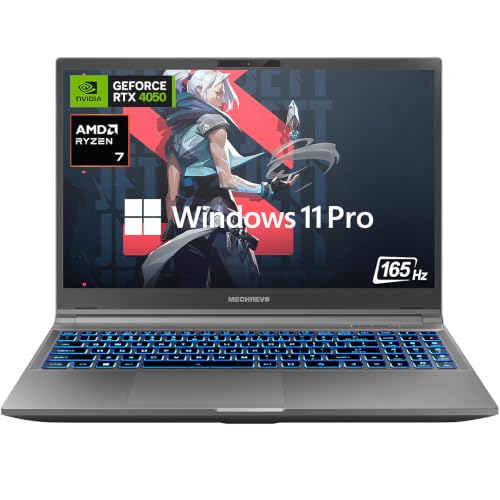
MECHREVO Dragon 15K Gaming Laptop RTX 4050

KAIGERR Gaming Laptop AMD Ryzen 7 5825U 15.6″
HP Victus 15.6″ Gaming Laptop i5-12450H RTX 3050

Acer Nitro 5 AN515-54-5812 GTX 1650 Laptop
NIMO 17.3″ Gaming-AI-Laptop R7-8745HS 32GB

NIMO 17.3″ FHD AI-Ready Laptop R7 8745HS 32GB DDR5

MECHREVO Dragon 15K Gaming Laptop Ryzen 7 RTX 4050

NIMO 15.6″ IPS Gaming Laptop R7 8745HS 32GB DDR5
A Closer Look At Each Pick
The Dragon 15K from MECHREVO is the most ambitious machine on this list, pairing an AMD Ryzen 7 7445HS processor with NVIDIA’s RTX 4050 graphics. That GPU supports DLSS 3, which is a fancy way of saying it can boost frame rates through AI-assisted upscaling, and it brings ray tracing to titles that actually use it. The 165Hz refresh rate panel matters for anyone playing Valorant, CS2, or Apex where every frame above 60 is a competitive edge.
Storage and memory upgrades here are generous: DDR5 5600MHz dual-channel RAM, a PCIe 4.0 SSD, and room to expand up to 64GB of RAM and 4TB of storage later. For competitive gamers who want longevity in their build, that headroom is a real perk. Compared to the older Acer Nitro 5 covered below, this is a generational leap in both silicon and panel quality.
Well-Handled Touches
- RTX 4050 with DLSS 3 support extends useful gaming life for at least several years.
- 165Hz display gives competitive players a tangible advantage in fast-paced shooters.
- DDR5 memory and PCIe 4.0 storage keep loading screens short.
- Expandability up to 64GB RAM and 4TB SSD means the laptop can grow with your library.
Things To Consider
- Higher-end RTX silicon tends to run warm under sustained load, so a cooling pad or ventilated desk is wise for long sessions.
- 15.6-inch chassis with serious GPU power tends to be heavier than ultrabooks, making daily backpack commutes a workout.
Who It Suits Best
Competitive gamers who prioritize frame rates and want enough GPU headroom for the next few years of releases.
Consider Something Else When
The Acer Nitro 5 is a better fit for someone shopping on a tighter budget who mainly plays esports and indie titles.
KAIGERR positions this 15.6-inch machine as a budget-friendly entry point, and the AMD Ryzen 7 5825U does the heavy lifting with 8 cores and 16 threads. Paired with Radeon RX Vega 8 integrated graphics, this is not a heavy-hitting AAA laptop, but it handles esports titles, indie games, and creative software well. The 16GB RAM and 1TB NVMe SSD are unusual at this price tier and matter for anyone who edits photos or runs multiple browser tabs alongside Steam.
WiFi 6 support and a Windows 11 install round out a sensible package for students or first-time gaming laptop shoppers. Where the MECHREVO Dragon 15K aims at frame-chasers, this KAIGERR plays a different game entirely: practical multitasking at a sensible cost.
Everyday Perks
- 16GB RAM and 1TB SSD out of the box is generous for the price point.
- Ryzen 7 5825U handles productivity tasks, light editing, and casual gaming without breaking a sweat.
- WiFi 6 keeps wireless latency low for online play.
Worth Noting
- Integrated Radeon graphics mean AAA titles will need low settings to stay playable.
- Build quality and thermals on lesser-known brands vary, so owner feedback after purchase is worth tracking.
Made For
Students and casual gamers who want a capable everyday laptop with light gaming on the side.
Look Elsewhere When
The NIMO 15.6″ IPS Gaming Laptop covered below is a better fit when dedicated graphics and more memory matter.
HP’s Victus line has earned a reputation as the mainstream choice for budget gaming laptops, and this 15.6-inch configuration continues that tradition. The 12th-gen Intel Core i5-12450H is paired with an NVIDIA GeForce RTX 3050 graphics card and 16GB of RAM. A 1TB PCIe SSD covers storage, and the 144Hz Full HD display keeps motion smooth in competitive titles.
Windows 11 Pro comes preinstalled, which matters for anyone who needs BitLocker encryption or Remote Desktop for school or work. The Performance Blue color is understated enough to use in a lecture hall without screaming “gamer” at the back row. Compared to the RTX 4050-equipped MECHREVO above, this is a quieter, more conservative package.
Useful Touches
- HP’s brand support and warranty service tend to be more accessible than smaller manufacturers.
- 144Hz panel paired with RTX 3050 handles 1080p gaming comfortably in most modern titles.
- 16GB RAM and 1TB SSD are the configuration most shoppers want out of the box.
- WiFi 6 and a backlit keyboard round out the daily-driver feature set.
Trade Offs
- RTX 3050 is older silicon and lacks DLSS 3 frame generation, which the RTX 4050 above offers.
- Plastic chassis construction is durable but lacks the premium feel of metal builds.
Key Specs
Right Fit For
Mainstream shoppers who want a reliable name-brand laptop that handles 1080p gaming without surprises.
Skip It When
The MECHREVO Dragon 15K is a stronger choice when ray tracing and DLSS 3 frame generation are deal-breakers.
This is the older sibling in Acer’s Nitro 5 lineup, packing a 9th-gen Intel Core i5-9300H and an NVIDIA GeForce GTX 1650. It is a few generations behind current silicon, but for esports and indie games it still pulls its weight at a lower cost. The 15.6-inch Full HD IPS display is comfortable for both work and play, and the backlit keyboard helps during late-night sessions.
8GB of DDR4 RAM and a 256GB NVMe SSD are modest by 2026 standards, so most owners will want to budget for an upgrade. Alexa built-in is a quirky extra for voice-control fans. This Acer is the practical choice when budget matters more than cutting-edge features.
Bright Spots
- Backlit keyboard and IPS panel feel premium for the price tier.
- GTX 1650 still handles esports titles at smooth frame rates.
- Available M.2 slot makes storage upgrades straightforward.
Room For Improvement
- 9th-gen Intel CPU is dated by 2026 standards and limits longevity for heavier software.
- 256GB SSD fills up fast with modern game installs, so external or upgrade storage is essentially required.
Best Suited To
First-time gaming laptop shoppers on a tight budget who mainly play esports and indie titles.
Reach For A Different Pick When
The HP Victus covered above is a smarter grab when modern AAA gaming or longer software support matters.
NIMO leans into the creator and streamer crowd with this 17.3-inch machine. The AMD Ryzen 7 8745HS processor runs at up to 4.9GHz across 8 cores, paired with Radeon 780M integrated graphics and 32GB of RAM. The larger chassis gives the cooling system room to breathe, which matters for sustained 4K video editing or local AI workloads. USB 4.0 is included for fast external storage or dock connections.
The 17.3-inch Full HD display gives streamers and editors more screen real estate for timelines and chat overlays. A 2-year warranty and U.S.-based support differentiate NIMO from other smaller brands. Compared to the 15.6-inch NIMO below, this is the screen-size upgrade for desk-bound creators.
Positive Takeaways
- 32GB RAM handles 4K editing and heavy multitasking without choking.
- 17.3-inch display is easier on the eyes for long streaming or editing sessions.
- USB 4.0 enables fast external drives and modern docking stations.
- 2-year warranty beats the industry-standard 1-year coverage.
Some Limits To Know
- Integrated Radeon 780M graphics mean this is not a dedicated-GPU gaming machine.
- 17.3-inch laptops tend to weigh more and feel bulky in a backpack.
Feature Snapshot
Who Should Grab It
Streamers, video editors, and remote creators who want screen real estate and plenty of memory for production work.
Swap It Out When
The MECHREVO Dragon 15K is the better fit for shoppers who prioritize dedicated RTX graphics over screen size.
The second NIMO on this list trades the gaming-focused marketing for an AI-ready productivity pitch, but the silicon is essentially the same Ryzen 7 8745HS with 8 cores. The shift to DDR5 memory over the older Acer Nitro 5’s DDR4 is meaningful for bandwidth-heavy workflows like compiling code or running local AI models. The 1TB SSD keeps project files close at hand.
At 17.3 inches, this laptop still favors desk use over backpack commuting. Where it shines is the hybrid workday: spreadsheets and video calls during the day, lighter gaming or AI tinkering at night. The integrated Radeon graphics handle esports titles without breaking a sweat.
What Works In Its Favor
- DDR5 memory bandwidth helps with AI tools and large datasets.
- 8-core Ryzen 7 8745HS is well-suited to multitasking and creative software.
- 1TB SSD gives ample room for project libraries and game installs.
- 17.3-inch display keeps multiple windows readable at once.
Honest Caveats
- Integrated graphics limit this to light gaming rather than AAA ray tracing.
- Battery life on 17.3-inch machines is rarely stellar, so expect a charger nearby.
Perfect Match For
Hybrid users who split their week between productivity software and lighter gaming sessions.
A Better Fit Elsewhere
The HP Victus covered above suits shoppers who want dedicated RTX graphics for mainstream gaming.
This second MECHREVO Dragon 15K shares the same Ryzen 7 7445HS and RTX 4050 foundation as the first entry on this list, but drops the 165Hz panel in favor of a more standard display. For shoppers who care more about GPU power and CPU headroom than extreme refresh rates, this variant often lands at a more attractive price. The PCIe 4.0 SSD and DDR5 5600MHz RAM stay the same.
Real-world use here looks like 1080p gaming at high settings with ray tracing enabled, plus video editing or streaming on the side. Compared to the 165Hz variant, expect slightly softer motion in competitive shooters, but visually richer single-player experiences thanks to the same RTX silicon.
Benefits That Matter
- RTX 4050 with DLSS 3 keeps modern games playable for years to come.
- DDR5 5600MHz memory and PCIe 4.0 storage deliver snappy system responsiveness.
- Same MECHREVO chassis and thermal design as the higher-spec sibling.
Possible Compromises
- Standard refresh rate display means competitive players lose some smoothness versus the 165Hz variant.
- 15.6-inch RTX-equipped laptops run warm under sustained load, so ventilation matters.
Built With In Mind
Gamers who prioritize GPU muscle and AI-assisted frame generation over extreme refresh rates.
Not Your Match When
The MECHREVO Dragon 15K with the 165Hz panel is the smarter choice for dedicated esports players.
The third NIMO on this list is the most portable option in the lineup, packing the same Ryzen 7 8745HS and 32GB DDR5 memory into a 15.6-inch chassis. The IPS Full HD panel keeps colors and viewing angles reasonable for photo editing on the road. 100W Type-C charging and USB 4.0 connectivity let travelers leave the barrel charger behind on day trips.
A fingerprint reader on the power button adds quick login security for shared spaces like coworking lounges. The Radeon 780M integrated graphics handle lighter games smoothly, though AAA ray tracing is not in the cards. Compared to the 17-inch NIMOs above, this is the road-friendly sibling.
A Favorable Mix
- 32GB DDR5 memory is rare at this price tier and excellent for future-proofing.
- USB 4.0 and 100W Type-C charging simplify travel setups.
- Fingerprint reader speeds up login in busy environments.
- 15.6-inch form factor fits standard laptop sleeves and backpacks.
Where It May Fall Short
- Integrated Radeon 780M graphics cannot match the RTX 4050 in the MECHREVO Dragon above.
- Smaller chassis means fans tend to ramp up under heavier loads.
Whose Shelf It Belongs On
Travelers and remote workers who want strong CPU performance, plenty of memory, and lighter gaming capability.
Where A Sibling Pick Shines
The MECHREVO Dragon 15K with RTX 4050 is a better fit when dedicated graphics for AAA gaming are the priority.
What Matters Most In A Budget Gaming Laptop
GPU choice drives the whole experience. An RTX 4050 with DLSS 3 frame generation delivers meaningfully better longevity than a GTX 1650, especially in modern titles that lean on AI upscaling. For shoppers focused on competitive shooters, refresh rate (the number of times the screen redraws per second) matters as much as resolution. A 144Hz or 165Hz panel makes motion feel smoother even in games that do not push high frame counts.
Storage and memory decide how painful day-to-day ownership feels. 16GB of RAM is the practical floor in 2026, and 32GB pays off if you edit video or run AI tools. A 1TB SSD keeps game libraries manageable without an external drive, while smaller drives push users toward constant cleanup.
Display size and thermals travel together. A 17.3-inch laptop gives content creators and streamers more screen real estate, but the larger chassis is heavier in a backpack. Smaller 15.6-inch builds are easier to carry, though high-end GPUs in compact cases tend to run hotter. Plan your purchase around where the laptop will live most of the time.
Brand support and warranty can save headaches. Mainstream brands like HP and Acer have established service networks, while newer entrants like NIMO and MECHREVO often ship longer warranties to compete. The two-year NIMO coverage is a real differentiator worth weighing.
Key Considerations Across These Picks
Where Shoppers Go Wrong
The most common slip-up is chasing the newest CPU at the expense of an older GPU. A fast processor with a weak graphics card bottlenecks gaming frame rates, while a mid-tier CPU paired with an RTX 4050 often plays games far better. Memory configuration is the other trap: 8GB DDR4 systems feel sluggish in 2026, even for browsing, so prioritizing 16GB or 32GB DDR5 pays off daily.
When Paying More Pays Off
Spending up for an RTX 4050 over a GTX 1650 typically buys two to three extra years of playable performance in new releases. The same logic applies to refresh rate, where 144Hz and above make competitive titles feel noticeably smoother. Higher-tier configurations also tend to include better cooling systems, which keeps sustained performance stable during long sessions.
Frequently Asked Questions
Is an RTX 4050 laptop enough for modern games? For 1080p gaming at medium-to-high settings, the RTX 4050 handles most modern titles well, especially with DLSS 3 enabled. Ray tracing is possible but expect to lower settings in demanding games.
How much RAM do I really need in a gaming laptop? 16GB is the practical minimum for current games and multitasking. 32GB is worth the upgrade for video editing, streaming, and future-proofing over the next several years.
Are 9th-gen Intel laptops still worth buying? For budget shoppers focused on esports and indie games, a 9th-gen system like the Acer Nitro 5 can still serve well. Heavier modern software and AAA titles will feel sluggish, however.
Does refresh rate matter more than resolution? For competitive games, yes. A 1080p 144Hz or 165Hz panel feels smoother than a 60Hz 4K display in fast-paced shooters. Resolution matters more for single-player and creative work.
What is the deal with DLSS 3? DLSS 3 is NVIDIA’s AI-assisted upscaling that generates extra frames, boosting frame rates without as much hardware cost. Only RTX 40-series GPUs and newer support the frame generation portion of the feature.
Wrap Up
The right pick depends on what kind of gaming you actually do. Competitive players get the most from a 165Hz panel and RTX 4050, while creators benefit more from extra memory and a bigger screen. Match the hardware to the workload and the laptop will feel like it was built for you, not the other way around.