A short power blip can destroy an afternoon of work, corrupt a NAS drive, or take a gaming PC offline mid-match. Anyone who runs a home office, a media server, or a sensitive workstation eventually meets the same wall: one unplanned outage wipes out hours of progress. I’ve put together this roundup to help you pick gear that keeps your setup running through brownouts, surges, and the occasional full blackout, whether you need a simple wall-plug backup or a full lithium iron phosphate system.
Your Options, Compared

Power Sonic PS-6100 6V 12AH UPS Battery (10 Pack)

CyberPower CP1500PFCLCD PFC Sinewave UPS
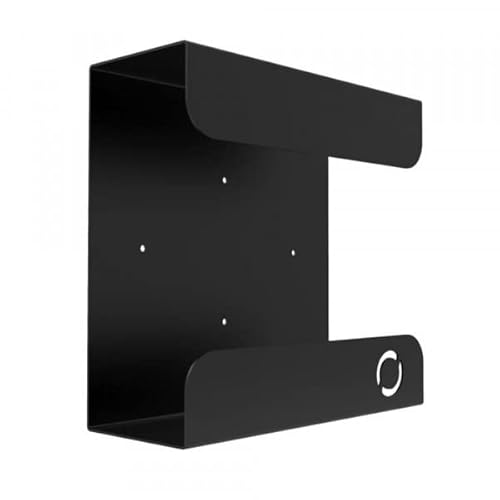
Oeveo UPS Mount 143 Single Wall Bracket

Glitwing UPS Mount 548 Cold Rolled Steel Bracket

APC BE600M1 and BE425M Backup Bundle

APC APCRBC123 Replacement Battery Cartridge

GOLDENMATE 1500VA/1000W Lithium UPS White

GOLDENMATE 1000VA/800W Lithium UPS White

UGREEN NAS UPS US3000 12000mAh Backup
Inside Each Recommended Option
Bulk replacement batteries don’t get much more practical than a ten-pack of sealed lead-acid cells. This bundle targets the Lithonia ELB-0612 light fixture, but the format is common across emergency lighting and several low-voltage UPS chassis, so IT departments and facility managers often stock a case for service runs.
Each unit measures roughly 5.95 inches long by 2 inches wide and 3.86 inches tall, weighing about 4.3 pounds. The SLA/AGM construction, which means the electrolyte is held in absorbent glass mats rather than sloshing liquid, makes the cells spill-proof and mountable in any orientation. Compared with the wall-mounted UPS picks later in this list, this is closer to a component shelf item than a finished consumer product.
Where It Excels
- Spill-proof AGM construction handles odd mounting angles
- Rechargeable cells rated for vibration and shock resistance
- Ten-pack format drops the per-unit cost for fleet service
- Compact 6V 12AH profile fits common emergency lighting fixtures
Worth Noting
- Lead-acid chemistry means periodic replacement on a 3-5 year cycle
- No included wiring harness, so connectors must be sourced separately
Feature Snapshot
Whose Shelf It Belongs On
Facility maintenance teams and IT service shops replacing the Lithonia ELB-0612 across multiple locations at once.
A Better Fit Elsewhere
Home users protecting a single desktop should look at the CyberPower CP1500PFCLCD instead, since it ships ready to plug in.
Most modern desktop power supplies use active PFC (Power Factor Correction), and that detail quietly decides whether a cheap backup works or fights the hardware. The CP1500PFCLCD outputs a pure sinewave, which mimics utility power closely enough that PFC components stay happy during switchover.
The mini-tower chassis takes up roughly the space of a small subwoofer, and the front color LCD panel surfaces load, battery level, and estimated runtime at a glance. Compared with the bulk battery cells in item 1, this is a finished consumer unit ready to plug a workstation and monitor into on day one.
The Good Stuff
- Pure sinewave output is safe for active PFC power supplies
- LCD panel reports load percentage and remaining runtime
- Line-interactive topology regulates minor brownouts without draining the battery
- Twelve outlets split between battery-backed and surge-only banks
Trade Offs
- Internal lead-acid batteries typically need replacement within 3-5 years
- Tower footprint crowds tight under-desk installations, which is where the Oeveo mount from item 3 can help
Quick Facts
Made For
Gaming rigs, CAD workstations, and audio production desktops with active PFC power supplies.
Skip It When
Power users planning to skip the lead-acid swap cycle should reach for the GOLDENMATE 1500VA/1000W Lithium UPS in item 7 instead.
Few things clutter a home office faster than a UPS sitting on the floor collecting dust. The Oeveo Mount 143 is a flat black powder-coated steel shelf designed to get that box off the carpet and onto the wall behind your workstation.
It is built in the USA, and the package includes the mounting hardware, which removes a small but real friction point from setup. The 70-pound weight capacity easily handles mid-sized APC and CyberPower units, though I’d hesitate to hang the largest rack-mount chassis on it.
A Strong Showing
- Included hardware means no second trip to the hardware store
- Flat black powder coat blends into most office walls
- Compatible footprint with popular APC and CyberPower models
- Multi-pack pricing available for offices deploying several units
Small Caveats
- Installation requires basic stud-finding, which adds time for renters avoiding wall damage
Best Suited To
Anyone running a mid-size UPS under their desk who wants it gone from floor level without sacrificing access to outlets.
Swap It Out When
Holders of heavier tower units near the 70-pound ceiling should choose the Glitwing UPS Mount 548 in item 4 for the thicker steel.
Some users hang a UPS off a stud because they want it off the floor; others need a mount that disappears into a server closet and never moves again. The UPSM-548 leans into the second camp with 16-gauge cold rolled steel, the same family of material used in electrical enclosures, finished in flat black powder coat.
It is engineered specifically around common APC Back-UPS footprints, so the unit seats vertically without rattling. Compared with the lighter Oeveo bracket in item 3, this one feels more like shop equipment than home office furniture.
What Earns Its Place
- 16-gauge cold rolled steel resists bending under heavier tower UPS units
- Powder-coated finish protects against garage or basement humidity
- Vertical orientation keeps vents clear and cables routed downward
- Direct fit for popular APC Back-UPS chassis families
Points To Note
- Form factor is APC-centric, so CyberPower-only households may need to verify dimensions
- Heavier steel means a sturdier drill and wall anchor than the lighter Oeveo bracket
Right Fit For
Small business IT closets and home workshops that want a permanent, rattle-free mounting point for a backup unit.
Reach For A Different Pick When
Anyone running a smaller plug-in UPS in a rental should look at the Oeveo UPS Mount 143 in item 3 for a lighter install.
First-time UPS shoppers often underestimate how much gear needs protection once they start counting modems, routers, and a monitor. This bundle ships two standalone APC units in the box, which is a useful way to spread coverage across rooms without buying one oversized tower.
APC explicitly notes the two units must run independently, so they should not be plugged into each other. For a remote worker with a desktop in the office and a cable modem in the hall closet, this kind of split setup tends to fit real layouts better than a single big box.
What Makes Sense
- Two units cover separate circuits or rooms in one purchase
- Compact wall-tap design works behind desks and entertainment centers
- APC brand recognition means replacement batteries are easy to source later
Possible Compromises
- Smaller VA ratings per unit mean limited runtime for power-hungry gaming rigs
- Units must run on separate outlets and cannot be daisy-chained
Feature Card
Who Should Grab It
Remote workers just starting out who want a low-fuss way to protect a desktop and a networking stack in two spots.
Where A Sibling Pick Shines
Power-hungry workstations should pick up the CyberPower CP1500PFCLCD in item 2 for proper sinewave and runtime headroom.
Every UPS eventually needs a fresh battery, and the wrong replacement cell can throw off runtime estimates or refuse to seat properly. The APCRBC123 is a genuine APC cartridge (a sealed, pre-assembled battery module with the correct connectors and mounting points) tested for compatibility with SmartUPS models like the SMT750RM2UC and the BX1350M.
It’s the kind of part IT managers keep on the shelf so a failed battery doesn’t mean an overnight shipping scramble. Compared with the bulk SLA cells in item 1, this is a single, drop-in module with no soldering required.
A Few Highlights
- Factory-matched connectors mean no rewiring during the swap
- VRLA (valve-regulated lead-acid) chemistry is sealed for safe indoor handling
- Designed to restore original runtime specifications
Where It May Fall Short
- Only fits specific APC chassis, so model numbers must be verified before ordering
Who Will Love This
Owners of the APC SMT750RM2UC or BX1350M whose UPS has started beeping the low-battery warning.
Not Your Match When
Anyone replacing batteries in a CyberPower unit should look at CyberPower’s own replacement parts catalog rather than this APC cartridge.
Lead-acid batteries have powered UPS units for decades, but they wear out every few years and end up in landfills. The GOLDENMATE 1500VA uses a lithium iron phosphate (LiFePO4) battery pack, which is a chemistry known for tolerating many more charge cycles than standard lithium-ion, rated for over 3,000 cycles and a service life past ten years.
That longer lifespan is the headline feature, but the unit still ships as a familiar wall-plug tower with the outlets and indicators you’d expect. Compared with the CyberPower CP1500PFCLCD in item 2, this one trades a heavier upfront footprint for fewer battery swaps over its life.
What Pays Off
- LiFePO4 chemistry rated for 3,000+ charge cycles, so replacements are rare
- 1500VA / 1000W capacity handles full-size desktop workstations
- White housing fits modern decor better than the typical beige rack tower
Honest Caveats
- Larger and heavier than compact models, so it may need the Oeveo wall mount from item 3
- Premium LiFePO4 build costs more up front than lead-acid alternatives
Quick Technical Notes
Perfect Match For
Prosumers who would rather pay more up front than swap batteries every few years.
Look Elsewhere When
Shoppers on a tighter budget who only need short-runtime backup should look at the APC bundle in item 5.
The 1000VA model slots below the flagship in item 7 but keeps the same LiFePO4 battery advantage. That chemistry is rated for over 5,000 charge cycles in this configuration, which is the kind of spec that quietly outlasts every other UPS in the house.
With 800W of usable output, the unit covers a typical home office desktop, a 27-inch monitor, and a network switch without breaking a sweat. The white housing matches the larger sibling and pairs nicely with the Oeveo wall mount from item 3.
Real Benefits
- 5,000+ cycle LiFePO4 cell reduces long-term battery waste
- 1000VA / 800W output handles typical home office load
- Compact footprint fits under most desks
Things To Consider
- Lower wattage means dual-GPU workstations may need the 1500VA sibling in item 7
- Smaller unit may still weigh more than plastic-cased competitors
Built With In Mind
Home office desktops running productivity apps, video calls, and a small network stack.
Consider Something Else When
Creative pros with high-wattage workstations should choose the GOLDENMATE 1500VA/1000W unit in item 7.
Most UPS units in this roundup assume you’re protecting a wall-plug desktop, but a NAS (Network Attached Storage) enclosure draws DC power through a barrel connector and doesn’t need a full sinewave tower. The US3000 is purpose-built for that job, sitting between the NAS and its power brick to bridge short outages with a 12,000mAh built-in Li-ion cell.
UGREEN publishes a clear compatibility list, and the unit is designed for 2-bay and 4-bay DXP-series enclosures. The catch, and it’s a meaningful one, is that the DXP6800 and DXP8800 series are explicitly excluded, so model numbers must be verified before ordering.
What It Does Well
- 120W DC output matches common NAS power bricks without conversion loss
- Compact, silent operation suits a bedroom or living-room NAS
- Multiple protection protocols guard against surges, overcharge, and short circuits
Factors To Consider
- Compatibility is limited to specific UGREEN NAS models, which restricts household flexibility
- Lower capacity than a full AC UPS, so it’s a graceful-shutdown device, not a long-runtime one
Feature Overview
The Right Fit
Owners of compatible UGREEN 2-bay or 4-bay NAS enclosures who want clean shutdowns during short outages.
Where Another Pick Suits Better
Anyone running a NAS from a different brand should pick the APC APCRBC123 from item 6 to refresh an existing AC UPS instead.
What To Weigh Before Choosing Power Protection
The right UPS depends less on brand loyalty and more on what you actually plug in. A 1500VA pure sinewave unit is wasted on a router, and a tiny plug-in backup is useless for a workstation. Match capacity to load first, then worry about chemistry and form factor.
Capacity And Runtime
Look at the wattage of everything on the UPS, add a safety margin of 20-30%, and choose a VA rating (VA, or volt-amps, estimates total power capacity including reactive loads; watts measures real working power) that comfortably covers that load. Higher numbers buy more runtime during an outage, but only if the unit is correctly sized.
Output Waveform
Active PFC power supplies in modern desktops behave badly with simulated sinewave (stepped approximation) output, so pure sinewave models like the CyberPower CP1500PFCLCD are the safer pick for that gear. Smaller electronics such as routers and monitors tolerate stepped output fine.
Battery Chemistry
Sealed lead-acid is the traditional UPS battery, cheap and proven, and it generally lasts three to five years. Lithium iron phosphate (LiFePO4) costs more up front but pushes cycle life past ten years for users who don’t want to crack open their UPS every few years.
Physical Footprint And Mounting
Tower units slide under desks, but larger models can dominate small home offices. Wall-mount brackets like the Oeveo or Glitwing options solve the floor clutter problem cleanly for those willing to drill into a stud.
Key Considerations Across These Picks
Pitfalls Shoppers Hit
The most common mistake is buying by VA rating alone without checking the actual watt capacity, since some budget units advertise high VA but low watts. Another is ignoring the active PFC issue, which surfaces only when a power-hungry desktop reboots mysteriously during a brief outage.
When Paying More Pays Off
Higher-tier models justify their cost in two ways: longer battery life from LiFePO4 chemistry, and pure sinewave output that protects modern power supplies. For a workstation that runs daily, the upgrade tends to pay back in fewer service events over several years.
Frequently Asked Questions
How long will a UPS keep my computer running during an outage?
Runtime depends on how much wattage your gear draws and how big the UPS battery is. A typical 1500VA unit powers a modest desktop and monitor for roughly 5-15 minutes, enough for a clean shutdown but not a full work session.
Do I really need pure sinewave output?
Most modern desktops with active PFC power supplies should use pure sinewave to avoid nuisance shutdowns. Simpler electronics like routers, modems, and basic monitors usually tolerate simulated sinewave without issue.
How often should I replace the battery?
Sealed lead-acid UPS batteries typically need replacement every three to five years. Lithium iron phosphate models like the GOLDENMATE units can run much longer before service, often past a decade of typical home use.
Can a UPS protect a NAS from sudden power loss?
Yes, though NAS enclosures often run on DC power, which is why a DC-specific backup like the UGREEN US3000 makes more sense than a full AC tower. The goal is enough runtime for the NAS to write its caches to disk and shut down cleanly.
What size UPS do I need for a home office desktop?
Add up the wattage of your PC, monitor, router, and any peripherals, then add a 20-30% safety margin. Most home offices fall comfortably within a 1000-1500VA unit, while heavier gaming or content creation rigs benefit from the higher tier.
Wrap Up
The right UPS depends on what you’re protecting, how much runtime you need, and how often you want to think about battery swaps. For most home offices, a mid-size pure sinewave unit covers daily threats; specialty builds like NAS or rack setups call for more targeted solutions. Pick the option that matches your gear, mount it sensibly, and the next power event becomes a minor inconvenience rather than a data loss.