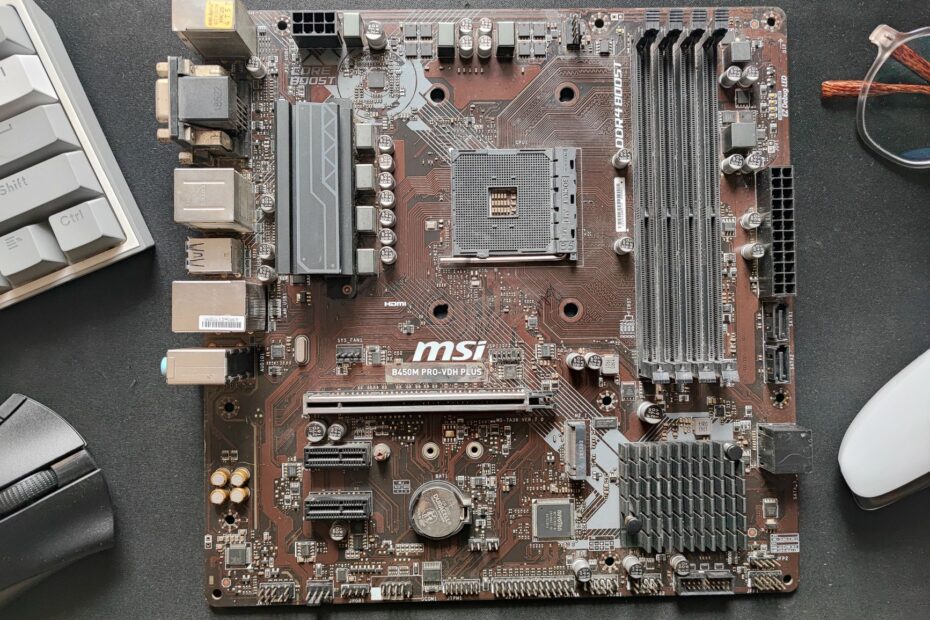
Three common desktop form factors determine case compatibility, expansion capacity, cooling layout, and future upgrade options. ATX offers the largest footprint, Micro-ATX trims unused board space, and Mini-ITX places a full desktop platform on a 170 x 170 mm board.
Your choice affects the case, graphics card, cooler, storage, memory layout, and future hardware changes. This comparison suits anyone planning a gaming PC, work desktop, compact setup, or transportable system.
Motherboard Form Factors Set the Physical Layout
A motherboard does more than hold your CPU and RAM. Its form factor fixes the outer dimensions, screw-hole pattern, rear-panel location, and PCIe layout. Those measurements shape the PC case compatibility, cooling room, and expansion hardware available inside your system.
You should view ATX motherboard form factor, Micro-ATX motherboard form factor, and Mini-ITX motherboard form factor as physical standards rather than performance levels. A compact board can run the same AMD Ryzen or Intel Core processor as a larger board, provided the CPU socket and chipset match.
ATX is the full-size desktop layout. Micro-ATX, also written as mATX, reduces the board into a shorter square shape. Mini-ITX shrinks the layout further and suits small-form-factor (SFF) PC builds where your desk space, shelf size, or transport needs guide the parts list.
Your platform still controls CPU compatibility. An AM5 board accepts AMD processors built for AM5, while an LGA1851 board accepts Intel processors built for LGA1851. Board size does not alter the socket requirement for your PC.
Power connections remain familiar across the three formats. Your board still uses a 24-pin motherboard connector and CPU power near the upper edge. Smaller cases leave less cable room, so thick power leads and sharp bends become more noticeable during installation.
The same rule applies to the E-ATX form factor. E-ATX boards are larger than standard ATX boards and need a case that names E-ATX in its specifications. Your case may accept ATX but still lack the width needed for an E-ATX layout.
Board Dimensions Set the Available Hardware Space
The gap between 305 mm and 170 mm changes more than the board silhouette. Every missing centimeter removes room for RAM/DIMM slots, PCIe expansion slots, headers, heat sinks, or M.2 SSD slots that could matter later in your build.
| Form factor | Motherboard dimensions | Typical RAM layout | Expansion space |
|---|---|---|---|
| ATX | 305 x 244 mm | Four DIMM slots | Up to seven case expansion positions |
| Micro-ATX | Up to 244 x 244 mm | Two or four DIMM slots | Up to four case expansion positions |
| Mini-ITX | 170 x 170 mm | Two DIMM slots | One PCIe expansion slot |
These ATX MicroATX Mini-ITX dimensions describe the physical footprint, not a fixed feature count. A higher-end Micro-ATX board can include more M.2 SSD slots than a lower-cost ATX board. Chipset choice, board tier, and layout decisions shape the final connector count.
You can see the largest difference near the lower edge of the board. An ATX layout can expose seven horizontal expansion positions in a standard tower. Mini-ITX gives your graphics card one position, leaving no spare slot for a capture card, sound card, or extra network card.
RAM capacity follows the same space pressure. Four DIMM slots allow your system to start with two memory modules and leave two slots open. With a two-slot board, your final memory target needs more thought because a later capacity increase may mean replacing both modules.
Your motherboard size and case compatibility also affect airflow paths. A larger board leaves more room around headers and cable channels, while a compact layout can place fan leads, front-panel wiring, and storage connectors close together. That crowding does not harm performance by itself, but it makes your installation less forgiving.
Because smaller boards concentrate more hardware into less room, case support must be checked from the largest format downward.
Case Compatibility Follows a Larger-to-Smaller Pattern
Board dimensions matter only where the case has matching standoffs, rear-panel clearance, and expansion openings. Larger enclosures accept smaller board types because their motherboard trays include mounting points for several formats.
| Case rating | ATX board | Micro-ATX board | Mini-ITX board |
|---|---|---|---|
| ATX case | Fits | Fits | Fits |
| Micro-ATX case | Does not fit | Fits | Fits |
| Mini-ITX case | Does not fit | Does not fit | Fits |
A Micro-ATX motherboard does not fit inside a Mini-ITX-only case. Micro-ATX reaches 244 x 244 mm, while the Mini-ITX limit is 170 x 170 mm. Your Micro-ATX board also needs extra mounting positions and rear expansion clearance that the smaller enclosure lacks.
Your case choice needs more than an exterior height check. A tall, narrow chassis can still lack room for a long graphics card, front radiator, or full-height PCIe card. Product photos can hide these limits, while the specification sheet lists the actual GPU length, cooler height, and radiator restrictions.
Check the listed motherboard formats, standoff locations, expansion-slot count, GPU clearance, CPU-cooler height, and radiator support before your parts arrive. A case that fits your board can still reject your cooling plan.
That physical check explains why an ATX case is flexible but not always sensible for your setup. A Mini-ITX board inside a large tower works electrically, yet the unused space may conflict with your goal of a compact desk arrangement.
Check the case manual before fastening the board. Extra standoffs under an unused mounting hole can touch solder points on the underside of your motherboard. Your board should sit only on standoffs that match its documented mounting pattern.
Expansion and Connectivity Grow With Board Area
One PCIe slot changes your future hardware choices. On a Mini-ITX motherboard, that slot almost always belongs to your graphics card, leaving no location for a capture card, PCIe sound card, extra network adapter, or PCIe storage card.
PCIe Slots Shape Add-In Card Choices
An ATX board can hold your graphics card plus several add-in cards, although lane sharing and slot spacing vary by model. This room matters where your workstation needs a video capture card, 10-gigabit Ethernet adapter, or another expansion device.
Micro-ATX gives your system a middle path. Your PC can hold a GPU and one or two smaller cards in many cases, while avoiding the unused lower slots common on a full-size board. Thick triple-slot GPUs can still cover nearby positions, so check the exact slot map before purchase.
- Graphics card space: Your GPU uses the main PCIe x16 slot on every format, but a thick cooler can block nearby positions.
- Capture hardware: Your capture card needs a spare PCIe slot, which pushes streaming systems toward Micro-ATX or ATX.
- Network upgrades: PCIe Ethernet and Wi-Fi cards need room that your Mini-ITX system rarely has after GPU installation.
- Audio expansion: Your dedicated sound card fits more easily on larger boards, although onboard audio suits many desktop PCs.
Headers and Storage Follow the Same Limits
More board area leaves more locations for connectors around the edges. An ATX model may include extra SATA ports, M.2 SSD slots, fan headers, internal USB headers, and rear-I/O connections because the board designer has more physical room.
You should not assume size tells the entire story. Higher-end Mini-ITX boards can include two M.2 SSD sockets, Wi-Fi, fast USB ports, and substantial power delivery and VRM cooling. Their compact layout still leaves fewer routes for later expansion hardware.
Motherboard size does not make your CPU or GPU faster in games. Frame rate comes from the processor, graphics card, memory settings, cooling, power limits, and board power design. A well-cooled Mini-ITX system can match an ATX system with the same core parts.
Your storage plan deserves the same attention as your GPU. Two M.2 drives fit neatly on some compact boards, but a build with four SATA drives and several M.2 drives points toward a larger layout. Count every drive before your board choice locks in the available connectors.
Compact Cases Require Closer Part Planning
A 170 x 170 mm board is only one limit inside a compact PC. The case around it decides whether your graphics card, cooler, radiator, power supply, and cables can coexist without pressure against a panel or intake vent.
Small Cases Have Interlocking Clearances
GPU length is only the starting point for a fit check. A card can fit from front to back but fail because its thickness uses three slots, its power lead presses into the side panel, or its cooler sits too close to a vent.
Your CPU cooler height matters just as much. Small cases may list a 55 mm low-profile cooler, a 67 mm tower, or a 240 mm radiator, but rarely every option at once. Radiator placement can also remove room that your graphics card needs.
- Graphics card dimensions: Check your GPU length, height, thickness, and power-connector clearance against the case limits.
- Cooler clearance: Match your CPU cooler height or radiator thickness to the enclosure’s published interior measurements.
- Power supply format: SFX power supplies save room, while ATX power supplies fit only in selected compact cases.
- Cable routing room: Short cables reduce pressure on panels and keep front intake paths open.
- Fan placement: Your radiator, fan, and GPU can compete for the same few centimeters near a side panel.
Mini-ITX Hardware Can Cost More
A compact board can cost more than larger alternatives despite requiring less circuit-board material. Dense traces, stacked connectors, reinforced power stages, custom heat sinks, and lower production volume add manufacturing complexity.
Micro-ATX avoids much of that compact premium for your build. You get a smaller tower, room for standard ATX power supplies in many cases, and up to four expansion positions. For your gaming PC or home office system, that balance has clear appeal.
A compact board does not automatically make your PC compact. Your case volume, graphics-card dimensions, cooling hardware, and power-supply format set the final size.
And compact systems reward a careful parts list. A 10-liter Mini-ITX case beside your monitor can look tidy, but your graphics card, CPU cooler, and power supply need to fit the same tight interior. Your board is only the starting measurement.
Once every component shares the same restricted volume, the best format depends on which capability you value most.
Each Format Fits a Different Hardware Priority
Once the physical limits are clear, each board size has a practical role. The right format leaves room for hardware you plan to install rather than empty slots that only enlarge your case.
ATX Fits Hardware-Heavy PCs
ATX suits your workstation, storage-heavy PC, multi-card setup, or high-end system with several fans and large radiators. The added area can hold four DIMM slots, more drive connectors, and the broadest PCIe expansion capacity.
Your video-editing PC has a clear ATX use case where it includes a GPU, capture card, several SATA drives, and a 360 mm liquid cooler. That hardware fills the extra room rather than leaving your tower oversized for appearance alone.
ATX also suits a system where your future plans include more than one add-in card. A dedicated network adapter, audio card, PCIe storage card, and capture hardware all consume physical slots. Your graphics card may occupy two or three positions by itself.
Micro-ATX Fits Conventional Desktop PCs
Micro-ATX suits many gaming and productivity systems because one graphics card handles the main workload. Your case becomes shorter, while up to four expansion positions leave room for a future capture card or network card.
The downside is real but limited for many builds. Micro-ATX boards may have fewer headers, fewer PCIe slots, fewer SATA ports, and fewer higher-end choices than ATX boards. Your parts list decides whether those limits matter.
For ATX vs MicroATX, ATX suits dense storage, wide cooling layouts, and extra PCIe hardware. Micro-ATX suits your standard single-GPU desktop where unused expansion slots would only enlarge the case. That comparison comes down to installed hardware, not CPU performance.
Mini-ITX Prioritizes Space and Portability
At just 170 x 170 mm, this form factor fits desk-space-focused PCs, living-room systems, and machines that travel. You trade later expansion room for a smaller footprint, so your component list should start with the case instead of ending with it.
In a MicroATX vs Mini-ITX comparison, Micro-ATX suits fewer part restrictions and room for another card. Mini-ITX suits a system where the enclosure itself is the priority, such as a 10-liter PC beside your monitor.
Your graphics card selection matters more in a Mini-ITX build. A compact board can use a powerful GPU, but the case needs enough length, thickness, and power-cable room for that card. A small case with a large GPU compartment can still be far larger than a compact system with integrated graphics.
A Fit Check Avoids Form-Factor Mistakes
Your final check should happen before the case or motherboard enters your cart. A few measurements on paper cost less than discovering that a radiator blocks your graphics card after cable routing is complete.
Component Planning Points to the Right Board Size
- Desk space: Measure the shelf, desk, or floor area for your case, including rear cable clearance.
- Portability needs: Choose Mini-ITX where moving your PC matters enough to accept tighter component limits.
- Graphics card fit: Match your GPU length, height, thickness, and power-plug space to the chosen case.
- Cooling plan: Check CPU cooler height, radiator room, fan positions, and intake paths before board selection.
- Memory target: Choose four DIMM slots where your RAM target needs room for later additions.
- Storage plan: Count M.2 SSD slots and SATA ports against every drive in your planned system.
- Future cards: Reserve PCIe slots for capture, audio, network, or storage hardware on your list.
You can identify an existing board before replacing its case. Find the printed model number, check the manufacturer specifications, and measure the board edge to edge. ATX measures 305 x 244 mm, while a square board near 244 x 244 mm points to Micro-ATX.
Mounting holes offer another useful clue for your inspection. An ATX tray uses a longer vertical pattern, Micro-ATX stops higher, and Mini-ITX uses a compact four-hole square. Count rear expansion positions too, but dimensions remain the stronger evidence.
Terms can confuse a parts search. “Mini ATX” appears in casual listings, but Mini-ITX is the established compact desktop standard. Your case specification sheet should name Mini-ITX or Micro-ATX directly rather than relying on vague language.
Your final parts list should show a matched board and enclosure. Check the motherboard format, graphics-card clearance, CPU-cooler height, radiator location, PSU format, RAM target, storage count, and needed PCIe cards. Eight checks are easier than rebuilding around a single missed measurement.
Putting the Parts List Together
Your motherboard form factor sets the physical ceiling for your PC before CPU installation begins. ATX leaves the most room for expansion, Micro-ATX gives many single-GPU systems a practical middle size, and Mini-ITX rewards careful planning with a much smaller footprint.
Choose your board and case as a matched pair. Then check every large component against the enclosure’s listed clearances. Your GPU, cooler, radiator, power supply, cables, memory plan, and storage plan all need room inside the same chassis.
The motherboard form factor comparison becomes simple once your hardware list is complete. A larger board suits expansion needs already on the list. A smaller board suits a smaller case where your parts fit without forced compromises.
FAQ
What is the difference between ATX, Micro-ATX, and Mini-ITX motherboards?
At 305 x 244 mm, ATX is the largest, while Micro-ATX uses a shorter square layout and Mini-ITX measures 170 x 170 mm. Your board size affects PCIe slots, RAM/DIMM slots, M.2 SSD slots, headers, cooling space, and compatible case sizes.
What are the dimensions of ATX, Micro-ATX, and Mini-ITX motherboards?
ATX measures 305 x 244 mm. Micro-ATX measures up to 244 x 244 mm. Mini-ITX measures 170 x 170 mm. These dimensions describe the board footprint, while feature counts such as M.2 storage and fan headers vary by individual board model.
Which motherboard form factor is best for gaming?
Micro-ATX fits many gaming PCs because your graphics card uses the main PCIe slot and the smaller case still leaves room for cooling hardware. ATX suits your build where extra storage, expansion cards, or larger radiators are part of the plan. Mini-ITX suits your gaming PC where compact size matters more than spare expansion space.
Which is better, Mini-ITX or Micro-ATX?
Micro-ATX is better for your system where you want spare PCIe slots, more header choices, easier cooling, and fewer graphics-card limits. Mini-ITX is better where your desk space or portability goal outweighs those expansion options. Neither format changes your CPU or GPU performance on its own.
Can an ATX, Micro-ATX, or Mini-ITX motherboard fit in the same case?
Most ATX cases include mounting points for ATX, Micro-ATX, and Mini-ITX boards. A Micro-ATX case fits Micro-ATX and Mini-ITX boards but not ATX. A Mini-ITX-only case fits Mini-ITX boards and does not have room for larger board formats.
Can I put a Micro-ATX motherboard in a Mini-ITX case?
No. A Micro-ATX board can measure up to 244 x 244 mm, while a Mini-ITX case is built around a 170 x 170 mm board. Your Micro-ATX board also needs mounting points and expansion-slot clearance that a Mini-ITX-only enclosure does not have.