Building a gaming rig or productivity workstation used to mean sourcing parts and spending a weekend with thermal paste. Today, preconfigured desktops let people skip that detour without giving up the customization that makes a desktop worth owning. The picks below cover gamers chasing high frame rates, creators needing all-in-one convenience, and anyone who just wants a machine that boots up and gets out of the way.
A Side-By-Side Look

CYBERPOWERPC Gamer Master Gaming PC (Ryzen 5 7600, RTX 4060)
CyberPowerPC Gamer Xtreme VR Gaming PC (i5-13400F, RTX 4060)

Apple 2024 iMac M4 24-inch All-in-One (Blue)

Apple 2024 iMac M4 24-inch All-in-One (Pink)

Apple 2024 iMac M4 24-inch All-in-One (Silver)
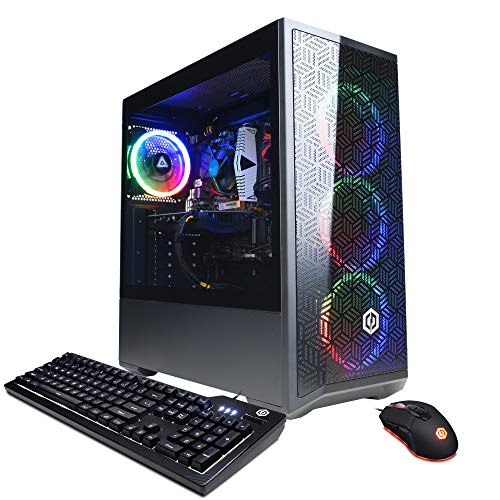
CYBERPOWERPC Gamer Xtreme VR (i5-12400F, RTX 3050)
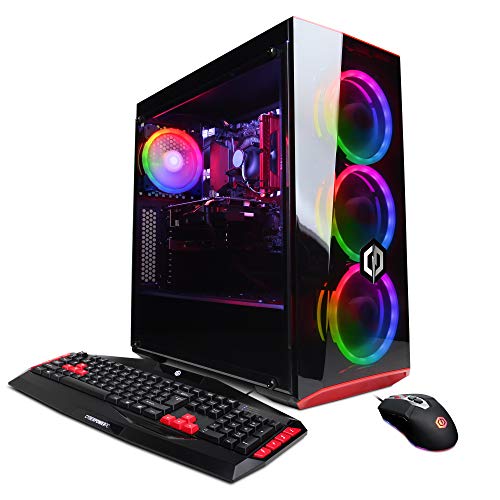
CyberpowerPC Gamer Xtreme VR (i5-9400F, GTX 1660)
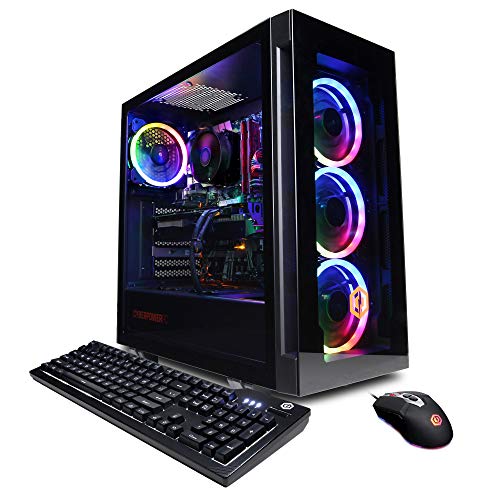
CyberpowerPC Gamer Xtreme VR (i7-12700F, RTX 3060)
The Strengths Of Each Pick
The Gamer Master lands in that sweet spot where modern AM5 silicon meets a current-generation GPU without breaking stride. The Ryzen 5 7600 is a six-core, twelve-thread chip built on AMD’s latest platform, which matters because it leaves headroom for tomorrow’s CPU upgrades, while the RTX 4060 handles 1080p and entry-level 1440p gaming comfortably.
Tempered glass on the side and a tempered-glass-adjacent RGB lighting setup mean the case earns its place under a desk rather than behind one. Owners who care about cable management may want to tidy up out of the box, since prebuilt cases can be a touch messy inside.
Everyday Wins
- AM5 motherboard gives a real upgrade path for future Ryzen processors
- PCIe Gen4 NVMe SSD keeps load times short on modern titles
- RTX 4060 supports DLSS 3 frame generation for smoother gameplay
- DDR5 memory at 16GB is the right starting point for current games
- Six USB 3.1 ports plus Wi-Fi cover most peripheral setups
Things To Consider
- 500GB of storage fills up fast once a few modern games are installed
- The included keyboard and mouse are functional rather than enthusiast-grade
Who It Suits Best
PC gamers stepping up from a console or older rig who want a current-generation platform with room to grow.
A Better Fit Elsewhere
Shoppers who need more out-of-the-box storage should consider the CyberPowerPC Gamer Xtreme VR Gaming PC (i5-13400F, RTX 4060), which doubles the SSD capacity to 1TB.
Where the previous Gamer Master capped storage at 500GB, this Gamer Xtreme VR doubles down with a full 1TB PCIe Gen4 NVMe drive. For shoppers juggling a dozen modern games, that extra room matters more than any incremental clock speed.
Intel’s Core i5-13400F handles everyday gaming and streaming without complaint, and the F-suffix simply means there’s no integrated graphics to fall back on, which is fine because the RTX 4060 carries the load. VR-ready titles run cleanly at the resolutions this card was built for.
What Pays Off
- 1TB SSD holds a serious library without immediate external drive juggling
- 16GB of DDR5 RAM keeps multitasking fluid across game-launcher tabs
- RTX 4060 brings DLSS 3 support for higher effective frame rates
- Wi-Fi and gigabit Ethernet give flexibility for any home network layout
Points To Note
- Intel platform here is LGA 1700, which has a more limited forward upgrade path than AM5
- Front-panel I/O and case airflow are functional, not premium
Made For
Gamers with sprawling Steam libraries who want storage headroom from day one and don’t plan to swap the CPU soon.
Consider Something Else When
Shoppers prioritizing long-term CPU upgradability should look at the CYBERPOWERPC Gamer Master Gaming PC (Ryzen 5 7600, RTX 4060) for its AM5 socket.
The blue iMac trades the tower-and-cable sprawl of a traditional desktop for a single slab that doubles as a 24-inch Retina display. Apple’s M4 chip pairs a 10-core CPU with a 10-core GPU, and unified memory means the CPU and GPU share one pool of 16GB, which trims latency in creative apps.
For families setting up a shared creative corner or a writer who wants a clean, cable-free desk, the all-in-one form factor feels like a relief. The trade-off shows up in storage, where 256GB is comfortable for documents and lighter projects but tight for raw 4K footage.
What Works In Its Favor
- M4 chip delivers strong performance per watt, so the system stays quiet under most tasks
- 24-inch Retina display removes the need to budget for a separate monitor
- Unified 16GB memory architecture benefits video and photo workflows
- Blue finish gives the room a focal point without screaming for attention
Honest Caveats
- 256GB of internal storage will feel cramped for anyone editing large media libraries
- macOS-only ecosystem limits game compatibility compared to Windows machines
Perfect Match For
Creative households and remote workers who value screen quality, low fan noise, and a tidy desk over maximum storage.
Swap It Out When
Gamers wanting Windows-native titles and upgrade flexibility should consider the CYBERPOWERPC Gamer Master Gaming PC (Ryzen 5 7600, RTX 4060) instead.
The pink iMac is the same machine as its blue sibling, only dressed in a warmer hue that suits a sunlit home office or a kid’s homework corner. Spec-for-spec, the M4 chip, 16GB of unified memory, and 24-inch Retina display match across the color lineup.
For households where the computer lives in a multi-use room rather than a dedicated den, the all-in-one chassis cuts clutter to a single power cable. Owners who store large photo libraries should plan on external SSDs early.
The Case For It
- M4 chip with 10-core CPU handles everyday creative apps with ease
- Built-in Retina display simplifies setup and reduces cable clutter
- Soft pink finish adds warmth to shared family spaces
- Whisper-quiet operation, since there’s no dedicated cooling fan array
Trade Offs
- 256GB storage is the same tight ceiling as the other iMac colors
- No touchscreen or height-adjustable stand, so ergonomic accessories are worth budgeting for
Best Suited To
Home users who want a friendly, all-in-one setup that handles documents, streaming, and light creative work without dominating the room.
Look Elsewhere When
Shoppers needing serious gaming performance or storage headroom should consider the CyberPowerPC Gamer Xtreme VR Gaming PC (i5-13400F, RTX 4060).
The silver iMac is the same M4 hardware as the pink and blue versions, but it leans into a more neutral, professional aesthetic. For minimalist workspaces, kitchens doubling as office nooks, or studios that want the machine to blend in, the silver finish pulls less visual weight than the brighter colors.
Performance-wise, the M4 chip holds its own against much larger towers in creative benchmarks. The 256GB SSD still demands a storage plan for serious media work.
Strong Points
- Same M4 10-core CPU and GPU as the other iMac colors
- Silver finish fits modern minimalist decor without clashing
- All-in-one form factor cuts accessory clutter to nearly nothing
- 16GB unified memory smooths multitasking for typical creative apps
Worth Noting
- 256GB SSD limits heavy local media storage
- macOS gaming support is narrower than what Windows offers
The Right Fit
Professionals and home users who want a sleek, neutral desktop for productivity and creative work without the visual punch of brighter colors.
Reach For A Different Pick When
Gamers and hobbyists wanting Windows compatibility and easy storage expansion should consider the CYBERPOWERPC Gamer Xtreme VR Gaming PC (i5-12400F, RTX 3050).
The Gamer Xtreme VR with an RTX 3050 lands as the honest entry point in this list. The i5-12400F still handles current 1080p gaming competently, and 16GB of DDR4 memory keeps day-to-day multitasking responsive. Just don’t expect the same headroom the newer RTX 4060 brings to demanding AAA titles.
Owners who upgrade over time should note that this build sits on an older platform, so swapping in a faster GPU later is more realistic than swapping the CPU. The case and cooling are functional, and prebuilt cable management is often modest out of the box.
The Practical Payoff
- Affordable entry into 1080p PC gaming without skimping on RAM
- 500GB NVMe SSD boot drive keeps Windows snappy
- Wi-Fi and gigabit Ethernet cover most home network setups
- Compact tower fits under most desks without crowding the room
A Few Limitations
- RTX 3050 trails the RTX 4060 in modern AAA titles
- DDR4 memory and older chipset limit future CPU upgrades
- 500GB storage fills quickly once game libraries grow
Who Should Grab It
First-time PC builders and casual gamers who want a working Windows gaming setup without stretching the budget.
Not Your Match When
Shoppers wanting longer platform longevity should look at the CYBERPOWERPC Gamer Master Gaming PC (Ryzen 5 7600, RTX 4060) with its AM5 socket.
This older Gamer Xtreme VR pairs an i5-9400F with a GTX 1660 and a dual-drive layout: a small 120GB SSD for the operating system and a 1TB HDD for bulk storage. It’s a sensible split for someone who mainly plays older or indie titles and keeps a media library on hand.
The GTX 1660 is a 1080p card at heart, so shoppers expecting ray tracing or high-refresh 1440p should temper expectations. Windows 10 Home is the preinstalled OS here, which is a meaningful detail for anyone planning to upgrade.
A Few Highlights
- Dual-drive design balances fast boot times with bulk storage capacity
- 1TB HDD holds a sizeable game or media collection
- Compact tower case fits comfortably in smaller rooms
- Wi-Fi ready for flexible placement
Softer Spots
- 8GB of RAM is tight for modern multitasking demands
- Older CPU and GPU generations show their age in newer releases
Whose Shelf It Belongs On
Casual users and students handling schoolwork plus light gaming, who won’t notice the limits of older hardware.
Where A Sibling Pick Shines
Anyone wanting a faster chip and more memory should look at the CyberpowerPC Gamer Xtreme VR (i7-12700F, RTX 3060), which jumps significantly in CPU and GPU tier.
The i7-12700F version of the Gamer Xtreme VR is where the line tips from casual into genuinely capable. Twelve hybrid cores (eight performance plus four efficiency) chew through game-streaming workloads, and the RTX 3060’s 12GB of VRAM is a quiet win for anyone dabbling in 3D or video editing on the side.
The 1TB NVMe SSD gives breathing room without forcing an immediate storage upgrade, and 16GB of DDR4 RAM keeps multitasking honest. The case features tempered glass and RGB lighting similar to its siblings, so the build looks the part of a mid-range gaming tower.
Good Reasons To Consider
- i7-12700F’s hybrid core design handles streaming and gaming simultaneously
- RTX 3060 12GB VRAM benefits creative apps beyond pure gaming
- 1TB NVMe SSD offers solid capacity for a starting library
- Tempered glass side panel and RGB lighting add desk-side appeal
Things That May Matter
- DDR4 platform means slower memory bandwidth than newer DDR5 picks
- Prebuilt cable routing can be inconsistent and may benefit from a quick tidy
Built With In Mind
Mid-range gamers and hobbyist creators who want extra VRAM for editing without jumping to a high-end price tier.
Skip It When
Shoppers prioritizing a newer CPU platform should consider the CYBERPOWERPC Gamer Master Gaming PC (Ryzen 5 7600, RTX 4060) instead.
Choosing A Prebuilt Desktop That Actually Fits
Picking a desktop is less about chasing specs and more about matching the machine to how it will actually live on your desk. Start with the workload: gaming, video editing, and software development each lean on different components, and a balanced build beats an unbalanced one every time.
CPU And Platform Longevity
The processor sets the ceiling for everything else. AMD’s AM5 socket and Intel’s recent platforms both offer multi-year upgrade paths, while older sockets like LGA 1700 are nearing their end. Shoppers who plan to keep a desktop for five years or more should weigh platform support heavily. For pure gaming at 1080p, a modern six-core chip is usually enough, while creative work rewards more cores.
GPU, RAM, And Storage Reality
The graphics card matters most for frame rates and creative GPU acceleration. RTX 40-series cards support DLSS 3 (an AI-driven frame generation feature) on supported games, while RTX 30-series cards remain capable at 1080p and lighter 1440p loads. Pair the GPU with at least 16GB of system RAM and a PCIe NVMe SSD for the boot drive. A common ownership trap is buying a fast CPU with a small SSD and then juggling storage from day one.
Form Factor And Daily Use
Tower desktops offer easy access for upgrades and cooling, while all-in-ones trade some flexibility for a clutter-free desk. Consider the room where the machine will live, the peripherals already on hand, and whether the buyer expects to open the case for upgrades later.
Matching The Pick To The Person
A first-time PC user often does best with a budget gaming tower or a friendly all-in-one, while hobbyists and creators usually want more VRAM, more cores, and faster storage. Prebuilts remove the assembly anxiety but limit customization, so honest expectations matter.
Smart Picks Across The Lineup
Common Shopping Slip Ups
The most common mistake is chasing a high-end GPU while leaving the CPU or storage underpowered, which creates a bottleneck. Another is underestimating how fast modern games fill a 500GB drive, leading to constant uninstalls. Shoppers should also confirm the included OS version matches their needs and budget for peripherals if the bundled keyboard and mouse feel basic.
What Separates Premium From Basic
Higher-tier builds in this category bring newer CPU platforms with longer upgrade paths, more VRAM for creative work, and larger or faster SSDs. The jump from an RTX 3050 to an RTX 4060 is meaningful for modern gaming, and the move from DDR4 to DDR5 memory bandwidth shows up in heavier workloads. For most shoppers, mid-tier configurations offer the best balance of capability and cost, while premium picks make sense when platform longevity or VRAM-intensive creative work is a priority.
Frequently Asked Questions
Is A Prebuilt Desktop Worth It Compared To Building One?
Prebuilt desktops trade some customization for convenience, including assembly, a single warranty, and preinstalled Windows. For shoppers who don’t want to source parts or troubleshoot a first boot, prebuilts remove real friction.
How Much RAM Do Modern Custom Built Computers Need?
16GB handles most gaming and general productivity comfortably. 32GB becomes worthwhile for video editing, 3D work, or running multiple virtual machines.
What Is The Difference Between SSD And HDD Storage?
SSDs (solid-state drives) use flash memory and load programs much faster, while HDDs (hard disk drives) offer more capacity per dollar for bulk files. Modern desktops benefit from at least a small SSD for the operating system.
Do I Need A Dedicated Graphics Card For A Desktop?
For gaming, video editing, or 3D work, a dedicated GPU is essential. For browsing, documents, and streaming, integrated graphics are usually enough.
How Long Should A Custom Built Computer Last?
A well-chosen desktop typically stays useful for five to seven years, with GPU or storage upgrades extending that window. Platform longevity matters as much as raw specs.
Closing Remarks
The right desktop is the one that fits the desk, the workload, and the upgrade path you actually expect to take. Gamers chasing high frame rates will feel at home with the AM5-based Gamer Master, while households and creatives may prefer the cable-free simplicity of an iMac. Either way, the best pick is the one that does what you need today without boxing you out of tomorrow.