A second screen changes how a desk feels. Swapping the stock bases for a proper mount frees up a surprising amount of surface area, lines up your eye level, and turns a wobbly pair of screens into a clean, intentional workstation. I put this list together for anyone working from a small home office, a shared studio, or a tight dorm setup who wants that upgrade without guesswork.
Your Options, Compared

HUANUO 17-32 Inch Dual Monitor Stand, Stacked Monitor Mount

HUANUO Premium Dual Monitor Mount with USB (HNDS7)
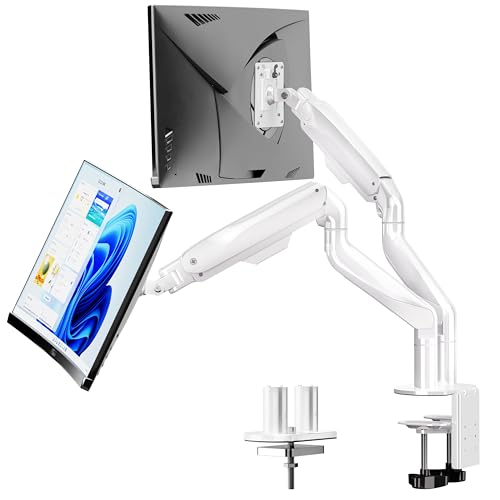
BIZUM Heavy Duty Ultrawide Monitor Arm (White)

Suptek Free-Standing Dual Monitor Stand (ML6802)

VIVO Dual Monitor and Laptop Mount Kit

HUANUO FlowLift Pro Dual Monitor Mount

HUANUO Dual Monitor Mount, 22 lbs per Arm

ARES WING Dual Monitor Wall Mount for Ultrawide Screens

VIVO Pneumatic Arm Dual Ultrawide Wall Mount (MOUNT-V120K)

HUANUO FlowLift Dual Monitor Stand, Full Motion
The Strengths Of Each Pick
This HUANUO entry earns its slot by rethinking the classic side-by-side layout. Instead of two arms reaching outward, it stacks your monitors vertically on a single column, which is a clever move if your desk is deep enough front-to-back but cramped left-to-right. For anyone working from a narrow 48-inch surface, that vertical lift changes everything; one screen sits at eye level, the other floats above for reference docs or chat windows.
It accepts screens from 17 to 32 inches and up to 19.8 lbs per arm, so most mainstream office panels fit comfortably. Tilt, swivel, and full rotation are all there, which means portrait mode is on the table for coding, reading long PDFs, or editing vertical video. The trade-off is that stacked ergonomics require a deeper desk so the front screen doesn’t crowd your keyboard.
Notable Gains
- Vertical stacking frees up left-to-right desk space for notebooks, lamps, or a second keyboard.
- Supports a healthy 19.8 lbs per arm, covering most 27- and 32-inch office monitors on the market.
- Full VESA 75/100 compatibility, the two mounting hole patterns every mainstream flat-panel uses.
- Rotation to portrait orientation, which is genuinely useful for document work and spreadsheet scrolling.
Things To Consider
- Requires a desk with enough front-to-back depth so the front screen does not collide with your keyboard.
- No mention of a built-in cable channel, so owners commonly route ties along the column themselves.
Who It Suits Best
This stacked mount works well for analysts, writers, and developers who want portrait rotation on a narrow desk and don’t mind giving up some keyboard clearance.
Where Another Pick Suits Better
Choose the HUANUO Premium Dual Monitor Mount with USB (HNDS7) instead for a wider ultrawide setup where side-by-side positioning matters more than vertical lift.
The HNDS7 sits in HUANUO’s upper tier, and you can see where the extra effort went. Solid aluminum arms, a wider base footprint, and a dual C-clamp mounting system give it noticeably more confidence when carrying heavy ultrawide panels. Each arm is rated to 26.4 lbs, which is enough headroom for a 34-inch curved ultrawide without that sinking-screen feeling during the workday.
The integrated USB pass-through is a small touch that pays off daily: a single cable reaches the hub, then your peripherals plug into the mount itself. Screen range runs from 13 to 40 inches, so it covers everything from a compact side panel to a wide main display. The clamp and grommet base options give flexibility on thicker desks or those with cable-routing holes already cut.
Key Advantages
- Dual C-clamp design adds lateral stability for heavier screens where single-clamp mounts sometimes drift.
- 26.4 lbs per arm supports ultrawide curved panels that overwhelm lighter mounts.
- Integrated USB hub reduces cable clutter running to the back of your PC.
- VESA 75 and 100 compatibility covers virtually every flat-panel on the consumer market.
Points To Keep In Mind
- Clamp installation requires a sturdier desk, ideally wood; glass tops need a grommet hole or a different base.
- Wider arm span takes up more rear-desk space than compact gas-spring designs.
Right Fit For
Owners of ultrawide panels between 30 and 40 inches who want a clamp-mounted rig with extra USB connectivity and don’t mind a heavier installation footprint.
Skip It When
Step up to the BIZUM Heavy Duty Ultrawide Monitor Arm (White) if you want even higher per-arm capacity, since it handles up to 33.1 lbs per arm and screens up to 42 inches.
BIZUM built this mount around one core idea: bigger screens, heavier arms, no drama. The aviation-grade aluminum construction and dual C-clamp base pair up to support 33.1 lbs per arm, which is enough to hold a 42-inch curved panel without the joint slowly drifting down through the afternoon. It targets users with serious ultrawide gaming monitors or color-grading displays where weight adds up fast.
Full articulation covers the standard tilt-swivel-rotate range, and the larger base footprint prevents the wiggle that lighter mounts develop when you push a panel to the side. The white finish also matters for anyone running a bright, minimalist studio aesthetic. You get the same VESA 75/100 compatibility as the rest of the field, plus a grommet option for those with pre-drilled desks.
Points In Its Favor
- 33.1 lbs per arm is the highest rated capacity on this list, comfortable for 38- to 42-inch curved panels.
- Aviation-grade aluminum adds long-term durability where cheaper steel arms develop joint play.
- Dual C-clamp and grommet base options accommodate a wider variety of desk thicknesses.
- Clean white finish suits bright or studio-style workspaces.
Honest Caveats
- Larger base footprint takes up more desk real estate behind the screens.
- White finish may show dust and fingerprints more visibly than matte black.
Who Should Grab It
Power users running heavy curved panels in the 38- to 42-inch range, especially those with bright minimalist studios where the white finish fits the aesthetic.
Look Elsewhere When
The HUANUO Premium Dual Monitor Mount with USB (HNDS7) is a smarter pick if your screens are lighter and you want built-in USB connectivity without paying for extra load capacity you won’t use.
Most dual mounts clamp onto your desk, which is a problem if your desk is glass, particleboard, or a rental you cannot drill. Suptek sidesteps that entirely with a weighted free-standing base. You set it down, tighten the column, and the rig holds itself up. For shared workspaces or anyone who moves their setup seasonally, that portability is more useful than it sounds.
Each arm carries up to 22 lbs and accommodates screens from 17 to 32 inches, so most office and gaming monitors sit comfortably. The center pole runs an extra-tall 31.5 inches, which lets you stack the top screen higher than typical gas-spring designs, useful when you want both panels close to eye level. The base itself adds weight and footprint, so factor that into tighter setups.
What Earns Its Place
- Free-standing base means no clamping, drilling, or grommet holes required.
- 22 lbs per arm covers mainstream 27- and 32-inch panels without strain.
- Extra-tall 31.5-inch pole gives more vertical adjustment than typical dual-arm columns.
- Integrated cable management keeps the back of the column clean.
Possible Compromises
- Weighted base adds bulk behind the monitors and reduces usable desk depth.
- Moving the unit requires lifting the entire base, which can feel awkward at full monitor load.
Made For
Renters, glass-desk owners, and shared office users who cannot drill into their work surface and want a mount that travels when they do.
Reach For A Different Pick When
The HUANUO FlowLift Pro Dual Monitor Mount is a better fit for small 13- to 27-inch panels if a tool-free clamp install fits your desk.
VIVO’s kit is the only option here built around a three-screen setup: two monitors plus a laptop tray. The ventilated 14 by 12-inch tray accepts laptops up to 27 inches and 22 lbs, which covers most mobile workstations without thermal throttling. Designers, coders, and remote consultants who run a laptop as their main machine get a unified rig instead of a separate stand cluttering the desk.
The dual monitor arms share the same articulation language as the rest of the VIVO lineup: 360-degree rotation, generous tilt, and side-to-side swivel. Screen range runs 13 to 27 inches per monitor, so very large panels are out, but the average 24-inch office setup works cleanly. The bundle format simplifies ordering since everything arrives in one box.
Everyday Perks
- Laptop tray adds a third ergonomic screen position without buying a separate stand.
- Ventilated tray design helps airflow for slim laptops under sustained load.
- All-in-one bundle means a single install process instead of mixing brands.
- Standard VESA 75/100 mounting across both monitor arms.
Worth Noting
- 27-inch monitor ceiling is smaller than most of the other picks on this list.
- Laptop tray positioning may take trial and error to align with eye-level monitor height.
Best Suited To
Remote workers using a laptop as their primary machine who want a unified, adjustable three-screen rig on a single clamp base.
Consider Something Else When
The HUANUO Dual Monitor Mount with 22 lbs per Arm is a cleaner fit for a pure dual-monitor setup without the laptop tray taking up pole space.
The FlowLift Pro skips the Allen key for the VESA plate, which sounds minor until you’ve fumbled with tiny screws behind a monitor. Its tool-free mounting uses a click-in plate system that snaps the screen onto the arm in seconds. For anyone who moves their rig, swaps monitors seasonally, or simply hates tools, that single design choice pays off every time you adjust.
MechaSpring articulation refers to the internal spring mechanism that holds each arm’s position. You push the monitor up, it stays; you pull it forward, it stays; no clamp-tightening required. Each arm caps at 15.4 lbs, which fits most 24- and 27-inch office panels comfortably. The 13 to 27-inch screen range confirms the small-to-mid-panel focus.
The Value In It
- Tool-free VESA plates eliminate the screwdriver step that frustrates first-time installers.
- MechaSpring joints hold position without constant re-tightening throughout the day.
- Compact arm geometry suits desks under 48 inches wide.
- Full tilt, swivel, and rotation across both arms.
Small Caveats
- 15.4 lbs per arm rules out heavier 32-inch panels or ultrawides.
- Recommended only for wood desks, since the clamp works best on solid wood edges.
Who Will Love This
Anyone running 24- or 27-inch office monitors who values quick tool-free installation over heavy-duty load capacity, particularly on wood desks.
A Better Fit Elsewhere
Step up to the HUANUO Dual Monitor Mount with 22 lbs per Arm for a similar form factor with noticeably higher load capacity for 32-inch panels.
Aerospace-grade aluminum is the headline feature here, and it shows up where it counts: joint stiffness. Cheaper steel arms develop wobble over time as the internal springs settle, but the aluminum frame on this HUANUO resists that gradual loosening. For a 32-inch panel that weighs north of 15 lbs with a stand, that rigidity translates to a screen that stays where you put it.
At 22 lbs per arm, capacity lands comfortably above what most 32-inch panels weigh, giving you real headroom. Standard VESA 75 and 100 mounting keeps it compatible with the vast majority of flat-panels, and the tilt, swivel, and rotation range covers the ergonomic adjustments a remote worker actually uses. The clamp-and-grommet base handles both common install scenarios.
Where It Delivers
- Aerospace aluminum resists the joint sag common in cheaper steel arms.
- 22 lbs per arm gives generous headroom for standard 32-inch office monitors.
- Clamp or grommet base options suit desks with or without pre-drilled holes.
- Standard VESA 75/100 fits virtually every mainstream flat-panel.
Areas To Watch
- Does not specify ultrawide or curved-panel support beyond standard flat screens.
- Joint tension may require occasional re-adjustment after months of daily repositioning.
Perfect Match For
Remote workers and small-office setups running standard 27- to 32-inch flat panels who want a sturdy aluminum mount without paying for ultrawide-specific capacity.
Swap It Out When
The BIZUM Heavy Duty Ultrawide Monitor Arm (White) handles curved and ultrawide panels more confidently if your screens weigh above 20 lbs each.
Wall mounts change the math entirely. ARES WING’s dual arm pushes screen compatibility up to 57 inches, which is the largest range in this roundup, and each arm supports 60 lbs (22 kg for curved screens). For sim-racing enthusiasts, content creators, and anyone running a true super-ultrawide, this is the load class most desk mounts cannot match.
The bearing-head joint is the standout engineering detail: it lets you pivot a 50-inch panel with one finger rather than fighting spring tension. The wall-mount format also clears your desk entirely, which matters for racing wheels, drafting tables, or any workflow where the surface needs to stay open. The trade-off is the installation, since the mount needs solid wall anchoring rather than just a desk edge.
Strengths Worth Knowing
- Supports screens up to 57 inches, covering the largest consumer ultrawides on the market.
- 60 lbs per arm handles super-ultrawide curved panels that overwhelm desk mounts.
- Bearing-head pivot adjusts smoothly under heavy loads.
- Wall-mount format frees the entire desk surface for other tools.
Trade Offs
- Requires secure wall anchoring into studs or masonry, which limits placement options.
Built With In Mind
Sim-racing enthusiasts, colorists, and content creators running super-ultrawide panels up to 57 inches who want the desk surface cleared entirely.
Not Your Match When
Choose the VIVO Pneumatic Arm Dual Ultrawide Wall Mount (MOUNT-V120K) instead for a more compact wall-mounted setup with gas-spring articulation on screens up to 49 inches.
VIVO’s pneumatic (gas-spring) version brings that smooth, counterbalanced feel you expect from premium monitor arms. Push the screen up, it floats; pull it forward, it drifts into place without a fight. For users who reposition their monitors throughout the day, that level of articulation is genuinely habit-forming. The 33.5 lbs per arm capacity covers most ultrawides on the market without strain.
Installation goes into wood studs or concrete and brick, but the spec sheet explicitly excludes drywall-only mounting. That detail matters: drywall alone will not hold a 49-inch panel over time. Cast aluminum arms provide scratch resistance and durability under repeated motion. The 49-inch (stacked) and 38-inch (side-by-side) range tells you this mount is tuned for ultrawide, not standard 16:9 panels.
What Pays Off
- Pneumatic gas-spring arms glide under load rather than fighting spring tension.
- 33.5 lbs per arm handles most ultrawide monitors on the market.
- Cast aluminum construction resists wear from daily repositioning.
- Supports stacked 49-inch configurations for vertical workspace layouts.
Practical Considerations
- Must anchor into wood studs or masonry, never drywall alone, which limits placement.
- Pneumatic arms may need occasional gas-pressure adjustment after years of daily use.
Whose Shelf It Belongs On
Ultrawide owners with a sturdy stud-framed or masonry wall who want premium gas-smooth articulation on screens up to 49 inches.
Another Choice May Suit
The ARES WING Dual Monitor Wall Mount is a stronger fit for super-ultrawide panels above 49 inches, since it handles up to 57 inches.
The original FlowLift rounds out the list with the broadest mainstream screen compatibility of any HUANUO mount here. It carries 4.4 to 19.8 lbs per arm, fits 13 to 32-inch monitors, and uses both C-clamp and grommet bases. For mixed-use home offices where one screen might be a work panel and the other a casual gaming display, that range keeps the mount relevant through equipment swaps.
Full motion articulation covers the same tilt-swivel-rotate language as the rest of HUANUO’s lineup, and the gas-spring design keeps position drift minimal. For someone upgrading from stock monitor bases for the first time, the FlowLift is a sensible middle-of-the-road choice. It’s not the most specialized mount on this list, but it rarely fails to fit the panels a typical household owns.
Positive Points
- Broad 13 to 32-inch screen range covers nearly all home-office and gaming monitors.
- C-clamp and grommet base options handle different desk types.
- Full motion articulation keeps the mount useful across work, gaming, and creative tasks.
- 4.4 to 19.8 lbs weight range suits the most common flat-panel classes.
Where It May Fall Short
- 19.8 lbs ceiling rules out heavier 32-inch curved and ultrawide panels.
- Not designed for stacking, so vertical layouts are out of reach.
Who Should Grab It
First-time mount shoppers with mainstream 24- to 27-inch panels who want a versatile, full-motion mount without paying for ultrawide-specific capacity.
Where A Sibling Pick Shines
The HUANUO FlowLift Pro Dual Monitor Mount is a cleaner fit if your screens are 27 inches or smaller and you specifically want tool-free VESA plates.
What To Match Before Buying Dual Monitor Mounts
Screen Size And Weight Capacity
The first filter is straightforward: confirm your monitor’s VESA pattern (the four-hole mounting pattern on the back, standardized at 75x75mm or 100x100mm on consumer panels) and its weight without the stand. Each mount lists a per-arm weight limit, and exceeding it usually means the arm drifts down through the day. For curved ultrawides, leave at least 20% headroom under the listed capacity since curved panels concentrate leverage at the joint.
Desk Type And Mounting Style
Wood desks take a C-clamp cleanly. Glass desks usually need a grommet hole or a free-standing base like the Suptek ML6802. Thick desks (over 3 inches) may require longer clamp bolts that ship separately. Wall mounts demand studs or masonry, never just drywall. If your desk moves often, portability matters more than raw capacity.
Articulation Range And Daily Habits
Tilt, swivel, and rotation sound similar across listings, but the practical range varies. Users who swap between landscape and portrait for coding or reading benefit from full 90-degree rotation. Users who only nudge screens for glare should prioritize smooth tilt resistance instead. Gas-spring and pneumatic mounts cost more but feel noticeably better under repeated motion.
Cable Management And Build Materials
Aluminum arms resist joint sag better than steel over years of use. Cable channels integrated into the arm reduce the zip-tie pile behind your desk. For wall mounts, cast aluminum adds scratch resistance when you reposition a heavy panel weekly.
Key Considerations Across These Picks
Where Shoppers Go Wrong
The most common mistake is buying by screen size alone and skipping the weight check. A 32-inch panel can weigh anywhere from 10 to 25 lbs depending on whether it’s flat, curved, or a gaming model with a heavy metal backplate. Always verify the spec sheet of your actual monitor against the mount’s per-arm rating. The second pitfall is ignoring desk thickness: a clamp that fits a 1-inch top won’t fit a 3-inch butcher block, and the product photo rarely tells you the limit.
When Paying More Pays Off
Higher-tier mounts earn their price through joint materials, gas-spring articulation, and weight headroom. For users who adjust their screens multiple times a day, the pneumatic feel of the VIVO MOUNT-V120K or the aluminum stiffness of the HUANUO 22 lbs-per-arm mount quickly becomes worth the upgrade. If your screens stay put once positioned, a standard clamp mount handles the job without the extra cost.
Frequently Asked Questions
What Does VESA 75/100 Mean For Monitor Mounts?
VESA refers to the standardized four-hole mounting pattern on the back of most flat-panel monitors. The 75 and 100 numbers indicate the millimeter spacing between the holes (75x75mm or 100x100mm). Nearly every consumer monitor on the market uses one of these two patterns, so a dual monitor mount that lists VESA 75/100 compatibility fits the vast majority of screens without an adapter.
Can One Mount Hold Two Different Sized Monitors?
Yes, most dual monitor mounts accept asymmetric setups as long as each monitor individually falls within the arm’s size and weight limits. The key check is per-arm weight, since a heavier 27-inch panel paired with a lighter 24-inch panel still works if both fall under the rated capacity. Mixed curved and flat setups also work, though you may need to adjust tilt tension individually.
Do Dual Monitor Mounts Need A Specific Desk Thickness?
Most clamp-style mounts fit desks between roughly 0.5 and 3.5 inches thick, but the exact range varies by product. Wood desks are the easiest fit. Glass desks usually require a grommet hole or a free-standing base. Wall mounts bypass desk thickness entirely but require solid wall anchoring into studs or masonry, never drywall alone.
Are Free-Standing Mounts Stable Enough For Daily Use?
Free-standing mounts like the Suptek ML6802 use a weighted base to stay planted, and they handle daily repositioning well within their weight limits. The trade-off is added bulk behind the monitors and reduced desk depth, since the base occupies surface area. For most home office users, the stability is more than adequate, and the no-drill convenience is worth the footprint.
How Much Weight Can A Dual Monitor Mount Hold Per Arm?
Per-arm capacity on consumer dual monitor mounts typically ranges from 15 to 60 lbs, depending on the model. Mid-range mounts cluster around 19 to 26 lbs per arm, which covers most 24- to 32-inch office monitors. Heavy-duty and wall-mounted options push higher to support ultrawide and super-ultrawide curved displays that exceed 25 lbs each.
Bottom Line
The right dual monitor mount depends less on brand hype and more on three specifics: your monitor’s VESA pattern and weight, your desk’s mounting style, and how often you reposition the screens. Match those three against the picks above and the right choice usually surfaces quickly. Start with the load capacity, confirm the desk fit, and pick the articulation style that matches your daily workflow.