Remote workers, frequent travelers, and anyone juggling endless browser tabs know the constant tab-switching grind. A second (or third) screen solves that, but most setups stay anchored to a desk. I’ve pulled together ten portable dual screen computers and screen extenders that travel well, plug in quickly, and hold up to daily use. The list spans ultra-light 14-inch clip-ons, full 23.8-inch travel panels, and foldable dual-screen kits for serious multitaskers.
The Shortlist At A Glance

PORTAMAX Triple Laptop Screen Extender 14″ FHD 1080P IPS
VisionOwl 15.6 Inch 1080P FHD Travel Monitor

VisionOwl 23.8 Inch Portable Monitor with Kickstand

cocopar 15.6 Inch IPS Travel Monitor

Upperizon Foldable Dual Screen 15.6 inch
DZVW 14″ FHD 1080P IPS Dual Laptop Monitor Extender

Blackview 14″ 1080P FHD IPS Triple Portable Monitor

DZVW 15.6″ FHD 1080P Triple Monitor Extender
DZVW 1.3lb Ultra Lightweight 14″ 1080P FHD Portable Monitor

AOC 14″ Laptop Screen Extender
Inside Each Recommended Option
The PORTAMAX turns a single 13-to-17-inch laptop into a three-screen workstation without the usual mounting headaches. It uses a USB-C plug-and-play connection, which is a cable standard that carries both video signal and power through a single port, so most users avoid the driver dance entirely. Compatibility spans Windows, Mac, Android, and even the Nintendo Switch, which makes it one of the more flexible picks in this lineup.
For someone who lives in spreadsheets and browser tabs, the FHD 1080P IPS panel delivers sharp text and stable color from wider angles than older TN screens. The IPS (in-plane switching) technology keeps colors consistent when your head moves, which matters during long review sessions. The whole unit weighs around three pounds, light enough for a daily commute bag.
The Value In It
- Triple-screen setup from a single USB-C connection keeps cabling minimal
- Wide device compatibility including Mac, Windows, Android, and Switch
- 1080P IPS panel renders spreadsheets and code with reliable color accuracy
- Lightweight build at roughly three pounds stays manageable in a backpack
Worth Noting
- Some laptops need both USB-C ports occupied to power two external panels
- 14-inch displays feel compact for color-grading work in a studio
Feature Snapshot
Who It Suits Best
Remote workers and analysts who want a three-screen setup they can fold into a backpack between meetings.
Where Another Pick Suits Better
The VisionOwl 23.8 Inch Portable Monitor suits designers who need a single larger canvas rather than three smaller ones.
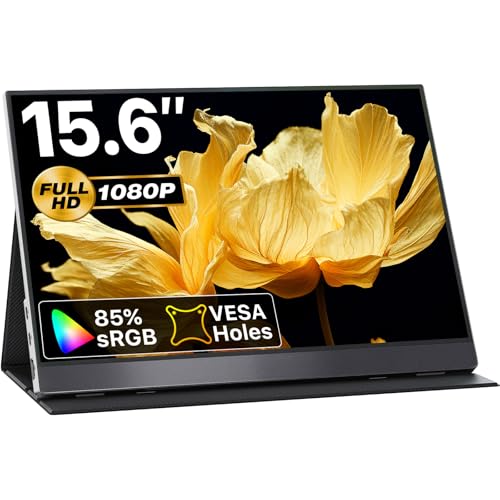
The VisionOwl 15.6-inch is a standalone second screen rather than a clip-on extender, and that distinction matters in real use. It pairs with laptops, MacBooks, PS5, and Xbox through USB-C or HDMI, and the VESA mountable back (VESA is a standard pattern of screw holes on the back of monitors that lets them attach to arms and wall mounts) means it can join a permanent desk setup when you get home. The included cover doubles as a stand, which is a thoughtful touch for hotel desks and café tables.
Color coverage hits 85% sRGB (sRGB is a standard color space used across most web content and apps, so a higher percentage means more accurate colors), which is solid for photo edits and decent for casual design work. The IPS panel keeps viewing angles honest, so colors don’t shift when you angle the screen on a cramped tray table.
Benefits That Matter
- Single 15.6-inch panel with 85% sRGB handles creative work with reasonable accuracy
- HDR and FreeSync support (FreeSync syncs the display refresh rate to your graphics card, reducing screen tearing during games) smooths out console and PC gaming
- Built-in speakers keep travel setups lighter without an extra audio accessory
- VESA mountable back integrates with existing monitor arms at home
Trade Offs
- Only adds one screen rather than transforming the laptop into a triple setup
- HDR brightness is modest, so daylight visibility is limited without shade
Quick Technical Notes
Made For
Creatives and remote workers who want a clean single-panel second screen that doubles as a console display.
Consider Something Else When
The Upperizon Foldable Dual Screen delivers two panels at once, which serves stock traders running multiple charts far better than a single screen.
The 23.8-inch VisionOwl is the largest panel on this list, and it leans into the performance lane. The 2K resolution (2560×1440) gives you noticeably more workspace than 1080P without stepping into 4K territory, which keeps mid-range graphics cards comfortable. A 180Hz refresh rate is overkill for spreadsheets but excellent for high-frame-rate gaming and smooth scrolling through long documents.
The built-in kickstand removes the need to carry a separate cover or mount, and color coverage at 130% sRGB gives creative work a wider palette to play with. The 23.8-inch form factor is closer to a desktop monitor than a travel companion, so I think of this as a hybrid pick for someone with a hybrid lifestyle.
The Practical Payoff
- 2K resolution strikes a useful middle ground between clarity and GPU demand
- 180Hz refresh rate handles fast-scrolling code or competitive gaming
- 130% sRGB coverage supports photo and video work with richer color
- Built-in kickstand eliminates a separate accessory to lose in transit
Room For Improvement
- 23.8-inch size weighs more and demands more desk space than 14-inch extenders
- Real-world gaming at 180Hz typically requires a discrete GPU (a dedicated graphics card separate from the laptop’s main processor)
Feature Card
Best Suited To
Designers, video editors, and engineers who need one big, color-accurate second screen at home or a co-working space.
Skip It When
The DZVW 1.3lb Ultra Lightweight extender suits commuters who need a featherweight setup over a large panel.
The cocopar 15.6-inch has been a quiet workhorse in the portable monitor space, and it covers the basics without drama. The IPS panel delivers 1080P with stable viewing angles, and the included kickstand handles most desk surfaces. It supports both extend and mirror modes (extend treats the second screen as extra desktop space, while mirror duplicates your laptop display for presentations), which covers both productivity and presentation use cases.
Compatibility runs across MacBook, Surface, Lenovo, HP, Dell, ASUS, and PS4/5, so this monitor rarely meets a device it refuses. The VESA mountable back adds the option of attaching it to a monitor arm when you settle into a longer-term desk.
Useful Strengths
- Broad compatibility across major laptop brands and game consoles
- Extend and mirror modes handle productivity and presentation needs
- VESA mountable back offers a permanent installation path
- 15.6-inch size matches most laptop screens for natural alignment
Honest Caveats
- Color coverage is standard, so photo pros may want a wider-gamut panel
- The included kickstand is functional but lacks the finer tilt angles some users prefer
Right Fit For
Hybrid office workers who toggle between home setups, conference rooms, and hotel desks and want a consistent second screen.
Look Elsewhere When
The VisionOwl 15.6-inch travel monitor offers HDR and FreeSync, which suits gamers and video editors more than the cocopar.
The Upperizon stands out by shipping two 15.6-inch panels that fold out from a single bracket, turning a laptop into a three-screen setup on demand. It uses DisplayLink technology (software that drives extra displays over USB by compressing the video signal), which is the only reliable way to run three external panels from most modern laptops. For stock traders and coders running multiple terminals, this is a genuine workspace upgrade rather than a convenience.
Color coverage reaches 90% sRGB, which is above the 15.6-inch extender average. The 60Hz IPS panel is fine for productivity and content consumption, though serious gamers will notice the limit. Folding flat into a single slab keeps travel practical.
Positive Takeaways
- Two 15.6-inch fold-out panels create a true three-screen workstation
- 90% sRGB color coverage is above average for this size class
- DisplayLink support enables triple-display output from most laptops
- Foldable design packs into a single slab for transport
A Few Limitations
- DisplayLink requires driver installation, which can be a hurdle for casual users
- 60Hz refresh is modest for fast-paced gaming
- Two-panel size adds weight compared to a single 14-inch extender
Spec Overview
Who Will Love This
Stock traders, financial analysts, and coders who run multiple terminals and need a portable triple-monitor rig.
A Better Fit Elsewhere
The PORTAMAX Triple Laptop Screen Extender is simpler to set up and suits users who prefer USB-C plug-and-play over DisplayLink drivers.
The DZVW 14-inch extender covers a wider compatibility range than most rivals, and that matters in mixed-OS households. It supports Windows, Mac, Chrome, and Android through HDMI, USB-A, and USB-C inputs, which sidesteps the single-cable limitation some extenders carry. For Chrome OS users in particular, this is one of the friendlier options I’ve seen.
The IPS panel delivers 1080P, and the design supports mirror, extension, and portrait modes (portrait mode rotates the screen vertically, useful for reading documents or long code files). The bracket fits laptops from 13.3 to 17 inches, so it grows with you if you upgrade machines.
What It Does Well
- Triple connection options (HDMI, USB-A, USB-C) cover older and newer laptops
- Chrome OS support opens up the category beyond Windows and Mac users
- Mirror, extension, and portrait modes adapt to different workflows
- Bracket fits 13.3 to 17-inch laptops for flexible upgrades
Points To Keep In Mind
- 14-inch panels pair best with 14-inch or smaller laptops for even alignment
- Some users report needing to test multiple cable configurations to get both displays running
Perfect Match For
Chrome and Windows users in mixed-device households who want maximum cable flexibility without a premium price tag.
Reach For A Different Pick When
The Blackview Triple Portable Monitor offers a more rugged shell for users who travel hard and want extra durability.
The Blackview leans into durability, and the design choice shows in the build. It uses a galvanized steel shell (steel coated with a layer of zinc to resist rust and scratches) rather than the plastic chassis common in this category, which is a meaningful upgrade for anyone who has cracked a screen in a backpack before. The matte finish resists fingerprints, which keeps the unit looking presentable in client meetings.
The 6-point mounting system and 90-degree adjustable stand create a stable platform on uneven surfaces like café tables and tray tables. Compatibility covers Windows, Mac, Android, and Switch over USB-C, so the cable situation stays simple.
Real-World Strengths
- Galvanized steel shell resists scratches and daily wear better than plastic
- 6-point mounting system holds steady on wobbly café and travel surfaces
- Matte finish hides fingerprints during client-facing work
- USB-C plug-and-play keeps cabling minimal across devices
Some Limits To Know
- Steel construction adds a small amount of weight versus all-plastic extenders
- 14-inch panels limit how much content fits on each side of the laptop
Built With In Mind
Frequent flyers, daily commuters, and field workers who need a second screen that survives a rough bag and a long trip.
Where A Sibling Pick Shines
The DZVW 1.3lb Ultra Lightweight extender beats the Blackview on portability for users who prioritize weight over durability.
The 15.6-inch DZVW triple extender steps up from the 14-inch sibling with larger panels, which makes a real difference for split-screen work. The extra screen real estate per side is welcome when you’re keeping documentation open on one panel and a working app on the other. The IPS panel keeps colors and viewing angles honest across the wide setup.
Plug-and-play installation keeps the setup short, and the ultra-slim profile matters when you’re sliding the unit into a laptop sleeve. The unit works for business travel, work-from-home, and study sessions, which is a wider use range than a pure productivity or pure gaming extender.
Where It Helps
- 15.6-inch panels offer more usable area per side than 14-inch models
- Plug-and-play setup avoids driver configuration delays
- Ultra-slim profile fits into a laptop sleeve alongside the host machine
- Multi-use appeal for business, study, and home office scenarios
Worth Bearing In Mind
- Two 15.6-inch panels add noticeable weight to a backpack
- 15.6-inch screens may feel oversized beside a 13-inch laptop
Whose Shelf It Belongs On
Programmers, content creators, and business travelers who want larger side panels and a single unit for multiple environments.
Swap It Out When
The DZVW 1.3lb Ultra Lightweight extender suits minimalists who prefer a featherweight single-cable solution over a heavier triple rig.
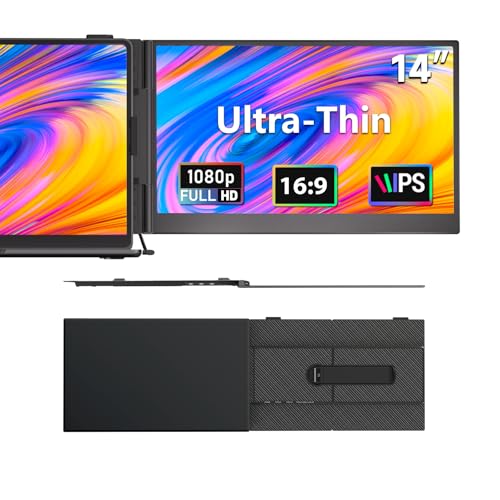
At 1.3 pounds and roughly 0.17 inches thick, this DZVW is the lightest extender in the lineup, and the difference shows up immediately in a shoulder bag. The 14-inch 1080P IPS panel delivers 16.7 million colors at 72% sRGB, which is modest but fine for document work, video calls, and casual content.
Plug-and-play over USB-C works with Windows, Mac, Android, and Chrome, so the device rarely meets a laptop it refuses. The thin frame keeps the unit low-profile in transit, and for anyone who counts grams in their daily carry, that’s the whole point.
Real Benefits
- 1.3-pound weight feels closer to a tablet than a monitor in transit
- 0.17-inch slim profile slides into sleeves without bulk
- USB-C plug-and-play covers Windows, Mac, Android, and Chrome
- 14-inch size pairs naturally with mainstream ultrabook screens
What To Weigh
- 72% sRGB color coverage is entry-level for creative work
- Single 14-inch panel adds one screen, not two or three
Who Should Grab It
Minimalists, daily commuters, and students who want the lightest possible second screen without giving up plug-and-play simplicity.
Another Choice May Suit
The Upperizon Foldable Dual Screen trades some portability for two full panels, which suits users who need more workspace over less weight.
AOC is a familiar name in monitors, and that brand recognition carries weight for shoppers who prefer an established name. The 14-inch extender fits laptops from 13 to 17.3 inches and turns the host machine into a triple-screen setup through a single connection. For office pros and students, the trade-off is straightforward: trust the brand, get a familiar install experience.
Plug-and-play keeps the setup short, which matters during a busy morning when nobody wants to fight display drivers. The 14-inch size pairs naturally with mainstream business laptops in the 14 to 15-inch range.
Useful Highlights
- AOC brand recognition adds confidence for first-time extender shoppers
- Plug-and-play setup avoids driver configuration delays
- Bracket fits 13 to 17.3-inch laptops for flexible pairing
- Triple-screen output suits spreadsheets, documents, and reference tabs
Less Ideal Details
- Brand familiarity comes with fewer unique features than specialty rivals
- 14-inch panels are smaller than 15.6-inch triple-screen options
The Right Fit
Office professionals and students who value brand trust and a simple setup over maximum screen real estate.
Not Your Match When
The Blackview 14″ Triple Portable Monitor is the stronger pick for users who want a steel-shell build and travel-grade durability.
What Matters Most Before Choosing Dual Screen Computers
The right portable screen hinges on how you actually work, not on which unit has the longest spec sheet. The single biggest fork is single panel versus multi-panel. A single 15.6-inch travel monitor (like the VisionOwl 15.6-inch) works beautifully for someone who mirrors presentations and edits documents on the road. A triple-screen extender (like the PORTAMAX or Upperizon) makes sense for spreadsheet-heavy roles where one screen is never enough.
Connection type is the next decision point. Pure USB-C plug-and-play is the easiest path, and most modern laptops support it. If your laptop is older or runs Chrome OS, an extender with HDMI and USB-A fallback (like the DZVW 14-inch dual extender) removes the compatibility gamble. DisplayLink units open triple-display territory on machines that don’t natively support it, but they add a driver step.
Size, weight, and durability trade off against each other. A 1.3-pound 14-inch extender disappears in a bag, while a 15.6-inch triple rig earns its keep through workspace but costs grams. Frequent flyers benefit from rugged builds like the Blackview, while commuters who walk from car to desk can prioritize thin-and-light designs.
Finally, color accuracy matters if your work touches photos, video, or design. For pure productivity, the 72 to 85% sRGB range common in this category is fine. Creatives should look at 90% sRGB or higher (like the Upperizon or VisionOwl 23.8-inch) for accurate color reproduction.
Key Considerations Across These Picks
Common Shopping Slip Ups
A common mistake is buying a triple-screen extender without checking whether the laptop has enough USB-C ports or bandwidth to drive two external panels. Some machines handle two, some handle one plus a hub, and a few handle none without DisplayLink. Check your laptop’s video output specs before committing to a triple rig.
Another trap is ignoring panel size relative to the host laptop. A 15.6-inch extender beside a 13-inch laptop creates an awkward, uneven look that also disrupts eye-line during long sessions. Matching the extender size to the laptop screen keeps the workspace visually balanced.
What The Higher Tier Buys
Premium options in this category typically deliver better color coverage, higher refresh rates, and sturdier materials. The VisionOwl 23.8-inch jumps to 2K with 180Hz and 130% sRGB, which is meaningful for creative work and gaming. The Blackview trades some grams for a galvanized steel shell that survives rougher travel.
The upgrade is worth it for users who push their screens hard: designers needing color accuracy, gamers wanting smooth motion, or road warriors who want a unit that lasts. For pure document and email work, the entry tier handles the job without the extra spend.
Frequently Asked Questions
Do portable screen extenders work with any laptop? Most modern laptops with USB-C, HDMI, or DisplayPort output work with portable extenders. Older laptops may need HDMI or USB-A fallback, which is why some models include multiple input options. Check your laptop’s video output specifications before buying.
How heavy are portable dual screen setups? Lightweight single extenders weigh around 1.3 pounds, while triple-screen kits can reach three to four pounds combined. The exact weight depends on the panel size and materials, so consider your daily carry weight limit.
Can I use a portable monitor for gaming? Yes, though refresh rate matters. Panels with 60Hz work for casual and console gaming, while 144Hz and above (like the VisionOwl 23.8-inch at 180Hz) suit competitive PC gaming. HDR and FreeSync support add smoother visuals in compatible titles.
Do these extenders need their own power source? Most USB-C plug-and-play models draw power through the laptop connection. Larger panels or triple-screen setups may need a separate power adapter for full brightness, especially when running both panels at once.
Is the color accuracy good enough for professional work? Entry-level extenders cover around 72% sRGB, which is fine for office work but limited for color-critical design. Premium options reaching 90% or higher suit photo and video editing with reasonable accuracy.
Closing Remarks
The best portable screen is the one that matches your actual work pattern rather than chasing the largest panel or the most features. Frequent travelers usually benefit from lighter single-panel or clip-on designs, while analysts and coders get the most from triple-screen kits that stay anchored to a desk. Match the extender’s connection type, panel size, and durability to your daily routine, and the upgrade pays off quickly in saved tab-switching time.