A wobbly monitor arm turns a productive morning into a slow-motion argument. Two screens held by separate stands eat the back edge of your desk, force cables across the surface, and drift out of alignment within a week. The right dual screen monitor mount solves all three problems at once: it frees surface space, keeps eye level honest, and finally makes the second screen feel like part of the setup rather than an afterthought.
Below is a shortlist built for the people who asked me about this most: remote workers splitting attention across Zoom and docs, coders running two IDE panels, traders with a chart pinned to a corner, and anyone whose desk doubles as a studio. Each pick handles a different shape of that problem, so the right one depends less on brand and more on your screens, your desk, and how you actually sit.
A Snapshot Of The Selections
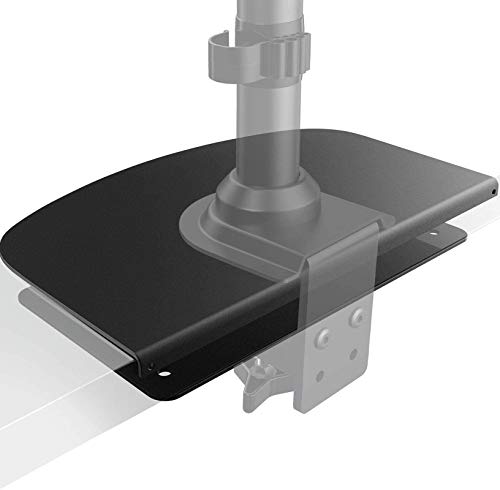
HUANUO Steel Monitor Mount Reinforcement Plate for Thin, Glass and Other Fragile Tabletop

WALI Monitor Mount Reinforcement Plate for Thin, Glass, and Other Fragile Table Tops

HUANUO Premium Dual Monitor Mount with USB, Height Adjustable, Holds 26.4lbs per Arm
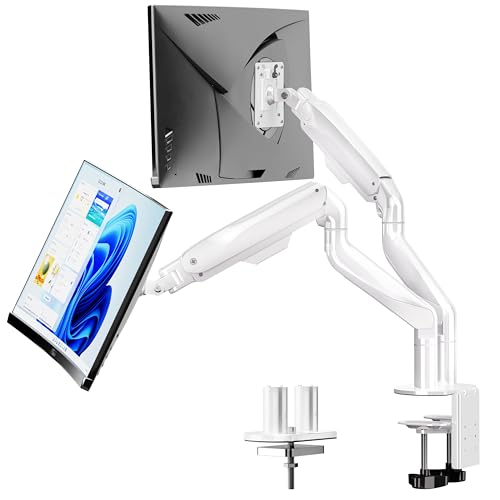
BIZUM Heavy Duty Ultrawide Dual Monitor Mount, Holds 33.1lbs per Arm, White

monTEK Freestanding Triple Monitor Stand for 17-32″ Screens, 22 lbs Each

monTEK Triple Monitor Stand for 17-32″ Screens, 22 lbs Each

monTEK Triple Monitor Mount for 13″-27″ Screens, Max 19.8 lbs Each Arm

Suptek Dual LED LCD Monitor Stand Free-Standing Desk Mount, Extra Tall 31.5″ Pole

HUANUO FlowLift™ Dual Monitor Stand, Fully Adjustable Gaming Monitor Desk Mount

HUANUO FlowLift™ Single Monitor Mount, 13 to 32 Inch Adjustable Monitor Arm
A Breakdown Of The Leading Choices
A steel reinforcement plate sounds unglamorous until you own a glass-top desk and watch a C-clamp slowly crush the edge. This HUANUO plate spreads the load from the clamp across a wider footprint, so the bracket stops chewing into the surface. It’s the kind of accessory that shows up in the box, gets ignored for a week, then becomes the reason nothing wobbles.
The build is straightforward steel with a finish that matches most clamp hardware. If your setup already leans on a standard C-clamp mount and your desktop is thin, glass, or just brittle, this plate keeps the whole arm honest. For solid wood desks you can skip it, but for everything else it earns its place.
Everyday Perks
- Distributes clamp pressure so a thin or glass surface isn’t slowly deformed
- Steel construction that pairs well with most C-clamp mounts on the market
- Adds very little height, so ergonomic adjustment barely shifts
- Useful insurance for desks you don’t want to drill into
Things To Consider
- You’ll still want to measure your base plate against your desk footprint before installing
- Adds a small step to setup if you’ve never installed a clamp before
Whose Desk It Belongs On
A glass-top or hollow-core desk owner who already owns a clamp-style dual mount and needs to protect the surface underneath.
A Better Fit Elsewhere When
If you don’t yet own a clamp mount and need the whole package, the WALI reinforcement plate below is the closer sibling.
WALI’s reinforcement plate is the all-steel sibling to the HUANUO plate above, with a slightly larger mounting surface and the option to install through a grommet hole rather than a clamp. For desks with a pre-cut cable hole, that flexibility matters, because the plate can bolt straight down instead of relying on clamp pressure alone.
The plate is finished in a low-key black that disappears under the mount, and the dimensions fit most generic clamp and grommet brackets on the market. If your desk is one wrong move away from a crack, this is the kind of low-cost insurance that pays off the first time a heavy dual arm lands on it.
Good Reasons To Consider
- All-steel build that handles heavier dual arms without flex
- Works with both grommet and C-clamp installs
- Low-profile finish that doesn’t fight your monitor’s aesthetic
Trade Offs
- You’ll need a properly sized grommet hole for the bolt-through method, or a clamp that lines up with the plate
- Heavier than the HUANUO plate, so removing and re-installing takes a little more effort
Quick Facts
Who It Suits Best
Shoppers with a glass, thin wood, or hollow-core desk who want either a clamp install or a bolt-through grommet install from the same plate.
Consider Something Else When
Skip it for the HUANUO plate above if your desk is solid wood and you only need light clamp protection at a lower price point.
This is the dual mount I’d hand to a friend who runs Zoom on one screen and a doc on the other for eight hours a day. The HNDS7 from HUANUO pairs solid aluminum arms with a built-in USB hub on the base, which sounds small until you try to plug a webcam and a wireless charger in without crawling under the desk.
It supports two screens between 13 and 40 inches at up to 26.4 pounds per arm, with VESA 75×75 or 100×100 patterns. The dual C-clamp base is genuinely wider than older single-clamp designs, which is how it gets away with the higher weight rating without tipping.
Well-Handled Touches
- Built-in USB ports save a hub on the desk and keep cables tidy at the base
- Holds larger 27″ to 32″ productivity monitors without sag at full extension
- Smooth height adjustment along both arms for matching eye lines across two screens
- Clamp and grommet base options so it adapts to common desk styles
Points To Note
- Larger footprint than a single-clamp dual mount, so shallow desks may not clear it
- The integrated USB hub adds wiring that you’ll want to route neatly from day one
Feature Card
Made For
Remote workers and home-office power users running two mid-to-large monitors who want a tidy base with USB ports built in.
Where Another Pick Suits Better
If your screens are heavier ultrawides, the BIZUM mount below lifts more weight per arm and feels calmer under that load.
Ultrawide monitors have a habit of exposing weak dual mounts the first time you push them up to standing-desk height. BIZUM’s heavy-duty mount is built for that fight: aviation aluminum arms, a wider dual C-clamp base, and a 33.1-pound-per-arm rating that leaves headroom for screens most other mounts refuse to lift.
It fits flat and curved displays between 17 and 42 inches, and uses the same VESA 75×75 or 100×100 patterns as the rest of this list. The white finish is a small touch, but it matters if your setup skews light and minimal.
A Few Strong Suits
- Holds 33.1 lbs per arm, comfortably above most consumer ultrawide weights
- Aviation aluminum arms that resist flex when the monitor is extended forward
- Wider dual-clamp base for stability on common desk thicknesses
- White finish that suits light, modern setups
Worth Bearing In Mind
- Heavier build means a more involved install than lighter mounts in this list
- The footprint is generous, so shallow or small desks may need a rethink
Right Fit For
Anyone running a single ultrawide or two large curved displays who needs a mount rated well above the screen weight for a calm setup.
Not Your Match When
Pick the HUANUO HNDS7 above instead if your monitors are standard 27″ panels and you’d rather have integrated USB ports than extra weight capacity.
Freestanding mounts are the answer to a question I get every week: how do I add a third screen without drilling into a desk I don’t own. This monTEK stand sits on the surface with its own base, holds three screens up to 22 pounds each, and leaves zero holes behind when you move on.
It works with displays from 17 to 32 inches using VESA 75×75 or 100×100 mounts, and the integrated cable management keeps the back of the desk looking intentional instead of like a bowl of wires.
Key Advantages
- No clamp or grommet required, so it works on any flat surface
- Holds three monitors at once for trading, editing, or dev workflows
- Cable routing built into the arms reduces visible wire clutter
- Easy to relocate when your lease changes or your desk layout shifts
Honest Caveats
- The base takes up desk real estate that a clamp mount would leave clear
- 22 lb per-arm limit means heavier ultrawides are out of reach
Best Suited To
Renters, hot-deskers, and shared-office workers who can’t drill but still want a true three-screen setup.
Look Elsewhere When
Choose the BIZUM mount above if you have a desk you can clamp into and your screens are heavy ultrawides.
This is the clamp-style sibling to the freestanding triple stand above, and the one to reach for when you want three screens but you also want a clean desk surface. It bolts to the back edge of the desk and lifts the same 17 to 32 inch displays at up to 22 pounds per arm.
The arm geometry is identical to monTEK’s other triple designs, so adjustment feel and tilt range will feel familiar if you’ve used a similar brand before. The trade-off is installation: a clamp is more secure but requires a desk you can tighten against.
Where It Helps
- Frees the desk surface that the freestanding version occupies
- Triple-screen layout for traders, streamers, and video editors who need side panels
- Standard VESA fit keeps it compatible with most mainstream monitors
- Integrated cable management along the arms
Small Caveats
- Clamp mount isn’t an option on glass or extreme-edge desks without a reinforcement plate
- 22 lb per arm means heavier 32″ screens need to be checked against the rating before buying
Perfect Match For
Productivity power users with three mid-sized monitors and a desk they can clamp into securely.
Skip It When
The monTEK freestanding triple stand above is a better pick if drilling or clamping isn’t an option in your workspace.
The smaller sibling of the monTEK triple lineup, this mount trades ultrawide capacity for a tighter footprint. It fits screens from 13 to 27 inches at up to 19.8 pounds per arm, which covers the majority of compact home-office and dorm setups without overbuilding.
It’s the option I’d point a student or a developer with a small standing desk toward, since the arms stay manageable at full extension and the install is forgiving on thinner tabletops.
What Stands Out
- Lower weight rating suits smaller 24″ and under screens without overpaying for unused capacity
- Compact arms keep the side-to-side footprint reasonable on a small desk
- Compatible with VESA 75×75 or 100×100 for mainstream monitors
- Useful for triple coding monitors or 13″ travel displays
Room For Improvement
- 19.8 lb per arm rules out 27″ panels at the heavier end of the spec range
- Triple-screen setups at 27″ can crowd smaller desks if monitors aren’t sized down
Feature Snapshot
Who Will Love This
Students, junior developers, and anyone building a triple-screen setup from smaller 24″ monitors or a mix of laptop-side displays.
Another Choice May Suit
The monTEK 17-32″ triple mount above handles larger screens if your monitors sit at the upper end of the size range.
The Suptek ML6802 is the odd one in this lineup, and that’s why it’s worth a look. Instead of two side-by-side screens on articulated arms, it stacks two monitors vertically on a tall center pole, which is exactly what coders monitoring logs and analysts scanning tickers sometimes prefer.
It fits screens up to 32 inches at 22 pounds each on a free-standing base, with 360-degree rotation and ±45 degrees of tilt and swivel per arm. The 31.5-inch pole gives meaningful vertical reach, so eye-level adjustment is possible without stacking books.
The Upside
- Vertical layout suits workflows that scroll vertically more than horizontally
- Free-standing base means no clamp pressure on your desk
- Tall pole offers more height range than most dual mounts
- Full-motion arms for tilting and swiveling each screen independently
Things To Weigh Up
- Vertical stacking takes some getting used to after years of side-by-side work
- Free-standing base occupies a slice of desk space behind the monitors
Who Should Grab It
Anyone whose primary use case involves long documents, code, or stacked dashboards and prefers a vertical workflow.
Reach For A Different Pick When
Pick the HUANUO HNDS7 above if you want a conventional side-by-side layout instead of a stacked one.
HUANUO’s FlowLift arms are the smoothest adjustment in this list, and that matters more than people expect. The gas-spring feel lets you push a screen up, pull it back, or rotate it a quarter turn with one hand, which is the kind of thing you stop noticing only after you’ve had it for a month.
The mount fits 13 to 32 inch screens weighing 4.4 to 19.8 pounds per arm, with VESA 75×75 or 100×100 mounting. The clamp and grommet base options cover most desk styles, and the cable channel along the underside of each arm hides the wiring for a clean profile.
Reasons It Performs
- One-handed adjustment makes repositioning between work and gaming painless
- Stable at any angle, so screens hold position without drift over a long session
- Cable management runs the length of each arm for a tidy back-of-desk look
- Fits both 60Hz office panels and high-refresh gaming monitors in the same size range
Less Ideal Details
- 19.8 lb per-arm cap rules out heavier 32″ ultrawides
- Gas-spring arms require occasional tension adjustment after months of use
Built With In Mind
Hybrid users who work on one screen and game on the other, and want a single mount that handles both smoothly.
Swap It Out When
Choose the BIZUM dual mount above if your screens are heavier ultrawides that exceed the FlowLift’s per-arm rating.
The single-arm version of the FlowLift earns its spot at the bottom of this list for a specific reader: someone who wants the smooth gas-spring feel and ergonomic flexibility of a premium arm, but only has one screen to mount right now. You can always add a second FlowLift later for a matched dual setup.
It fits 13 to 32 inch displays from 4.4 to 19.8 pounds, with the same VESA 75×75 or 100×100 patterns and the same clamp-and-grommet base as the dual version above.
Noteworthy Benefits
- Same one-handed adjustment feel as the dual FlowLift at a lower price
- Clean match if you later buy a second arm for a true dual setup
- Clamp and grommet install options for different desk styles
- Stable at any angle for long typing or reading sessions
Potential Sticking Points
- Carries the same 19.8 lb per-arm limit, so heavier ultrawides won’t fit
- Buying two singles can end up costing more than the dual FlowLift bundle
Key Specs
The Right Fit
Anyone who wants premium single-arm ergonomics today and the option to expand into a matched pair later.
Where A Sibling Pick Shines
Skip to the dual FlowLift above if you already know you’ll want two arms now, since the bundle pricing typically beats buying singles.
What Matters Most Before Choosing Dual Screen Monitor Mounts
The first decision is screen weight, not screen size. VESA 75×75 and 100×100 patterns are nearly universal, but a 32-inch panel can weigh anywhere from 12 to over 20 pounds, and a mount rated right at the edge tends to sag after a year of adjustment. Aim for a mount rated comfortably above your heaviest monitor, with at least 10 to 15 percent headroom.
Next comes the desk itself. Solid wood desks forgive clamp mounts; glass, hollow-core, and standing-desk edges do not. If your surface is fragile, pair the mount with a reinforcement plate from the first two picks. If you can’t drill or clamp at all, a freestanding base like the monTEK option above is the safer route.
Adjustability is the third factor. Gas-spring arms feel smoother than mechanical arms but need occasional tension tweaks. Pole-style mounts reach higher but offer less lateral flexibility. The right answer depends on whether you shift between sitting and standing or stay planted in one position.
Key Considerations Across These Picks
Where Shoppers Go Wrong
The most common mistake is matching screen size to a mount without checking weight. A 27-inch monitor can be lighter or heavier than a 32-inch depending on the panel and stand, so the spec sheet matters more than the diagonal measurement. Skipping the desk-thickness check is the other usual trap, since clamps that don’t fit end up returned or, worse, slowly crushing the desktop.
What Separates Premium From Basic
The higher tier in this category buys smoother gas-spring action, tighter VESA tolerances, and wider clamp footprints that handle heavier ultrawides without flex. For a single 24-inch office monitor, that premium is hard to justify. For two 27-inch panels you adjust ten times a day, the smoother arms and stronger clamps earn their cost in less wobble and fewer tension adjustments over the years.
Frequently Asked Questions
How do I know if my monitor will fit a dual mount? Check the VESA pattern on the back of your monitor. Most consumer displays use either 75x75mm or 100x100mm, which all the mounts in this list support. The weight of the monitor also matters and should sit comfortably below the mount’s per-arm rating.
Can I install a dual monitor mount on a glass desk? Most clamp mounts work on glass desks only with a reinforcement plate, because the clamp pressure can crack or distort the surface. A freestanding base is a safer alternative if drilling or clamping isn’t an option.
Do I need a special tool to install these mounts? A standard hex key or Allen wrench is usually included, along with a Phillips screwdriver for the VESA plate. Having a second person around helps when lifting heavy monitors onto the arms.
Are gas-spring arms better than mechanical arms? Gas-spring arms adjust more smoothly with one hand and stay in position without a separate locking lever. Mechanical arms are usually more affordable and still hold position reliably, but they take more effort to reposition.
How much weight can a dual mount really hold? Every mount in this list specifies a per-arm rating, ranging from about 4.4 to 33.1 pounds depending on the model. For two-screen setups, that per-arm figure is the number to compare against each monitor’s weight, not the combined total.
Bottom Line
A good dual screen monitor mount pays you back every day in eye comfort and desk space, and the right one usually comes down to your screens’ weight and your desk’s tolerance for a clamp. Start with the heaviest monitor’s weight and your desk material, and the rest of the shortlist above falls into place quickly.