Building a capable gaming setup without spending a fortune is a real puzzle, especially when GPU prices keep swinging and pre-built towers often hide compromises. I put together this list for anyone staring at a tight cap and wondering which desktops, mini PCs, and monitors actually deliver when the budget closes in at or near $500. Some picks lean toward full towers with discrete graphics, others toward compact rigs or matching displays that round out the experience. I’ll walk through what each one genuinely offers, where it cuts corners, and who it suits, so you walk away knowing which route matches your setup.
The Essentials At A Glance

CYBERPOWERPC Gamer Master Gaming PC Ryzen 5 7600 RTX 4060
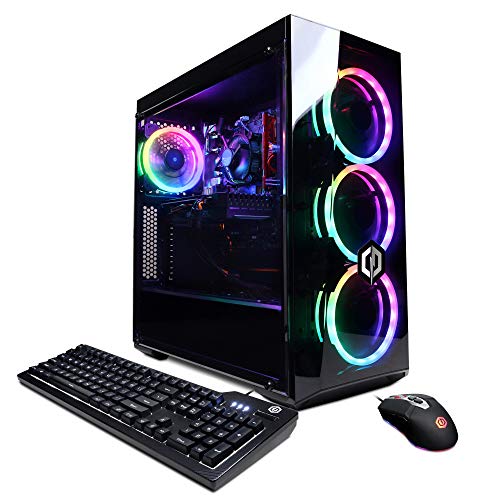
CyberpowerPC Gamer Xtreme VR Gaming PC i5-10400F GTX 1660

ArcticPro 22 Inch Gaming Monitor 144Hz FHD

ArcticPro 24 Inch Monitor 120Hz IPS

ArcticPro 27 Inch Monitor 120Hz IPS 1ms

ASUS ROG G700 Gaming Desktop RTX 5070

GEEKOM A5 Mini PC Ryzen 7 7730U

GEEKOM A6 Mini PC Ryzen 7 6800H

GEEKOM A8 Mini PC Ryzen 7 8745HS

GEEKOM IT13 MAX Mini PC Ultra 9 185H
The Picks, Examined More Closely
This Gamer Master build lands as the most future-aware pick near the $500 mark, pairing AMD’s Ryzen 5 7600 with the RTX 4060 and DDR5 memory on a current AM5 platform. For someone upgrading from an older DDR4 system, that platform longevity matters: the CPU drops into newer AM5 boards if you ever swap cases, and DDR5 keeps your RAM relevant for years. The RTX 4060 handles 1080p esports comfortably and pushes into modern AAA with sensible settings, so the build doesn’t box you into one resolution.
The tempered glass side panel and RGB lighting give it a more polished look than the plain black boxes from a few years back, and a keyboard and mouse ship in the box to get you playing right away. Owners running daily sessions will appreciate the 500GB PCIe Gen4 NVMe boot drive and the included Wi-Fi card, so no Ethernet drop is required.
What Helps Most
- AM5 platform keeps upgrade paths open, so adding a faster Ryzen 7000 or 9000 chip later stays simple.
- RTX 4060 8GB supports DLSS (an AI upscaling feature that boosts frame rates with minimal quality loss), stretching its life for modern titles.
- 16GB DDR5 is the new baseline, leaving room for browser tabs and Discord without choking the game.
- Wi-Fi 802.11AC and gigabit Ethernet both ship ready, useful for dorm rooms without easy wired drops.
- Tempered glass panel and RGB lighting make the tower feel less like a generic office box.
Points To Note
- 500GB fills up fast with modern game installs; budgeting for a secondary drive is wise within the first year.
- The included keyboard and mouse feel basic, so anyone serious about input will likely replace them.
- Cooling is adequate but not quiet under long gaming loads, depending on your room’s tolerance for fan noise.
Feature Card
Right Fit For
Esports and 1080p gamers who want a current-generation platform without overshooting the budget cap.
Look Elsewhere When
Your priority is raw ray-tracing performance in demanding AAA titles, in which case the ASUS ROG G700 with its RTX 5070 is the smarter stop.
The Gamer Xtreme VR predates the AM5 generation, but its Intel i5-10400F and GTX 1660 Super pairing still holds up for entry-level 1080p gaming. I include it because some shoppers want a turnkey tower with a discrete GPU at the absolute lowest entry, and that’s where this build fits. The 6-core, 12-thread CPU (a CPU core handles tasks, while threads let it run multiple tasks in parallel) chews through esports titles and lighter AAA games at medium settings, and the GTX 1660 Super ships with 6GB of VRAM, which helps at higher texture settings.
Compared to the Gamer Master above, this rig trades platform freshness for affordability. The DDR4 memory and 10th-gen Intel socket don’t share an upgrade path with the AM5 lineup, so future CPU swaps are limited. Still, for a first gaming PC in a dorm or shared space, it covers the basics without fanfare.
Standout Benefits
- GTX 1660 Super 6GB is well-suited to 1080p and offers better texture headroom than 4GB cards.
- i5-10400F delivers solid multi-threaded performance for schoolwork and streaming on the side.
- 500GB NVMe boot drive gets Windows and core games loading quickly.
Trade Offs
- 8GB DDR4 is the modern minimum, and heavy Chrome or Discord use may push it to its limits.
- The 10th-gen Intel platform is a dead-end for CPU upgrades, so any future gains come from the GPU alone.
- Comes with Windows 10 Home rather than Windows 11, which adds a setup step before first boot.
Feature Snapshot
Best Suited To
First-time gaming PC owners on a strict budget who prioritize a discrete GPU over long-term platform upgrades.
Consider Something Else When
You want DDR5 and AM5 longevity, in which case the CYBERPOWERPC Gamer Master is the better platform investment.
Stepping away from towers, this ArcticPro 22-inch monitor rounds out a budget gaming setup where desk space is tight. The 144Hz refresh rate is the headline feature: at 1080p, fast-paced shooters feel smoother, and your existing GPU doesn’t have to sweat to push high frame counts on a smaller panel. The 105% sRGB coverage (a measure of how much of the standard color gamut the display can reproduce) and 4000:1 contrast ratio push past what most budget TN panels offer, so colors look fuller during cutscenes.
For a dorm or a small bedroom desk, the ultra-slim profile and three-sided frameless design help the screen look less bulky. HDMI and VGA inputs cover both modern and older PCs, and VESA mount compatibility (a standardized hole pattern on the back for attaching the monitor to aftermarket arms or wall mounts) opens up arm-mount options down the line.
What Works In Its Favor
- 144Hz refresh is a real upgrade over standard 60Hz monitors, especially for fast esports titles.
- 105% sRGB and 4000:1 contrast give richer color than typical budget TN panels.
- Eye care features help during long sessions where fatigue is a concern.
- Three-sided frameless look keeps the desk appearing clean, especially in side-by-side setups.
Room For Improvement
- 22 inches feels small for immersive single-player RPGs where larger screens pull you in.
- VGA input is dated; most modern GPUs and consoles have moved to HDMI-only.
Perfect Match For
Dorm and apartment dwellers with limited desk depth who still want a high-refresh experience.
Skip It When
You want a more immersive single-screen layout, in which case the ArcticPro 27-inch monitor with the same 120Hz IPS panel gives you real estate without overspending.
The 24-inch ArcticPro steps up from the 22-inch model by swapping in an IPS panel, which delivers wider viewing angles and more accurate colors than TN or VA. That difference matters if you tend to lean back, watch cutscenes with a friend beside you, or do any creative work on the side. The 120Hz refresh rate and 1ms response keep motion crisp without the price tag of 144Hz-plus gaming panels.
For shoppers picking their first dedicated gaming monitor, this hits a sensible middle ground: large enough for immersion, fast enough for competitive play, and accurate enough for photo edits or streaming setups. Compared to the 22-inch pick, the extra two inches of diagonal real estate is felt the moment you boot up.
Good Reasons To Consider
- IPS panel gives consistent color and viewing angles, useful for both gaming and content viewing.
- 120Hz refresh with 1ms response strikes a balance between esports performance and pricing.
- 24 inches is the comfortable mainstream size that fits most desks without crowding them.
- Full HD resolution keeps GPU load low, helping budget cards hold high frame rates.
Honest Caveats
- 1080p at 24 inches shows individual pixels more than a 27-inch 1440p screen would.
- No built-in speakers confirmed in the source, so desk audio needs a separate solution.
Feature Rundown
Built With In Mind
All-around gamers and casual creators who want a versatile display for daily use and weekend sessions.
Swap It Out When
Esports is your main focus and every frame counts, in which case the ArcticPro 22-inch 144Hz panel pulls ahead in pure refresh rate.
Stepping to 27 inches changes how a game feels, and ArcticPro’s larger IPS panel keeps the same 120Hz refresh and 1ms response as its 24-inch sibling. The added screen space helps RPGs and sims breathe, especially on a desk with room for the wider footprint. IPS still handles the color accuracy side, so the panel pulls double duty for content work or movie nights.
For shoppers settling on a single, larger display rather than a multi-monitor wall, this is the practical sweet spot. It scales up without forcing you into 1440p territory, which a budget GPU would struggle to drive at high frame rates.
Practical Pluses
- 27 inches fills the field of view more naturally than 22- or 24-inch screens for immersive genres.
- IPS panel with 1ms response keeps colors faithful and motion crisp.
- 120Hz refresh stays smooth without taxing budget GPUs at 1080p.
Factors To Consider
- 1080p on 27 inches shows pixels more than on smaller screens, so text may look softer at native resolution.
- Larger screens demand more desk depth, and tight setups may feel cramped at this size.
Whose Shelf It Belongs On
Single-screen users who want a more cinematic feel without jumping to a 1440p display.
Another Choice May Suit
Esports-first players who want maximum pixel density for clarity at a distance, in which case the ArcticPro 24-inch IPS is the smarter pick.
The ROG G700 sits well above the budget $500 cap, but it anchors the top of this list for anyone stretching the budget for genuine future-proofing. The Intel Core Ultra 7 265F brings newer architecture with dedicated neural processing for AI workloads, while the RTX 5070 GPU is a meaningful step up in raw rendering power. Paired with 32GB of DDR5 and a 1TB NVMe SSD, the G700 targets 1440p high-refresh gaming rather than entry-level 1080p.
The dual-glass chassis with Aura Sync RGB (a software ecosystem that syncs lighting across compatible peripherals) signals ROG’s design language: this is a tower meant to be seen. For shoppers who want premium cooling headroom, modern connectivity, and the muscle to push ray tracing (a rendering technique that simulates realistic lighting, shadows, and reflections in real time) without compromises, the G700 earns its slot in the roundup.
The Practical Payoff
- RTX 5070 handles ray tracing and DLSS 4 (the newest generation of NVIDIA’s AI-driven upscaling), keeping the system relevant longer.
- 32GB DDR5 leaves plenty of headroom for streaming, video editing, or running VMs alongside games.
- 1TB NVMe SSD provides room for a healthy launch library without an immediate secondary drive.
- Intel Core Ultra 7 265F integrates an NPU (neural processing unit) for AI-accelerated tasks like background noise removal.
- ROG chassis design with tempered glass and Aura Sync RGB suits a showpiece setup.
Some Limits To Know
- Sits well above the $500 budget ceiling, so this is a stretch pick rather than a strict-budget one.
- Full tower size demands desk or floor space, which small-apartment dwellers may not have.
- RGB lighting requires occasional software tweaks to match peripherals, depending on how tidy you want the setup.
Quick Facts
Made For
Enthusiasts who want 1440p high-refresh gaming with ray tracing, plus the headroom to run streaming or creative tools at the same time.
Where Another Pick Suits Better
Strict-budget shoppers building a first PC, in which case the CYBERPOWERPC Gamer Master keeps the platform modern without breaking past the $500 cap.
GEEKOM’s A5 lands in a fully different lane from the gaming towers above: a compact mini PC with the Ryzen 7 7730U, designed for office work, light creative tasks, and casual gaming. The 15W TDP (thermal design profile, indicating how much heat the chip is designed to dissipate) keeps the system cool and quiet under typical loads, and the 16GB RAM plus 512GB NVMe combo is well-suited to everyday multitasking. Radeon Vega 8 graphics (the integrated GPU built into the Ryzen 7 7730U processor) handle older or indie games smoothly and light AAA at modest settings.
For a small desk or living-room setup where a full tower feels like overkill, the A5 tucks behind a monitor and stays out of the way. Compared to the Gamer Master and Gamer Xtreme, this isn’t a true gaming rig, but it’s a versatile everyday PC for shoppers who want one box for both work and play.
Reasons It Performs
- Ryzen 7 7730U with 8 cores, 16 threads handles office multitasking and light creative apps easily.
- Compact chassis fits behind a monitor or on a shelf, ideal for minimal setups.
- 16GB RAM keeps dozens of browser tabs responsive alongside productivity software.
- 512GB NVMe SSD offers quick boot and enough storage for typical work files.
Trade-Offs To Consider
- Integrated Radeon Vega 8 graphics limit AAA gaming to older or less demanding titles.
- 512GB fills quickly for anyone with a large media library.
- No discrete GPU, so ray tracing and high-refresh modern gaming are out of reach.
Who It Suits Best
Remote workers and students who want a quiet, compact PC that doubles as a casual gaming machine after hours.
Reach For A Different Pick When
Modern AAA gaming is the priority, in which case the CYBERPOWERPC Gamer Master with its RTX 4060 is the right tool for the job.
The A6 is where GEEKOM’s mini PCs graduate from office-first to genuine performance-first. The Ryzen 7 6800H runs at a 45W TDP, a notably higher sustained power envelope than the U-series chips (lower-power processors designed for thin laptops) in many competing mini PCs, and that headroom shows up in heavier workloads. The 16GB of upgradeable DDR5 and 1TB PCIe 4.0 SSD (a fast internal storage standard that doubles bandwidth over previous generations) make this more of a workstation-class compact than a casual machine.
For shoppers with a tiny desk but big workload demands, like code compilation, light video editing, or running multiple virtual machines, the A6 fits the bill without giving up the small footprint. Compared to the A5 above, the higher TDP and faster storage translate to tangible speed gains under sustained load.
Where It Helps
- Ryzen 7 6800H at 45W TDP delivers noticeably stronger performance than typical 15W mini PC chips.
- 1TB PCIe 4.0 SSD gives breathing room for project files and larger applications.
- 16GB DDR5 supports upgrades, extending the system’s useful lifespan.
- Compact form factor stays out of the way even on a crowded desk.
Worth Bearing In Mind
- 45W TDP means more heat and fan noise under load compared to the quieter A5.
- No discrete GPU, so modern AAA gaming still isn’t the focus here.
- Higher sustained power draw may matter for energy-conscious shoppers running the unit 24/7.
Right Fit For
Power users who want desktop-class CPU performance in a mini PC chassis for heavy office or creator workloads.
Not Your Match When
Whisper-quiet operation is the top requirement, in which case the GEEKOM A5 keeps things cooler and quieter for everyday use.
The A8 builds on the A6 with a newer Ryzen 7 8745HS, USB4 connectivity, and support for up to 128GB of DDR5 and 4TB of SSD storage. That scalability matters for creators running large datasets, multiple displays, or virtual machines: you can start with the included 16GB and 1TB, then expand as projects grow. The quad-4K display output turns the unit into a compact multi-monitor command center for editing, trading, or development workflows.
Wi-Fi 6E and 2.5G LAN (a wired networking standard that delivers 2.5 gigabits per second, much faster than typical gigabit Ethernet) round out modern networking, and the SD card slot is a small but appreciated touch for photographers and video editors pulling files straight off a camera. For shoppers who treat their desk like a studio, this is the mini PC that grows with them.
Bright Spots
- USB4 support enables high-speed external storage and modern docking stations.
- Four 4K display outputs suit multi-monitor creative or productivity setups.
- Memory upgradable to 128GB DDR5, far beyond typical mini PC limits.
- SD card slot is a genuine convenience for photographers and video editors.
- Wi-Fi 6E and 2.5G LAN keep network speeds current for fast transfers.
Trade-Offs To Consider
- Higher upgrade ceiling means a higher entry price compared to the A5 and A6.
- Mini PC size still restricts discrete GPU options, so AAA gaming stays limited.
Best Suited To
Creators and multitaskers who want a compact machine with serious expandability and modern connectivity.
A Better Fit Elsewhere
Light, casual home use, where the GEEKOM A5 is simpler and more affordable for everyday tasks.
GEEKOM’s IT13 MAX closes the list with Intel’s Core Ultra 9 185H, a 16-core mobile flagship (a high-end processor from Intel’s Core Ultra line, designed for laptops and compact desktops) with onboard AI acceleration. The 24GB of LPDDR5 memory (low-power DDR5, a memory standard that draws less energy than standard DDR5) supports AI inference workloads, and the unit is positioned for AI-assisted creative work, simulation, and content pipelines that benefit from NPU acceleration. In a compact chassis, this is as close as you get to workstation-class compute without stepping up to a tower.
For shoppers who want a future-leaning machine that handles productivity, light content creation, and emerging AI tools without dominating the desk, the IT13 MAX covers a lot of ground. Compared to the A8 above, the trade-off is soldered LPDDR5 (the memory is permanently attached to the motherboard and cannot be upgraded later) rather than upgradeable DDR5, so you buy the configuration you intend to keep.
What Stands Out
- Intel Core Ultra 9 185H with 16 cores handles heavy AI and creative workloads in a compact box.
- Onboard NPU accelerates supported AI tasks without leaning on the GPU.
- 24GB LPDDR5 is generous for productivity and creative multitasking.
- Compact footprint keeps the system out of the way on a creator’s desk.
A Few Limitations
- LPDDR5 is soldered, so memory upgrades aren’t possible down the line.
- 500GB SSD is modest for video or large project libraries.
- Premium positioning means higher cost than the A-series mini PCs.
Perfect Match For
Power users interested in AI-assisted creative work who want a compact desktop with flagship-class CPU performance.
Look Elsewhere When
Long-term memory expandability matters most, in which case the GEEKOM A8 with upgradeable DDR5 up to 128GB is the safer path.
What To Weigh Before Choosing Gaming Desktop Pcs Under 500
GPU generation and platform longevity sit at the top of the list. The RTX 4060 inside the Gamer Master is a generation newer than the GTX 1660 Super in the Gamer Xtreme, and that gap shows up in features like DLSS support and efficiency. Picking a current-generation GPU buys you longer relevance, while older cards stretch the budget further upfront.
Resolution and refresh rate target matter just as much. A 1080p 144Hz monitor like the ArcticPro 22-inch pairs naturally with midrange GPUs, while a 27-inch 1080p display wants more pixel density at native res for sharp text. For shoppers eyeing 1440p, expect to leave the strict $500 cap behind.
Form factor is the underrated decision. Full towers like the Gamer Master and ROG G700 offer the best thermal headroom and upgrade room, but they take up real space. Mini PCs like the GEEKOM A5, A6, A8, and IT13 MAX vanish behind a monitor, though their integrated graphics cap modern AAA play. Matching the chassis to your desk and use case prevents buyer’s regret a year in.
Key Considerations Across These Picks
Common Shopping Slip Ups
Chasing raw CPU clock speed without checking GPU pairing is a frequent stumble. A fast Ryzen chip paired with an outdated graphics card bottlenecks gaming, while a balanced pairing like the Gamer Master’s RTX 4060 with the Ryzen 5 7600 keeps both parts working. Ignoring platform longevity is another: AM5 and Intel Core Ultra sockets buy you CPU upgrade room, while older DDR4 platforms are closed roads.
Overlooking monitor pairing sinks otherwise solid builds too. A 144Hz-capable PC hooked to a 60Hz monitor leaves performance on the table, and a budget GPU driving a 4K panel chokes frame rates. Matching the display to the system is part of the build, not an afterthought.
Where The Extra Money Goes
Stepping from the Gamer Xtreme to the Gamer Master costs more, but the upgrade brings DDR5, an RTX 4060 with DLSS support, and an AM5 motherboard, which together extend the system’s useful life by a generation or two. Paying up further to the ROG G700 adds ray-tracing capability, 32GB of RAM, and a 1TB SSD, which removes the immediate need for storage upgrades and tightens the experience under multitasking loads.
Mini PC upgrades follow a similar pattern: the A5 to A8 jump brings newer CPUs, faster storage, and display output options, while the IT13 MAX adds AI acceleration for those running supported workloads. In each tier, the price reflects a mix of newer silicon and features that age well.
Frequently Asked Questions
Can I actually game on a mini PC under $500?
Yes, but with limits. The GEEKOM A5, A6, A8, and IT13 MAX handle older titles, esports games, and indie favorites smoothly through their integrated Radeon Vega graphics. Modern AAA at high settings is outside their reach, so a dedicated GPU tower like the Gamer Master or ROG G700 is the better path for that workload.
Is the GTX 1660 Super still relevant in 2026?
It remains a sensible 1080p card for esports and lighter AAA at medium settings, especially for shoppers on strict budgets. The trade-off is no DLSS support and a smaller feature gap compared to the RTX 4060 in the Gamer Master.
Do I need a 144Hz monitor for casual gaming?
A 144Hz panel makes fast motion noticeably smoother, but 120Hz, like the ArcticPro 24-inch and 27-inch monitors, is a solid middle ground. A 60Hz display works fine for slower-paced titles, but competitive players feel the upgrade immediately.
What does DDR5 actually buy me over DDR4?
DDR5 offers higher bandwidth and lower power draw, which helps in modern games and content creation apps. It also signals a current-generation platform, which means CPU upgrade options down the line. The Gamer Master and ROG G700 use DDR5 for exactly these reasons.
Is the ROG G700 worth it if my budget is $500?
Not realistically: the G700 sits well above that cap. It belongs in the conversation as a stretch goal for shoppers willing to flex the budget for ray tracing, 1440p gaming, and a 1TB SSD. For a strict $500 ceiling, the Gamer Master keeps the platform modern without going over.
The Takeaway
A $500 gaming desktop in 2026 is a real proposition, and the right pick depends on whether you want a current-platform tower like the Gamer Master, a value-focused starter like the Gamer Xtreme, or a compact mini PC for mixed work and play. Pair any of them with an ArcticPro monitor that matches your refresh-rate goal, and the rest of the system tends to fall into place. Start with the use case, match the form factor to your desk, and the rest of the choices get easier from there.