I spend a lot of time on keyboards, and once someone tries a build with linear optical switches, the appeal clicks fast: light, consistent actuation without the tactile bump, often faster reset times, and a feel that gaming and typing both benefit from. Optical switches use a beam of light to register keypresses rather than metal contacts, so there’s less physical wear on the actuation point. This list mixes ready-built boards with standalone switch packs for custom builds, so hobbyists and shoppers who just want a finished keyboard both have somewhere to land.
The Shortlist At A Glance

PAKJEL MMD Vivian Switch Pre-Lubed 5-Pin Linear

Razer Huntsman Mini Linear Optical (White)

EPOMAKER Silent Linear Switches Pre-Lubed 35-Pack
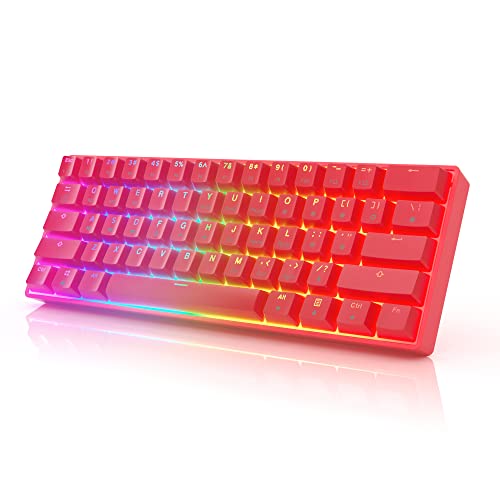
HK Gaming GK61 Optical Hotswap Red

EPOMAKER Creamy Jade 45gf Linear 100-Pack

HK Gaming GK61 Optical Hotswap Blue

Pulsar PK100 Nova Optical Red Linear
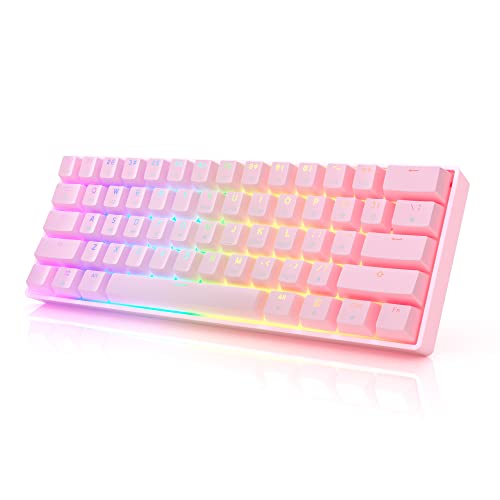
HK Gaming GK61 Optical Hotswap Pink
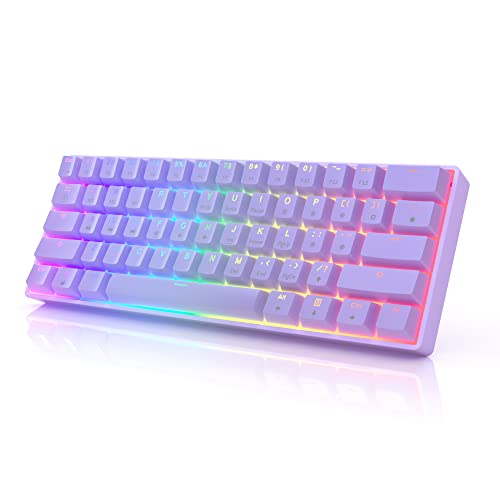
HK Gaming GK61 Optical Hotswap Lavender

Razer Huntsman Mini Linear Optical Black
Meet The Standout Selections
The MMD Vivian lives in that interesting middle ground for keyboard hobbyists: switches that target a deeper, marbly sound without requiring hand-lubing. Where many stock linear switches sound a bit thin out of the box, the Vivian is built around a modified UPE stem (a tough, low-friction plastic) and a PA12 top housing paired with a modified PUM bottom housing. The result, in most builds, is a noticeably warmer acoustic signature than something like a stock Gateron.
Coming factory lubed means the messy part of the hobby is largely skipped, and 5-pin compatibility makes the Vivian broadly friendly to PCB-mount boards across common socket types. For someone building their first custom who wants a switch with personality but does not want to spend an evening with a brush and Krytox 205g0, this is a sensible place to land.
Key Advantages
- Modified UPE stem gives the switch a characterful, deeper acoustic profile without needing hand-lubing.
- PA12 top housing and modified PUM bottom housing pair for a sound that tends to feel full rather than hollow.
- Factory pre-lubed out of the box, saving a step that intimidates newer builders.
- 5-pin design fits common PCB-mount boards including standard sockets from Outemu, Kailh, and Gateron layouts.
- 35g operating weight lands in a comfortable middle range for long typing sessions.
Worth Noting
- UPE-based stems can show wear faster than POM on heavy typists, so behavior over years may vary from a standard build.
- 30 switches covers roughly a 60% board plus a few spares; full-size builds may need a second pack.
- Sound profile leans “thocky,” which may not appeal to those wanting a brighter, crisper typing tone.
Feature Snapshot
Who It Suits Best
First-time custom builders who want a switch with a distinct sound profile without committing to hand-lubing gear.
Consider Something Else When
You need a quieter office-friendly setup, where the EPOMAKER Silent Linear Switches will be a better match.
The Huntsman Mini has been around long enough to build a real reputation, and it is still a useful reference point for what a compact optical board can be. Razer’s optical switches register keypresses via a light beam at roughly 1.0mm of travel, noticeably shorter than typical mechanical linear switches. The 60% layout (just the main alphanumeric block, no arrows, no function row) keeps the desk footprint tiny and the mouse-hand travel short.
The aluminum top frame is the kind of detail you appreciate every time you pick the board up: it feels solid, stays planted, and avoids the plasticky rattle that cheaper boards develop. Compared to the bare switches I covered first, this is the ready-to-go option. You plug it in, install Synapse, and you have a polished setup with no soldering involved.
What Pays Off
- Optical actuation registers at around 1.0mm, giving faster response than typical mechanical linears.
- Matte aluminum top frame keeps the chassis stiff and free of the hollow flex cheaper boards show.
- PBT keycaps (a thicker, more durable plastic than ABS) resist shine and wear over years of daily use.
- Chroma RGB integrates with a broad ecosystem of peripherals and lighting software.
- Onboard memory stores profiles on the board itself, useful at LAN events or borrowed machines.
Trade Offs
- 60% layout means no dedicated arrow keys, so spreadsheet and CAD work may feel cramped.
- Optical switches are proprietary to Razer sockets, limiting future modding compared to standard MX-style boards.
- Light tone and thin keycaps make this noticeably louder than the EPOMAKER Silent pack if acoustics matter.
Quick Facts
Made For
Competitive gamers and FPS players who value low actuation distance and a compact desk footprint over the convenience of arrow keys.
Skip It When
You regularly need a numpad or arrow cluster for work tasks, where the Pulsar PK100 Nova Optical is a better fit.
EPOMAKER’s Sea Salt silent linear switch is built around the same core appeal as the rest of this list, light beam actuation, but designed specifically for environments where keyboard noise is a problem. The switch uses internal dampening to absorb both the bottom-out and the stem return, which is where most typing noise actually comes from.
The 35-piece pack is convenient for a 60% or 65% board, and the factory lubrication smooths out scratchiness without any work on the owner’s part. Compared to the MMD Vivian I covered first, this is the opposite end of the sound spectrum: muted, soft, and far easier on housemates.
Everyday Advantages
- Internal dampening dramatically reduces bottom-out and return noise versus standard linear switches.
- Factory pre-lubed for consistent feel out of the box, no hand-tuning required.
- 5-pin design fits PCB-mount boards across most socket types used in custom builds.
- 35-piece count aligns well with 60% or 65% custom board layouts.
- 35-piece pack is approachable for first-time custom builders wanting a focused project.
Honest Caveats
- Silent switches feel slightly mushy to some typists used to crisper standard linears.
- 35 switches may not cover a full-size build without a second order.
- Switch is marketed as both linear and tactile in some materials, so verify the listing carefully before ordering.
Right Fit For
Office workers and shared-space users who need a near-silent mechanical feel without giving up the linearity of an optical switch.
Look Elsewhere When
You want a more characterful sound and feel, where the PAKJEL MMD Vivian Switch would serve you better.
The HK Gaming GK61 is the budget-friendly gateway into optical boards that does not feel budget once you start using it. The 60% layout keeps the desk clear for sweeping mouse movement, and the hotswap socket design means swapping switches later requires no soldering. For someone who wants to dip into optical switches without committing to a premium price, this is a sensible starting point.
Compared to the Razer Huntsman Mini I covered second, the GK61 trades Razer’s software polish and aluminum top for a lighter, plastic chassis and a more accessible price. The optical switches still register fast, and the 16.8 million color RGB lighting is more than most people will actually use.
Useful Touches
- Hotswap optical sockets let you change switches without soldering, a real plus for first-time builders.
- Detachable USB-C cable makes transport simple and storage tidy when not in use.
- Pre-lubed stabilizers reduce the rattle and pinging that often plague compact mechanical boards.
- Compact 60% layout leaves room for wide mouse sweeps during competitive play.
- Compatible with both macOS and Windows for flexible workstation use.
Points To Note
- Plastic chassis flexes more than the Huntsman Mini’s aluminum top under heavy typing.
- Software is more functional than polished compared to Razer’s Synapse ecosystem.
- Stock keycaps are basic and may benefit from an aftermarket set for long-term satisfaction.
At A Glance
Whose Shelf It Belongs On
First-time optical keyboard shoppers who want hotswap flexibility and a compact layout without paying premium-board prices.
Reach For A Different Pick When
You want a more refined typing experience with premium keycaps and aluminum, where the Razer Huntsman Mini is the upgrade path.
EPOMAKER’s Creamy Jade leans into the modern “creamy” switch category, which hobbyists describe as smooth, full-bodied, and free of scratch. The standout material choice here is the POK stem (polyketone), a high-performance plastic known for its self-lubricating feel and resistance to wear. The PC and PA66 housing combination is also a step up from the all-nylon stacks found in cheaper switches.
Coming in a 100-piece pack, this is a buy for someone planning a serious build. Full-size or 100% boards can be fully covered without needing a backup order, and EPOMAKER specs the actuation force at 45gf, a middle-ground weight that suits both typing and gaming. Compared to the Vivian I covered first, this is a smoother, more refined feel aimed at longer sessions.
What Stands Out
- POK stem material gives a smooth, low-friction feel that holds up well to extended typing.
- PC and PA66 hybrid housing combination supports both brightness and depth in the sound profile.
- Factory pre-lubed out of the box for immediate use in custom builds.
- 100-piece count covers most full-size boards including spares for experimentation.
- Standard MX-compatible stem means broad aftermarket keycap compatibility.
Minor Gripes
- 45gf actuation may feel slightly heavy to those used to 35g linears for fast gaming inputs.
- Bulk 100-pack pricing is higher than smaller packs, so casual buyers may want to start smaller.
- Premium materials mean small QC variation can be more noticeable on close inspection.
Who Will Love This
Custom builders planning a full-size or 100% layout who want premium materials and a smooth, refined typing feel for long daily sessions.
A Better Fit Elsewhere
Gamers chasing lighter actuation for FPS play should look at the Razer Huntsman Mini instead.
The blue variant of the GK61 is functionally identical to the red version I covered fourth, with the same hotswap Gateron optical switches, the same 16.8 million color RGB, and the same detachable USB-C cable. The difference is purely aesthetic: a blue chassis that fits a particular desk palette better.
For shoppers who care about a cohesive setup, color-matched peripherals can pull a whole desk together without spending much more. The hotswap optical sockets still let you change switch feel later, and the pre-lubed stabilizers keep the wide keys from sounding cheap. This is the same board as the red version, just dressed differently.
Good Reasons To Consider
- Blue colorway matches cool-toned desks and setup themes.
- Hotswap optical switches allow future switch swaps without tools.
- Compact 60% layout is friendly to small desks and tight mouse hand space.
- Detachable USB-C cable simplifies travel and storage between sessions.
Points To Keep In Mind
- Internal specs mirror the red GK61, so this is an aesthetic choice rather than a performance upgrade.
- Plastic chassis still flexes compared to aluminum-cased options like the Huntsman Mini.
- Software customization is functional but not as deep as premium ecosystems.
Best Suited To
Aesthetic-driven shoppers who want a blue chassis to match a specific desk theme without changing core specs.
Swap It Out When
You want a sturdier chassis and more refined typing feel, where the Razer Huntsman Mini delivers a clear step up.
The Pulsar PK100 is the full-size answer to all the compact optical boards on this list. The 100% layout includes the full function row, navigation cluster, and numpad, which makes it a strong choice for anyone working in spreadsheets, accounting software, or CAD where a dedicated numpad matters. Red linear optical switches are the heart of the board, giving fast actuation without tactile feedback.
What surprised me when looking into this board is the accessory bundle: it ships with a dust cover, keycap puller, switch puller, and a small dust wiper. For someone new to mechanical keyboards, having all the basic maintenance tools included removes a real friction point. Compared to the GK61 boards I covered, this trades compactness for utility and accessory completeness.
Strong Points
- Full-size layout with dedicated numpad is helpful for spreadsheet-heavy and numeric workflows.
- Red linear optical switches give fast, consistent actuation for both typing and gaming.
- Included accessory bundle (dust cover, key puller, switch puller, dust wiper) covers basic maintenance out of the box.
- Optical switches register via light, theoretically offering longer service life than contact-based switches.
Some Limits To Know
- Full-size footprint demands significant desk space compared to the 60% boards elsewhere on this list.
- Linear feel offers no tactile bump, which may frustrate typists who prefer feedback per keystroke.
- Wired-only design limits placement flexibility compared to wireless options.
Spec Overview
Perfect Match For
Productivity-focused users who want a full-size keyboard with a numpad and the consistency of linear optical switches.
Not Your Match When
You need a portable, desk-space-saving board for travel, where the Razer Huntsman Mini is a better fit.
The pink GK61 brings the same hotswap optical foundation as the red and blue versions, but with a chassis color that suits a softer or pastel-themed setup. Hotswap Gateron optical switches, 16.8 million color RGB backlighting, a detachable USB-C cable, and pre-lubed stabilizers are all part of the package.
Pink is not a subtle color choice, so this version is for someone whose desk is set up around a clear visual theme. The internals are otherwise identical to the other GK61 boards, so the decision here is purely about how the keyboard looks on the desk.
Noteworthy Benefits
- Pink chassis fits pastel and softer setup aesthetics.
- Hotswap sockets let you upgrade or change switches later without soldering.
- Compact 60% layout works well on smaller desks.
- Detachable USB-C cable makes transport straightforward.
Room For Improvement
- Plastic chassis flexes more than aluminum-cased alternatives under heavy typing.
- No unique switch or acoustic difference from the red or blue GK61 versions.
- Software customization is functional rather than polished.
Built With In Mind
Shoppers who want a pink-accented optical board that matches a soft or feminine desk theme without changing core specs.
Another Choice May Suit
You want a sturdier chassis and more refined feel, where the Razer Huntsman Mini Black is the upgrade path.
The lavender GK61 rounds out HK Gaming’s color range with a soft purple hue that fits calm, minimal desk setups. Like the other GK61 variants, it has hotswap Gateron optical switches, RGB backlighting with 16.8 million colors, and a removable USB-C cable. This is the same hardware dressed in a different color.
For shoppers who want a quieter visual statement than red or blue without going all the way to a neutral black or white board, lavender fills that gap. The performance profile is identical to the other GK61s covered on this list.
What Earns Its Place
- Lavender colorway sits between neutral and bold, fitting subtle or minimal setups.
- Hotswap optical sockets make future switch changes easy.
- 60% layout keeps the desk footprint small.
- Detachable USB-C cable simplifies travel and replacement.
Practical Considerations
- Plastic chassis still flexes more than the Huntsman Mini’s aluminum frame.
- Lavender is a niche color, so matching other peripherals may require extra effort.
- No internal spec differences from the other GK61 colorways.
Who Should Grab It
Shoppers who want a soft purple optical board with hotswap flexibility and a compact footprint.
Where A Sibling Pick Shines
You need better build quality and a more premium feel, where the Razer Huntsman Mini Black is the clear upgrade.
The black Huntsman Mini is the same proven platform as the white version I covered second, with the same optical switches, 60% layout, and aluminum top frame. The black colorway simply blends into darker desk setups more naturally, where the white version can be a visual standout.
This is the choice for someone who values understated looks without giving up the responsive optical feel. The build is identical, the keycaps are PBT, and the Chroma RGB lighting still cycles through the full spectrum even though the chassis is darker. Functionally, no trade-offs versus the white model.
Strengths Worth Knowing
- Black chassis pairs well with dark or stealth-themed desk setups.
- Optical linear switches register at around 1.0mm, faster than typical mechanical linears.
- Aluminum top frame keeps the chassis rigid and rattle-free under heavy typing.
- Compact 60% layout frees up significant desk space.
- PBT keycaps resist shine and texture loss longer than ABS alternatives.
Things To Consider
- No dedicated arrow keys can be limiting for spreadsheet and design work.
- Optical switches are proprietary, limiting aftermarket switch swap options.
- Premium pricing versus the budget-friendly GK61 line covered earlier.
The Right Fit
Competitive gamers and esports enthusiasts who want a refined, durable optical board with a low-profile dark aesthetic.
Where Another Pick Suits Better
You want a budget-friendly entry into optical boards, where the HK Gaming GK61 line is the more accessible choice.
What To Weigh Before Choosing Linear Optical Switches
Optical switches differ from traditional mechanical switches in one fundamental area: actuation happens when a light beam is broken, not when metal contacts touch. That mechanism has practical consequences. Optical switches tend to be more durable over millions of keypresses because there are no physical contact surfaces to wear down at the actuation point. They also typically allow shorter actuation distances, often around 1.0mm, which is meaningful for fast-paced gaming.
Actuation Distance And Reset Speed
Shorter actuation distances mean a key registers earlier in the keystroke, which can shave milliseconds off reaction times in competitive games. Optical switches also tend to reset faster because there’s no debounce delay from metal contacts. For typists, this means slightly faster typing is possible, though the difference from a quality mechanical linear is small in everyday use.
Force And Feel
Optical switches come in different actuation forces, typically ranging from 35g to 50g or higher. Lighter switches feel easier to press but can lead to accidental presses in fast typing. Heavier switches provide more deliberate feedback but may cause finger fatigue over long sessions. The MMD Vivian at 35g and the EPOMAKER Creamy Jade at 45g show how this range maps to different comfort preferences.
Layout And Form Factor
The choice between a 60% board like the Huntsman Mini and a full-size option like the Pulsar PK100 comes down to workflow needs. Compact boards save desk space and reduce mouse travel, which competitive gamers appreciate. Full-size boards include arrows, function rows, and numpads for productivity-heavy work.
Hotswap Vs. Proprietary
Some boards like the HK Gaming GK61 line use standard hotswap optical sockets that accept replacement switches without soldering. Others like the Razer Huntsman Mini use proprietary optical switches that can only be replaced with the same model. For hobbyists who like to experiment, hotswap is a real advantage.
Key Considerations Across These Picks
Common Shopping Slip Ups
First-time buyers often focus on switch type and ignore the layout, then regret the lack of arrow keys or a numpad within weeks. Think about your daily workload before committing to a 60% board. Another common mistake is buying optical switches without checking socket compatibility: not every optical switch fits every PCB. Razer optical switches, for example, will not work in a board designed for Gateron optical sockets.
What The Higher Tier Buys
Premium boards like the Razer Huntsman Mini justify their cost with aluminum frames, better software, and proven switch longevity. Mid-tier options like the HK Gaming GK61 line give you hotswap flexibility and 80% of the optical experience at a fraction of the cost. The upgrade is worth it for users who type or game for many hours daily and want a more refined chassis under their hands. For casual users, the budget options perform more than adequately.
Frequently Asked Questions
Are Linear Optical Switches Better Than Mechanical Linear Switches?
Linear optical switches register faster due to light-beam actuation, often around 1.0mm, and typically last longer because there are no contact surfaces to wear. Whether they feel “better” depends on preference: optical linears tend to feel slightly smoother out of the box, but quality mechanical linears can match them after hand-lubing.
Can I Replace Optical Switches In Any Keyboard?
Only if the keyboard uses hotswap optical sockets, like the HK Gaming GK61 line. Boards with proprietary optical switches, such as the Razer Huntsman Mini, generally require factory replacement or professional service. Standard mechanical switches will not fit optical-only PCBs.
What Does Linear Mean For A Switch?
A linear switch has no tactile bump and no audible click during the keystroke. The keypress travels smoothly from top to bottom with consistent resistance. This makes linear switches popular for gaming, where fast repeated presses benefit from uninterrupted travel.
Are Optical Switches Quieter Than Mechanical Switches?
Not inherently. Optical switches themselves do not produce less noise than mechanical ones, but the housings and dampening materials matter more. Silent optical switches like the EPOMAKER Sea Salt use internal dampening to reduce bottom-out and return noise, while standard optical switches can sound similar to their mechanical counterparts.
Do Optical Switches Need Lubrication?
Factory pre-lubed switches like the MMD Vivian and EPOMAKER Creamy Jade arrive ready to use. Hand lubrication is still possible for finer tuning, but most users will not need it. For boards without factory lube, light application of Krytox 205g0 can smooth out scratchiness and improve sound.
Wrap Up
For gamers chasing fast actuation in a portable package, the Razer Huntsman Mini line is the clear center of gravity, with aluminum frames and proven optical reliability. Custom builders should start with the PAKJEL MMD Vivian or EPOMAKER Creamy Jade for characterful sound and premium materials. Shoppers wanting quiet shared-space use land on EPOMAKER Silent switches, while those on a budget find real value in the HK Gaming GK61 series with its hotswap flexibility. Match the switch feel, layout, and chassis to your actual desk and workflow, and the choice tends to make itself.