A small-form desktop is the easiest way to put Linux on real hardware without the noise, the bulk, or the legacy baggage of a full tower. The picks below focus on mini PCs and barebones kits that handle common distros like Ubuntu, Fedora, and Linux Mint without driver drama, pairing modest footprints with enough muscle for daily work, tinkering, or a quiet home lab. I leaned on specs, expansion room, and platform maturity when sorting them, so anyone spinning up a fresh install has a strong starting point.
A Fast Comparison Of The Options
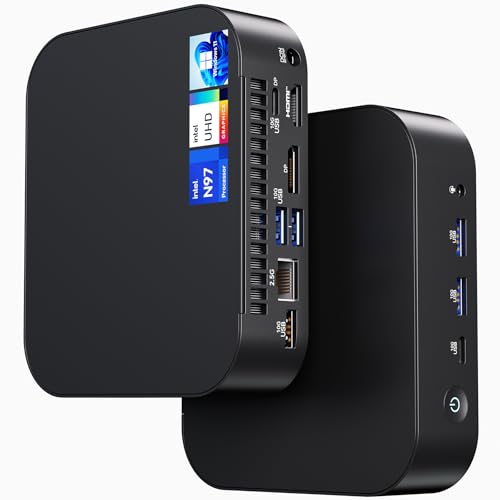
ASUS NUC 14 NUC14MNK Essential Mini PC, N97 CPU, 8GB RAM, 256GB SSD

ASUS NUC 13 Pro NUC13ANHi5 Arena Canyon Barebone Kit, Core i5-1340P
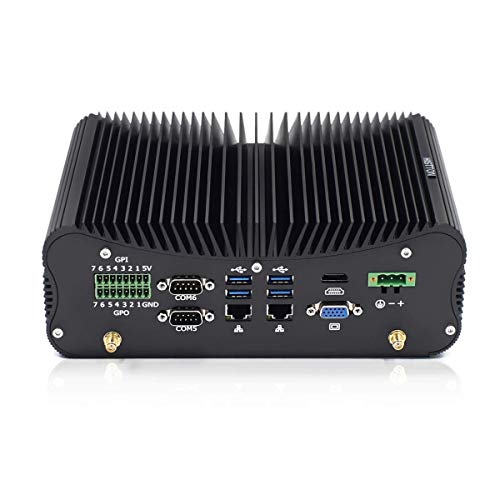
HISTTON Fanless Industrial PC Core i7-10510U, 32GB RAM 512GB SSD

GMKtec M3Pro Mini PC Intel Core i5-13500H 16GB DDR4 512GB NVMe SSD
GMKtec Mini PC Intel Core i7-1185G7 16GB DDR4 512GB SSD

ACEMAGIC K1 Mini PC AMD Ryzen 5 7530U, 16GB RAM, 512GB SSD

ASUS NUC 13 Pro NUC13ANHi5 Mini PC Core 1340P 16GB RAM 512GB SSD

GMKtec Mini PC Intel Core i7-1185G7 16GB DDR4 1TB SSD
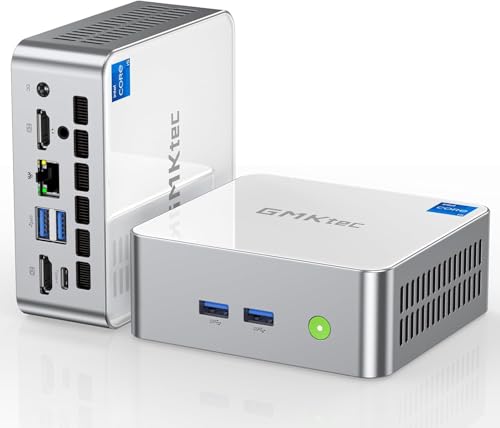
GMKtec Mini PC Intel i5-12450H 16GB DDR4 1TB M.2 NVMe SSD
Taking A Closer Look At The Options
The NUC 14 Essential is the kind of box that disappears behind a monitor and gets out of the way. The Intel N97 is a modest, low-power chip, but it pairs well with 8GB of RAM for a lean Linux install, and the 256GB NVMe drive keeps boot times snappy.
Wi-Fi 6E and Bluetooth 5.3 make peripheral headaches rare. For anyone moving off an aging Windows machine, the swap usually feels seamless. The chassis is small enough to VESA-mount, which is useful for kiosks or a tidy standing-desk setup.
Points In Its Favor
- Compact chassis that fits behind most monitors
- Modern Wi-Fi 6E for fast wireless networking
- Pre-installed storage means a quick install path
- Low power draw suits always-on roles
Things To Consider
- 8GB of RAM caps multitasking for heavy dev work
- 256GB fills up fast with media or VMs
Feature Snapshot
Who Will Love This
First-time Linux users who want a hassle-free entry box with a tidy footprint.
Skip It When
The HISTTON Fanless Industrial PC suits you better if silent, dust-resistant operation matters more than sheer speed.
A barebones kit means the chassis, CPU, and motherboard show up ready, but RAM, storage, and OS are your call. The 13th Gen Core i5-1340P brings 12 cores and a 4.6GHz turbo, which is overkill for a browser but useful for compiling code or running containers.
Compared to the ready-built NUC 14 above, this one rewards people who like picking their own components. Gigabit Ethernet and Wi-Fi 6 keep networking solid. The catch is that “barebone” means a second shopping trip for SO-DIMM and an M.2 drive.
What Makes Sense
- 12-core CPU handles parallel workloads well
- Pick your own RAM and SSD sizes
- Compact chassis with VESA mounting options
Worth Noting
- No RAM, storage, or OS included out of the box
- Assembly adds an extra step for newcomers
Best Suited To
Linux tinkerers who want full control over their build’s specs.
Consider Something Else When
The ASUS NUC 13 Pro NUC13ANHi5 Mini PC fits better if you want the same chip with RAM and SSD already installed.
The HISTTON trades a moving fan for a sealed, finned chassis that sheds heat passively. That makes it a strong fit for dusty workshops, lab benches, or anywhere fan noise would be a deal-breaker. The 10th Gen Core i7 and 32GB of RAM keep a Linux desktop running smoothly, and the 512GB SSD offers comfortable headroom for a typical distro plus apps.
Where the GMKtec M3Pro pushes newer CPU silicon, this one leans on proven parts. In a quiet bedroom office, the absence of a fan hum tends to feel like the upgrade nobody talks about.
What Stands Out
- Completely silent operation with no fan to fail
- 32GB RAM supports heavier workloads
- Dust-resistant sealed enclosure
- Stable, mature CPU platform for Linux
Trade Offs
- Older 10th Gen CPU lags behind newer picks
- Bulkier chassis than typical mini PCs
Quick Facts
Perfect Match For
Industrial and lab users who need silent, durable hardware for 24/7 operation.
Another Choice May Suit
The GMKtec M3Pro Mini PC makes more sense if you want newer CPU performance in a smaller box.
The M3Pro targets users who want a real workstation feel in a mini shell. The Core i5-13500H brings 12 cores, which is generous for a box this size, and 16GB of DDR4 plus a 512GB NVMe drive handle Linux installations with room to grow.
Relative to the barebones NUC 13 Pro above, this one arrives ready to image. Intel Iris Xe graphics cover light GPU work and casual 4K output. For developers running a few containers, the headroom is noticeable.
What Earns Its Place
- 12-core CPU breezes through multitasking
- Fast NVMe storage included
- Quiet under typical desktop loads
- Compact enough to mount behind a display
Room For Improvement
- 16GB of RAM caps heavier workloads
- Higher power draw than lower-tier picks
Right Fit For
Software developers and multitaskers who need real CPU muscle in a small form factor.
Where A Sibling Pick Shines
The GMKtec Mini PC Intel i5-12450H is a smarter pick if triple-display output is your priority.
The 11th Gen Core i7-1185G7 might be older, but it still holds up well for daily Linux use, with 4 cores and a 4.8GHz turbo. The 16GB of DDR4 and 512GB SSD give it the same comfortable baseline as the M3Pro above, just on a slightly older platform.
Where this one earns attention is I/O: USB4 alongside HDMI and DisplayPort opens up dock-friendly desk setups. The 35W power envelope is easy on electricity bills during long compile sessions.
Useful Highlights
- USB4 port supports modern docks
- 35W TDP keeps power use modest
- Solid port selection for a small box
Points To Note
- Older architecture trails newer chips
Built With In Mind
Home office users who want a tidy, dockable Linux desktop with quiet operation.
Look Elsewhere When
The GMKtec Mini PC Intel Core i7-1185G7 1TB model suits you better if extra storage matters more than USB4.
For Linux users who prefer AMD silicon, the K1 brings a Ryzen 5 7530U with 6 cores, 12 threads, and Radeon graphics. That gives the system solid headroom for both productivity and light GPU-accelerated tasks like video encoding.
Compared to the Intel-driven GMKtec models above, this one shifts the platform conversation. AMD’s mature Linux support means most modern distros run without driver tweaking. In day-to-day use, the 16GB and 512GB combo feels appropriately balanced.
Real-World Strengths
- 6-core Ryzen handles parallel tasks well
- Radeon graphics support mature in Linux
- Reasonable power efficiency for everyday loads
- Compact shell fits small desks
Softer Spots
- Some niche distros still favor Intel firmware
- Fewer USB4-class ports than rivals
Feature Card
The Right Fit
Linux fans who prefer AMD platforms for driver maturity and open firmware.
Reach For A Different Pick When
The GMKtec M3Pro Mini PC is a stronger match if you want a more recent Intel chip with similar RAM.
This NUC 13 Pro variant shares the 1340P CPU with the barebones kit above but skips the assembly step. 16GB of RAM and a 512GB SSD come installed, which makes it the friendlier choice for people who want to jump straight to a Linux install.
The same 12-core chip keeps multitasking smooth, and the compact chassis hides cleanly behind a monitor. Compared to the NUC 14 Essential, you trade newer Wi-Fi for stronger CPU performance.
A Favorable Mix
- Pre-installed RAM and SSD save setup time
- 12-core CPU handles dev workloads
- Compact form factor with VESA options
Minor Gripes
- Wi-Fi 6E not included at this trim
- Pricier than barebones alternatives
Who Should Grab It
Plug-and-play adopters who want a pre-built NUC with strong CPU specs.
A Better Fit Elsewhere
The barebones NUC 13 Pro is smarter when you want to choose your own memory and storage brands.
The 1TB NVMe drive is the headline feature here. For users with sizable media libraries, Steam collections, or local project archives, the doubled capacity over the 512GB siblings removes a common storage squeeze.
Beyond storage, the rest mirrors the other Core i7-1185G7 GMKtec box above, including the Intel i226V 2.5G Ethernet. That 2.5GbE port is a quiet perk for anyone moving large files over a fast LAN.
Notable Gains
- 1TB SSD eases storage planning
- 2.5GbE LAN ready for fast networks
- USB4 connectivity included
A Few Limitations
- Same older CPU architecture as siblings
Whose Shelf It Belongs On
Media hoarders and creators who want storage headroom out of the box.
Swap It Out When
The GMKtec M3Pro is a stronger fit if newer CPU performance matters more than capacity.
The i5-12450H brings 8 cores, 12 threads, and a 4.4GHz turbo, paired with 16GB of dual-channel DDR4 and a 1TB NVMe drive. Where this pick separates itself is triple-display support, which turns a tiny box into the brains of a multi-screen workstation.
For productivity users running terminals across three panels or traders watching several feeds, that I/O matters. The 45W TDP is higher than smaller siblings, but the performance is easy to feel.
The Helpful Details
- Triple 4K display output supported
- 16GB dual-channel memory out of the box
- 1TB NVMe drive included
- USB 3.2 and Type-C port coverage
Honest Caveats
- Power draw is higher than smaller siblings
- Fan noise can rise under sustained load
Key Specs
Made For
Productivity users and traders who want three screens driven by a single quiet box.
Not Your Match When
The HISTTON Fanless Industrial PC is the better pick if silent operation outweighs the need for multi-display output.
What To Weigh Before Picking A Linux Desktop
Linux runs well on modest hardware, but the wrong mini PC can turn a fresh install into a weekend of driver hunting. Start with platform maturity. Intel 11th through 13th Gen and AMD Ryzen 5000/7000 series chips all have solid upstream kernel support, so mainstream distros install cleanly. Barebones kits like the NUC 13 Pro save money, but they also push RAM and SSD shopping onto you, so factor that into the total.
Next, think about expansion. A 256GB SSD fills up fast, especially with multiple distros, container images, or Steam libraries. A 1TB drive, or at least an accessible M.2 slot for a future upgrade, is worth seeking. Port selection matters too. USB4 and 2.5GbE Ethernet unlock fast docks and fast networks that older ports bottleneck.
Finally, match the chassis to the room. Fanless designs like the HISTTON keep dust out and noise down in workshops or bedrooms. Compact active-cooled boxes like the GMKtec M3Pro or ACEMAGIC K1 stay tidy on a desk. VESA mounting can hide a box behind a monitor entirely, which is a small quality-of-life gain for a tidy workspace.
Key Considerations Across These Picks
Where Shoppers Go Wrong
A common slip is buying the cheapest NUC and assuming Linux will “just work” without checking Wi-Fi firmware. Some chipsets need extra blobs, and an older Wi-Fi card can mean spotty connections on day one. Another miss is ignoring thermals. Slim cases with weak airflow throttle under sustained load, which is a real issue for compile jobs or long renders.
Where The Extra Money Goes
Stepping up to a 12-core chip like the i5-13500H buys headroom that lasts across Linux kernel upgrades and heavier workloads. The jump from 8GB to 16GB of RAM is where the experience shifts from “tight” to “comfortable,” especially for users who keep browsers, IDEs, and containers open. Storage scaling from 256GB to 1TB matters more than raw CPU power for many people, since reinstalling distros and shuffling media eats space faster than expected.
Frequently Asked Questions
Do mini PCs run Linux well?
Yes, most modern mini PCs handle mainstream distros like Ubuntu, Fedora, and Linux Mint without issues. Intel 11th Gen and newer, plus AMD Ryzen 5000/7000 series, all have strong kernel support. Wi-Fi and Bluetooth may occasionally need extra firmware on less common chipsets, but this is rare with the picks above.
Is 8GB of RAM enough for Linux?
For a lean install with a browser and a few apps, 8GB is workable. Running containers, virtual machines, or heavy IDEs benefits from 16GB. The NUC 14 Essential works fine for light use, while the GMKtec and NUC 13 Pro models handle bigger workloads more comfortably.
What is a barebones kit?
A barebones kit includes the chassis, motherboard, and CPU but leaves RAM, storage, and the operating system for you to buy separately. It saves money for people who already own compatible SO-DIMM RAM and an M.2 SSD, but adds setup steps for newcomers.
Can these mini PCs drive multiple monitors?
Most modern mini PCs support at least dual displays, and the GMKtec i5-12450H model supports triple 4K output. Check the specific port layout, since HDMI, DisplayPort, and USB4 each have different cable and adapter requirements.
Is fanless better than active cooling?
Fanless designs like the HISTTON Industrial PC run silent and resist dust, which is ideal for workshops or quiet rooms. Active-cooled boxes handle higher CPU performance more consistently. The right pick depends on whether silence or sustained performance matters more in your setup.
Wrap Up
A good Linux desktop does not need to be a tower. Each of these nine picks gives mainstream distros a stable home, and the differences come down to platform, ports, and physical fit. Match the box to the workload and the room, and the rest is just picking a wallpaper.