Linux computers come in all shapes now, from palm-sized sticks to rugged industrial boxes built for shop floors. Picking the right one depends on where it lives, what you run on it, and how much you expect to push it. I’ve rounded up nine options that span everyday home setups, business deployments, factory floors, and serious developer work, so anyone curious about a Linux-ready machine can find a sensible starting point.
A Quick View Of The Lineup

BOSGAME E2 Plus Mini PC Ryzen 5 3501U

GEEKOM IT12 Mini PC Intel i3-12300HE
HISTTON Fanless Industrial PC Core i7

FANPEEC Fanless Mini PC Core i5-8350U
NVIDIA Jetson Xavier NX Developer Kit

ACEMAGIC K1 Mini PC Ryzen 5 7530U

BOSGAME P3 Lite Mini PC Ryzen 7 6800H

BOSGAME P3 Plus Mini PC Ryzen 7 7840HS

A Deeper Look At The Lineup
The BOSGAME E2 Plus Mini PC sits in that comfortable middle zone where most Linux newcomers land. Its AMD Ryzen 5 3501U is a quad-core chip with eight threads, the kind of processor that handles a dozen browser tabs, a Spotify stream, and a terminal session without complaining. For a home office or a student’s desk, that headroom matters more than benchmark numbers.
Paired with 8GB of RAM and a 256GB SSD, the E2 Plus feels like a small desktop rather than a compromised computer. Compare that to the bulkier GEEKOM IT12 covered next: that machine leans business-rugged, while this one leans quiet and unobtrusive. For someone setting up a first Linux box, the E2 Plus offers a friendly on-ramp.
The Practical Payoff
- Quad-core, eight-thread Ryzen chip handles browsers, docs, and light dev work without dropping frames.
- 256GB SSD keeps boot times snappy, so the daily Linux workflow doesn’t feel sluggish.
- Compact chassis disappears behind a monitor, freeing desk space for actual work.
- 8GB of RAM suits most desktop Linux distros out of the box, including Ubuntu and Fedora.
Trade Offs To Consider
- 8GB caps heavy multitasking: running virtual machines or dozens of Chrome tabs will feel tight.
- Storage fills quickly with project files, so budgeting for an external drive is wise.
Feature Snapshot
Made For
Students, remote workers, and Linux newcomers who want a compact, capable daily driver without overspending.
Where Another Pick Suits Better
Power users running containers or video editing should reach for the BOSGAME P3 Lite instead.
The GEEKOM IT12 Mini PC feels like it was designed for an IT closet rather than a bedroom. Its full metal chassis suggests durability, and the i3-12300HE processor (a hybrid efficiency-oriented chip with multiple performance cores) gives it enough muscle for office software and remote sessions. For businesses rolling out fleets, that combination of sturdy build and modest power draws is appealing.
With 16GB of RAM and a 512GB SSD, the IT12 doubles the memory and storage of the BOSGAME E2 Plus. That extra headroom pays off when running heavier distros or multiple browser sessions. It’s a step up for anyone who found the E2 Plus too tight.
Where It Excels
- 16GB RAM comfortably handles heavier Linux distros and multitasking workloads.
- 512GB SSD leaves room for project archives and virtual machine images.
- Metal chassis stands up to the bumps of shared workspaces and frequent moves.
- Upgradable design lets shops extend the lifecycle as needs grow.
Worth Noting
- i3-class performance trails the Ryzen 7 picks covered later for sustained heavy workloads.
- Bulkier footprint than the E2 Plus, so plan a little extra desk space.
Who It Suits Best
IT managers and small business owners deploying Linux workstations in shared offices.
Consider Something Else When
Home users chasing raw performance should look at the BOSGAME P3 Plus for better gaming and creative output.
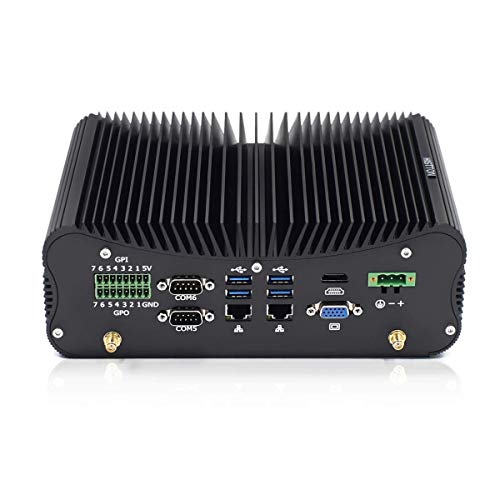
The HISTTON Fanless Industrial PC takes a different path. No fans means no moving parts to clog with shop dust, and the Core i7-10510U inside is a familiar 10th-gen workhorse that holds up well for industrial control, digital signage, and 24/7 operations. For a factory floor or a noisy retail back room, silent running is a real perk.
The 32GB of RAM is generous, and 512GB of SSD storage covers most kiosk or machine-vision workloads. Where the BOSGAME E2 Plus is built for casual use, the HISTTON is built to be ignored, mounted, and forgotten about until something needs attention.
The Value In It
- Fanless design eliminates dust-related failures common in industrial environments.
- 32GB RAM handles concurrent tasks and data logging with room to spare.
- Core i7-10510U (a 10th-gen Intel chip with boost speeds up to 4.9GHz) keeps responsive under load.
- Compact metal housing suits VESA mounts behind displays or inside enclosures.
Some Limits To Know
- Passive cooling means the chassis can run warm under sustained heavy loads.
- Older 10th-gen silicon trails newer Ryzen chips in raw efficiency.
- Bulkier than consumer mini PCs, so it’s not ideal for a tidy home desk.
Quick Facts
Best Suited To
Industrial operators, signage integrators, and small manufacturers running Linux on the shop floor.
Skip It When
A home user wanting quiet daily computing should consider the BOSGAME E2 Plus for a smaller footprint.
The FANPEEC Fanless Mini PC lands in the middle of the industrial lineup. Its Core i5-8350U is an 8th-gen quad-core chip that handles office suites, light code compilation, and standard Linux server tasks without drama. The 16GB DDR4 RAM and 512GB SSD pair up to give a balanced experience for users running mixed operating systems on a single box.
For lab environments or technicians who need to test software across Linux and Windows, this unit has the right amount of breathing room. Where the HISTTON offers 32GB of RAM for heavier industrial work, the FANPEEC lands at a more approachable middle ground.
Practical Pluses
- 16GB DDR4 covers multi-OS testing and most dev workflows comfortably.
- Fanless build keeps noise at zero in quiet office and lab settings.
- 512GB SSD accommodates several distros, container images, and project files.
- Compact shell works well in crowded server racks or behind monitors.
Points To Keep In Mind
- i5-8350U is an older 8th-gen chip, so newer Ryzen options run cooler and faster.
- Passive cooling may throttle under extended heavy compilation jobs.
Right Fit For
Techs and engineers who want a silent, dependable Linux workstation for mixed-OS testing.
A Better Fit Elsewhere
Gamers and creative pros should look at the BOSGAME P3 Plus for newer architecture and stronger graphics.
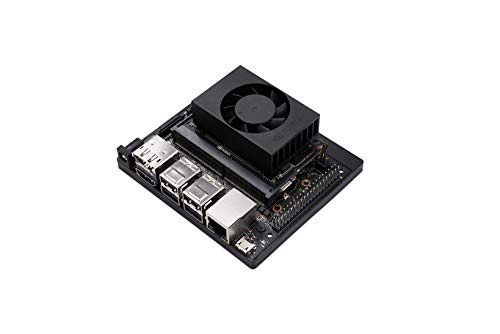
The NVIDIA Jetson Xavier NX Developer Kit exists in a different category from the rest. It’s not a desktop: it’s a developer platform built around edge AI (running machine learning directly on small, low-power devices). For robotics researchers, computer vision tinkerers, and anyone prototyping AI-powered devices, this kit offers a software stack designed for exactly that kind of work.
The Jetson Xavier NX module inside draws as little as 10 watts while delivering notable performance for inference tasks. It’s not a casual purchase, and the learning curve is steeper than installing Ubuntu on a mini PC. But for the right maker, it’s a powerful foundation.
Strong Points
- Compact, low-power module (around 10W) suits battery and embedded projects.
- Full NVIDIA software stack supports modern AI frameworks out of the box.
- Cloud-native support simplifies deploying containerized models to edge devices.
- Widely adopted, so community examples and reference projects are abundant.
What To Weigh
- Not a general-purpose desktop replacement; expect a learning curve for new developers.
- Storage and RAM are modest for the form factor, so expansion may be needed for large datasets.
Feature Rundown
Whose Shelf It Belongs On
AI developers, robotics hobbyists, and researchers prototyping edge-machine-learning projects.
Reach For A Different Pick When
Anyone wanting a simple Linux desktop should pick the BOSGAME E2 Plus instead.
The ACEMAGIC K1 Mini PC brings modern AMD silicon into a friendly home form factor. Its Ryzen 5 7530U is a 6-core, 12-thread chip built on AMD’s Zen 3 architecture, with enough headroom for family computing, school work, and casual gaming. Where the BOSGAME E2 Plus uses an older Ryzen chip, the K1 steps up in efficiency and graphics capability.
With 16GB of RAM and a 512GB SSD, the K1 has more room to breathe than the entry-level E2 Plus. For families splitting time between schoolwork, streaming, and creative hobbies, that extra space tends to matter.
Positive Points
- 6-core, 12-thread Ryzen 5 chip delivers modern efficiency for daily use.
- 16GB RAM supports heavier multitasking across family members.
- 512GB SSD gives comfortable storage for media libraries and projects.
- Compact housing fits neatly in living rooms or shared study spaces.
Honest Caveats
- Radeon integrated graphics handle casual games but not heavy 3D titles.
- Not fanless, so a faint hum may be noticeable in silent rooms.
Perfect Match For
Families and shared households wanting a versatile Linux-ready desktop for everyone.
Where Another Pick Suits Better
Hardcore gamers should grab the BOSGAME P3 Plus for stronger graphics performance.
The BOSGAME P3 Lite is the heavyweight of the lineup. Its Ryzen 7 6800H is an 8-core, 16-thread mobile processor built for sustained heavy workloads. Paired with 32GB of DDR5 RAM (a faster memory standard than DDR4) and a 1TB NVMe SSD, this machine is closer to a workstation than a casual desktop.
For developers compiling large codebases, content creators editing video, or anyone running virtual machines, the P3 Lite makes short work of what would choke lesser machines. Compared to the ACEMAGIC K1, it’s a meaningful leap in both CPU and memory bandwidth.
Strengths Worth Knowing
- 8-core, 16-thread Ryzen 7 chip chews through compiles and renders.
- 32GB DDR5 memory keeps many apps and VMs running simultaneously.
- 1TB NVMe SSD holds large project files and offers fast read/write speeds.
- Radeon 680M graphics handle light gaming and 4K media playback well.
Less Ideal Details
- Higher power draw means more heat and fan noise under load.
- Overkill for users who only browse, email, and stream.
Who Should Grab It
Software developers, content creators, and power users who want desktop-class performance in a small box.
Another Choice May Suit
Casual home users get more value from the ACEMAGIC K1’s balanced specs.
The BOSGAME P3 Plus builds on the P3 Lite with newer silicon. Its Ryzen 7 7840HS uses AMD’s Zen 4 architecture (the latest generation at the time of writing), reaching boost clocks around 5.1GHz with 8 cores and 16 threads. That’s the kind of speed that translates to snappier compile times and smoother creative workflows.
The Radeon 780M graphics are the real differentiator, delivering stronger integrated GPU performance than the 680M in the P3 Lite. For gamers wanting modern titles at reasonable settings or creators editing 4K video, that bump matters. Pair it with 16GB of DDR5 and a 1TB NVMe drive, and the P3 Plus covers most demanding use cases without breaking a sweat.
Noteworthy Benefits
- Zen 4 architecture brings strong single-thread and multi-thread performance.
- Radeon 780M graphics handle modern casual gaming and creative workloads.
- 1TB NVMe SSD balances speed and storage for large project files.
- Compact mini PC form factor fits gaming nooks and studio desks alike.
Potential Compromises
- 16GB RAM is the floor for this class; heavy VM users may want to upgrade.
- Boost performance requires good cooling, so fan noise can spike under stress.
Feature Overview
Built With In Mind
Gamers, streamers, and creative professionals who want strong CPU and GPU performance in a small chassis.
Swap It Out When
Heavy multitaskers needing extra RAM should consider the BOSGAME P3 Lite’s 32GB configuration.
The MeLE Stick PC is the smallest entry on the list, literally the size of a streaming stick. Its Intel N100 processor is a low-power quad-core chip designed for light tasks: kiosks, digital signage, hotel rooms, and travel setups. Plug it into any HDMI display, add a keyboard and mouse, and you’ve got a full Linux desktop.
With 8GB of RAM and 128GB of storage, it’s modest by desktop standards, but for its intended role, the spec sheet lines up. Compared to the BOSGAME E2 Plus, the trade-off is clear: less raw power, but far more portability.
The Case For It
- Pocket-sized form factor travels easily between home, office, and hotel rooms.
- Fanless design runs silently, fitting conference rooms and quiet spaces.
- Intel N100 chip handles lightweight Linux distros and kiosk apps smoothly.
- Low power draw keeps heat and electricity use minimal.
Practical Considerations
- 128GB storage is tight; expect to rely on cloud storage or external drives.
- Not built for heavy multitasking: stick to single-purpose workflows.
Who Will Love This
Travelers, digital-signage operators, and anyone needing a tiny, silent Linux terminal.
Not Your Match When
Home users running everyday office work should look at the ACEMAGIC K1 for a more capable desktop.
What To Weigh Before Choosing Linux Computers
Processor Generation And Core Count
The CPU (central processing unit) drives everything from boot times to how many apps can run at once. Modern Ryzen 7000-series chips like the 7840HS in the BOSGAME P3 Plus offer strong single-thread and multi-thread performance, while older Intel options like the i7-10510U in the HISTTON still hold up for industrial control work. For everyday browsing and office tasks, a recent quad-core chip is plenty. For compiles, VMs, or video editing, more cores matter.
RAM, Storage, And Upgradability
RAM affects how many apps run smoothly at once. 8GB suits light use, 16GB is the comfortable middle, and 32GB opens the door to virtualization and heavier workloads. Storage follows a similar logic: 256GB works for minimal setups, while 512GB or 1TB accommodates project files and media. Choosing an upgradable unit like the GEEKOM IT12 extends usable life when needs grow.
Form Factor And Environment
Where the machine lives shapes the right pick. Fanless industrial units like the HISTTON and FANPEEC thrive in dusty shops and quiet offices. Compact consumer mini PCs work behind monitors or in living rooms. Stick PCs like the MeLE suit travel and kiosk setups. For shared workspaces, a sturdy metal chassis like the GEEKOM IT12’s tends to age better than plastic shells.
Key Considerations Across These Picks
Pitfalls Shoppers Hit
A common mistake is underestimating RAM. People pick an 8GB machine for what turns out to be a dozen-tab workflow, then find the system grinding under swap. Another trap is assuming all mini PCs are quiet. Fanless designs run silent but can throttle under heavy load, while actively cooled units offer more sustained performance with some fan noise. For industrial users, ignoring cooling type in dusty environments is a frequent oversight.
Where The Extra Money Goes
Higher-tier models like the BOSGAME P3 Plus and P3 Lite deliver newer CPU architectures, faster DDR5 memory, and stronger integrated graphics. The practical payoff shows up in compile times, video rendering, and smoother multitasking. For casual use, that extra performance is wasted. For developers, creators, and gamers, the upgrade tends to pay back in saved time alone.
Frequently Asked Questions
Can these mini PCs really run Linux well?
Yes. Most modern mini PCs use standard x86 (the dominant desktop processor architecture) hardware that Linux supports directly. Distributions like Ubuntu, Fedora, and Linux Mint install smoothly on the Ryzen and Intel chips in this list. Fanless industrial units also tend to pair well with Linux because they avoid proprietary driver complications.
Do I need a fanless design?
For dusty shops, quiet offices, or 24/7 operations, fanless is a meaningful advantage. For home use or gaming, active cooling usually offers better sustained performance, since passive designs can throttle under heavy loads. The right answer depends on environment and workload.
Is 8GB of RAM enough for Linux?
For basic browsing, document editing, and light development, 8GB works fine. For running multiple virtual machines, editing video, or compiling large projects, 16GB or 32GB is the more comfortable choice. Most users find that 16GB hits a sweet spot.
What’s the difference between DDR4 and DDR5 RAM?
DDR5 is the newer memory standard, offering higher bandwidth and better power efficiency than DDR4. For most everyday tasks, the difference is subtle. For memory-heavy workloads like video editing or running many VMs, DDR5’s extra bandwidth becomes more noticeable.
Are stick PCs practical for daily use?
Stick PCs like the MeLE PCG02 work well for travel, kiosks, and single-purpose setups. For primary desktop computing, their limited storage and modest performance make them less practical than full mini PCs. Treat them as a portable companion rather than a main workstation.
The Takeaway
Linux computers span a wide spectrum, from pocket-sized sticks to industrial-grade silent boxes. The right pick depends on where it lives and what it has to do. For everyday home use, the BOSGAME E2 Plus or ACEMAGIC K1 offer approachable entry points. For heavier workloads, the BOSGAME P3 Lite and P3 Plus deliver workstation-class muscle in a small chassis. Industrial and specialty needs point toward the HISTTON, FANPEEC, GEEKOM, or NVIDIA picks. Match the machine to the mission, and Linux handles the rest.