A good office desktop clears your day, not clutters it. The right machine handles spreadsheets, video calls, browser tabs, and project files without turning into a desk heater. I’ve narrowed down ten options across tower and mini-PC form factors, each with a clear strength, so you can match your workspace and workload without overspec’ing.
The Shortlist At A Glance
ACEMAGIC X3 Mini Gaming PC Ryzen 7 H 255 Radeon 780M

ACEMAGIC K1 Mini PC Windows 11 Pro Intel 12600H

ACEMAGICIAN K1 Mini PC AMD Ryzen 7 7730U

HP OmniDesk Desktop Computer PC Ryzen 5 64GB DDR5
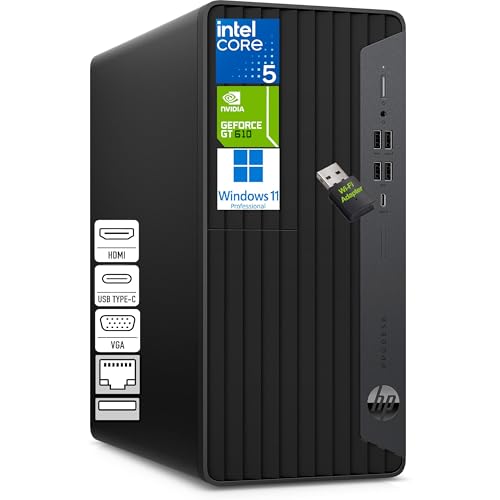
HP Desktop Computer Tower PC Intel i5-10400F

GEEKOM A5 2027 Edition Mini PC Ryzen 7 7730U

GEEKOM A6 Mini PC Ryzen 7 6800H DDR5

Dell Slim Desktop Intel Core Ultra 5-225

HP EliteDesk 800 G5 SFF Intel Core i5 32GB

GEEKOM IT13 MAX AI Mini PC Intel Ultra 9 185H
A Breakdown Of The Leading Choices
The X3 leans on AMD’s Ryzen 7 H 255, an eight-core, sixteen-thread chip designed to hold sustained clocks rather than spike briefly. That matters on a busy workday where you’ll keep dozens of browser tabs, a chat client, and a video call open for hours. The integrated Radeon 780M graphics handle light creative work and high-resolution playback without leaning on a discrete GPU.
It comes ready with 16GB of RAM and a 1TB SSD, which keeps the boot time short and the workspace responsive. Compared to the ACEMAGIC K1 on this list, the X3 trades some efficiency for a heavier workload ceiling, so analysts, designers on a budget, or anyone juggling VMs will feel the difference.
Where It Excels
- Eight-core CPU sustains multi-threaded office loads
- Radeon 780M handles FHD-plus display output smoothly
- 1TB of SSD storage leaves room for project archives
- Compact mini form factor frees desk space
- Windows 11 Pro included for business workflows
Points To Note
- Mini fans ramp up under sustained heavy threads, depending on your room temperature
- Integrated graphics limit serious 3D work
Who It Suits Best
Power users running spreadsheets, code, or design apps who want tower-class muscle in a mini-PC footprint.
Swap It Out When
The HP OmniDesk fits better if you need true quad-monitor setups and traditional tower upgradability.
The K1 slots an Intel i5-12600H into a mini-PC shell, and that processor brings twelve threads to the table for routine office work. Hybrid staffers running both office apps and the occasional image edit will appreciate the headroom. Storage sits at a sensible 512GB SSD, paired with 16GB of DDR4 RAM that handles modern browser and meeting stacks comfortably.
Compared to the ACEMAGICIAN K1 with its Ryzen chip, this K1 leans on Intel’s stronger single-core behavior, which shows up in spreadsheet recalcs and older line-of-business tools. The compact body mounts behind a monitor with VESA hardware in most setups, depending on your display.
Benefits That Matter
- Twelve-thread CPU handles hybrid workloads
- 16GB DDR4 supports heavy browser sessions
- Small footprint fits cramped workstations
- Windows 11 Pro ready out of the box
Worth Noting
- 512GB storage fills up fast with archived project files
- DDR4 lags behind DDR5 in bandwidth-heavy tasks
- Intel H-series runs warmer than U-series chips
Made For
Hybrid office staff who want Intel’s single-core strength for traditional productivity apps.
A Better Fit Elsewhere
The GEEKOM A6 Mini PC suits you more if DDR5 bandwidth and upgradability matter for your workflow.
The ACEMAGICIAN K1 wraps Ryzen 7 7730U silicon in a small case, and that U-series chip balances threading with low power draw. A standard eight-core, sixteen-thread setup keeps Teams, Outlook, browser stacks, and lightweight IDEs humming without sounding like a jet. The 512GB PCIe SSD keeps the desk responsive at boot and during file opens.
Where the bigger ACEMAGIC X3 above prioritizes raw clocks, this K1 chases quiet efficiency, which matters in shared or home offices. Owners commonly report the chassis stays cool and quiet under office loads, depending on ventilation in your setup.
The Practical Payoff
- Ryzen 7 7730U balances threads and efficiency
- 16GB RAM covers heavy browser days
- Quiet operation suits shared spaces
- PCIe SSD speeds up cold launches noticeably
Some Limits To Know
- U-series throttles under prolonged heavy compile loads
- 512GB limits large local media libraries
Feature Snapshot
Right Fit For
Minimalist desk owners who want tidy Ryzen power without tower bulk or fan noise.
Not Your Match When
The GEEKOM A6 Mini PC is a smarter pick if sustained 45W loads and DDR5 bandwidth matter more.
The OmniDesk aims straight at multi-screen operators, with quad-monitor support through its Radeon 740M graphics output and abundant 64GB of DDR5 memory. Financial analysts, dispatch coordinators, and anyone running four panels at once will find it hard to overflow 64GB during a normal day. The combined 3TB storage split between a 2TB SSD and 1TB HDD gives you speed for active files plus bulk space for archives.
Wi-Fi 6 keeps network lag in check on busy office routers, and the included wireless keyboard and mouse cut clutter. Stack it next to the ACEMAGIC X3 and the comparison is straightforward: the X3 saves desk space, while the OmniDesk adds screen real estate and room to grow.
Why It Works Well
- Quad-monitor support expands visible workspace
- 64GB DDR5 future-proofs heavy app loads
- Dual-drive setup blends speed and capacity
- Wi-Fi 6 holds steady on crowded networks
Things To Consider
- Tower footprint demands dedicated desk or floor space
- Ryzen 5 trails Ryzen 7 chips in multi-thread work
Spec Overview
Best Suited To
Multi-screen power users in finance, logistics, or trading who need many panels running at once.
Consider Something Else When
The Dell Slim Desktop is a cleaner choice for tight desk spaces that still want modern Intel silicon.
This HP tower runs on the Intel i5-10400F, a six-core, twelve-thread chip that’s been a steady performer in home and small-business setups. For spreadsheet-heavy days, accounting software, and frequent browser pivots, the chip holds up better than its age suggests. The “F” suffix means no integrated graphics, so a discrete GPU is part of the equation.
Compared to the AMD-driven OmniDesk above, this tower trades newer platform features for a classic, easily upgradable chassis. Owners commonly appreciate the straightforward access for memory or storage swaps when the workload grows.
What It Does Well
- Six-core i5 handles typical office workloads
- Tower chassis supports memory and storage upgrades
- Proven Intel platform with broad driver support
- Stable choice for long-running business apps
Room For Improvement
- No integrated graphics requires a discrete GPU
- Older platform trails current gen in efficiency
- Tower footprint takes more space than a mini
Whose Shelf It Belongs On
Small-business offices running accounting, ERP, or document workflows who value a classic upgradable tower.
Skip It When
The ACEMAGIC K1 Mini PC fits better if you want a smaller footprint with newer silicon.
The A5 2027 Edition repeats a winning formula: Ryzen 7 7730U paired with 16GB of RAM and a 512GB NVMe SSD, all in a tidy chassis. Remote workers running video calls, browser-based SaaS dashboards, and lightweight Photoshop or Premiere work find it balanced rather than stretched. The eight-core chip handles thread-heavy apps without sounding like a small fan heater.
Place it next to the ACEMAGICIAN K1 with the same CPU, and the A5 leans on GEEKOM’s reputation for tidy chassis design and stable thermals. Owners commonly report easy VESA mounting behind monitors, depending on their bracket setup.
Positive Points
- Ryzen 7 7730U handles eight threads comfortably
- NVMe SSD speeds up app and file launches
- Compact form factor tucks behind monitors
- Radeon integrated graphics handle FHD playback
Trade Offs
- U-series chip throttles during long compile runs
- 512GB storage may need a NAS companion
Quick Facts
Perfect Match For
Remote workers with mixed workloads, from calls to light creative tasks, who want balanced Ryzen power in a small box.
Look Elsewhere When
The GEEKOM A6 Mini PC is the stronger choice for sustained 45W loads and DDR5 throughput.
The A6 brings a real H-class chip into mini-PC territory, with the Ryzen 7 6800H sustaining a 45W TDP for heavy workloads. Creative pros running short renders, code compilations, or large dataset analysis will feel the headroom that U-series chips can’t quite match. The 16GB of DDR5 is upgradable, and a 1TB PCIe 4.0 SSD adds fast throughput for active project files.
Compare it to the ACEMAGIC X3 from earlier, and the A6 trades integrated Radeon 780M for a more power-hungry but thermally serious chip. Owners commonly report sustained performance during long sessions, depending on their ventilation.
What Earns Its Place
- H-class Ryzen 7 maintains 45W sustained output
- DDR5 memory bandwidth speeds up large datasets
- PCIe 4.0 SSD shortens project load times
- Upgradable RAM extends the useful life
Honest Caveats
- 45W TDP means more heat and fan activity under load
- Higher power draw than U-series mini PCs
Who Should Grab It
Creative professionals on mini rigs who need true sustained CPU power and modern memory bandwidth.
Another Choice May Suit
The GEEKOM A5 Mini PC fits better for quieter, cooler home office use on lighter workloads.
Dell’s Slim Desktop rides on Intel’s Core Ultra 5-225, a newer-generation chip that pairs CPU cores with onboard AI acceleration for productivity tasks. The slim tower case slips into tight spots where a traditional tower won’t, which makes it a natural fit for home offices with limited floor space. DisplayPort output can support up to one 4K or four FHD monitors when displays are daisy-chained.
The 16GB DDR5 and 512GB SSD configuration is modest but reasonable for daily office use. Wi-Fi 6 and Bluetooth round out a tidy modern platform. Compared to the HP OmniDesk above, this Dell sacrifices quad-monitor readiness for a smaller footprint.
Everyday Perks
- Intel Core Ultra platform brings modern AI features
- Slim chassis fits narrow desk gaps
- DDR5 memory headroom for browser-heavy days
- DisplayPort daisy-chain enables multi-screen setups
Points To Keep In Mind
- 512GB SSD fills quickly with archived media
- Slim case limits internal expansion compared to towers
Built With In Mind
Modern home offices that want Intel’s latest platform in a footprint smaller than a traditional tower.
Reach For A Different Pick When
The HP OmniDesk is the smarter call if quad-monitor support and bigger storage pools are your priority.
The EliteDesk 800 G5 in its small form factor brings an Intel Core i5 paired with 32GB of DDR4 RAM and a 1TB SSD. The 32GB ceiling is generous for office teams running multiple line-of-business apps, browser stacks, and the occasional large spreadsheet. The SFF chassis keeps the desk footprint manageable, and the included keyboard and mouse cut setup steps.
Compared to the HP tower above, this EliteDesk gives up some expansion headroom for a smaller box. Owners commonly appreciate the Wi-Fi and DisplayPort support that lets them keep their existing monitor setup intact.
Everyday Wins
- 32GB RAM covers multi-app office workloads
- 1TB SSD provides ample local storage
- SFF chassis fits cramped workstations
- DisplayPort output supports modern monitors
Less Ideal Details
- DDR4 trails DDR5 in memory-bound tasks
- SFF case restricts future internal upgrades
Who Will Love This
Office teams running multiple concurrent apps who want strong memory headroom in a tidy small form factor.
Where Another Pick Suits Better
The GEEKOM A6 Mini PC is a smarter match if DDR5 memory and upgradability are top priorities.
The IT13 MAX plants Intel’s Ultra 9 185H, a sixteen-core flagship, into a mini-PC body, and that combination turns heads in AI-assisted workloads. Content creators running local LLMs, simulation engineers pushing models, and studios with inference on the desktop benefit from this much silicon in a small chassis. The 24GB of LPDDR5 supports large model contexts, and the 500GB SSD keeps project transfers quick.
Place it against the GEEKOM A6 from earlier, and the IT13 MAX trades upgradability for raw flagship power. Owners commonly note that the platform demands good ventilation in tight desks, depending on how heavily they push threads.
Advantages To Know
- Sixteen-core Ultra 9 delivers flagship compute
- 24GB LPDDR5 supports large AI contexts
- Compact chassis fits creator workstations
- Modern platform handles AI-assisted office tools
Things That May Matter
- Flagship chip generates noticeable heat under load
- 500GB SSD may feel tight for media-heavy projects
- Premium silicon commands a premium position
Feature Rundown
Who Will Love This
AI-driven professional users running local inference or creative simulations on a desktop-class mini PC.
Where A Sibling Pick Shines
The GEEKOM A6 Mini PC is the better balanced choice for sustained creative workloads on a smaller budget.
What Matters Most Before Choosing Office Desktop Pcs
Form Factor And Desk Footprint
Mini-PCs keep clutter off the desk and mount behind monitors with VESA hardware, but their compact cooling often caps sustained performance. Towers like the HP OmniDesk or EliteDesk trade floor space for stronger thermals, easier upgrades, and room for full-size components. Slim desktops such as the Dell Slim Desktop split the difference, keeping a small footprint while accepting modern DDR5 platforms.
CPU Class And Real Workload Match
A U-series chip like the Ryzen 7 7730U on the ACEMAGICIAN K1 and GEEKOM A5 keeps things quiet and cool for everyday office tasks. H-series chips like the Ryzen 7 6800H on the GEEKOM A6 hold higher clocks for sustained creative work. Flagship Ultra and Ryzen H 255-class silicon handles AI and simulation loads but pulls more power and heat.
Memory, Storage, And Display Counts
DDR5 platforms like the Dell Slim Desktop and GEEKOM A6 future-proof against heavy browser and app stacks, while 32GB-plus configurations from the HP EliteDesk cover most office workloads. Storage pairings matter: a 2TB SSD plus 1TB HDD in the HP OmniDesk blends speed and archive space. For multi-screen operators, DisplayPort daisy-chain and quad-monitor support change the day’s productivity ceiling.
Key Considerations Across These Picks
Pitfalls Shoppers Hit
Mini-PC shoppers often overlook sustained thermals, since U-series chips throttle during long compile or render sessions. Quad-monitor marketing can also mislead, since some integrated graphics support fewer panels than advertised without daisy-chain displays. Storage sizing is another trap: a 500GB SSD fills quickly when project archives stack up, leaving you dependent on cloud or external drives.
The Case For Spending Up
Higher-tier options like the GEEKOM IT13 MAX or ACEMAGIC X3 cost more because they bring flagship CPU power and modern memory bandwidth. The upgrade pays off when you run AI-assisted workflows, sustained creative apps, or large datasets that bottleneck lesser chips. For pure office productivity on a tight budget, mid-tier picks like the ACEMAGIC K1 or GEEKOM A5 deliver the right balance without the premium price.
Frequently Asked Questions
Do I really need a desktop instead of a laptop for office work?
A desktop like the HP OmniDesk or Dell Slim Desktop typically runs cooler, lasts longer, and offers more ports and storage than a comparable laptop. Mini-PCs narrow that gap, but desktops still give you easier memory and storage upgrades over time.
How much RAM is enough for office multitasking?
Sixteen gigabytes handles most office workloads comfortably, but thirty-two gigabytes from the HP EliteDesk gives breathing room for heavy browser stacks and parallel apps. Sixty-four gigabytes makes sense mainly for multi-screen operators or anyone running local datasets.
Are mini-PCs powerful enough for serious work?
Mini-PCs with H-class chips like the GEEKOM A6 sustain creative workloads, while U-series chips handle lighter office tasks. The trade-off is thermals and sustained clocks, since compact cases cool less effectively than towers.
What is DDR5 and why does it matter?
DDR5 is the latest generation of system memory, offering higher bandwidth than DDR4. That matters when moving large datasets, running AI inference locally, or keeping dozens of browser tabs responsive. Platforms like the GEEKOM A6 and Dell Slim Desktop embrace DDR5 for future-proofing.
Should I worry about integrated graphics?
Integrated Radeon graphics handle office playback, FHD monitors, and light creative work. Multi-screen operators may need DisplayPort daisy-chain support, and heavy 3D or video work demands a discrete GPU, which most of these office desktops skip.
Bottom Line
The right office desktop depends on your desk, your screens, and how hard you push the CPU each morning. Match the form factor to your space, pick a chip class that fits your workload, and don’t overspec storage you won’t fill. Any of these ten picks will serve a busy workday well, so choose the one that fits your real setup rather than chasing flagship numbers you’ll never use.