A reliable work PC shouldn’t slow you down mid-project, but shopping for one often turns into a spec-sheet maze. I’ve put together this list of 10 office desktop computers that span compact mini PCs, traditional towers, and flexible barebones builds, so you can match the right machine to the work you actually do.
The Main Contenders

HP OmniDesk Desktop AMD Ryzen 5 16GB DDR5 1.5TB Storage
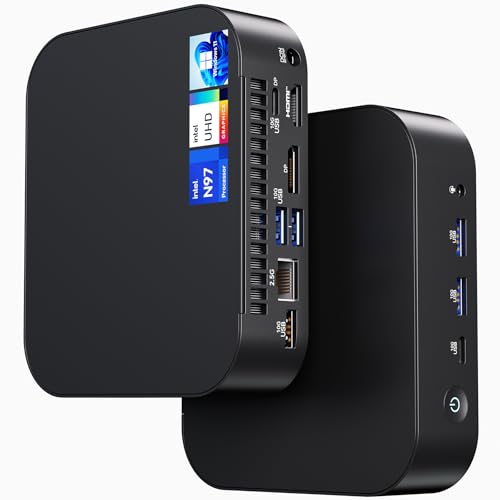
ASUS NUC 14 Essential Mini PC N97 8GB 256GB

KAMRUI Hyper H2 Mini PC Intel Core i7 14650HX 32GB 1TB

ASUS NUC 13 Pro Arena Canyon Barebone Kit Core i5-1340P
HP OmniDesk Desktop AMD Ryzen 5 64GB DDR5 3TB Storage

KAMRUI Mini PC Ryzen 7 7735HS 16GB LPDDR5 512GB
KAMRUI Mini PC AMD Ryzen 7530U 16GB 1TB SSD
KAMRUI Hyper H2 Mini PC Intel Core i5-14450HX 32GB 1TB
HP OmniDesk Desktop AMD Ryzen 5 32GB DDR5 3TB Storage

ASUS NUC 13 Pro NUC13ANHi5 Core i5-1340P 16GB 512GB
More Details On Our Top Picks
The HP OmniDesk with the AMD Ryzen 5 8500G lands as my everyday anchor pick because it covers the bases most home offices actually need. A six-core, twelve-thread CPU handles browser tabs, spreadsheets, and a video call without breaking a sweat, and the Radeon 740M graphics chip means a second or third monitor isn’t a struggle.
Quad-monitor support is a quiet standout. Plenty of mini PCs in this list run two screens fine, but this OmniDesk pushes four, which matters if you keep dashboards, Slack, and a full-screen doc open at the same time. Wi-Fi 6 and Bluetooth 5.4 keep the desk cable-light, and a wireless keyboard and mouse come in the box.
What Earns Its Place
- Six-core Ryzen 5 plus integrated Radeon graphics cover office work and light creative tasks without a discrete GPU.
- Quad-monitor support lets analysts and admins spread work across four panels instead of tab-switching.
- 1.5TB of mixed SSD and HDD storage gives fast boot times plus room for project archives.
- Wi-Fi 6 and Bluetooth 5.4 reduce cable clutter on small desks.
- Included wireless peripherals mean zero extra purchases on day one.
Things To Consider
- The integrated graphics handle productivity, not serious gaming or 3D rendering.
- A traditional mid-tower takes more desk or floor space than the mini PCs elsewhere in this list.
Feature Snapshot
Best Suited To
Hybrid workers and home-office professionals who want a turnkey Windows tower with real multitasking muscle and zero setup friction.
Consider Something Else When
Shoppers with very tight desk space should look at the ASUS NUC 14 Essential Mini PC instead, since it tucks behind a monitor.
The ASUS NUC 14 Essential is the smallest machine on this list, and it leans into that role without apology. Powered by an Intel N97 chip (a low-power, four-core processor tuned for efficiency), it runs Windows 11 Pro out of the box and weighs almost nothing.
For digital signage, a back-office terminal, or a tight reception desk, this NUC makes more sense than any tower. It supports Wi-Fi 6E and Bluetooth 5.3, which helps in offices where the strongest wireless band isn’t always the 5GHz one. You also get VESA mounting, so it can hide behind a monitor entirely.
Useful Highlights
- Tiny chassis with VESA mounting for a clean, monitor-mounted setup.
- Windows 11 Pro pre-installed, ideal for business environments with BitLocker and Remote Desktop.
- Wi-Fi 6E and Bluetooth 5.3 handle crowded office networks gracefully.
- Fanless-friendly efficiency, so it tends to run quiet under typical office loads.
Worth Noting
- 8GB of RAM and a 256GB SSD fill up fast with a heavy project workflow.
- The N97 chip is built for efficiency, not for sustained heavy compiling or rendering.
- Storage and memory expansion depend on the specific chassis configuration.
Who It Suits Best
Small business owners, school admins, and signage operators who want a silent, mounted PC for light productivity and always-on tasks.
A Better Fit Elsewhere
Power users running large datasets or video edits should pivot to the KAMRUI Hyper H2 Mini PC Intel Core i7 14650HX 32GB 1TB, which has the headroom they need.
The Hyper H2 wraps a desktop-class Intel Core i7-14650HX into a mini chassis, which is a real engineering trick. Sixteen cores and twenty-four threads push past anything the smaller NUC entries can offer, and the 32GB of DDR5 memory means virtual machines and large spreadsheets stay resident.
What stands out, relative to the HP OmniDesk above, is the form factor. You get nearly the same throughput without dedicating floor space to a tower. The PCIe 4.0 SSD keeps reads and writes fast, which matters when transferring large project files or loading a database locally.
Notable Upsides
- HX-class 16-core CPU delivers desktop-tier multitasking in a mini PC envelope.
- 32GB DDR5 handles virtualization, large spreadsheets, and creative work without swapping.
- PCIe 4.0 SSD speeds up file transfers and reduces load times for heavier apps.
- Compact chassis frees desk space compared with traditional mid-towers.
Honest Caveats
- An HX chip runs hotter and may push fans harder under sustained loads.
- The 1TB SSD fills quickly if you work with raw video or massive datasets.
- A discrete GPU is absent, so true GPU-accelerated workloads are limited.
Right Fit For
Engineers, analysts, and creators who need real horsepower but don’t want a tower dominating the corner of the room.
Skip It When
Casual office users doing email and docs should save with the KAMRUI Mini PC AMD Ryzen 7530U 16GB 1TB SSD, which covers the basics for less.
This NUC 13 Pro arrives as a barebones kit, which means no RAM, no SSD, and no operating system. That’s a feature, not a flaw, for anyone who wants to spec the machine themselves. The 13th Gen Core i5-1340P brings twelve cores and Intel’s hybrid performance architecture, balancing snappy single-thread work with serious multi-thread throughput.
Compared with the pre-built ASUS NUC 13 Pro NUC13ANHi5 entry later in this list, this kit trades convenience for choice. You decide whether to load it with 16GB or 64GB of DDR4 or DDR5, which SSD brand to trust, and whether to run Linux, Windows, or something more specialized. Gigabit Ethernet and Wi-Fi 6 are baked in for steady connectivity.
What Pays Off
- Twelve-core i5-1340P with hybrid architecture handles both quick tasks and heavier multi-thread jobs.
- Barebones format lets you choose exact RAM, SSD, and OS for your workflow.
- Compact NUC footprint with VESA mounting keeps it out of sight.
- 8K and 4K UHD display support for high-resolution office setups.
- Gigabit Ethernet plus Wi-Fi 6 covers wired and wireless networks.
Trade Offs
- No RAM, SSD, or OS included, so total cost rises once you add components.
- Assembly and OS installation require basic technical comfort.
- Sourcing compatible DDR4 or DDR5 SODIMMs takes an extra spec check before purchase.
Quick Facts
Made For
IT builders, hobbyists, and Linux-friendly tinkerers who want a NUC sized PC and don’t mind installing their own memory and storage.
Not Your Match When
Anyone who needs a ready-to-run plug-and-play experience should pick the ASUS NUC 13 Pro NUC13ANHi5 Core i5-1340P 16GB 512GB instead.
This OmniDesk shares its silicon with the entry-level HP OmniDesk earlier in this list, but doubles the memory and triples the storage. The Ryzen 5 8500G still pulls office duty comfortably, while 64GB of DDR5 turns it into a memory-rich platform for serious multitasking.
The 3TB combined storage, split between a 2TB SSD and a 1TB HDD, means project files, OS images, and archival data can all coexist without juggling external drives. For analysts and engineers running VMs or large local databases, that headroom is the whole point of choosing this tier.
The Practical Payoff
- 64GB DDR5 handles dozens of browser tabs plus multiple VMs side by side.
- 3TB of mixed SSD and HDD storage keeps working files and archives in one machine.
- Quad-monitor support and Wi-Fi 6 carry over from the base OmniDesk.
- The same AMD Ryzen 5 8500G keeps power draw reasonable for an always-on workstation.
Minor Gripes
- The processor is identical to the cheaper OmniDesk, so raw CPU-bound speed doesn’t scale up.
- Mid-tower size still demands dedicated floor or desk space.
- More storage and RAM mean higher total cost than the base configuration.
Who Will Love This
Data analysts, developers, and power users running memory-hungry apps who don’t need a faster CPU but want breathing room.
Look Elsewhere When
Shoppers who want raw CPU horsepower in a smaller box should consider the KAMRUI Hyper H2 Mini PC Intel Core i7 14650HX 32GB 1TB instead.
The Ryzen 7 7735HS in this KAMRUI sits in a sweet spot. Eight cores, sixteen threads, and a 4.75GHz boost clock handle everyday office work without spinning into HX-class territory. Compared with the ASUS NUC 14 Essential above, this brings substantially more CPU muscle to the same compact footprint.
LPDDR5 memory soldered to the board keeps latency low and power draw tight, which suits all-day-on use in a quiet office. The 512GB SSD is a measured starting point for productivity users who live in cloud apps and don’t archive everything locally.
Key Advantages
- Eight-core Ryzen 7 with high boost clocks chews through spreadsheets and code editors.
- LPDDR5 keeps the system responsive and energy efficient under typical workloads.
- Compact mini-PC form factor fits anywhere a textbook would.
- Strong performance-per-watt profile, friendly to always-on scenarios.
Soft Spots
- 512GB of storage can feel tight for users with large local media libraries.
- LPDDR5 is often soldered, so memory upgrades may not be an option down the road.
Key Specs
Perfect Match For
Students, remote employees, and small-office users who want strong performance in a small box and don’t need terabytes of local storage.
Reach For A Different Pick When
Anyone needing more local storage from the start should choose the KAMRUI Mini PC AMD Ryzen 7530U 16GB 1TB SSD instead.
The Ryzen 7530U is a familiar, efficient chip with solid everyday performance, and this KAMRUI wraps it in a compact chassis with a generous 1TB SSD. For shoppers focused on storage and price together, that’s the headline story. The 16GB of LPDDR4 memory is enough for browser-heavy office work.
Compared with the Ryzen 7 7735HS KAMRUI earlier, this model trades raw CPU speed for double the storage out of the box. It’s a smart choice if your files live on the PC rather than the cloud, and you don’t push the processor to its limits day to day.
Where It Excels
- 1TB SSD removes the immediate need for external storage or cloud archiving.
- Sixteen gigabytes of RAM handles browser stacks and standard office apps comfortably.
- The efficient U-class chip tends to run cool and quiet in compact builds.
- Small footprint suits dorm rooms, studios, and compact offices.
Some Limits To Know
- The 7530U trails the 7735HS in raw CPU throughput for heavier multi-thread jobs.
- LPDDR4 memory is slower than LPDDR5 in higher-tier mini PCs.
Built With In Mind
Budget shoppers, students, and first-time buyers who want a tidy mini PC with plenty of local storage for documents and media.
Where A Sibling Pick Shines
Power shoppers who want stronger CPU headroom should step up to the KAMRUI Hyper H2 Mini PC Intel Core i5-14450HX 32GB 1TB.
The Hyper H2 with the Core i5-14450HX is the quieter sibling of the i7-14650HX model reviewed earlier. Ten cores and sixteen threads deliver genuine HX-class performance in the same compact chassis, with 32GB of DDR5 and a 1TB PCIe 4.0 SSD as standard.
For most office users, this strikes a sensible balance. You get the multi-thread muscle of the HX platform without paying for the i7’s extra cores, and the 1TB SSD matches what many users would spec themselves anyway. If your work involves CAD, code compilation, or large local datasets, this is the sweet spot in KAMRUI’s lineup.
What Makes Sense
- HX-class 10-core CPU handles heavy multi-thread workloads without breaking a sweat.
- 32GB DDR5 keeps large projects and VMs responsive over long sessions.
- PCIe 4.0 SSD cuts file load and transfer times for big project files.
- Mini PC format leaves desk space free compared with mid-towers.
A Few Limitations
- HX chips run warmer; expect the fan to work harder during sustained loads.
- No dedicated GPU, so GPU-accelerated tasks stay limited.
Whose Shelf It Belongs On
Mid-range power shoppers who want HX-class muscle and modern memory without paying the i7 premium.
Swap It Out When
Users on tighter budgets with lighter workloads should grab the KAMRUI Mini PC AMD Ryzen 7530U 16GB 1TB SSD and save.
The middle tier in HP’s OmniDesk trio offers a sensible balance for full-time work-from-home setups. The Ryzen 5 8500G handles the daily app grind, while 32GB of DDR5 keeps multitasking smooth across browsers, Office, and creative apps.
The 3TB combined storage, split between a 2TB SSD and a 1TB HDD, mirrors the Premium Pick above but at a more approachable configuration. Compared with the entry OmniDesk, you get double the memory and a larger SSD, which feels like the right place to land if you work heavily in design tools or juggle many files at once.
Features That Help
- 32GB DDR5 plus 2TB SSD covers daily multitasking with room to spare.
- Quad-monitor support keeps multi-app workflows visible at once.
- Wi-Fi 6 and Bluetooth 5.4 support modern peripherals without dongles.
- Wireless keyboard and mouse included in the box.
Points To Keep In Mind
- Mid-tower footprint still demands real desk or floor space.
- Same CPU as the cheaper OmniDesk, so raw processor speed doesn’t climb with the storage.
The Right Fit
Work-from-home professionals and small-business owners who want a turnkey Windows tower with serious storage and breathing room for multitasking.
Where Another Pick Suits Better
Anyone working in a tight space should pivot to the ASUS NUC 14 Essential Mini PC N97 8GB 256GB for a VESA-mounted setup.
Where the barebones NUC 13 Pro Kit above demands DIY effort, this pre-built NUC13ANHi5 ships ready to run. The same twelve-core Intel Core i5-1340P handles multi-thread office work, but with 16GB of RAM and a 512GB SSD already installed and Windows 11 Pro pre-loaded.
For small-business IT deployments, that plug-and-play profile is often the deciding factor. Compare it to the HP OmniDesk tower: this NUC delivers comparable CPU muscle in a fraction of the space, and its VESA-mountable chassis can hide behind any monitor on the floor.
What Helps Most
- Twelve-core i5-1340P with hybrid architecture for both quick and sustained workloads.
- Comes with 16GB RAM and 512GB SSD installed, so it works straight out of the box.
- Windows 11 Pro pre-installed with BitLocker and Remote Desktop support.
- Compact form factor with VESA mounting for clean installations.
Practical Considerations
- 512GB of storage fills up faster than the HP OmniDesk’s larger configurations.
- Smaller chassis can run warmer under sustained heavy loads, so airflow matters.
Who Should Grab It
Small-business IT managers and remote teams who want a reliable pre-built NUC they can deploy without opening the case.
Not Your Match When
Tinkerers who want to choose their own components should opt for the ASUS NUC 13 Pro Arena Canyon Barebone Kit Core i5-1340P instead.
What To Weigh Before Choosing Office Desktop Computers
Form Factor And Desk Footprint
Mini PCs like the ASUS NUC 14 Essential and the KAMRUI Hyper H2 pack serious specs into a chassis small enough to mount behind a monitor. Mid-towers like the HP OmniDesk models need dedicated floor or shelf space but trade size for easier internal upgrades and more ports. Match the chassis to your desk reality before falling for a spec sheet.
CPU Cores And Memory Headroom
Six cores and 16GB of RAM handle most office work today, but workloads stack quickly with browser tabs, virtual meetings, and large spreadsheets. The KAMRUI Hyper H2 and HP OmniDesk Premium Pick go further with HX-class chips and 32GB or 64GB of memory. Choose based on whether your typical day leans toward email or toward engineering work.
Storage Mix And Expansion
A 512GB SSD is a sensible starting point, but adding an HDD, like the 1TB drives inside the HP OmniDesk configurations, gives breathing room for project archives. PCIe 4.0 SSDs, found in the KAMRUI Hyper H2 models, also speed up file loads and large transfers, which matters when you open hefty databases or media projects.
Connectivity And Display Plans
Wi-Fi 6 and 6E keep wireless stable in crowded offices, while quad-monitor support on the HP OmniDesk line suits analysts and admins juggling dashboards. If you plan to drive a single 4K panel and value clean cable management, a VESA-mounted NUC may suit you better than a desk-bound tower.
Key Considerations Across These Picks
Where Shoppers Go Wrong
The most common slip is chasing core counts without checking memory and storage. A six-core CPU with only 8GB of RAM and a 256GB SSD will feel sluggish long before a twelve-core CPU with 32GB slows down. Another trap is buying a tower when a mini PC would have freed up the desk, or vice versa, when internal expansion matters.
The Upgrade Payoff
Higher-tier models like the HP OmniDesk Premium Pick and the KAMRUI Hyper H2 i7 buy you real headroom: 64GB of RAM, multi-terabyte SSD plus HDD storage, and HX-class processors that don’t bottleneck under heavy multi-thread work. For most everyday office users, those upgrades only matter if virtualization, large datasets, or sustained creative workloads are part of the job. Everyone else will find plenty of performance in the value and balanced tiers.
Frequently Asked Questions
How Much RAM Do Office Desktop Computers Need In 2026?
Most office work runs well with 16GB of RAM today, though 32GB gives noticeable headroom for browser-heavy multitasking and creative apps. Pick 64GB only if you run virtual machines, large local databases, or memory-hungry development tools.
Are Mini PCs Powerful Enough For Office Work?
Modern mini PCs like the ASUS NUC 14 Essential and the KAMRUI Hyper H2 handle spreadsheets, video calls, and many browser tabs without strain. HX-class chips in compact chassis now rival older mid-towers, though sustained heavy compiling still benefits from larger cooling solutions.
What Is The Difference Between SSD And HDD Storage?
SSDs use flash memory and load apps, files, and the operating system much faster, while HDDs offer more bulk storage at lower cost per gigabyte. Many office desktops, including the HP OmniDesk line, combine both, giving you fast boot and project files alongside room for archives.
Do Office Desktop Computers Need Dedicated Graphics?
Integrated graphics, like the AMD Radeon 740M in the OmniDesk models, drive multiple monitors and most productivity apps without issue. A discrete GPU only becomes important for 3D rendering, video editing, or gaming, which most office work does not require.
How Important Is Wi-Fi 6 Or 6E On A Desktop?
Wi-Fi 6 and 6E deliver faster wireless speeds and handle crowded office networks more gracefully than older standards. For desktops that mostly rely on Ethernet, the benefit is smaller, but a strong wireless standard keeps the desk flexible if you ever move the PC.
Wrap Up
The right office desktop depends less on chasing the highest specs and more on matching hardware to the work in front of you. A mini PC like the ASUS NUC 14 Essential fits a tight desk, while a tower like the HP OmniDesk 32GB version gives storage and connectivity without a learning curve. Match the chassis, CPU, memory, and storage to your actual day, and the rest takes care of itself.