I spend my days at a desk that doubles as a dining table, so I know the frustration of a bulky tower eating into elbow room. Small computer desktops solve that exact problem: real productivity in a chassis you can tuck behind a monitor or slide into a drawer. I’ve narrowed the field to ten solid picks across budget, mid-range, and high-compute tiers, and I’ll walk you through which one fits your workspace, your workload, and your tolerance for fan noise.
The Main Contenders
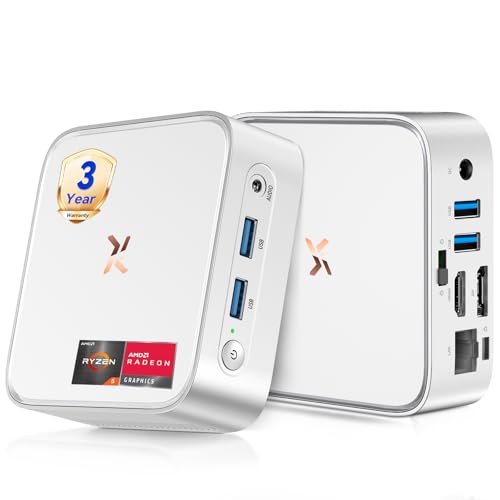
Huidun 2026 H80 Mini PC Ryzen 5 3500U 16GB 512GB

GEEKOM A5 Mini PC Ryzen 7 7730U 16GB 512GB
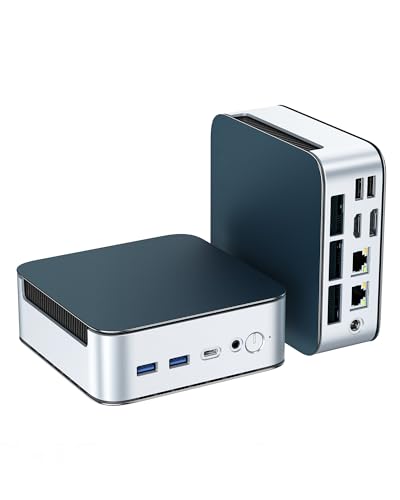
Glorlin Mini PC Ryzen 5300U 16GB 512GB Triple 4K

Beelink Mini S12 N95 Mini PC

Beelink SER5 MAX Mini PC Ryzen 7 7735U

Beelink SER5 Mini PC Ryzen 5 5500U

C4 SE Mini PC Ryzen 5 3500U 8GB 256GB

GEEKOM Air12 Budget Mini PC Intel 7505 8GB 256GB
GEEKOM AX8 Max Silent Mini PC Ryzen 7 8745HS

GEEKOM IT13 MAX AI Mini PC Intel Ultra 9 185H
Inside Each Recommended Option
The Huidun H80 lands squarely in the sweet spot where price and capability stop fighting each other. It runs the AMD Ryzen 5 3500U, a four-core, eight-thread chip with integrated Radeon Vega 8 graphics, and pairs it with 16GB of RAM and a 512GB SSD. That means spreadsheets, browser tabs stacked to the ceiling, and the occasional video call all happen on the same box without a stutter party.
Display coverage is one of the nicer surprises here. You get HDMI plus DisplayPort plus USB 3.2, so a dual-monitor setup is a five-minute job rather than a dongle hunt. Compared with the GEEKOM Air12 you’ll see later in this list, the Huidun delivers noticeably more processing headroom for a similar footprint.
The Good Stuff
- Radeon Vega 8 graphics handle 4K video and casual photo edits without choking.
- 16GB RAM keeps dozens of browser tabs productive for daily office workflows.
- Three display outputs let commuters split work across HDMI, DP, and USB-C screens.
- Silver chassis looks professional in shared meeting rooms and reception desks.
Points To Note
- The 3500U is aging, so heavy video rendering may outpace it.
- Wi-Fi and Bluetooth versions are not listed, so verify connectivity for your office router.
Made For
Hybrid home-office workers running browsers, Office apps, and Zoom calls who want a quiet Ryzen 5 box that disappears behind a monitor.
Consider Something Else When
Creators who push 4K timelines should look at the GEEKOM IT13 MAX AI Mini PC for the heavier Intel Ultra 9 muscle.
The GEEKOM A5 steps up to the Ryzen 7 7730U, an eight-thread chip built for the kind of multitasking that happens in any office after 9 a.m. GEEKOM pitches it heavily at bulk deployments: classrooms, retail back offices, service counters. That tells me the chassis is engineered for long uptime rather than flashy specs.
With 16GB of RAM alongside the 7730U, you’re covered for the usual office stack and then some. Compared with the Huidun H80 above, this GEEKOM leans more toward sustained workloads and business fleet use than pure home value.
A Favorable Mix
- Ryzen 7 7730U handles large spreadsheets and CRM dashboards with room to spare.
- Compact shell makes it easy to mount behind monitors in shared workspaces.
- Solid fit for bulk office rollouts where predictable performance matters.
- Whisper-quiet operation during routine office tasks.
Trade-Offs To Consider
- Graphics lean toward productivity, so gaming or GPU work is limited.
- Storage tops out at 512GB; data-heavy teams may need external drives.
- Listed as a business-grade unit, so retail availability can shift quickly.
Key Attributes
Whose Shelf It Belongs On
Small business owners and IT leads deploying consistent workstations across an office, classroom, or service counter.
A Better Fit Elsewhere
Quiet-studio creators who need more graphics headroom should consider the Beelink SER5 MAX Mini PC with its eight-core Ryzen 7 7735U.
The Glorlin Mini PC is the I/O heavyweight of this roundup. It runs the AMD Ryzen 3 5300U, four cores and eight threads boosting up to 3.8GHz, and pairs it with 16GB of DDR4 and a 512GB NVMe SSD. The chip is brisk for daily productivity, but the real story sits on the back panel.
Triple 4K output through HDMI, DisplayPort, and USB-C makes it a natural for stock traders, video editors on a budget, or anyone running a wall of dashboards. Dual 2.5G LAN ports are unusual at this tier and welcome for anyone running NAS gear. Compared with the Huidun H80, you trade some CPU muscle for a much richer port selection.
Where It Excels
- Triple 4K display support turns a tiny box into a serious multi-monitor workstation.
- Dual 2.5G LAN is rare in this class and great for home labs and NAS fans.
- Wi-Fi 6 and Bluetooth 5.3 cover current wireless standards out of the box.
- Expandable to 64GB RAM and 4TB storage for future-proofing.
Small Caveats
- The 5300U lacks the multi-core punch of Ryzen 7 picks elsewhere in this list.
- Triple-display USB-C may need a dock or hub to support older monitor types.
- Achieving 4K on all three outputs requires capable cables and monitor support.
Technical Snapshot
Who Should Grab It
Power users and small-office creators who live on multiple monitors and need a dense port selection without a full tower.
Look Elsewhere When
Anyone chasing heavier CPU work like compiling code or video rendering will appreciate the GEEKOM AX8 Max Silent Mini PC’s Ryzen 7 8745HS.
The Beelink Mini S12 sits at the entry-level tier, built around Intel’s 12th-gen N95 quad-core processor. That’s four cores running up to 3.4GHz with a 6MB cache, plenty for browser work, digital signage, and the kind of background office jobs that don’t need fireworks.
Where this pick earns its place is price-to-footprint. It’s small enough to disappear behind any monitor and quiet enough to live in a bedroom or reception desk. Compared with the GEEKOM Air12 you’ll see later, the S12 leans on the Intel side for its budget silicon.
What It Does Well
- Low power draw makes it well-suited for always-on roles like kiosks.
- Tiny chassis fits in cramped workstations and behind VESA mounts.
- Quad-core N95 handles browsers, Office, and streaming reliably.
- Available in multiple RAM and SSD configurations for flexible budgets.
Honest Caveats
- Not suited for gaming or video editing given integrated graphics limits.
- 8GB base RAM can feel tight when juggling heavy browser stacks.
Best Suited To
Shoppers building a secondary PC for a guest room, dorm, retail counter, or digital signage display where simple tasks dominate.
Skip It When
Anyone running photo or video edits should step up to the Beelink SER5 Mini PC with its six-core Ryzen 5 5500U.
The SER5 MAX is Beelink’s answer for people who want desktop-class power in a chassis you could lose behind a bookend. It carries the AMD Ryzen 7 7735U, an 8-core, 16-thread chip on a 6nm process that boosts to 4.75GHz. That’s a lot of compute for a small footprint.
For multitasking pros, coders running local builds, or anyone editing 1080p video without a full tower, this hits a sweet spot. Against the GEEKOM A5 above, the SER5 MAX brings more cores and a faster ceiling, which can matter under sustained load.
Real-World Strengths
- Eight cores handle code builds and large spreadsheets comfortably.
- 4.75GHz boost helps in single-threaded tasks like photo exports.
- Compact case makes relocation between home and office painless.
- Energy-efficient 6nm design keeps thermals in check.
Things To Weigh Up
- High boost clocks mean cooling fans may spin up under heavy loads.
- Premium positioning may exceed the budget of casual users.
- Best paired with fast DDR5 or dual-channel memory for full benefit.
Feature Rundown
Right Fit For
Prosumers and remote engineers who want genuine workstation muscle in a mini-PC form factor.
Reach For A Different Pick When
AI researchers and creators needing maximum cores and memory should look at the GEEKOM IT13 MAX AI Mini PC.
The Beelink SER5 sits in the most pragmatic middle ground. It uses the Ryzen 5 5500U, a six-core, twelve-thread chip with a max boost up to 4.0GHz and 16MB of cache. Storage is a generous 480GB NVMe SSD paired with 16GB of DDR4, plenty for most households.
This is the kind of box you set up, forget about, and use daily for years. Compared with the Beelink Mini S12 above, the SER5 trades budget pricing for noticeably more headroom in everyday tasks.
Where It Helps
- Six cores and twelve threads keep productivity apps feeling snappy.
- 16MB cache reduces bottlenecks during multitasking bursts.
- 480GB NVMe SSD offers room for sizeable media libraries.
- Reliable choice for households replacing an aging family desktop.
A Few Limitations
- Integrated graphics limit gaming to older or indie titles.
- 480GB can feel small for users with large local photo libraries.
Perfect Match For
Households and students wanting a reliable everyday PC for schoolwork, browsing, streaming, and light creative projects.
Where A Sibling Pick Shines
Power users who want faster boost clocks should consider the Beelink SER5 MAX Mini PC with its Ryzen 7 7735U.
The C4 SE Mini PC carries the same Ryzen 5 3500U you’ll find in the Huidun H80, but in a tighter configuration: 8GB of DDR4 and a 256GB NVMe SSD. It’s the smallest, lightest Ryzen 5 box in this list, designed to live behind a monitor and be ignored.
It’s a tidy pick when you want Vega 8 graphics for media playback but don’t need a large library sitting locally. The trade-off versus the Huidun is storage size and a bit less RAM. Depending on your workflow, that smaller footprint may be exactly what the desk needs.
Practical Advantages
- Compact chassis disappears behind VESA-mounted displays.
- Radeon Vega 8 graphics support smooth 4K video playback.
- Auto Power On, RTC Wake, and Wake-on-LAN help in mixed-use setups.
- Lower overall cost than the higher-tier Ryzen 5 picks.
Practical Considerations
- 8GB RAM is the floor for modern Windows use and may need upgrades later.
- 256GB storage fills quickly with photo and video libraries.
- Cooling performance can vary in tightly enclosed mounting setups.
Who It Suits Best
Minimalists and media-focused users who stream most content and want a tidy desktop replacement behind a screen.
Not Your Match When
Heavy multitaskers should step up to the Huidun 2026 H80 Mini PC, which doubles the memory at a similar CPU class.
The GEEKOM Air12 is the budget Intel option in this roundup, running on the Intel 7505 processor with 8GB of RAM and a 256GB SSD. GEEKOM positions it for bulk business environments where the workload is predictable and the deployment is large.
RAM is expandable to 64GB, so the Air12 can grow into heavier use if needed. Compared with the Beelink Mini S12 above, the Air12 trades quad-core N95 silicon for a slightly different Intel class, with stronger future memory headroom.
Everyday Perks
- Memory scales to 64GB, useful for fleet longevity.
- Compact footprint fits shared desks and small workstations.
- Targeted at offices, classrooms, and retail back rooms.
- Quieter operation typical of low-wattage Intel chips.
Less-Strong Areas
- 256GB base SSD fills fast without external storage planning.
- Intel 7505 is modest for sustained creative workloads.
- Bulk pricing means retail availability can vary.
Who Will Love This
Budget-focused shoppers and small offices needing reliable Intel hardware for everyday tasks at a low entry cost.
Swap It Out When
Anyone who wants more graphics and storage should look at the Beelink SER5 Mini PC with its Ryzen 5 5500U and 480GB NVMe.
The GEEKOM AX8 Max is a quiet heavyweight. The Ryzen 7 8745HS brings eight cores with boosts up to 4.9GHz, and it’s paired here with 16GB of DDR5 RAM and a 1TB SSD. DDR5 is the newer memory standard, offering more bandwidth than the DDR4 found in lower picks.
The “Silent” framing matters for studio environments, audio recording booths, and bedrooms where fan noise is the enemy. Compared with the Beelink SER5 MAX above, this GEEKOM trades a slightly older CPU generation for DDR5 memory and a 1TB drive, a more balanced configuration for creators.
Notable Gains
- Ryzen 7 8745HS delivers strong multi-thread performance for CAD and media work.
- DDR5 memory unlocks higher bandwidth for modern workloads.
- 1TB SSD provides generous local storage for project files.
- Silent cooling helps in studios and shared quiet spaces.
Possible Compromises
- Premium positioning puts it above budget shoppers’ comfort zone.
- Silent cooling under heavy loads may throttle sustained performance.
- Best paired with capable cooling in warmer rooms for full boost duration.
Quick Facts
Built With In Mind
Studio creators and engineers running CAD or media workloads who need quiet operation and a generous storage floor.
Another Choice May Suit
Anyone pushing AI inference or simulation work should consider the GEEKOM IT13 MAX AI Mini PC for its Intel Ultra 9 silicon.
The GEEKOM IT13 MAX sits at the top of this list for good reason. It runs the Intel Core Ultra 9 185H, sixteen cores reaching up to 5.1GHz, paired with 24GB of LPDDR5 memory and a 500GB SSD. LPDDR5 is a low-power version of DDR5, ideal for compact, thermally tight builds.
GEEKOM positions this for AI creative studios, film production, automotive R&D, and medical imaging, which tells you the silicon is built for heavy lifting. Compared with the GEEKOM AX8 Max above, the IT13 MAX trades storage capacity for substantially more cores and higher clocks, which matters in AI inference and large renders.
Why It Works Well
- Sixteen cores handle AI inference and multi-track timelines smoothly.
- 5.1GHz boost keeps single-threaded tools feeling instant.
- 24GB LPDDR5 memory supports large models and datasets.
- Compact form factor fits on crowded production desks.
Potential Drawbacks
- Premium pricing places it well above typical home setups.
- 500GB storage is small for video and simulation assets; plan for external drives.
- Demanding workloads need adequate ventilation to sustain boost clocks.
The Right Fit
AI researchers, video professionals, and engineering teams who need workstation-class compute in a desk-friendly chassis.
Where Another Pick Suits Better
Casual households and offices will find more value in the Beelink SER5 Mini PC for everyday productivity needs.
Factors To Weigh Before Choosing Small Computer Desktops
CPU Class And Use Case
The processor defines what your small computer can actually do day to day. AMD Ryzen and Intel Core chips split into tiers: entry-level N-series for browsing and signage, mid-range Ryzen 5 for everyday multitasking, and Ryzen 7 or Intel Ultra for creative and AI work. Match the chip to the heaviest task you’ll realistically run. A family PC that only sees Netflix and email doesn’t need sixteen cores, but a creator running 4K timelines will feel the difference immediately.
Memory, Storage, And Upgrade Paths
RAM (random access memory) is what lets you keep many apps and browser tabs open at once. 8GB is a workable floor for light use, 16GB is the sweet spot for most households, and 32GB or more is reserved for creators and engineers. SSD storage affects boot speed and file access. NVMe (Non-Volatile Memory Express) SSDs are faster than older SATA drives. Look for expandable RAM and storage if you want the machine to last several years without replacement.
Ports, Displays, And Connectivity
A small PC earns its space by replacing what a tower does, so check the rear panel before buying. HDMI and DisplayPort handle most monitors; USB-C with DisplayPort alt-mode opens up modern displays. Dual LAN ports help if you run a home server or NAS. Wi-Fi 6 and Bluetooth 5.3 are current standards worth having for wireless reliability and accessory support.
Smart Upgrades And Shopping Slip Ups
Mistakes Worth Dodging
A common slip-up is buying on CPU class alone and ignoring memory headroom. A Ryzen 7 with only 8GB of RAM will bottleneck faster than a Ryzen 5 with 16GB. Another trap is underestimating storage; pre-installed apps, Windows updates, and a year of photos can quietly fill a 256GB drive. Confirm the ports before you commit, since adapters are a recurring expense.
Where The Extra Money Goes
Higher-tier small computer desktops pay for newer CPU architectures, faster DDR5 memory, and quieter thermals. The Ryzen 7 7735U and Intel Ultra 9 185H add cores that matter when you run multiple heavy apps, compile code, or run local AI models. DDR5 memory offers more bandwidth than DDR4, which speeds up tasks that move large files. Better cooling means longer boost clocks before the system slows down to manage heat. For most households the mid-range pays off; for creators the jump to premium is often worth it.
Frequently Asked Questions
How Much RAM Do I Really Need In A Mini PC?
Most households do well with 16GB of RAM, which keeps browsers, Office apps, and video calls running smoothly together. Light browsing and signage setups can manage on 8GB, while creative workloads benefit from 32GB or more.
Can A Mini PC Handle 4K Video?
Yes, most modern mini PCs with Ryzen or recent Intel chips include integrated graphics that drive 4K playback and even multiple 4K displays. Check the display outputs to confirm HDMI 2.0, DisplayPort, or USB-C support at 60Hz.
Are Mini PCs Good For Gaming?
Mini PCs handle casual and indie gaming comfortably, but high-end 3D titles still benefit from a dedicated graphics card. Some higher-end mini PCs include respectable integrated Radeon graphics, but a full gaming rig remains the path for the most demanding titles.
Do Mini PCs Run Hot?
Compact chassis can trap heat, so look for models with effective cooling designs. Fan noise and thermal throttling are more likely under sustained heavy loads, especially in warmer rooms or tightly enclosed setups.
How Long Do Mini PCs Typically Last?
A well-chosen mini PC with upgradeable RAM and storage can comfortably last four to six years for typical productivity use. Premium models with newer architectures may stay relevant longer as software demands evolve.
Bottom Line
Small computer desktops have grown up. What used to be a compromise is now a genuinely smart pick for everything from a kitchen browser to a creator’s editing suite. The right choice comes down to honest self-honesty about your workload: pick the chip and memory that match your heaviest day, leave room for storage growth, and don’t overspend on cores you’ll never use. Whichever of these ten you take home, you’re getting back your desk space and then some.