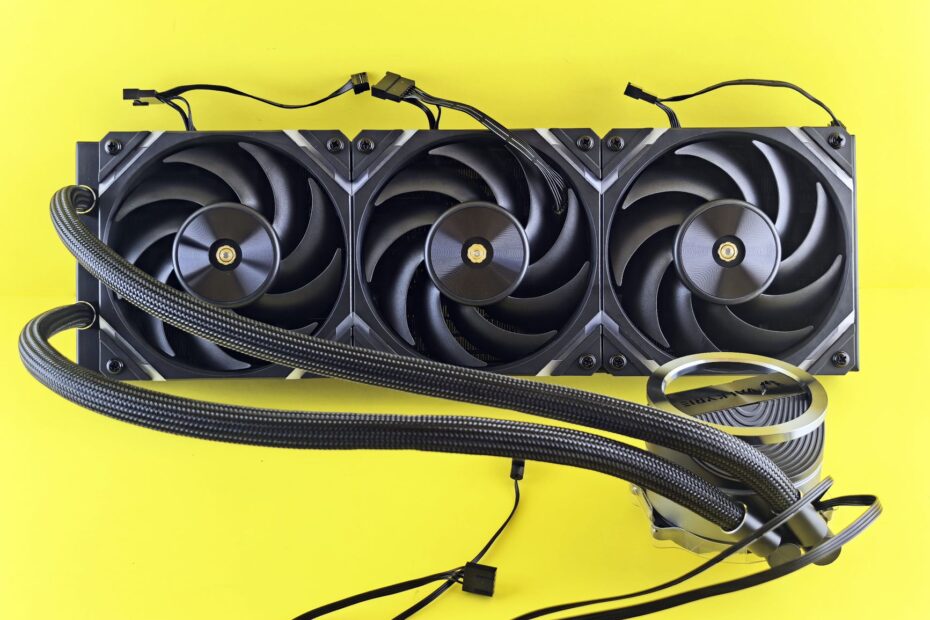
A CPU’s heat can reach room air through a metal heatsink and fans or through coolant, a radiator, and fans. Both routes send heat into your room, yet sustained wattage, case space, fan noise, and added parts shape which route suits your computer.
This comparison covers heat transfer, case airflow, benchmark limits, fit checks, noise, and upkeep for your gaming PC or high-load work machine.
PC Cooling Sends Component Heat Into Room Air
A CPU drawing 200 watts turns much of that electrical energy into heat inside a small silicon package. Heat buildup raises junction temperature until CPU thermal throttling cuts clock speed, fans spin faster, or shutdown protection steps in.
Heat moves through a defined chain. Your CPU or GPU die passes energy through its heat spreader, thermal paste, and cooler contact surface. A heatsink or coolant then carries that energy outward, while fins or a radiator expose it to moving case air.
Neither cooling route makes heat disappear. Liquid cooling moves heat to another part of the case before radiator fans release it, so fan placement and case airflow shape your final temperatures.
Air Coolers Move Heat Through Metal Fins
Thermal Paste and Heat Pipes Move Energy Away From the CPU
Thermal paste fills microscopic gaps between your processor and the cooler base. Air trapped in those gaps insulates the contact area, while a thin paste layer gives heat a more direct path into the metal cold plate.
Heat pipes carry that energy from the cooler base into an aluminum fin stack. Inside each sealed pipe, a working fluid evaporates near the hot base and condenses farther up the pipe, moving heat faster than solid aluminum across the same distance.
| Cooler part | Heat path | Practical result |
|---|---|---|
| Cold plate | CPU heat enters copper or nickel-plated metal. | Mounting pressure affects heat transfer at once. |
| Thermal paste | Paste fills insulating air gaps. | Poor spread or dried paste can raise temperatures. |
| Heat pipes | Pipes carry energy toward distant fins. | A larger tower has more fin surface for heat release. |
| Fan | The fan pushes room air through heatsink fins. | Your fan curve sets much of the sound level. |
A large dual-tower CPU air cooler, such as the Noctua NH-D15 G2, uses two fin stacks and wide fans to move heat at lower RPM. Your case still needs enough height clearance and a clear intake-to-exhaust route, or the fin stack sits in warm trapped air.
That design explains why a large tower can compete with smaller radiators. More metal surface and slower 140 mm fans can handle substantial CPU heat without a pump or tubing.
AIO Liquid Coolers Carry Heat to a Radiator
Coolant Moves Heat Across the Case
An AIO liquid cooler sends CPU heat into coolant rather than heat pipes. A pump moves that coolant through tubing to a radiator, where narrow channels transfer heat into metal fins and fans push air through the radiator.
- Cold plate contact: Your processor transfers heat through thermal paste into the AIO block.
- Pump movement: The pump sends warmed coolant away from the socket area.
- Tubing travel: Tubes carry warmed liquid from the CPU block to the radiator.
- Radiator release: Radiator fins release heat into fan-driven air.
- Coolant return: Cooled liquid returns to the block for another circulation cycle.
Sealed all-in-one units from Arctic, Corsair, and NZXT arrive filled and closed. A custom liquid-cooling loop uses separate blocks, fittings, reservoir, tubing, coolant, and pump, giving your build more layout control but adding more assembly and leak-checking work.
An AIO is not fanless, and it is not automatically quieter. Radiator fans still need airflow, while the pump adds a hum or high-pitched sound that a conventional air tower does not produce.
Case Airflow Limits Both Cooler Designs
Fresh Intake Air Feeds the Cooler
Radiator fans and heatsink fans can only work with the air around them. A front intake fan brings cooler room air toward your components, while rear or top exhaust fans give heated air a route out of the case.
- Clear intake paths: Front fans need open space rather than a solid panel or blocked filter.
- Clean dust filters: Clogged mesh cuts airflow long before a fan stops spinning.
- Tidy cable runs: Loose cable bundles can interrupt the route from intake fans to the GPU.
- Match fan direction: Fan-frame arrows should point along the intended air route.
- Leave panel clearance: Your side panel should not press against a tower fan or coolant tubing.
Your CPU temperature can look excellent while GPU temperature rises, especially with a front radiator sending radiator-warmed air into the graphics card area.
A front-mounted radiator gives the CPU cooler outside air, which can lower CPU temperature during a long render. A top-mounted radiator sends CPU heat out of the case, leaving cooler intake air for your GPU.
Your graphics card load decides which compromise matters more. A gaming system that loads both CPU and GPU benefits from checking each component rather than focusing on a single CPU number.
Because heat must leave the enclosure continuously, long workloads expose limits that short temperature spikes can hide.
Sustained Wattage Reveals Cooling Capacity
Long Loads Show the Full Temperature Pattern
A 10-minute screenshot cannot settle an air cooler vs AIO cooler choice. Your CPU can boost at high power for a short period, then settle at a lower clock speed or higher temperature after coolant, metal, and case air reach a stable heat level.
Run the same 20- to 30-minute game, compile, render, or stress load before drawing a conclusion. Ambient room temperature, motherboard power limits, paste thickness, fan curves, and CPU voltage can shift results enough to make a raw air cooler vs liquid cooler temperature difference misleading.
| Measurement | What it shows |
|---|---|
| Sustained package wattage | The CPU’s real heat load during demanding work. |
| Clock speed after 30 minutes | Whether the chip holds performance without thermal throttling. |
| Fan RPM and sound | The acoustic trade for a given temperature result. |
| Room temperature | The baseline, since warmer intake air raises every temperature. |
A large dual-tower air unit can equal or pass many 120 mm AIOs and some 240 mm models under similar airflow. Larger 280 mm and 360 mm radiators have more fin area and coolant volume, so they hold an advantage during sustained high-wattage loads.
That capacity matters most during repeated renders, compiles, and CPU-heavy production work. A brief gaming burst places far less demand on the cooler than an hour of all-core work.
Meeting a sustained heat load often requires higher fan speeds or additional moving parts, bringing noise and longevity into the decision.
Noise and Reliability Shape the Real Trade
Fan diameter and fan curves matter more than the label on the box. Your air tower can stay quiet with two 140 mm fans at modest speed, while an AIO can become loud once dense radiator fins push fans toward higher RPM.
Is liquid cooling quieter than air cooling depends on radiator restriction, pump speed, fan quality, mounting vibration, and CPU wattage. A faint pump whine can stand out more than broad fan noise in a quiet room.
| Concern | Air tower | AIO unit |
|---|---|---|
| Moving parts | The main wear item is a replaceable fan. | The pump and radiator fans add moving parts. |
| Failure points | Heat pipes and fins have few active parts. | Tubing, seals, coolant, and pump add more failure paths. |
| Upfront spend | A tower cooler takes less of your budget. | A radiator setup needs more parts and installation time. |
| Routine care | Dust removal and fan checks cover most upkeep. | Dust removal matters, and pump behavior needs attention. |
For a mainstream CPU, a quality tower cooler gives you strong value with fewer parts to watch. A larger AIO suits a processor that holds high wattage for long workloads, a cramped layout where radiator mounting helps, or a build where an open socket area matters to you.
Fit and Mounting Control Real-World Results
Clearance Checks Stop Installation Problems
A cooler that fits the socket can still fail the case test. Your AM5 or LGA 1851 hardware, RAM height, motherboard VRM heatsinks, side-panel clearance, radiator thickness, fan thickness, and tube bend space all need checking before installation.
- Check socket hardware: Your mounting kit must match the CPU socket and backplate layout.
- Check tower height: Case specifications must exceed cooler height with room for the side panel.
- Check RAM overlap: The front tower fan may need raising above tall memory modules.
- Check radiator depth: Radiator and fan thickness can interfere with motherboard heatsinks or front GPU length.
- Check tube routing: Tubes need a relaxed route without sharp bends or side-panel pressure.
- Check fan headers: Your motherboard needs headers or a splitter for every fan and pump.
Temperature Changes Point to Physical Faults
Dust can turn fins into a felt-like layer over time. Clean filters, fan blades, heatsink fins, and radiator fins with the system powered down, then confirm that every fan spins after hardware work.
Sudden temperature spikes point toward poor mounting, uneven paste contact, or a disconnected fan. Pump rattle, a missing pump-speed report, or steadily rising temperatures point toward coolant-flow trouble.
Reseat the cooler before blaming the CPU. Your paste layer should stay thin, mounting screws should tighten in an alternating pattern, and radiator fans should move air through the fins rather than pulling against a blocked panel.
Hardware and Workload Set the Cooler Choice
Your workload should set the target, not a dramatic temperature screenshot. A stock gaming CPU that spends much of its time below peak package power has different needs from a workstation chip rendering video for an hour.
- Mainstream gaming CPUs: A dual-tower or mid-size air cooler is a sensible route for your system.
- Long productivity loads: A 280 mm or 360 mm AIO can absorb sustained heat with lower fan speed.
- Compact cases: A radiator mount can fit where a tall tower cannot fit.
- Low-complexity builds: Air cooling avoids pump aging and tube routing.
- Appearance-focused systems: An AIO can leave the socket area visually open.
Liquid cooling vs air cooling for gaming becomes more relevant with a power-hungry CPU, not merely a strong GPU. An RTX 5090 does not need liquid cooling because its factory air cooler is designed around its rated thermal load.
Your GPU needs liquid cooling only for a custom loop, a strict noise target, or an unusually cramped high-end enclosure. A stock graphics card cooler already handles the load specified for that card.
Consider a compact build with a high-wattage CPU and a front-mounted 280 mm radiator. The CPU gains cooler intake air, but the GPU can inherit warmer case air; a top radiator can trade a few CPU degrees for a healthier GPU environment during your actual gaming load.
Final Thoughts
Sustained CPU heat must reach room air without blocking your case, filling your desk with noise, or adding parts you do not need. Your CPU power draw and case layout set the technical need, while radiator placement and fan curves remain choices you can make deliberately.
FAQ
How does an air CPU cooler work?
Heat first crosses thermal paste into a metal base before heat pipes carry it into a heatsink fin stack. Fans push air through the fins, carrying CPU heat into the case and then out through exhaust fans.
How does liquid cooling work in a PC?
Liquid cooling moves CPU heat from a cold plate into coolant. A pump circulates the warmed coolant through tubing to a radiator, where metal fins and fans release the heat into room air.
Is liquid cooling better than air cooling for a gaming PC?
Frame rates rarely improve simply because a gaming PC uses liquid cooling. A large air cooler handles many gaming CPUs well, while a 280 mm or 360 mm AIO has more thermal capacity for a high-wattage CPU under long loads.
Are AIO liquid coolers quieter than air coolers?
Pump noise and fan curves can make an AIO louder than a comparable air cooler. Your sound level depends on fan size, radiator resistance, pump speed, fan curves, mounting vibration, CPU wattage, and case airflow.
Do high-end CPUs or GPUs need liquid cooling?
Even flagship CPUs and GPUs can run safely on capable air coolers. A CPU with sustained high wattage can benefit from a large radiator, while an RTX 5090 can run on its factory air cooler at its rated thermal load.
What are the reliability and maintenance differences between air coolers and AIOs?
Air coolers have heat pipes, fins, and fans, so a fan is the main wear item. AIOs add a pump, tubing, seals, coolant, and radiator fans, giving your system more parts that need attention over time.