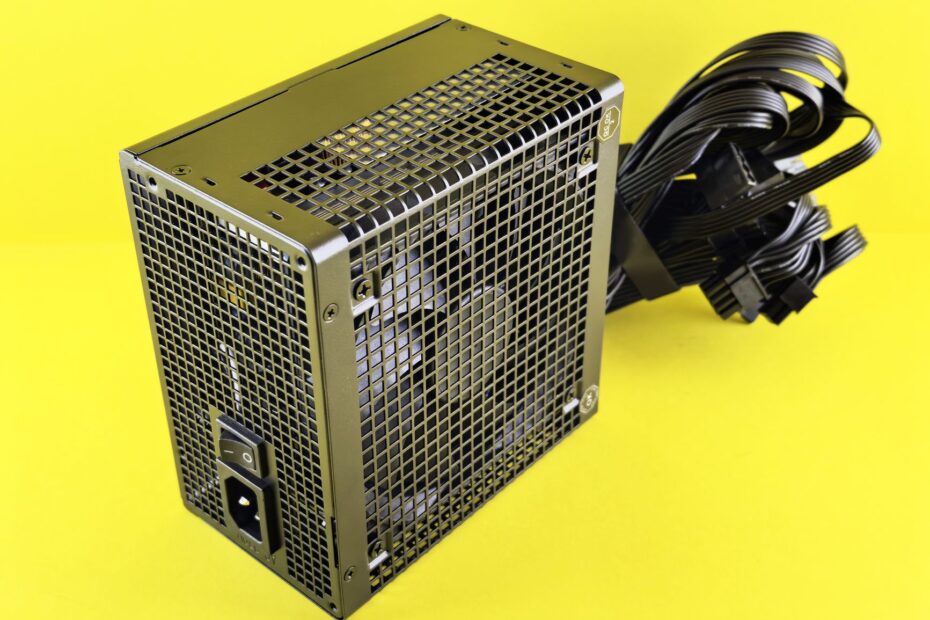
A PSU’s cable design determines whether its leads attach permanently or detach from the unit. A modular model lets you attach only the leads your PC needs, while a non-modular PSU keeps every lead fixed to its housing. Your choice affects case clutter and installation access, not electrical strength.
This guide compares cable-management approaches, chassis fit, connector panels, and compatibility precautions, helping a first-time PC builder choose a power supply that suits the planned build.
PSU Modularity Does Not Define Electrical Quality
The PSU converts wall power into the low-voltage power used by your motherboard, CPU, graphics card, storage drives, and fans. A Fully modular PSU has detachable output cables, while a Non-modular PSU has every output lead permanently attached to its housing.
Your cable layout does not set PSU wattage, voltage regulation, component quality, or the 80 PLUS efficiency rating. A well-built 650W non-modular ATX power supply can deliver steadier power than a weak 650W fully modular model with poor internal parts.
Semi-modular PSUs sit between those layouts. They keep core cables attached for connections nearly every desktop needs, then leave ports open for PCIe GPU power cables, SATA power cables, and peripheral leads you may not need.
That distinction matters during shopping. You should rank wattage, connector count, electrical protections, and ATX power supply standard compatibility above removable cables.
Once those baseline requirements are met, the way cables attach chiefly changes installation effort and cable management.
Three Cable Layouts Shape Installation Work
Most desktop builds need an ATX 24-pin motherboard cable and at least one EPS/CPU power cable. The cable layout changes where those leads begin: directly from the PSU housing or from a detachable port panel.
Fully Modular Units Keep Every Cable Detachable
A fully modular PSU leaves every cable optional. You attach the 24-pin motherboard lead, EPS/CPU cable, PCIe GPU power cable, and SATA power cable only when your hardware calls for each connection.
Your case stays less crowded because unused SATA chains and PCIe plugs remain outside the chassis. That difference stands out in a Mini-ITX build, where a spare cable bundle can press against front fans or block access near the power supply compartment.
Semi-Modular Units Keep Core Cables Attached
A semi-modular PSU keeps the essential leads fixed in place and leaves optional leads removable. The ATX 24-pin motherboard cable and EPS/CPU power cable are commonly attached because nearly every desktop requires them.
Removable SATA, PCIe, Molex, and peripheral cables still reduce clutter around your storage drives and graphics card. You get much of the cable-management benefit without a detachable port for every single connection.
Non-Modular Units Keep the Full Cable Bundle Attached
A non-modular PSU routes every cable through one fixed opening in the housing. Your PC still receives the same motherboard, CPU, GPU, SATA, and peripheral connections needed for normal operation.
Unused plugs stay inside the case, so cable routing takes more planning. A roomy mid-tower with a deep PSU shroud can hide that extra bundle without affecting your build process much.
| PSU layout | Cable attachment | Unused cable result |
|---|---|---|
| Fully modular PSU | You attach every required cable | Unused leads stay outside the case |
| Semi-modular PSU | Core leads stay attached, extras attach at ports | Unused PCIe and SATA leads stay outside |
| Non-modular PSU | Every lead stays fixed to the housing | Unused leads remain inside the case |
Case Space Drives the Practical Difference
Spare cables do not automatically raise component temperatures. But a dense cable bundle can sit in front of an intake fan, crowd the lower chamber, and make it harder for you to reach a fan header or storage connector.
Fully modular units simplify routing because you install the PSU, then attach each needed lead through the cable openings in your case. That sequence gives your hands more room around a long graphics card and stiff PCIe power connector.
Non-modular designs suit a straightforward system with one NVMe drive, integrated graphics, and ample space behind the motherboard tray. Your unused cables still need a secure resting place, yet a PSU shroud or empty drive bay can keep them out of sight.
Cable management improves service access more than cooling. You can remove a graphics card, add a SATA SSD, or clean dust around the front intake without untangling a large cluster of unused connectors.
| Build task | Fully modular PSU | Non-modular PSU |
|---|---|---|
| Initial cable routing | You route only needed leads | You route needed leads and store extras |
| Dust cleanup | You have clearer access around components | You work around the fixed cable bundle |
| Adding a drive | You attach a SATA cable at the PSU | You locate an unused SATA plug in the case |
| Replacing a GPU | You add or remove the required PCIe lead | You trace the needed fixed PCIe lead |
Installed PSU Cable Panels Reveal the Layout
A glance at the PSU housing settles the cable-layout question quickly. A fully modular model has a wide panel of labeled sockets for motherboard, CPU, PCIe, SATA, and peripheral connections.
Semi-modular models have both fixed leads and detachable sockets. The thick 24-pin ATX cable and EPS/CPU power cable leave the PSU directly, while graphics and storage leads attach to the port panel.
Non-modular models have no output socket panel. Every cable exits through a rubber collar or strain-relief opening, then branches toward the motherboard, drive bays, fan hubs, and graphics card.
Your side panel may need removal before you can inspect the PSU. In bottom-mounted cases, the modular ports face the motherboard tray, while the rear AC input and power switch face the back of the chassis.
Those detachable ports make upgrades tidier, yet they also make using the correct cable family essential.
- Inspect output sockets: A fully modular PSU has labeled cable ports across much of one side.
- Trace the 24-pin lead: A semi-modular PSU keeps this thick motherboard cable attached in many designs.
- Find one cable exit: A non-modular PSU sends its full lead bundle through one opening.
- Check spare ports: Empty SATA or PCIe sockets point to a detachable-cable layout.
Modular Cable Pinouts Need Exact Model Matching
Detachable ports create one serious safety rule: never mix PSU cables from unrelated models without model-specific confirmation from the PSU manufacturer. PSU-side pinouts differ, even between units from the same brand and wattage range.
Use only cables supplied with your exact PSU model or cables confirmed by the PSU manufacturer for that exact model. A mismatched modular lead can send voltage to the wrong pin and damage your motherboard, drive, or graphics card.
A graphics-card plug or SATA plug can look identical at the component end while the wiring differs at the PSU end. Your hardware expects defined voltage and ground positions, so a wrong cable can place the wrong voltage on a drive or PCIe device.
Check the label on your PSU before seeking a replacement cable. The full model name matters because a brand can sell several cable pinout families under similar product names.
Connector Counts Come Before Cable Layout
Count every required power connection before choosing a PSU. Your motherboard needs one ATX 24-pin motherboard cable, while the CPU area needs one or more EPS/CPU power cables.
Graphics cards create the biggest connector-count difference between builds. A low-power card can draw power through the PCIe slot, while a higher-power GPU can need one, two, or three PCIe connectors, including a 16-pin connection on some models.
- Motherboard power: Your board uses one 24-pin ATX connector in nearly every desktop build.
- CPU power: Your CPU socket area uses an 8-pin EPS connector, and some boards need two EPS plugs.
- Graphics power: Your GPU can need PCIe 6-pin, 8-pin, or 16-pin power connections.
- Drive power: Your SATA SSDs, hard drives, and hubs use SATA power cables.
- Accessory power: Your pump, fan controller, or legacy device can need a peripheral connector.
Connector count affects PSU selection more directly than cable modularity. A compact fully modular unit still fails your build plan when it lacks the right EPS plugs or enough PCIe GPU power cables.
PC Size and Upgrade Habits Point to a Suitable Layout
A simple desktop with integrated graphics, one NVMe drive, and a roomy chassis gains little from a detachable cable panel. A non-modular PSU can fit that setup well, assuming its wattage, connectors, and electrical design suit the installed parts.
Your compact Mini-ITX case changes the trade-off. A fully modular PSU leaves you with a 24-pin lead, CPU cable, GPU cable, and perhaps one SATA chain instead of several unused connectors beside the front intake fan.
A semi-modular PSU suits a mainstream gaming build with one graphics card and several drives. You retain the fixed motherboard and CPU leads while leaving extra SATA and PCIe cables in the box.
Frequent part changes add value to detachable cables. You can add a SATA drive or swap a graphics card without pulling a large unused bundle from behind the motherboard tray.
| PC situation | Suitable cable layout | Reason |
|---|---|---|
| Low-part-count budget desktop | Non-modular PSU | A roomy case can store spare leads |
| Mainstream gaming PC | Semi-modular PSU | Removable SATA and PCIe leads reduce clutter |
| Compact Mini-ITX build | Fully modular PSU | Only required cables enter a tight compartment |
| Frequently changed system | Fully modular PSU | Hardware swaps need less cable rearrangement |
Electrical Priorities Should Outrank Modularity
Removable cables are convenient, but they belong below electrical quality on your selection list. A solid fixed-lead PSU with suitable wattage, documented over-current protection, over-voltage protection, and short-circuit protection is the stronger choice over a weak modular unit.
Your PSU wattage should cover the combined demand of your CPU, GPU, storage, cooling hardware, and USB-powered accessories. A power supply running close to its rated limit leaves less room for short bursts of higher GPU or CPU demand.
The 80 PLUS efficiency rating describes how efficiently a PSU converts AC wall power into DC power for your components. It does not describe cable attachment, cable length, voltage regulation, or the number of PCIe connectors included.
- Set wattage headroom: Your PSU needs capacity beyond the steady demand of installed components.
- Count GPU plugs: Your graphics card needs the right number and type of PCIe connections.
- Check case fit: Your case must accept the PSU length and ATX mounting format.
- Review efficiency rating: Your 80 PLUS rating covers power conversion rather than cable layout.
- Check protection data: Your PSU needs documented over-current, over-voltage, and short-circuit safeguards.
The Final Choice Depends on Your Build Constraints
Convenience favors fully modular cabling, while a lower upfront cost favors fixed leads. Semi-modular designs split the difference by keeping the motherboard and CPU cables attached while removing optional device cables.
Neat routing gives your hands clearer access, keeps unused plugs away from a small PSU compartment, and makes hardware service less awkward. It does not compensate for inadequate wattage, missing GPU connectors, poor voltage regulation, or weak internal construction.
Start with your case dimensions and a written connector list. Then select wattage, ATX power supply standard fit, cable count, and electrical quality before choosing the cable layout that fits your PC.
What to Remember
The difference between modular and non-modular PSUs is cable control, not power delivery. Choose full modularity for cramped cases and repeated hardware changes, choose semi-modular for a balanced setup, and choose fixed leads where your system has room and few components.
Your build needs the correct ATX 24-pin motherboard cable, EPS/CPU power cable, PCIe GPU power cable, and SATA power cable before it needs detachable ports. A tidy case is useful, but safe cables and suitable electrical capacity matter more.
FAQ
What is the difference between modular and non-modular PSUs?
A modular PSU uses detachable power cables, so you attach only the leads your PC needs. A non-modular PSU has its cable bundle fixed to the housing, leaving you to store unused SATA, PCIe, and peripheral connectors inside your case.
What is a semi-modular PSU, and how does it compare with the other two types?
A semi-modular PSU keeps core leads, such as the 24-pin motherboard cable and EPS/CPU cable, attached to the housing. Your SATA, PCIe, and peripheral cables attach only as needed, placing it between fully modular and non-modular layouts.
Should I buy a modular or non-modular PSU for my PC?
Choose a non-modular PSU for a low-part-count system with enough room behind the motherboard tray. Choose a modular model for a compact case, a high-end GPU, visible cable routing, or hardware changes that require you to add and remove power leads.
Is a modular PSU worth the extra cost?
In cramped cases or frequently upgraded builds, paying extra can simplify cable management and future changes. For a basic desktop with one drive and no graphics card, your budget can have more value in stronger electrical design, suitable wattage, and better protection circuitry.
Do modular PSUs improve performance, efficiency, or airflow?
The 80 PLUS rating remains unchanged, while detachable cables do not boost CPU or GPU performance. Your airflow can benefit indirectly in a small case because fewer unused cables sit near intake fans and component clearances.
How can I tell whether my existing PSU is modular?
Look at the PSU body where cables leave the unit. A fully modular model has a panel of detachable ports, a semi-modular model has both ports and fixed core leads, and a non-modular model has every cable fixed through one opening.